

Description
StoreBooster is the ultimate WooCommerce enhancement plugin designed to transform your online store into a modern, efficient, and user-friendly shopping experience. With powerful features like Real-Time AJAX Search, Quick View, Fly/side Cart, Gallery Slider, Variation Swatches, Stock Bar, Sale Countdown, and Direct Checkout, StoreBooster helps boost conversions and keep shoppers engaged.
Why Choose StoreBooster?
By default, WooCommerce offers only basic features that lack modern e-commerce functionality. Customers often struggle with slow search, limited product previews, and clunky cart management. Studies show that 85% of online shoppers go straight to the search bar when visiting a store, and if they can’t find what they’re looking for quickly, they’re likely to leave, leading to lost sales.
StoreBooster solves these problems by providing instant, as-you-type search suggestions, quick product previews, seamless cart management, and enhanced product displays. Customers can find products within seconds, preview products instantly, and manage their cart without leaving the page, helping you boost conversions and keep shoppers engaged.
Powerful Features
Real-Time AJAX Search
- Instant Search Results – Search results are displayed via AJAX, either while typing or when the search button is clicked
- Multiple Implementation Options – Display search bar using shortcode
[ttsb_ajax_search], as a menu item namedStoreBooster Search bar, or as a widget namedStoreBooster Search Bar - Replace Theme’s Search – Option to automatically replace your theme’s default search with StoreBooster
- Comprehensive Search Fields – Search by product title, SKU, content, keywords, categories, tags, and attributes
- Enable/Disable Search Fields – Control which fields are searched for optimal performance
- Rich Search Results – Show product title, SKU, image, description, price, categories, Add to Cart button, and Quick View button
- Default Panel – Show/hide default panel with search history and predefined products
- Search History – Displays recent search terms. Click on a term to show results instantly
- Predefined Products – Display Recent, Featured, Best Selling, Top Rated, or Sale products on default panel
- Grid Control – Control grid columns for predefined products
- 6 Search Bar Layouts – Choose from 6 different search bar styles using
[ttsb_ajax_search style="layout1"]throughlayout6 - Customizable Design – Customize search bar input color, width, height, and typography
- Load More – Seamlessly load additional search results without page reload
Fly Cart / Side Cart
- AJAX-Powered Fly Cart / Side Cart – Stylish, responsive side cart powered by AJAX for instant updates
- Auto-Open on Add to Cart – Automatically opens when products are added from search results, shop page, or single product page
- Floating Cart Icon – Display a floating cart icon with customizable position (bottom-left, bottom-right, top-left, top-right)
- Menu Cart Icon – Add cart icon to your navigation menu
- Real-Time Updates – Cart updates instantly without page reload
- Coupon Management – Apply discount coupons directly from the cart using AJAX
- Quantity Control – Increase and decrease product quantity with AJAX
- Remove Items – Remove items from cart with undo functionality
- Cart Totals – Display subtotal, shipping, taxes, and total
- Quick Actions – Continue Shopping and Checkout buttons
Quick View
- Instant Product Preview – View complete product details instantly without page reloads
- Simple Products – View detailed information for simple products directly in the popup
- Variable Products – Full support for variations and attribute selection
- Grouped Products – Access grouped product details within the same modal
- AJAX Add to Cart – Add products to cart directly from Quick View
- Product Gallery – Rich image gallery with slider support
- Shop Loop Integration – Add Quick View button to shop loop with customizable positions (on image, before/after title, after price, before/after add to cart)
- Customizable Button – Customize button text and icon with icon position options
Gallery Slider
- Replace Default Gallery – Replace WooCommerce default product gallery with a modern slider
- Slick Carousel – Powered by Slick carousel for smooth navigation
- Thumbnail Navigation – Thumbnail gallery with active state indication
- Lightbox Support – Full-screen gallery view
- Responsive Design – Fully responsive on all devices
- Customizable – Control slider behavior, navigation, and appearance
Variation Swatches
- Color Swatches – Display product variations as color swatches
- Image Swatches – Use custom images for variation swatches
- Button Swatches – Display variations as styled buttons
- Admin Interface – Easy-to-use admin interface for managing swatches
- Visual Selection – Customers can visually select product variations
- Quick View Support – Swatches work seamlessly in Quick View popup
- Gallery Sync – Variation images automatically update the gallery
Stock Bar
- Stock Progress Bar – Visual progress bar showing stock levels
- Sold Items Display – Show number of items sold
- Remaining Items – Display remaining items in stock
- Variable Product Support – Works with variable products
- Customizable Design – Control colors, typography, and layout
- Show/Hide Control – Control when stock bar is displayed
Sale Countdown
- Countdown Timer – Display countdown timer for products on sale
- Multiple Styles – Choose from different countdown styles
- Shop Page Support – Display countdown on shop and archive pages
- Single Product Support – Show countdown on single product pages
- Quick View Support – Countdown works in Quick View popup
- Variable Product Support – Works with variable products
Discount Badge
- Percentage Display – Show discount percentage on sale products
- Customizable Design – Control badge appearance and position
- Shop Page Support – Display badges on shop and archive pages
- Product Image Overlay – Overlay badge on product images
Direct Checkout
- Skip Cart – Allow customers to go directly to checkout
- Customizable Button – Control button text and appearance
- Product Page Integration – Add direct checkout button to product pages
Screenshots

Welcome page 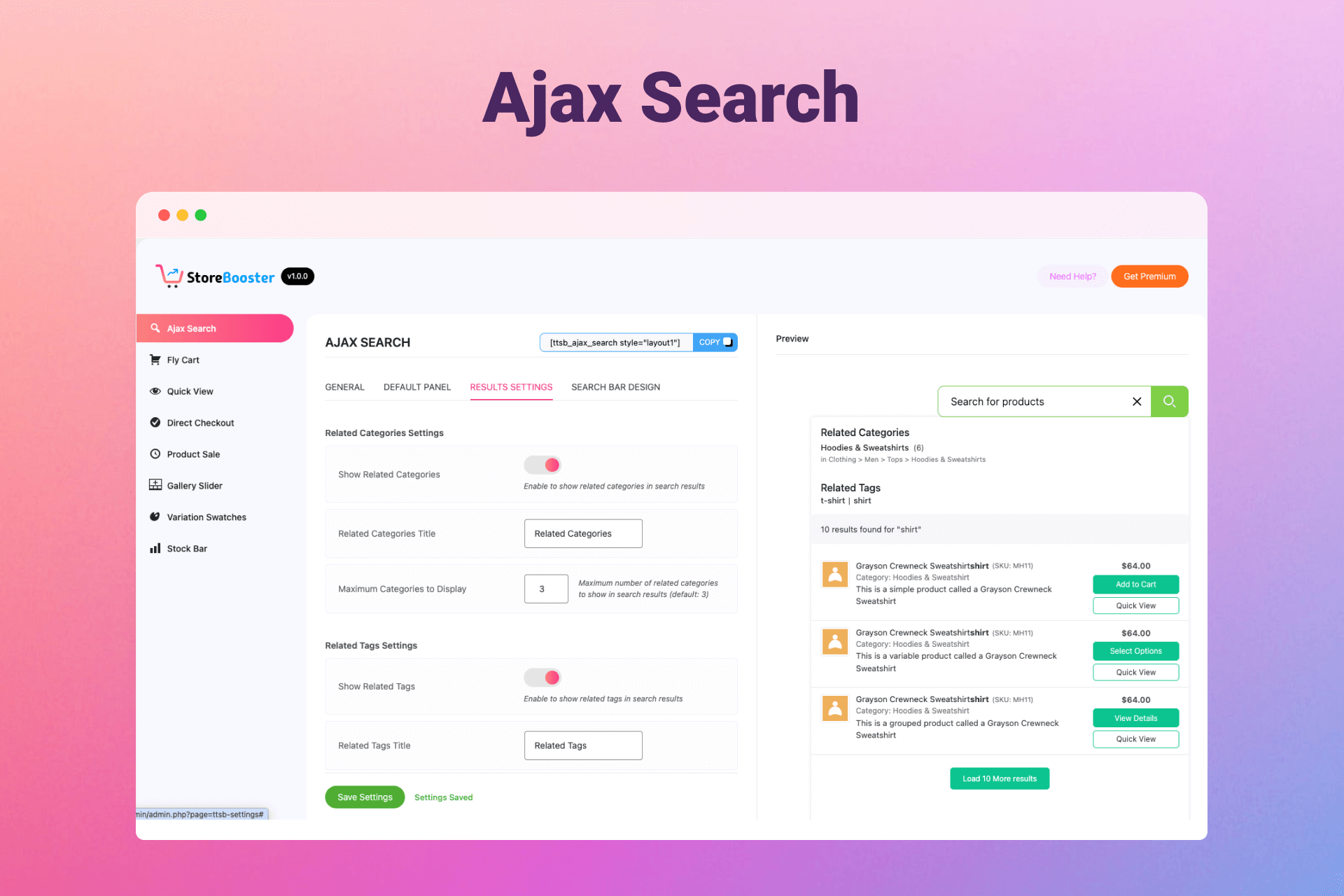
AJAX Search Settings page 
Fly/side Cart / Side Cart backend 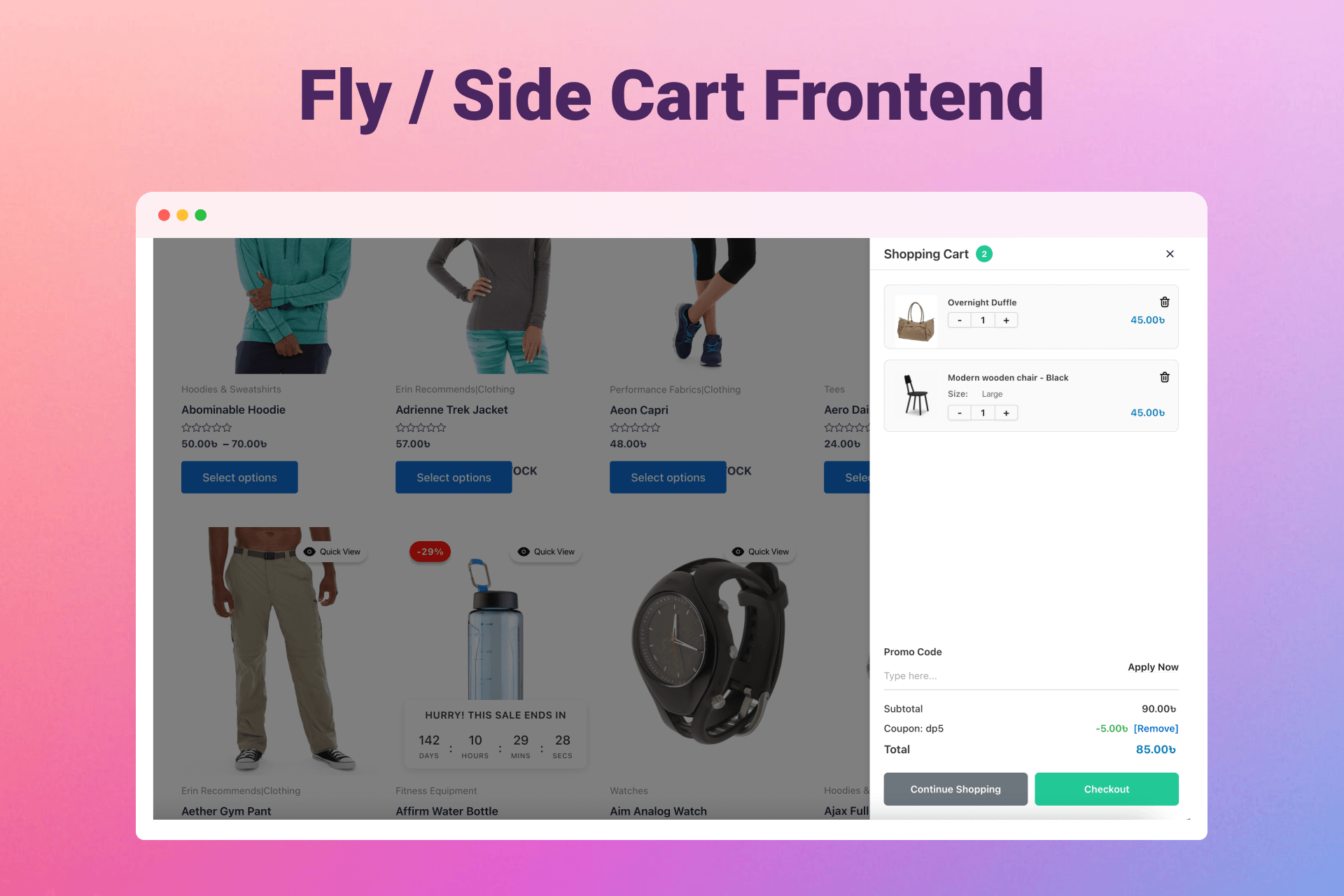
Fly/side Cart Frontend 
Quick view, support gallery slider and variation swatches 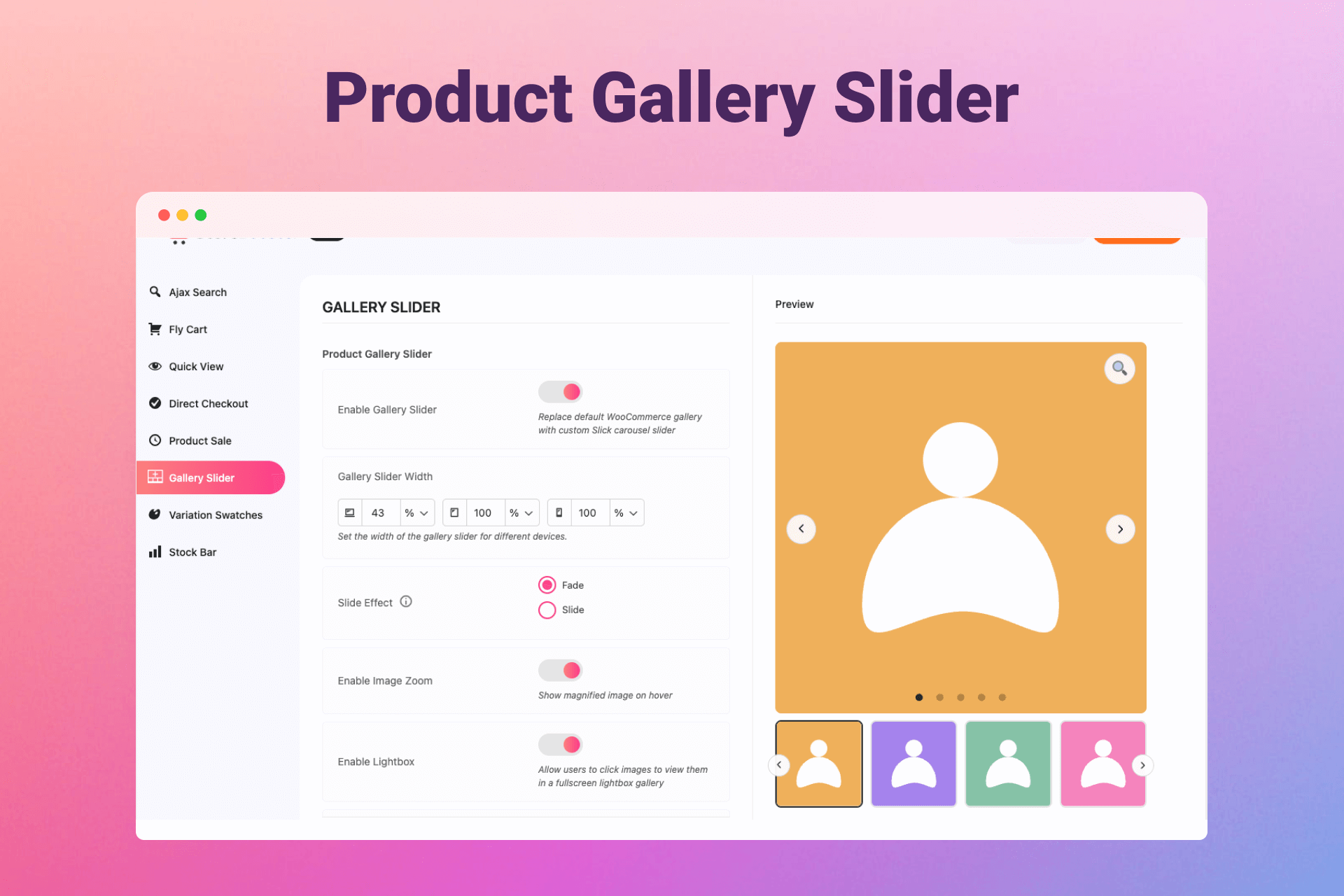
Gallery Slider with thumbnail navigation Settings 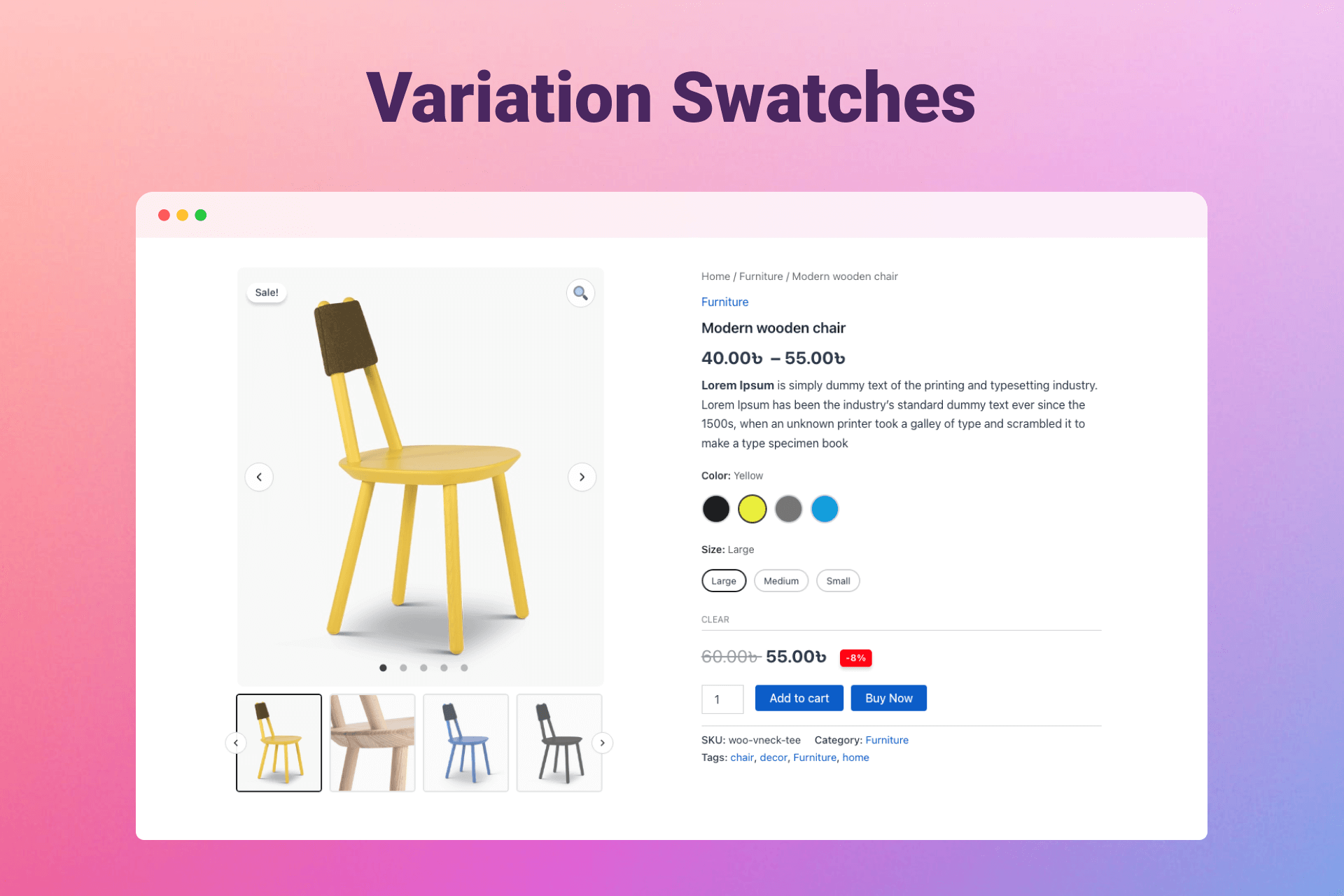
Variation Swatches (Color, Image, Button) 
Sale Countdown and Discount badge 
Stock Bar with progress indicator
Installation
- Upload the StoreBooster plugin files to the
/wp-content/plugins/storeboosterdirectory, or install the plugin through the WordPress plugins screen directly - Activate the plugin through the ‘Plugins’ screen in WordPress
- Navigate to StoreBooster > Settings in your WordPress admin dashboard
- Configure and customize each module according to your needs
- Use the shortcode
[ttsb_ajax_search]or[ttsb_ajax_search style="layout1"]to display the search bar, or use the StoreBooster widget/menu item
FAQ
-
Does StoreBooster work with all themes?
-
StoreBooster is designed to work with all WordPress themes. It follows WordPress and WooCommerce coding standards and uses proper hooks and filters to ensure compatibility. The plugin integrates seamlessly with theme templates and can be customized to match your theme’s design.
-
Can I override template files?
-
Yes, you can override any StoreBooster template file by copying it to your theme directory. Create a
storeboosterfolder in your active theme directory and place the template files there maintaining the same folder structure. For example, to override the Fly Cart template, copytemplates/cart/fly-cart.phptoyourtheme/storebooster/cart/fly-cart.php. The plugin will automatically use your theme’s template instead of the default plugin template. Available templates include: search templates (content-main.php, content-search-history.php, etc.), cart templates (fly-cart.php, cart-contents.php, cart-totals.php), Quick View templates (content-popup.php, loop-quickview-button.php), Gallery Slider (product-gallery.php), Sale Countdown (sale-countdown.php), and more. -
How do I display the search bar on my site?
-
You can display the search bar in three ways: 1) Use the shortcode
[ttsb_ajax_search]or[ttsb_ajax_search style="layout1"]anywhere on your site, 2) Add the StoreBooster Search Bar widget to your sidebar, or 3) Add the StoreBooster Search bar menu item to your navigation menu. -
Can I replace my theme’s default search with StoreBooster?
-
You can enable the “Replace Theme’s Search Form” option in the AJAX Search settings, and StoreBooster will automatically replace your theme’s default search form. However, if your theme author has implemented a custom search form without using the default WordPress or WooCommerce search hooks, the replacement may not work. In such cases, you can manually add the StoreBooster search bar using the shortcode
[ttsb_ajax_search]or the widget/menu item. -
Can I customize the search bar appearance?
-
Yes, you can customize the search bar input color, width, height, typography, and choose from 6 different layout styles.
-
Does StoreBooster Ajax Search work with multilingual sites?
-
Yes, StoreBooster ajax search supports multilingual sites and works with translation plugins like WPML and Polylang. The search index supports multiple languages.
-
Can I customize the search result display?
-
Yes, you can control which information is displayed in search results: product title, SKU, image, description, price, categories, Add to Cart button, and Quick View button.
-
Can I control which fields are searched?
-
Yes, you can enable/disable individual search fields (title, SKU, content, keywords, categories, tags, attributes) for optimal performance.
-
How do I rebuild the search index?
-
Go to StoreBooster > Settings > AJAX Search, and click the “Build/Rebuild Index” button. The index is also automatically built when you activate the plugin.
-
How does the Fly Cart / Side Cart work?
-
The Fly Cart is a side panel that slides in from the side of your screen when products are added to the cart. It automatically opens when products are added from search results, shop page, or single product pages.
-
Does the Quick View work with variable products?
-
Yes, Quick View fully supports variable products with variation selection, attribute swatches, and gallery updates.
-
Can I customize the floating cart icon position?
-
Yes, you can position the floating cart icon in four positions: bottom-left, bottom-right, top-left, or top-right.
-
Does the Quick View work on shop pages?
-
Yes, you can add Quick View buttons to your shop loop with customizable positions: on product image, before/after product title, after price, or before/after add to cart button.
-
Yes, you can customize the Quick View button text and choose from predefined icons or upload a custom icon. You can also control the icon position (before or after text).
-
Does the Gallery Slider replace WooCommerce default gallery?
-
Yes, when enabled, the Gallery Slider replaces WooCommerce’s default product gallery with a modern slider powered by Slick carousel.
-
Can I use custom images for variation swatches?
-
Yes, you can upload custom images for each variation attribute term. The plugin supports color swatches, image swatches, and button swatches.
-
How do I set up variation swatches?
-
Go to Products > Attributes, edit an attribute, and set the attribute type to “Color”, “Image”, or “Button”. Then assign colors, images, or labels to each attribute term.
-
Does the Stock Bar work with variable products?
-
Yes, the Stock Bar works with variable products. It displays stock information when a variation is selected and hides when no variation is chosen.
-
Can I control when the Stock Bar is displayed?
-
Yes, you can enable/disable the Stock Bar and control its display settings. The bar automatically hides for variable products until a variation is selected.
-
Does the Sale Countdown work on shop pages?
-
Yes, the Sale Countdown displays on shop pages, archive pages, and single product pages. It also works in Quick View popups.
-
Can I customize the countdown timer style?
-
Yes, you can choose from multiple countdown styles and customize the appearance, colors, and typography.
-
How does the Discount Badge work?
-
The Discount Badge automatically calculates and displays the discount percentage on sale products. You can customize its appearance and position (overlay on product images).
-
Does the Discount Badge work with variable products?
-
Yes, the Discount Badge works with variable products and displays the discount percentage based on the selected variation’s sale price.
-
What is Direct Checkout?
-
Direct Checkout allows customers to skip the cart and go directly to the checkout page when clicking the Direct Checkout button on product pages.
-
Does StoreBooster affect site performance?
-
StoreBooster is optimized for performance. The search uses an indexed database table for fast queries, and you can control which search fields are enabled to optimize performance further. All AJAX requests are cached for better speed.
-
Can I use StoreBooster with caching plugins?
-
Yes, StoreBooster works with all major caching plugins. The search results are cached in the browser, and the plugin is compatible with server-side caching.
-
What happens to plugin data when I uninstall StoreBooster?
-
When you uninstall StoreBooster, all plugin data is automatically removed, including the search index table, all plugin options, and transients. This ensures a clean uninstall with no leftover data in your database.
Reviews
ഈ പ്ലഗിന് റിവ്യൂകൾ ഒന്നുമില്ല.
Contributors & Developers
“StoreBooster” is open source software. The following people have contributed to this plugin.
Contributors

Translate “StoreBooster” into your language.
Interested in development?
Browse the code, check out the SVN repository, or subscribe to the development log by RSS.
Changelog
1.0.0
- Initial release