

Description
Easy Form Builder is a comprehensive WordPress form plugin designed to help website owners create, manage, and maintain a wide variety of forms using a visual drag-and-drop form builder interface. The plugin is suitable for users who want to build professional forms without writing code, while still keeping full control over form data, submissions, and communication workflows.
This form builder plugin can be used to create contact forms, support request forms, survey and feedback forms, payment forms using Stripe, subscription forms and custom login or registration forms for WordPress users. All form data is stored directly on your WordPress website, ensuring transparency, data ownership, and predictable behavior.
Easy Form Builder focuses on clarity, extensibility, and usability. The plugin does not rely on external form services by default and does not send form submissions to third-party servers. This makes it suitable for websites that require clear data handling policies and on-site form management.
What Can This Form Plugin Do?
With Easy Form Builder, you can use a single form plugin to build and manage multiple types of forms and form-based workflows:
- Contact forms for general inquiries
- Support and feedback forms with message tracking
- Survey and poll forms with structured results
- Stripe payment forms for online payments
- PayPal payment forms for collecting online payments
- Login (sign-in) forms for WordPress users
- Registration (sign-up) forms for new users
- File upload forms
- Private or restricted-access forms
- Multi-step forms for improved usability
- Electronic signature forms for contracts and agreements
- Location picker forms for address and map selection
- Custom email notification templates with a built-in visual editor
- Job application forms for hiring and recruitment
- Event registration forms for conferences and workshops
- Order forms with recurring and subscription billing options
The form builder provides a consistent interface for form creation, submission handling, and response management inside WordPress.
Core Features
Drag & Drop Form Builder
The plugin includes a visual drag-and-drop form builder. Fields can be added, removed, and reordered without writing code. Each field provides configuration options such as labels, placeholders, validation rules, and display settings.
Email Notification
Easy Form Builder supports automatic email notifications after a form is submitted. Notifications can be sent to administrators, form managers, or users. Email templates can be customized to control the message content and layout.
For detailed setup instructions, see:
How to set up form notification emails in Easy Form Builder
Confirmation Code (Tracking ID)
Each form submission generates a unique confirmation code. This tracking ID allows administrators and users to reference, search, and manage individual submissions efficiently.
Learn more about this feature:
How to activate a Confirmation Code in Easy Form Builder
Form Validation and Spam Protection
The form plugin includes client-side and server-side validation. Google reCAPTCHA v2 can be enabled to reduce spam and automated submissions.
Multi-Step Forms
Multi-step forms allow long forms to be divided into multiple sections. This improves user experience and helps reduce form abandonment.
Ready-Made Form Templates
The plugin includes pre-built form templates to help you get started quickly. Available templates include contact forms, reservation forms, job application forms, event registration forms, quote request forms, booking forms, order forms, survey forms, and more.
Form Entry & Message Management Dashboard
Easy Form Builder includes a dedicated Form Entry & Message Management Dashboard that allows administrators to manage all form submissions directly from the WordPress admin area. This dashboard acts as a centralized system for reviewing messages, tracking requests, and communicating with users without relying solely on email.
Through this dashboard, administrators can read submitted messages, respond directly from the WordPress backend, and attach files to replies when needed. This approach helps keep communication organized and ensures that conversations related to form submissions remain accessible in one place.
The Form Entry & Message Management Dashboard also provides practical tools for organizing and reviewing submissions. Administrators can change the status of messages (Open or Closed), edit or delete entries, search submissions by form or confirmation code, and receive notifications when new messages arrive. Form responses and message data can be downloaded in PDF format or exported to CSV files for reporting, archiving, or further analysis.
Survey and Poll Forms
Easy Form Builder includes dedicated fields for creating survey and poll forms. These fields allow website owners to collect structured feedback and analyze results directly inside WordPress.
Survey-related features include:
- Rating star fields
- 5-point scale fields
- Net Promoter Score (NPS) fields
- Yes / No question fields
- Visual charts for survey results
- Exporting survey responses to CSV format
Survey forms can be used for customer feedback, research, evaluations, and internal assessments.
Payment Forms with Stripe
Easy Form Builder supports Stripe payment fields, allowing you to collect online payments securely through your WordPress forms.
You can use Stripe payment fields to create:
- Donation forms
- Order forms
- Booking and service payment forms
Payment entries are handled alongside other form submissions and can be reviewed through the form management dashboard.
For a step-by-step guide, see:
How to Create a payment form to collect online payments in Easy Form Builder
Login and Registration Forms
The form builder allows you to create custom login and registration forms for WordPress users. These forms can replace the default WordPress login page and provide a customized user onboarding experience.
Login and registration forms integrate with WordPress user management and allow you to control form layout, validation, and additional user fields.
Advanced Form Fields
Easy Form Builder provides a wide collection of advanced form fields, including:
- Drag and drop file upload fields
- Signature (e-signature) fields
- Location picker fields (OpenStreetMap and LeafletJS)
- Country, state/province, and city dropdown fields
- Multiple select dropdown fields
- Range slider fields
- Rating and star fields
- Switch and toggle fields
- Date pickers (Gregorian, Hijri, and Jalali)
- Telephone and mobile input fields
- Color picker fields
- Matrix and table fields for structured data collection
These fields allow you to build complex, region-aware, and structured forms without custom development.
Integrations and Add-ons
Easy Form Builder supports optional integrations and add-ons that extend the functionality of the form plugin:
-
SMS notification add-on for sending text messages on form submission
-
Stripe add-on for extended payment workflows
-
PayPal add-on for creating payment forms and managing transactions through PayPal
-
Offline forms add-on for collecting data without an active internet connection
-
Hijri (Qamari) date picker add-on
-
Jalali (Shamsi) date picker add-on
-
Autofill add-on for auto-completing form fields based on user input using internal datasets (CSV) or external API connections
-
Telegram notification add-on for sending instant form submission alerts and admin response notifications to Telegram using a bot
-
Shield Security plugin silentCAPTCHA integration for invisible bot and spam protection without user interaction
Available Versions
Easy Form Builder is available in multiple versions to support different usage needs. Each version is designed to provide a clear and predictable set of features.
Free Version
The Free version provides essential form-building tools. It is suitable for users who need reliable form creation with email notifications, confirmation codes, entry management, file uploads, and basic surveys fields.
This version is suitable for personal websites, blogs, and small business sites.
Free Plus Version
The Free Plus version extends the Free version by enabling advanced form fields and features available in the form builder, while excluding external add-ons.
This version is suitable for users who need advanced form layouts and surveys without add-on-based extensions. A small “Powered by Easy Form Builder” credit is displayed on the form output.
Pro Version
The Pro version includes all Free Plus features and adds support for official add-ons and integrations.
This version is suitable for professional websites, service platforms, and projects that require extended workflows such as SMS notifications, payment forms, and advanced integrations.
As of this release, we have partnered with the following WordPress plugins:
Documentation & Support
For setup guides, tutorials, and feature walkthroughs, visit the official documentation:
Easy Form Builder Documentation
For more information, visit the official website:
WhiteStudio – Easy Form Builder
Screenshots

Form Builder 
Create a form 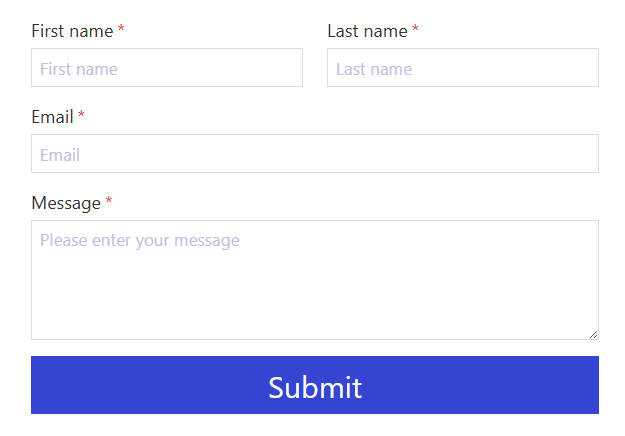
Preview a form 
Panel of Easy Form Builder 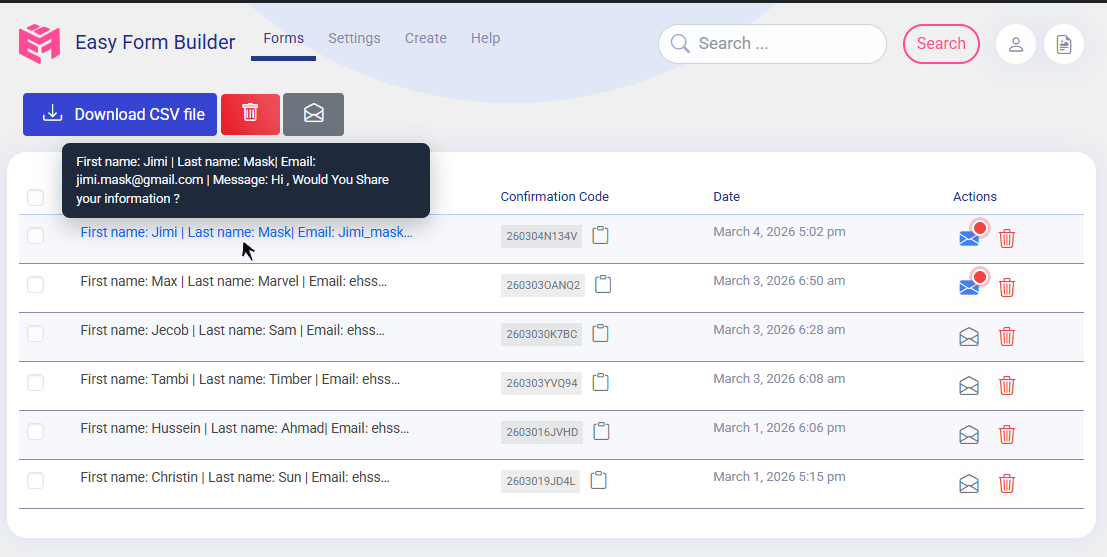
List of responses 
Setting of Easy Form Builder 
Present chart of poll 
Form submitted and Confirmation Code (tracking pixels) 
Create a contact us form 
Localization Easy Form Builder to your language 
Email template Editor of Easy Form Builder 
Order payment forms 
configuration Response box of Easy Form Builder 
Email Setting of Easy Form Builder 
SMS configuration of Easy From Builder 
Confirmation Code Search Field 
WordPress Support Ticket Conversation and Reply Form
ബ്ലോക്കുകൾ
ഈ പ്ലഗിൻ 1 ബ്ലോക്ക് നൽകുന്നു.
- Easy Form Builder Display an Easy Form Builder form with drag and drop simplicity.
Installation
Bootstrap Notice:
If your theme uses Bootstrap, go to “Easy Form Builder” “Settings” and enable the Bootstrap option.
- Download Easy Form Builder
- Navigate to Dashboard “Plugins” “Add New” “Upload Plugin” select Easy Form Builder zip file then “Activate”.
- In the menu bar, navigate to “Easy Form Builder” “Settings” “Add Google recaptcha keys”
- For local testing environments, you may use the key and secret below. For online websites, click here to obtain the API keys for reCAPTCHA v2.
Development Google captcha Keys for LOCALHOST
Site key: 6LeIxAcTAAAAAJcZVRqyHh71UMIEGNQ_MXjiZKhI
Secret key: 6LeIxAcTAAAAAGG-vFI1TnRWxMZNFuojJ4WifJWe
FAQ
-
What is Easy Form Builder used for?
-
It is a WordPress form plugin used to create contact forms, survey forms, payment forms,subscription forms and login or registration forms using a drag-and-drop form builder.
-
Is Easy Form Builder WCAG(ADA) compliant?
-
Form Builder has tried to add necessary standards to the forms, making them accessible to individuals with disabilities during form display.
-
Is my form data sent to external services?
-
No. All form submissions and messages are stored locally on your WordPress website. Easy Form Builder does not send form data to external servers by default.
-
Is coding knowledge required to build forms?
-
No. All forms can be created visually without writing code.
-
Does Easy Form Builder support email notifications?
-
Yes. Email notifications can be sent automatically after form submission.
How to set up form notification emails in Easy Form Builder -
What is a confirmation code in Easy Form Builder?
-
A confirmation code is a unique tracking ID generated for each form submission.
How to activate a Confirmation Code in Easy Form Builder -
Can I manage and reply to form submissions from the dashboard?
-
Yes. The plugin includes a message management dashboard with reply and file upload support.
-
Can I download form responses as PDF or CSV?
-
Yes. Form entries and responses can be downloaded in PDF and CSV formats.
-
Does the form plugin support file uploads?
-
Yes. Users can upload files through forms, and administrators can attach files in replies.
-
Can I create payment forms with Stripe?
-
Yes. Stripe payment fields are supported.
How to Create a payment form to collect online payments in Easy Form Builder -
Does Easy Form Builder support PayPal payments?
-
Yes. You can add and set up the PayPal payment field to accept online payments through your WordPress forms. The PayPal add-on supports one-time payments as well as recurring billing options including daily, weekly, monthly, and yearly subscriptions. Payment entries are managed alongside other form submissions in the Form Entry & Message Management Dashboard.
-
Does Easy Form Builder support survey forms?
-
Yes. The form builder includes survey and poll fields such as rating stars and NPS.
-
Does Easy Form Builder include ready-made form templates?
-
Yes. The plugin comes with pre-built templates for contact forms, reservation forms, job applications, event registrations, booking forms, quote requests, order forms, and more.
-
Does Easy Form Builder support recurring payments?
-
Yes. The payment fields support one-time, daily, weekly, monthly, and yearly billing options for subscription and recurring payment forms. You can create payment forms using Stripe or PayPal to accept online payments directly through your WordPress forms. Both payment gateways are available as add-ons and can be configured from the Easy Form Builder settings.
How to Create a payment form to collect online payments in Easy Form Builder -
Do the country, state, and city fields load data from an external source?
-
Yes. The country, state/province, and city lists used in Easy Form Builder are automatically loaded from an external CDN-hosted JSON source maintained on GitHub.
These lists are fetched from the following public repository:
https://github.com/hassantafreshi/Json-List-of-countries-states-and-cities-in-the-worldThe data is delivered via a CDN to ensure fast loading and reliable access, and it includes country names, states/provinces, and cities in multiple language formats where available.
If you notice any missing entries, incorrect names, or data issues related to countries, states, or cities, please report the issue by creating a ticket in the GitHub repository above. This helps keep the dataset accurate and up to date for all users.
No personal or form submission data is sent to this external source. The CDN is used only to retrieve static geographic lists required for form fields.
-
Where can I find documentation and support?
-
For full setup instructions, and guides visit Easy Form Builder Documentation
Reviews


Contributors & Developers
“Easy Form Builder by WhiteStudio — Drag & Drop Form Builder” is open source software. The following people have contributed to this plugin.
Contributors


“Easy Form Builder by WhiteStudio — Drag & Drop Form Builder” has been translated into 8 locales. Thank you to the translators for their contributions.
Translate “Easy Form Builder by WhiteStudio — Drag & Drop Form Builder” into your language.
Interested in development?
Browse the code, check out the SVN repository, or subscribe to the development log by RSS.
Changelog
3.8.22
- Enhanced Security Features in the Easy Form Builder WordPress Plugin
3.8.19
- Improved UX of Easy Form Builder
=3.8.18=
- Fixed issues
3.8.17
-
Fixed issues
-
Enhanced Security Features in the Easy Form Builder WordPress Plugin
3.8.14
-
Improved Email notification configuration in Easy Form Builder.
-
Improved UX of Easy Form Builder
=3.8.13=
- Improved Email notification configuration in Easy Form Builder.
=3.8.11=
- Improved UX of Easy Form Builder
3.8.10
- Fixed issues
3.8.9
- Enhanced Security Features in the Easy Form Builder WordPress Plugin
3.8.7
- Fixed issues
3.8.6
- Enhanced Security Features in the Easy Form Builder WordPress Plugin
3.8.5
- Easy Form Builder Plugin is compatible with WordPress version 6.7
3.8.4
- Fixed issues of UI Easy Form Builder
3.8.3
-
Fixed issues
-
Fixed issues of UI Easy Form Builder
3.8.2
3.8.1
- Fixed issues
3.8.0
-
Improvement of the location Picker feature for the form and changing the service provider to OpenStreetMap.
-
Fixed issues
3.7.35
-
Fixed issues of loading time of Easy Form Builder
-
Fixed issues
3.7.34
- Fixed issues of loading time of Easy Form Builder
- Fixed issues
3.7.33
- Fixed issues
3.7.31
- Resolved issues related to sending email notifications for forms.
3.7.30
- Improved Security of Easy Form Builder
- Change the default response state by the admin to require admin login.
3.7.29
3.7.28
- Resolved issues related to sending email notifications for forms.
3.7.27
- Resolved issues related to sending email notifications for forms.
3.7.26
- Fixed issues of UI Easy Form Builder
- Added new feature: ‘terms input field’ to form builder.
3.7.25
- Fixed issues of UI Easy Form Builder
3.7.24
- Fixed issues of UI Easy Form Builder
- Resolved Google ReCaptcha loading issues in Easy Form Builder’s forms.
3.7.21
- CAPTCHA Issue Present Resolved on Edit Form on Easy Form Builder Panel page
- Admins Can Now Add Responses Without Logging In
- “Select All” Checkbox Added for Messages Section on Easy Form Builder Panel
- Delete Button Added to Message Section on Easy Form Builder Panel
- “Read” Button Added to Message Section on Easy Form Builder Panel
- Resolved issues with changing phone number in settings.
- Fixed issues of UI Easy Form Builder
3.7.20
- Fixed issues of UI Easy Form Builder
3.7.19
- Fixed issues of UI Easy Form Builder
3.7.18
-
Fixed issues of UI Easy Form Builder
-
Resolved issues related to sending email notifications for forms.
3.7.17
- Fixed issues of UI Easy Form Builder
3.7.16
- Fixed issues of UI Easy Form Builder
3.7.15
-
Improved Email notification configuration in Easy Form Builder.
-
Added total price and input price fields for building payment forms.
-
Updated readme.
3.7.14
3.7.13
-
Resolved issues related to sending email notifications for forms.
-
Fixed issues of performance conflicts with popular cache plugins.
3.7.11
- Fixed issues
3.7.10
-
The link to documents in German and Arabic has been added to the Easy Form Builder.
-
Fixed issues
3.7.9
-
Fixed issues of performance conflicts with popular cache plugins.
-
Enhance the user interface for loading forms.
-
Fixed issues