Showing posts with label jQuery. Show all posts

Friday, October 31, 2008

MVC Framework and jQuery = Ajax heaven

I've got an admission to make: I've never used any of the Microsoft Ajax Toolkit. But recently I've been adding some mapping functionality to the project I'm working on. We wanted users to be able to pull a marker to a position on a map and have the new position updated on the server. Obviously we were going to have to use Ajax of some kind to do that. What I want to show today is how trivially easy it's proved to be to use MVC Framework on the server and jQuery on the browser to do Ajax requests and updates. JQuery is now included in the default project for the MVC Framework, so there's no excuse not to use it.

Here's a very simple scenario. I've got a a page where I want to show a list of people when I click 'Get People'. I also want to add a person to the database when I type their name into a text box and click 'Add Person'. Here's what it looks like:

AjaxDemo

The first thing we do is create the button for 'Get People' and an unordered list to put the people in:

    <input type="button" id="getPeople" value="Get People" />
    <ul id="people_list">         

Next we have a jQuery ready handler (which fires when the page loads) that sets up the event handler for the getPeople button:

$(function() {
    $("#getPeople").click(function() {
        $.getJSON("/Home/People", null, getPeople);
    });
});

When the button is clicked we fire off a json request to /Home/People. This maps to a People action in our Home controller:

[AcceptVerbs(HttpVerbs.Get)]
public ActionResult People()
{
    var db = new DataClasses1DataContext();
    return Json(db.Persons);
}

All we do here is get all our Person records (using LINQ to SQL) and return them as Json. When the response is returned to the browser the getPeople callback function is called. Remember we set this in the getJSON jQuery method above. Here's the getPeople function:

function getPeople(people) {
    $("#people_list").text("");
    $.each(people, function(i) {
        $("#people_list").append("<li>" + this.Name + "</li>");
    });
}

The callback provides the data returned from the JSON request as its argument. All we have to do is use the handy jQuery each function to iterate through our people collection and append a new li element to our list for each one. The really nice thing here is how well the MVC Framework and jQuery interact. I didn't have to do any conversions between them. Our data just automagically converts from C# objects to Javascript.

How about the update? This is just as simple. First we need some more HTML: a text box to type the name into and a button to fire the update:

    <label>Name <input type="text" id="name" /></label><br />
    <input type="button" id="addPerson" value="Add Person" />

Next another click event handler is set up to handle the addPerson click event:

$("#addPerson").click(function() {
    var name = $("#name")[0].value;
    if (name == "") {
        alert("You must provide a name");
        return;
    }
    var person = { Name: name };
    $.post("/Home/People", person, null, "json");
});

This time we use the useful 'post' function to post our newly created person JSON object to the /Home/People URL. Because this is a POST request it's handled by our overloaded People action, this time attributed with AcceptVerbs[HttpVerbs.Post]:

[AcceptVerbs(HttpVerbs.Post)]
public ActionResult People(string Name)
{
    var db = new DataClasses1DataContext();
    var person = new Person {Name = Name};
    db.Persons.InsertOnSubmit(person);
    db.SubmitChanges();
    return null;
}

All we have to do to retrieve the Name of the person is to name the argument of the action 'Name'. The MVC Framework automatically pulls apart the request, finds a value called 'Name' and supplies it to the action. If you have a complex JSON structure you can deserialize it to a C# object using the built in data binding. All that's left to do is create a new Person instance with the given name and save it to the database. Nice!

I'm a latecomer to the Ajax party, but with jQuery and the MVC Framework I'm finding a breeze to wire up some pretty nice functionality.

You can download the demo solution here:

http://static.mikehadlow.com/JQueryAjax.zip

Tuesday, October 21, 2008

Rendering a tree view using the MVC Framework

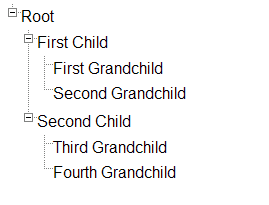
A tree view is a wonderful way to present nested data structures or trees.  Here's an example:

treeview

I've written an HTML helper that presents tree structures as nested unordered lists in HTML. First I've got an interface to represent a tree node. It's called IComposite after the GoF pattern.

public interface IComposite<T>
{
    T Parent { get; }
    ISet<T> Children { get; }
}

Now we just need to make sure that our entity implements this interface. Here's a simple example, CompositeThing:

public class CompositeThing : IComposite<CompositeThing>
{
    public CompositeThing()
    {
        Children = new HashedSet<CompositeThing>();
    }
    public string Name { get; set; }
    public CompositeThing Parent { get; set; }
    public ISet<CompositeThing> Children { get; set; }
}

Now all we need to do is get the object graph from the database. Techniques for doing that are the subject for another post, but it's pretty straight forward with both LINQ-to-SQL and NHibernate. Once we have the graph we can pass it to our view and display it like this:

<%= Html.RenderTree(ViewData.Model.CompositeThings, thing => thing.Name) %>

And finally here's the code for  the RenderTree HtmlHelper extension method:

public static class TreeRenderHtmlHelper
{
    public static string RenderTree<T>(
        this HtmlHelper htmlHelper,
        IEnumerable<T> rootLocations,
        Func<T, string> locationRenderer)
        where T : IComposite<T>
    {
        return new TreeRenderer<T>(rootLocations, locationRenderer).Render();
    }
}
public class TreeRenderer<T> where T : IComposite<T>
{
    private readonly Func<T, string> locationRenderer;
    private readonly IEnumerable<T> rootLocations;
    private HtmlTextWriter writer;
    public TreeRenderer(
        IEnumerable<T> rootLocations,
        Func<T, string> locationRenderer)
    {
        this.rootLocations = rootLocations;
        this.locationRenderer = locationRenderer;
    }
    public string Render()
    {
        writer = new HtmlTextWriter(new StringWriter());
        RenderLocations(rootLocations);
        return writer.InnerWriter.ToString();
    }
    /// <summary>
    /// Recursively walks the location tree outputting it as hierarchical UL/LI elements
    /// </summary>
    /// <param name="locations"></param>
    private void RenderLocations(IEnumerable<T> locations)
    {
        if (locations == null) return;
        if (locations.Count() == 0) return;
        InUl(() => locations.ForEach(location => InLi(() =>
        {
            writer.Write(locationRenderer(location));
            RenderLocations(location.Children);
        })));
    }
    private void InUl(Action action)
    {
        writer.WriteLine();
        writer.RenderBeginTag(HtmlTextWriterTag.Ul);
        action();
        writer.RenderEndTag();
        writer.WriteLine();
    }
    private void InLi(Action action)
    {
        writer.RenderBeginTag(HtmlTextWriterTag.Li);
        action();
        writer.RenderEndTag();
        writer.WriteLine();
    }
}

The resulting HTML looks like this:

<html>
<head>
    <title>Tree View</title>
    <link href="jquery.treeview.css" rel="stylesheet" type="text/css" />
    <script src="jquery-1.2.6.min.js" type="text/javascript"></script>
    <script src="jquery.treeview.js" type="text/javascript"></script>
    <script type="text/javascript">
        $(function() {
            $("#treeview ul").treeview();
        });
    </script>
</head>
<body style="font-family : Arial; ">
    <h1>
        Tree View
    </h1>
    <div id="treeview">
        <ul>
            <li>Root
                <ul>
                    <li>First Child
                        <ul>
                            <li>First Grandchild</li>
                            <li>Second Grandchild</li>
                        </ul>
                    </li>
                    <li>Second Child
                        <ul>
                            <li>Third Grandchild</li>
                            <li>Fourth Grandchild</li>
                        </ul>
                    </li>
                </ul>
            </li>
        </ul>
    </div>
</body>
</html>
Note that I'm using the excellent jQuery.treeview to render the collapsible tree with expansion buttons.

Thursday, October 09, 2008

Using Google Maps with the MVC Framework

For the last week or so I've been having a lot fun at work adding some Google map functionality to our application. It's an internal application for my clients, so I can't show you any of the code, but I've put together a little demo to demonstrate some of the techniques. The core message here is that it's easy. Taking a some geographic information from your model and putting some markers on a google map with a bit of interactive functionality is really only a matter of a few lines of code. You can download a zip file of the solution here:

http://static.mikehadlow.com/Mike.GoogleMaps.zip

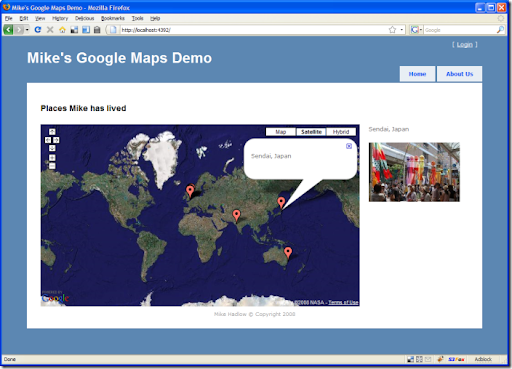
Here's the application. It's pretty simple, it just displays a map with a collection of locations. For fun I've made it show some of the places I've been lucky enough to live in during my fun-packed life :) Each location has a latitude, longitude, name and an image. You can click on the marker for a location and its name is displayed in a speech bubble (known as an 'info window' by Google) and it's image is displayed to the right of the map.

googleMapDemo

I build the map object graph in memory with a simple 'repository' (this is just a demo, your repository would normally talk to a database).

using Mike.GoogleMaps.Models;
namespace Mike.GoogleMaps.Repositories
{
    public class MapRepository
    {
        public Map GetById(int id)
        {
            return new Map
                   {
                       Name = "Places Mike has lived",
                       Zoom = 1,
                       LatLng = new LatLng { Latitude = 0.0, Longitude = 0.0, },
                       Locations =
                           {
                               new Location
                               {
                                   Name = "St. Julians, Sevenoaks, UK",
                                   LatLng = new LatLng { Latitude = 51.25136, Longitude = 0.21992 },
                                   Image = "st_julians.jpg"
                               },
                               new Location
                               {
                                   Name = "Kadasali, Gujerat, India",
                                   LatLng = new LatLng { Latitude = 21.235142, Longitude = 71.4462 },
                                   Image = "india.jpg"
                               },
                               // ...
                           }
                   };
        }
    }
}

Next we have a controller action that returns the object graph serialized as JSON:

public ActionResult Map()
{
    var mapRepository = new MapRepository();
    var map = mapRepository.GetById(1);
    return Json(map);
}

On the home controller's index view we have some simple HTML that has div placeholders for the content. One for the map name, another for the map itself and two more for the dynamic location name and image. Please forgive the inline CSS :(

<!DOCTYPE html PUBLIC "-//W3C//DTD XHTML 1.0 Strict//EN" "http://www.w3.org/TR/xhtml1/DTD/xhtml1-strict.dtd">
<html xmlns="http://www.w3.org/1999/xhtml">
<head><meta http-equiv="Content-Type" content="text/html; charset=iso-8859-1" /><title>
 Mike's Google Maps Demo
</title><link href="Content/Site.css" rel="stylesheet" type="text/css" />
    <script src="../../Content/jquery-1.2.6.min.js" type="text/javascript"></script>
    <script src="http://www.google.com/jsapi?key="<key>" type="text/javascript"></script>
    <script src="../../Scripts/LocationsMap.js" type="text/javascript" ></script>
</head>
<body>
    <div class="page">
...
  <h2 id="mapName"></h2>
  <div id="map" style="width : 700px; height : 400px; margin : 0px; padding : 
   0px; float : left; margin-right:20px;"></div>
     
  <p id="info"></p>
  <img id="image" src="" />
  <div style="clear:both;"></div>
...
    </div>
</body>
</html>

Note that this is the HTML as rendered and is a combination of the master view and the home controller's index view. Also note the script references for the Google maps API, jQuery and the LocationMap.js script which controls the page.

jQuery makes writing Javascript a dream. I am a Javascript novice, but I found it blissfully easy to write this code. Here's the javascript which does all the work:

google.load("maps", "2");
// make a json request to get the map data from the Map action
$(function() {
    if (google.maps.BrowserIsCompatible()) {
        $.getJSON("/Home/Map", initialise);
    }
});
function initialise(mapData) {
    $("#mapName").text(mapData.Name);
    // create the map
    var map = new google.maps.Map2($("#map")[0]);
    map.addControl(new google.maps.SmallMapControl());
    map.addControl(new google.maps.MapTypeControl());
    map.setMapType(G_SATELLITE_MAP);
    var latlng = new google.maps.LatLng(mapData.LatLng.Latitude, mapData.LatLng.Longitude);
    var zoom = mapData.Zoom;
    map.setCenter(latlng, zoom);
    // set the marker for each location
    $.each(mapData.Locations, function(i, location) {
        setupLocationMarker(map, location);
    });
}
function setupLocationMarker(map, location) {
    // create a marker
    var latlng = new google.maps.LatLng(location.LatLng.Latitude, location.LatLng.Longitude);
    var marker = new google.maps.Marker(latlng);
    map.addOverlay(marker);
    // add a marker click event
    google.maps.Event.addListener(marker, "click", function(latlng) {
        
        // show the name and image on the page
        $("#info").text(location.Name);
        $("#image")[0].src = "../../Content/" + location.Image;
        
        // open the info window with the location name
        map.openInfoWindow(latlng, $("<p></p>").text(location.Name)[0]);
    });    
    
}

When the page loads we make an ajax request 'getJSON' to the HomeController's Map action listed above. When the call completes, it fires the callback function 'initialise'. This creates the map and binds it to the map div. We set the centre of the map to the map object's LatLng and the zoom level to the map's Zoom value.

Next we iterate (using jQuery's $.each()) through the locations and call setupLocationMarker for each one. This creates a new Marker object for each location and adds it to the map. It also adds a click event handler to each marker to set the name and image url, and popup the info window.

Simple and easy. I've been really impressed by the power of jQuery. It's very good news that Microsoft have adopted it. With the Firebug plugin for Firefox doing javascript development is a real pleasure.  As for the Google maps API, it is nicely conceived and has excellent documentation.

So what's stopping you? Get mapping!