WP Simple Membership Members Password Reset post shows you how the members can reset their password.
This post shows you how to allow your members to reset their password if they have forgotten their password or wish to change their password. These steps are very easy to follow and will help your members change their password with a few clicks.
What You Need:
- Simple Membership plugin.
- (Optional: Documentation you might want to read how-to-deal-with-the-common-challenges-of-a-membership-site)
- (Optional: You might be interested in the following documentation adding-a-terms-and-conditions-and-privacy-policy-to-member-registration-page.)
WP Simple Membership Members Password Reset
Login Widget
Step 1 ) The following image Member Login shows you the login widget in a site. This allows the members to click on Forgot Password? link to reset their password.

Step 2 ) The following image shows you the Email Address field for the members to enter their email address so that they can reset the password. Once the email address is entered they can click on the Reset Password button to receive the new password.

Step 3 ) The following image displays an error message if the member enters the wrong email address.
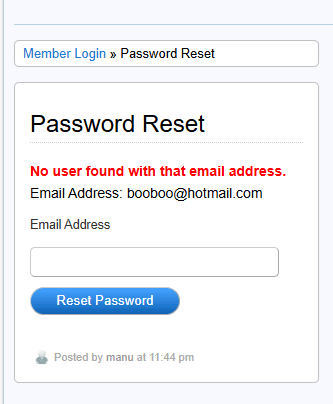
Step 4 ) The following image displays the message stating the new password has been sent if the member enters the correct email address.

Note: If you want to customize the message displayed above, click on the following tutorial wordpress-simple-membership-custom-message-add-on to learn more.
===========================
If you have any questions please let me know. I will be updating this tutorial from time to time.
Enjoy.
Simple Membership Plugin Tutorial List:
 I have been working in IT since 1999 and I enjoy the challenges it brings me. I love developing websites with WordPress. I spend a lot of time helping out in wordpress.org forums. I have been writing tutorials since 2011. Now I am learning how to manage my own VPS "Virtual Private Server.