Archive Page 4

19
Oct
11

DWG to FDO: Moving Blocks to SDF (with Attributes)

I have had a lot of questions lately on how to move complex DWG files with Rotated Blocks with Attributes to FDO.

(Feature Data Objects include storage such as Oracle Spatial, SQL Server Spatial, SHP, SDF, mySQL, etc.)

Moving from DWG to Universal Spatial Storage (USS) is key for any organization wanting to share data or maintain a “Truth” to their assets.

I have created a video that shows how to take Blocks with 3 Attributes and export them to a SDF file – which can then be put in the SQL Server or Oracle etc.

I use the existing block as a symbol with FDO, so please keep your individual DWG block libraries on your system.  For example, I have a folder with all my utility blocks – each block exploded in an individual DWG file.

04
Oct
11

MapGuide and Oracle OpenWorld/JavaOne Conference

This year the “navigate” application for finding your session, demo kiosk or company booth is being hosted by Arrow Geomatics Inc.  The servers, which are provided by our partners as Technique Microsystems, are supplied with MapGuide OpenSource and Oracle 11G.

I have teamed up with Andrea Bell to build a very powerful application with of all the floorplans representing 11 hotels around San Francisco that have the Sessions, Demos and Company Kiosks.

You can find your session etc for OpenWorld at http://www.navigate2011.com/openworld and JavaOne at http://www.navigate2011.com/javaone

The site was rapidly built using MapGuide OpenSource and Oracle 11G.  The Web API is FUSION mainly because of the beautiful URL API &theme=on the Web Layout URL.

Another way to find the site is by to Oracle’s site: http://www.oracle.com/openworld/index.html and click Tools>Navigate

Or for JavaOne:

site: http://www.oracle.com/javaone/index.html and Click Tools>Navigate

Next stop, Autodesk University?

22
Sep
11

Best Observation at Denver FOSS4G 2011

One of the biggest items that struck me while attending FOSS4G last week was how robust openstreetmap.org is and how it compares to other online web mapping systems.

One of my favourite comparisons is how google maps (maps.google.com) and OpenStreetMaps show Kabul, Afghanistan.

Google:

Google shows very little detail, but the crowd sourcing approach of openstreetmaps shows a lot more detail.

Since anyone can edit and upload GIS data to OpenStreetMaps, if your town is “off” in Google or Bing, why not upload your information to OpenStreetMaps? 

OpenLayers.org can connect to OpenStreetMaps.  Because of that, MapGuide and Autodesk Infrastructure Map Server 2012 can utilize OpenStreetMaps. 

Autodesk Infrastructure Map Server Studio 2012 supports the OpenStreetMap as an OpenLayers base layer.

QGIS, http://www.qgis.org, not only can consume OpenStreetMap data but can be used to edit it as well.

16
Jul
11

What I learned at ESRI UC 2011 and how it can help AutoCAD Map users

The ESRI Conference ended yesterday and I had some time for some sober second thought.

ESRI User Conference 2011 San Diego

ESRI User Conference 2011 San Diego

Since this was my first ESRI conference (I usually go to FOSS4G and Autodesk University), I was really curious about the setup and what courses were available.  My main objective was to learn more about integration between Autodesk/Oracle/SQL Server/ArcGIS while I was here, since those are the products and databases I use most.

One of the key things I learned was that although in ArcGIS 10 you can directly connect to Oracle SDO_GEOM and SQL Server Geometry/Geography features with “Query Layers”; it is read-only.

In ArcGIS 10.1, there will be full read-write with “foreign” data types (great news). This is really good for those using AutoCAD Map to store geometry in FDO Schemas.

Another item that really twigged my interest was the ability to use native spatial geometry types “out of the box” when creating Features in ArcGIS.  Everyone using ArcGIS 9.3.1. and 10 currently has the choice when creating Features to choose SQL Server’s Geography/Geometry and Oracle’s SDO_GEOM for their data.
Some really funky features might not be supported but for 90% of your data, why not just open it up to all GIS/CAD systems at your organization.

One comment I heard repeatedly was, “AutoCAD people don’t really get GIS”.  I think the pain-point for ESRI GIS users is the CAD to GIS transition required in almost all organizations.

What is ESRI doing?  ESRI wrote the ArcGIS for AutoCAD and this tags any data in DWG with attributes (like Object Data) so that the AutoCAD users can maintain attribute info while still using native AutoCAD (shocker!).
Who would have thought of that!?

Now back at the ranch, FDO and Autodesk IMS/MapGuide cannot natively read DWG or Object Data.

In fact, the migration from Object Data to FDO is a complete pain in the neck (unlike the old OSE).

Why does ESRI see this as a priority and Autodesk doesn’t?

Well, I think ESRI realizes how universal the DWG is and how important it is to keep AutoCAD users happy and within a familiar environment.

How could Autodesk fix this?

Steps:

  1. AutoCAD Map’s Object Data should be inherently in base edition of AutoCAD (big ask but ESRI has already beat them to the punch)
  2. There should be a FDO Provider for DWG that reads Object Data.
  3. The FDO Provider for DWG should work in AutoCAD Map AND MapGuide/IMS.
  4. The FDO Provider for DWG should have read/write access
  5. The Object Data should be mapped to any FDO feature source so attributes can be brought into AutoCAD from any FDO Feature
Perhaps Autodesk can catch up to ESRI and realize that FDO should not move everyone away from DWG but integrate it as part of the geospatial suite.
DWG is here to stay and is part of  GIS and Geospatial.
22
Jun
11

New Blog Name – There Be Dragons.

The products I have been using have been changing names. 

One product changed  from MapGuide to MapGuide Enterprise to Infrastructure Map Server (the product formerly known as MapGuide)  so I have decided to give my BLOG a new name. 

As we tend to go into unknown geospatial mapping areas where most consider “There be Dragons”, the name of the blog should reflect that!

10
Jun
11

FDO in AutoCAD Map needs to Cowboy Up!

FDO, Feature Data Objects, have been around for almost 7 years.  It enables products such as MapGuide, AutoCAD Map, Maestro, Autodesk Infrastructure Map Server, etc connect seamlessly to many standard GIS formats including SQL Server, ArcSDE, and Oracle.

Before there was FDO, AutoCAD Map had a system that was called OSE (Oracle Spatial Extension).  This OSE enabled the AutoCAD Map user to seamlessly store Blocks, Lines, Polylines, Points with Object Data, Block Attributes, and Link Templates directly into an Oracle Database and read/write back and forth back into AutoCAD with a click of a button.  Seriously.

It was truly seamless CAD/GIS integration.

It still is.

OSE still works in AutoCAD Map 2012 (for now but only on 32bit – blah!).

What FDO/AutoCAD Map needs is to cowboy up.  The AutoCAD community needs this to happen to be integrated with Geospatial.

What did OSE do so well?  You can map the features in AutoCAD directly to columns in the database.  For example, if you drew a Block in AutoCAD and scaled and rotated it, it would dynamicly store those properties in the Oracle database so that when you asked for those BLOCKS again, you got them back in AutoCAD, as BLOCKS (shocker!).

This is true CAD-Geospatial integration. If you have to use Bulk Copy or Safe Software FME, it’s not INTEGRATION.

How would this occur?  The FDO datastore (such as SDF, Oracle, SQL Server, ArcSDE, SHP, etc) would have to have some CAD/FDO mapping information for AutoCAD.  So when the AutoCAD draftsperson draws a polyline with attached Object Data, it can be stored seamlessly into the SQL Server database and retrieved exactly as is back into AutoCAD.

NO BULK COPY.

Just read/write.

If I spent my days drafting, I would not want to have to learn a new software after years of working with AutoCAD.  Read/Write is simple enough.

11
May
11

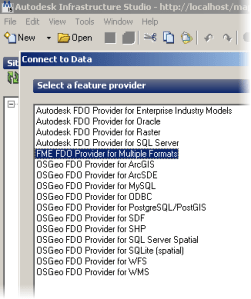
AutoCAD Map Data with Object Data? Don’t Translate – Use FDO and SAFE!

For years I have been struggling to get DWG Data with AutoCAD Map Object Data into MapGuide or AIMS2012. 
MapGuide using Object Data from DWG

Until today!  I have the BETA of FME Desktop with FDO Extension. 

I just pasted this string into the “Value”

SOURCE_FORMAT,AUTOCAD_OD,SOURCE_DATASET,D:\TEMP\SANITARY.dwg,
RUNTIME_MACROS,”OD_READ_MODE,od_mode_entity,QUALIFY_OBJECT_DATA_RECORDS_WITH_TABLE_NAME,
no,OD_TABLE_NAME_SEPARATOR,_,RESOLVE_BLOCKS,yes,USE_BLOCK_HEADER_LAYER,yes,
EXPLODE_MTEXT,yes,READ_AS_2_5D,no,READ_PAPER_SPACE,no,IGNORE_UCS,no,
IGNORE_HIDDEN_LAYERS,yes,APPLY_WORLD_FILE,yes,USE_SEARCH_ENVELOPE,
NO,SEARCH_ENVELOPE_MINX,0,SEARCH_ENVELOPE_MINY,0,SEARCH_ENVELOPE_MAXX,
0,SEARCH_ENVELOPE_MAXY,0,CLIP_TO_ENVELOPE,NO,_MERGE_SCHEMAS,YES”,META_MACROS,
“SourceOD_READ_MODE,od_mode_entity,SourceQUALIFY_OBJECT_DATA_RECORDS_WITH_TABLE_NAME,
no,SourceOD_TABLE_NAME_SEPARATOR,_,SourceRESOLVE_BLOCKS,yes,SourceUSE_BLOCK_HEADER_LAYER,
yes,SourceEXPLODE_MTEXT,yes,SourceREAD_AS_2_5D,no,SourceREAD_PAPER_SPACE,no,SourceIGNORE_UCS,
no,SourceIGNORE_HIDDEN_LAYERS,yes,SourceAPPLY_WORLD_FILE,yes,SourceUSE_SEARCH_ENVELOPE,
NO,SourceSEARCH_ENVELOPE_MINX,0,SourceSEARCH_ENVELOPE_MINY,0,SourceSEARCH_ENVELOPE_MAXX,
0,SourceSEARCH_ENVELOPE_MAXY,0,SourceCLIP_TO_ENVELOPE,NO”,METAFILE,AUTOCAD_OD,COORDSYS,,
IDLIST,

A little long, but don’t worry, just run the C:\Program Files\FME\FMEPCConfig.exe to get this long string.

Tool For Getting FME String for MapGuide

Need Proof?  Check out this layer in Studio pointing directly to a DWG with Object Data in a column called “LINKING_COLUMN”

DWG with Object Data in Studio 2012

06
Apr
11

First Look at Autodesk Infrastructure Map Server 2012

First Look at Autodesk Infrastructure Map Server 2012 (aka MapGuide Enterprise mashed up with Topobase Web).

So now there is no MapGuide and no Topobase Web it is now Infrastructure Map Server.

In installed on my PC this morning, and I really like the installer.

Installing Infrastructure Map Server

The cool thing about the install is that it knows if you are configuring the Autodesk Infrastructure Web Server Extension (aka MapGuide Web Extensions) with IIS and .NET, because if you are not, you cannot install the Infrastructure Application Extensions (tbweb) and the Infrastructure Administrator because those two applications only work with IIS and .NET. 
 
I’m ok not using them for now since I am not a current Topobase user (but that may change as more databases are supported – more than Oracle anyway).
 
I installed Infrastructure Studio (aka MapGuide Studio) and was pleased to see two big additions:
  1. Built-in Support for OpenStreetMap – which is awesome – I think most Governments could leverage storing their public data in OSM and streaming it back to mapguide, er infrastructure map server  (marbles in mouth) would be a win-win-win scenario!
  2. Quick Plot – awesome rotation of map plotting and setting of scale (see image)
Both Quickplot and OpenStreetMap in IMS (old MapGuide)

Both Quickplot and OpenStreetMap in IMS (old MapGuide)

 I am  incredibly dissapointed with two main things though.

  1. No FDO Provider for DWG – this is a “no-brainer” – I was able to get at the Object Data/Link template Key/Block Attributes within DWG files with MapGuide 6.5 but not 8 years later?!  Yikes.  Back to FME to fix this chasm in the product.
  2. No Redline/Markup support – well it’s kind of there but it’s so lame I usually hide it from the users so that they are not so disappointed.

 Overall, it is nice to see that I could load my old MGP (Packages) and have it up and running so nicely.  I don’t need a LIC file anymore just register your MapGuide like you would AutoCAD.  It is really sweet.


10
Mar
11

SelectWithin – MapGuide 2011 or MG OpenSource Fix for FUSION

I really like the widgets in MapGuide Flexible Web Layouts a.k.a Fusion.

I had a weird issue where I buffered an area and wanted to select within that buffer those layers available to select (in my case ‘Parcels’).  But the list of selected layers include those that are hidden in Groups that aren’t even turned on.

Here is how to fix MapGuide so you only get the list of selectable layers that are actually turned on:

In the C:\Program Files\Autodesk\MapGuideEnterprise2011\WebServerExtensions\www\fusion\widgets\SelectWithin\ folder open the SelectWithinPanel.templ page in notepad.exe.

we want to replace the FillLayerList() function with the following:

function FillLayerList()
{
 //GL: FILTER BASED ON LEGEND
 var currentVisibleLayer=0;
 var list = document.getElementById("layers");
 var listNames = document.getElementById("layerNames");
 list.options.length = 0;
 var map = GetParent().Fusion.getMapByName(mapName);
 var layers = map.aMaps[0].getSelectableLayers();
 if(layers.length > 0) {
 for(var i = 0; i < layers.length; i++) {
 var layer = layers[i];
 if(layer.visible)
 {
 var groupVisible = true;
 var currentGroup = layer.parentGroup;
 while(currentGroup.name != "layerRoot")
 {
 if(!currentGroup.visible)
 groupVisible=false; 
 currentGroup = currentGroup.parentGroup;
 
 }
 if(groupVisible!=false)
 {
 list.options[currentVisibleLayer] = new Option(layer.legendLabel != ""? layer.legendLabel: layer.layerName);
 if (i == 0) list.options[0].selected = true;
 listNames.options[currentVisibleLayer] = new Option(layer.layerName);
 currentVisibleLayer++;
 }
 }
 }
 } else {
 
 list.options[0] = new Option("__#BUFFERNOLAYER#__");
 }
 document.getElementById("Done").disabled = layers.length == 0;
}
18
Feb
11

MapGuide Enterprise with AJAX (BASIC) Layout – Home Task

I haven’t posted for a while.  I have been working on syncing Video with GPS points to animate the location of the videographer while the movie is playing in MapGuide.

I found a quick fix for those MapGuide users who are using MapGuide Enterprise 2011 or older.  The home task button doesn’t work.  So here is the fix: http://trac.osgeo.org/mapguide/ticket/1227

The only catch is that the relative paths always go 2 deep into the viewer files, so don’t forget the ../../

for example:

../../search.htm rather than just search.htm


Gordon Luckett

Unknown's avatar

Arrow Geomatics Inc's Gordon Luckett

Contact

gordon dot luckett at arrowgeo dot com 1-519-837-9500 (Arrow Geomatics Inc.)

Checkout MapGuide Guy’s Youtube Channel


Design a site like this with WordPress.com
Get started