
Apraksts
Simple wordpress plugin that embeds a counter in your blog and shows the number of visits your website’s pages and posts has. Enables you to display how many times a post/page had been viewed.
Feature:
- Works on all modern browsers.
- Work With all the cache plugins.
- Widget available.
- Simple configuration.
- Exclude Bot Views option available
- Most Viewed Template.
- Display Options.
Support Forums
Credits
- WP-PostViews By GamerZ
Ekrānuzņēmumi
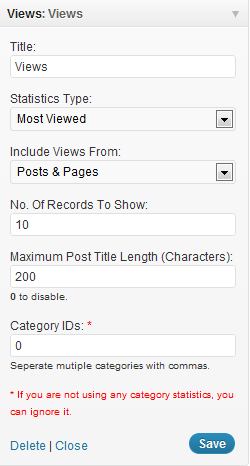
Uzstādīšana
To do a new installation of the plugin, please follow these steps
- Download the zipped plugin file to your local machine.
- Unzip the file.
- Upload the
WP-Post-Statsfolder to the/wp-content/plugins/directory. - Activate the plugin through the ‘Plugins’ menu in WordPress.
- Go to
WP-Admin -> Settings -> PostStatsto configure the plugin.
Check more details here.
Usage
- Open
wp-content/themes/<YOUR THEME NAME>/index.php - You may place it in archive.php, single.php, post.php or page.php also.
- Find:
<?php while (have_posts()) : the_post(); ?> - Add Anywhere Below It (The Place You Want The Views To Show):
<?php if(function_exists('the_views')) { the_views(); } ?>
Check more details here.
BUJ
You can check more FAQ on plugin website URL :
WP Post Stats
Atsauksmes
Par šo spraudni nav atsauksmju.
Autori un izstrādātāji
“WP Post Stats” ir atvērtā pirmkoda programmatūra. Šo spraudni ir veidojuši šādi cilvēki.
Līdzdalībnieki
Tulkot “WP Post Stats” savā valodā.
Vai jūs interesē attīstība?
Pārlūkojiet kodu, apmeklējiet SVN krātuvi vai abonējiet attīstības žurnālu, ko izveidojis RSS.
Izmaiņu žurnāls
2.2
Comfortable with wordpress 3.8. Check more details here.
2.1
Comfortable with wordpress 3.6. Check more details here.
2.0
- Works on all modern browsers.
- Work With all the cache plugins.
- Widget available.
- Simple configuration.
- Exclude Bot Views option available
- Most Viewed Template.
- Display Options.