

Apraksts
Upload Converter for WebP is a powerful WordPress plugin that automatically converts uploaded JPG, JPEG, and PNG images to modern WebP format for faster load times and better optimization. You can also convert existing images manually with one click from the Media Library or the plugin’s admin panel.
🎯 Features:
- ✅ Automatic conversion to WebP during upload
- ✅ Convert existing images from the admin dashboard
- ✅ Media Library support:
- List View: Action link to convert
- ✅ Fullscreen lightbox preview with file info
- ✅ Built using native WordPress functions (Imagick or GD)
- ✅ Lightweight and cleanly coded for performance
How to Use
This plugin automatically converts images to WebP format during upload. You don’t need to do anything manually after installation.
🔄 Automatic Conversion (On Upload)
- After activation, when you upload a JPG or PNG image to the Media Library, it will be automatically converted to WebP.
- The converted image will be smaller in size, helping improve site speed and performance.
🛠️ Convert Existing Images
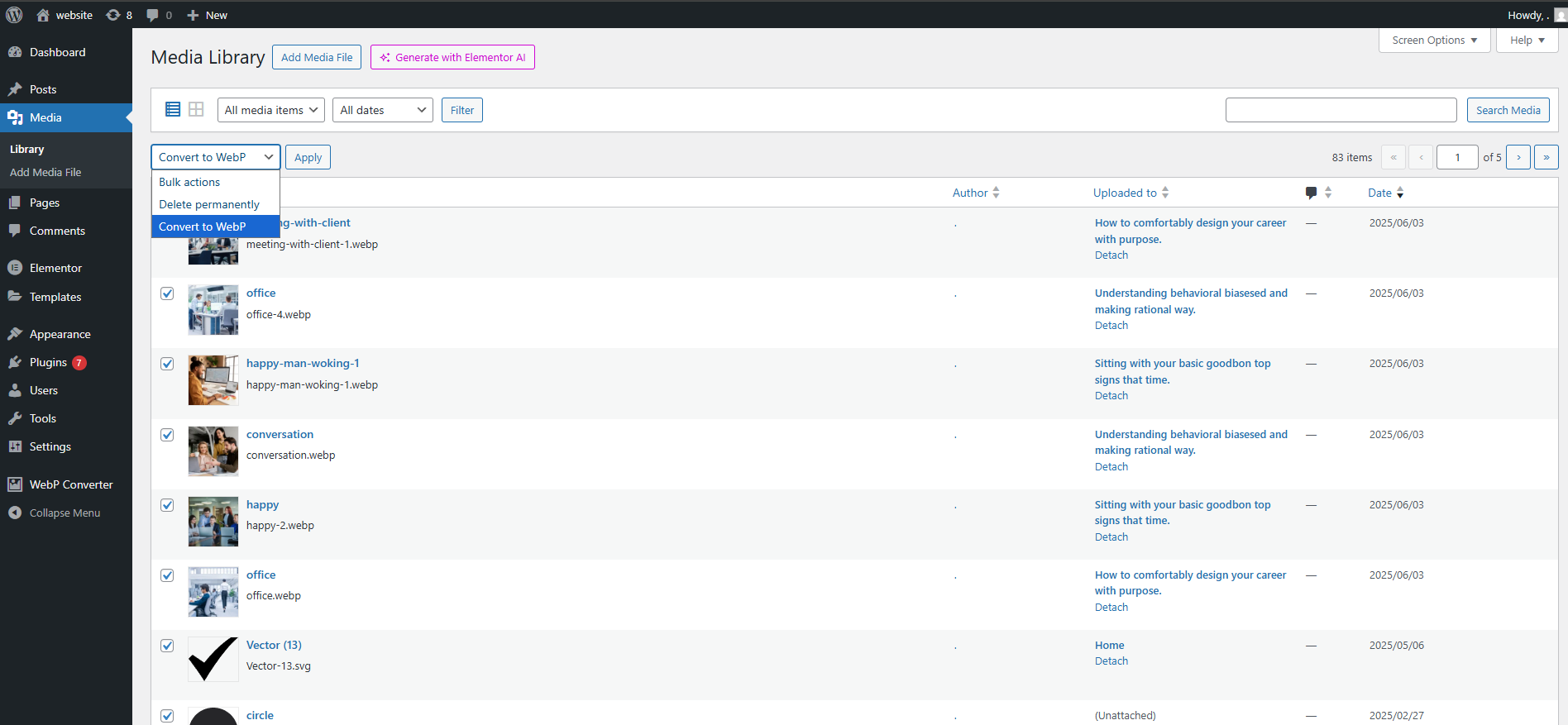
Option 1: From Media Library (List View)
- Go to Dashboard Media Library.
- Switch to List View.
- Select one or more JPG/PNG images.
- From the Bulk Actions dropdown, choose Convert to WebP.
- Click Apply.
Option 2: From Plugin Page
- Go to Dashboard WebP Converter (menu added by the plugin).
- You’ll see a list of all JPG and PNG images.
- Select the images you want to convert.
- Click on Convert Selected.
✅ After conversion, you’ll see the message:
Converted to WebP successfully.
Notes
- Only JPG and PNG images are supported.
- Make sure your server supports WebP and the
imagewebpextension in PHP. - If you get an error like “An error occurred in the upload”, check:
- If the file type is supported
- If PHP GD/WebP is enabled
- File permissions are correct
Links
Ekrānuzņēmumi

Uzstādīšana
- Upload the plugin folder to the
/wp-content/plugins/directory or install via the Plugins screen in WordPress. - Activate the plugin through the ‘Plugins’ screen.
- After activation, go to Dashboard WebP Converter or use the Media Library for manual conversions.
BUJ
-
Will it slow down uploads?
-
There is a minimal delay if automatic conversion is enabled, depending on image size and your server.
-
What if Imagick or GD is not available?
-
The plugin checks for both. If neither is available, a helpful error is shown.
Atsauksmes


Autori un izstrādātāji
“Upload Converter for WebP” ir atvērtā pirmkoda programmatūra. Šo spraudni ir veidojuši šādi cilvēki.
Līdzdalībnieki
Tulkot “Upload Converter for WebP” savā valodā.
Vai jūs interesē attīstība?
Pārlūkojiet kodu, apmeklējiet SVN krātuvi vai abonējiet attīstības žurnālu, ko izveidojis RSS.
Izmaiņu žurnāls
1.0
- Initial release with full automatic and manual WebP conversion support.