
Apraksts
The widget shows the prayer/fasting time on your website using the local WordPress timezone and the provided salah.csv file (see installation description).
Front-end language support for:
– English
– German
– Bosnian
Ekrānuzņēmumi

Widget Theme Blue (Front-end) 
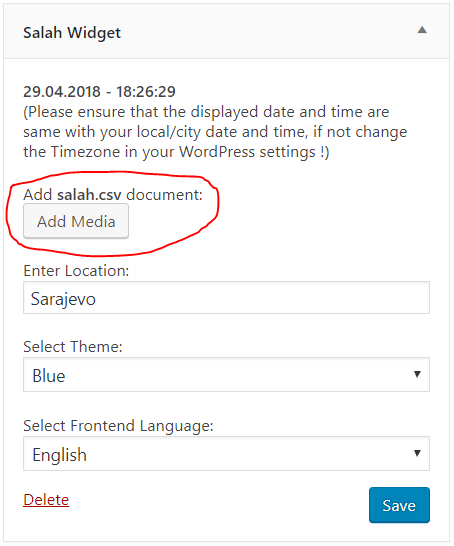
Widget Settings (Back-end) 
Widget Theme Green (Front-end) 
Widget Theme Red (Front-end) 
Widget Theme Grey (Front-end) 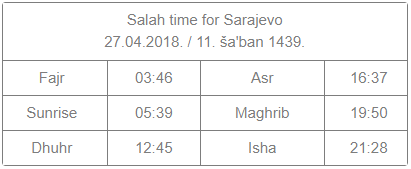
Widget Theme Classic (Front-end)
Uzstādīšana
- Install and activate the plugin through the “Plugins” menu in WordPress
- Add the Salah Widget in the “Appearance -> Widgets” menu in WordPress
- Check if the displayed time matches your local (city) time, if not update your timezone in “Settings -> General” menu in WordPress
- Download the example salah.csv file
- Edit the downloaded salah.csv file and adapt it to your needs. Remember that your website will load faster if you have lesser days in the csv file (ideally 365 or less rows)
- Save the edited salah.csv file as a comma delimited csv file
- Upload the edited salah.csv file via the Salah Widget settings menu. Remember that the file must be called salah.csv and no other file should contain this name in your WordPress Media Library
- Enter the name of your city in the Salah Widget settings
- Choose a Theme
- Select the front-end language
- Save your Salah Widget settings
BUJ
- Installation Instructions
-
- Install and activate the plugin through the “Plugins” menu in WordPress
- Add the Salah Widget in the “Appearance -> Widgets” menu in WordPress
- Check if the displayed time matches your local (city) time, if not update your timezone in “Settings -> General” menu in WordPress
- Download the example salah.csv file
- Edit the downloaded salah.csv file and adapt it to your needs. Remember that your website will load faster if you have lesser days in the csv file (ideally 365 or less rows)
- Save the edited salah.csv file as a comma delimited csv file
- Upload the edited salah.csv file via the Salah Widget settings menu. Remember that the file must be called salah.csv and no other file should contain this name in your WordPress Media Library
- Enter the name of your city in the Salah Widget settings
- Choose a Theme
- Select the front-end language
- Save your Salah Widget settings
Atsauksmes
Par šo spraudni nav atsauksmju.
Autori un izstrādātāji
“Salah Widget” ir atvērtā pirmkoda programmatūra. Šo spraudni ir veidojuši šādi cilvēki.
Līdzdalībnieki


“Salah Widget” ir tulkots lokalizācijās 3. Paldies tulkotājiem par ieguldījumu.
Tulkot “Salah Widget” savā valodā.
Vai jūs interesē attīstība?
Pārlūkojiet kodu, apmeklējiet SVN krātuvi vai abonējiet attīstības žurnālu, ko izveidojis RSS.
Izmaiņu žurnāls
1.0
- Initial version.
1.1
- Stable version.
- Added front-end language selection for: english, german, bosnian