

Apraksts
Install this plugin to accept payment using Kineticpay.
Ekrānuzņēmumi

screenshot-1.png (Forminator >> Settings >> Payments). 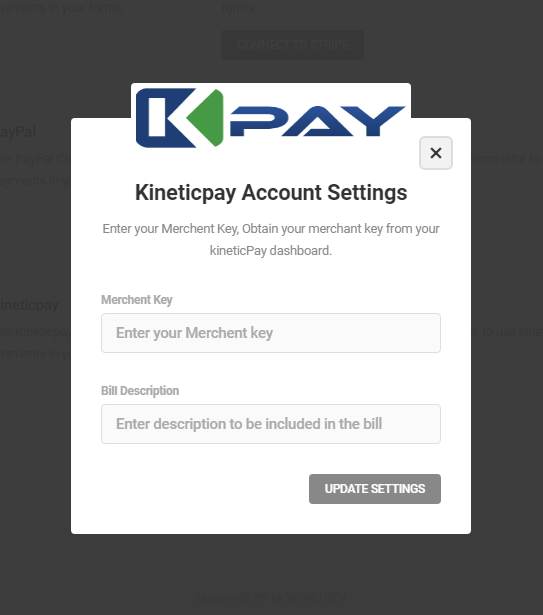
screenshot-2.png (Kineticpay Settings Popup). 
screenshot-3.png (Enter Kineticpay Merchent Key And Bill Description). 
screenshot-4.png (Hit Update Settings). 
screenshot-5.png (Close Popup And Reload Page). 
screenshot-6.png (Go to Custom Form Settings And Enable Kineticpay). 
screenshot-7.png (Select Bank And Checkout). 
screenshot-8.png (View Kineticpay Transaction Details In Form Submissions).
Uzstādīšana
- Install & Activate.
- Go to Forminator >> Settings >> Payments. Wait few seconds so the Kineticpay gateway start showing and then Click Kineticpay Account Settings.
- Add merchent key and bill description, then close the popup and reload the page.
- Creat forminator form with Name, Email, Phone and Currency Field.
- Now go to Form Settings and enable the Kineticpay swith.
- You are now ready to accept payments.
Atsauksmes
Par šo spraudni nav atsauksmju.
Autori un izstrādātāji
“Kineticpay for Forminator” ir atvērtā pirmkoda programmatūra. Šo spraudni ir veidojuši šādi cilvēki.
Līdzdalībnieki

Tulkot “Kineticpay for Forminator” savā valodā.
Vai jūs interesē attīstība?
Pārlūkojiet kodu, apmeklējiet SVN krātuvi vai abonējiet attīstības žurnālu, ko izveidojis RSS.
Izmaiņu žurnāls
1.0.2
- Compatibility release.
1.0.1
- Compatibility release.
1.0.0
- Initial release.