

Apraksts
The Jetpack visibility module is appended to the bottom of all widgets (including 3rd parties). This plugin adds any active WPML language options to the list so you can have widgets appear for specific languages. For example, show french translated text widget, or a french twitter account for the French translation of your website.
Ekrānuzņēmumi
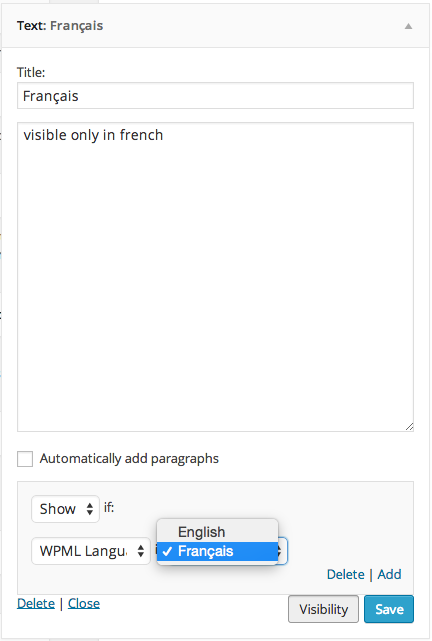
WPML Language Options
Uzstādīšana
Using The WordPress Dashboard
- Navigate to the ‘Add New’ in the plugins dashboard
- Search for ‘Jetpack Widget Visibility Extended’
- Click ‘Install Now’
- Activate the plugin on the Plugin dashboard
Uploading in WordPress Dashboard
- Navigate to the ‘Add New’ in the plugins dashboard
- Navigate to the ‘Upload’ area
- Select
bugherd-dashboard.zipfrom your computer - Click ‘Install Now’
- Activate the plugin in the Plugin dashboard
Using FTP
- Download
bugherd-dashboard.zip - Extract the
bugherd-dashboarddirectory to your computer - Upload the
bugherd-dashboarddirectory to the/wp-content/plugins/directory - Activate the plugin in the Plugin dashboard
BUJ
- This plugin doesn’t appear to do anything
-
This plugin itself does not add any user facing features. It adds the capability for theme/plugin developers to add additional options/fields to the Jetpack Widget Visibility Module.
- What do I need to do to add options or fields within my theme/plugin
-
This feature is not part of the official Jetpack plugin (yet). In order for this to work you must first install the “Jetpack Widget Visibility Extended” plugin.
Atsauksmes
Par šo spraudni nav atsauksmju.
Autori un izstrādātāji
“Jetpack Widget Visibility – WPML Languages” ir atvērtā pirmkoda programmatūra. Šo spraudni ir veidojuši šādi cilvēki.
Līdzdalībnieki
Tulkot “Jetpack Widget Visibility – WPML Languages” savā valodā.
Vai jūs interesē attīstība?
Pārlūkojiet kodu, apmeklējiet SVN krātuvi vai abonējiet attīstības žurnālu, ko izveidojis RSS.
Izmaiņu žurnāls
1.0
- Initial Release