

Apraksts
Adaptive Login Form: Adjusting compromise between Comfort and Paranoia.
Conception:
If my current IP address is not marked as Dangerous since my last successful login, then there is no need to distrust me and force me to go through Quests to solve different types of Captchas.
In this case, the standard “Password” field is sufficient for one attempt.
But if the Attempt is unsuccessful, then we mark the IP address as Dangerous, and then it is possible and necessary to trick me (or the one who is trying to be me) with a more thorough login procedure.
There may be multilevel options. It doesn’t matter (this will be gradually added to the functionality). We are now talking about the General Principle.
Separate statistics are generated for each IP address and the ratio “Successful number of entries” / “Total number of entries” is determined. Depending on how close this parameter is to 100%, we can talk about the need for the Toughness of the Mistrust process.
This mechanism starts before the User enters his Login.
The more Unsuccessful Login attempts occur from a given IP Address, the more thoroughly it is checked.
Conversely, the Login procedure can be simplified as much as possible if there is no obvious reason.
Futured
- Regardless of what kind of Authentication Error occurred, be it:
- Invalid Username;
- Invalid User Password;
- Incorrectly specified additional security elements: “Secret Key” / Captcha / etc.
This will not be indicated in the error message. There will always be only one message: “Authentication Failed”.
Thus, we do not explicitly indicate to the potential Villain / Bot the reason for the denial of access. And the more such Reasons there are, the more complicated the Entry procedure becomes. - Integration with “New Users Monitor”
Ekrānuzņēmumi

screenshot-1.png This is the “Login Form” with “Adaptive Login Action” – Mode: Normal. 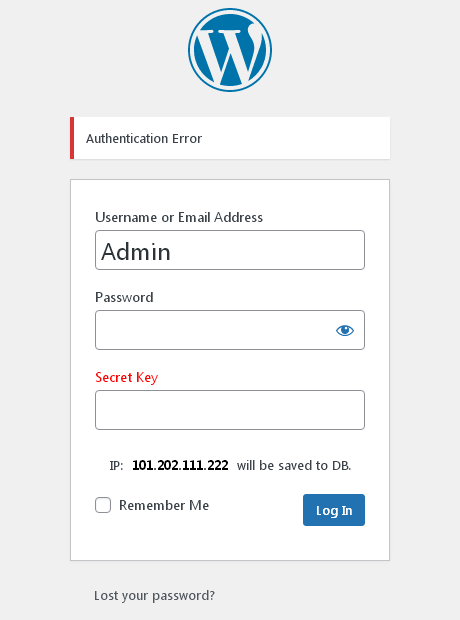
screenshot-2.png This is the “Login Form” with “Adaptive Login Action” – Mode: Security. 
screenshot-3.png This is the “Adaptive Login Action” Options page.
Uzstādīšana
- Upload ‘adaptive-login-action’ folder to the
/wp-content/plugins/directory. - Activate the plugin through the ‘Plugins’ menu in WordPress.
- If you have any problems – please ask for support.
BUJ
- After installation, with default settings, at the first login attempt, what should be entered in the “Secret Key” field?
- Nothing! Just leave this field blank. But after logging in, go to the settings and set “Secret Key”.
Atsauksmes
Par šo spraudni nav atsauksmju.
Autori un izstrādātāji
“Adaptive Login Action” ir atvērtā pirmkoda programmatūra. Šo spraudni ir veidojuši šādi cilvēki.
Līdzdalībnieki
Tulkot “Adaptive Login Action” savā valodā.
Vai jūs interesē attīstība?
Pārlūkojiet kodu, apmeklējiet SVN krātuvi vai abonējiet attīstības žurnālu, ko izveidojis RSS.
Izmaiņu žurnāls
1.9
2026.01.28
* Fix Save Options.
* Tested to PHP: 8.4.17
1.8
2025.12.04
* Fix WhiteList Processing.
* Add WPGear_Debugger.
* Tested with WP6.9
1.7
2025.08.18
* Fix "Translation loading was triggered too early"
* Tested with WP6.8.2
1.6
2025.01.03
* Add Option "Clearing (Uninstall)".
* Add Option "Enable On/Off".
* Tested with WP6.7.1
* Update Translates;
1.5
2024.11.05
* Tested with WP6.6.2
* Add the possibility of internationalization.
* Add Translate: Russian
1.4
2021.10.01
* Fix load style.css for Frontend.
1.3
2021.09.29
* Restored compatibility with previous WP versions 4.*
* Tested with WP5.8
1.2
2021.09.28
* Update Screenshots Description.
* Integration with "New Users Monitor".
1.1
2021.05.29
* Published in the Repository. Go!
1.0
2021.05.13
* Initial release