

Apraksts
1PointMail Subscription Box for WordPress provides a simple to configure, easy to use widget that allows you to create a basic opt-in subscription box on your site. The submitted data is transmitted securly back to your 1PointMail instalation.
Ekrānuzņēmumi

Plugin Configuration Options 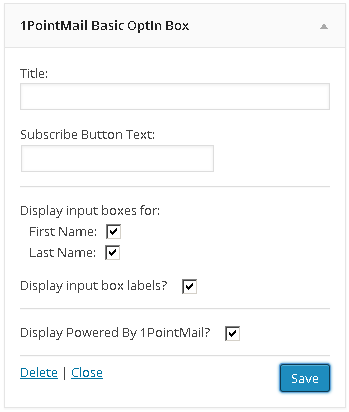
Widget Configuration Options
Uzstādīšana
- Upload the plugin zip file to to the
/wp-content/plugins/directory - Activate the plugin through the ‘Plugins’ menu in WordPress
- Configure the API endpoint and your API username and password.
- Configure the ListID where you want your subscribers to be registered.
- Place your widget and start collecting subscribers!
BUJ
Where do I find my listid?
While you are logged into your 1PointMail portal, choose LISTS from the main navidation. Your ListID
is the 1st column listed in the view.
Atsauksmes
Par šo spraudni nav atsauksmju.
Autori un izstrādātāji
“1PointMail Subscription Box for WordPress” ir atvērtā pirmkoda programmatūra. Šo spraudni ir veidojuši šādi cilvēki.
Līdzdalībnieki
Tulkot “1PointMail Subscription Box for WordPress” savā valodā.
Vai jūs interesē attīstība?
Pārlūkojiet kodu, apmeklējiet SVN krātuvi vai abonējiet attīstības žurnālu, ko izveidojis RSS.
Izmaiņu žurnāls
1.0
- First major release.
1.2
- Added an unsubscribe widget