

Description
DPLab Page Studio is a powerful visual layout builder that lets you create stunning page layouts without writing any code. With an intuitive drag-and-drop interface, you can design custom layouts for your homepage, blog posts, and any page on your WordPress site.
100% Free – All features included, no premium upsells, no hidden costs.
Key Features
- Visual Drag & Drop Builder – Intuitive interface for creating layouts
- Live Preview – See changes instantly as you edit
- Interactive Editing – Click-to-edit interface that behaves like the real site
- Flexible Column System – 1, 2, 3, or 4 column layouts with custom widths
- 17 Built-in Widgets – Everything you need to build professional layouts
- Responsive Design – Automatically adapts to mobile, tablet, and desktop
- Template Override – Use custom layouts for homepage and single posts
- Shortcode Support – Embed layouts anywhere with
[dplab_pagestudio_layout id="X"] - Widget Customization – Card styles, colors, padding, borders, and more
- Global Design Settings – Colors, typography, and container width
- External Widget API – Extensible for plugins like DP Slider Pro, DP Gallery Pro, and DP Contact Form Pro
17 Built-in Widgets
Content Widgets:
* Text (Rich Editor)
* Heading (H1-H6)
* List
* Quote
Media Widgets:
* Image
* Video (YouTube/Vimeo embed)
* Icon
* Button
Layout Widgets:
* Spacer
* Divider
* Layout (Nested layouts)
* HTML Code
Dynamic Widgets:
* Blog List
* Current Post
* Categories
* Menu
* Social Share
Perfect For
- Creating unique homepage layouts
- Designing custom single post templates
- Building landing pages
- Creating portfolio pages
- Customizing blog post layouts
- Adding structured content sections
Global Design Settings
Configure site-wide design settings:
* Colors – Primary, Secondary, Text, Background, Heading, Accent, H1
* Typography – Heading font, Body font, Base font size
* Layout – Container width (default 1200px)
All colors are available as CSS variables for consistent styling.
How It Works
- Create a Layout – Use the visual builder to design your layout
- Add Widgets – Drag and drop text, images, buttons, and more
- Customize Appearance – Style your widgets with colors, padding, borders
- Publish & Use – Embed with shortcode or set as template override
Developer Friendly
- Clean, well-documented code
- WordPress Coding Standards compliant
- Extensible architecture with External Widget API
- REST API for programmatic access
- CSS variables for theme integration
External Services
This plugin uses third-party services for social sharing and video embedding functionality. These services are only accessed when the user actively uses specific widgets.
Social Share Widget
When users click on social sharing buttons, they are redirected to the respective platform’s sharing page. The following data is sent:
Facebook
* Data sent: Current page URL
* When: User clicks the Facebook share button
* Service: Facebook Terms | Privacy Policy
X (Twitter)
* Data sent: Current page URL and title
* When: User clicks the X/Twitter share button
* Service: X Terms | Privacy Policy
LinkedIn
* Data sent: Current page URL and title
* When: User clicks the LinkedIn share button
* Service: LinkedIn Terms | Privacy Policy
WhatsApp
* Data sent: Current page URL and title
* When: User clicks the WhatsApp share button
* Service: WhatsApp Terms | Privacy Policy
Telegram
* Data sent: Current page URL and title
* When: User clicks the Telegram share button
* Service: Telegram Terms | Privacy Policy
Pinterest
* Data sent: Current page URL and title
* When: User clicks the Pinterest share button
* Service: Pinterest Terms | Privacy Policy
Instagram
* Data sent: None (opens Instagram app/website)
* When: User clicks the Instagram share button
* Service: Instagram Terms | Privacy Policy
Video Embed Widget
When embedding videos, the plugin loads content from external video platforms:
YouTube
* Data sent: Video ID, user’s IP address (by YouTube)
* When: A YouTube video is embedded and displayed
* Service: YouTube Terms | Privacy Policy
Vimeo
* Data sent: Video ID, user’s IP address (by Vimeo)
* When: A Vimeo video is embedded and displayed
* Service: Vimeo Terms | Privacy Policy
Important Notes
- No data is sent automatically. Social sharing only occurs when users actively click share buttons.
- Video embeds load content from YouTube/Vimeo servers when the page is viewed.
- This plugin does not store or process any personal data from these services.
- Site administrators should update their privacy policy to inform visitors about embedded content and social sharing features.
Screenshots
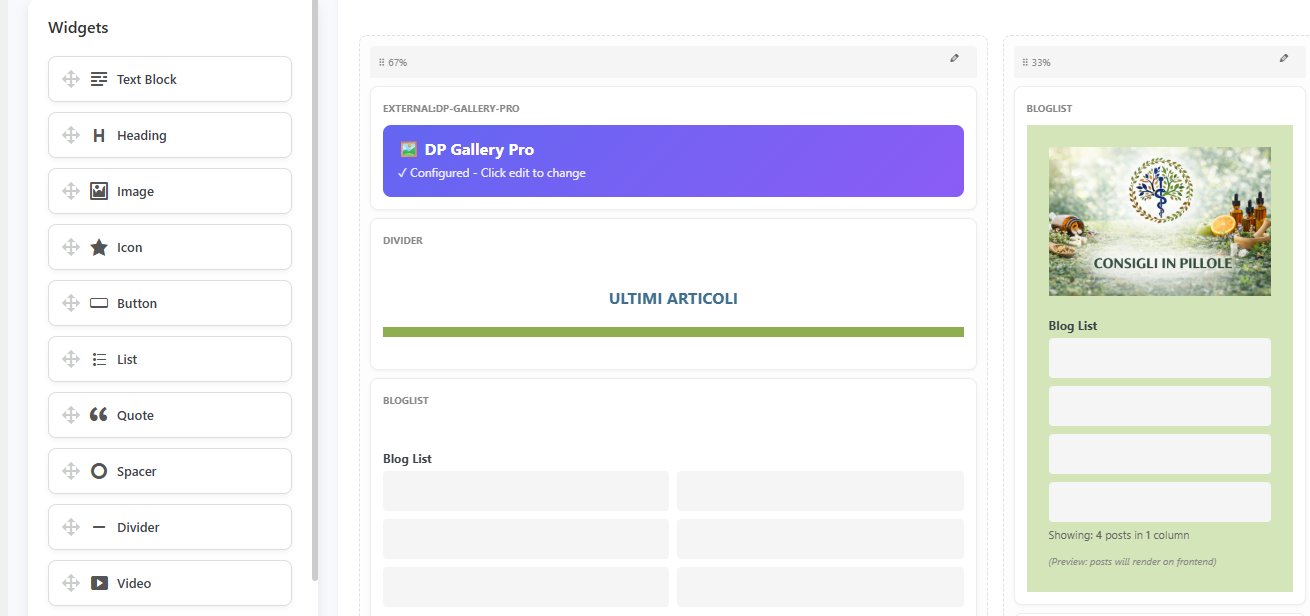
Visual layout builder with drag-and-drop interface 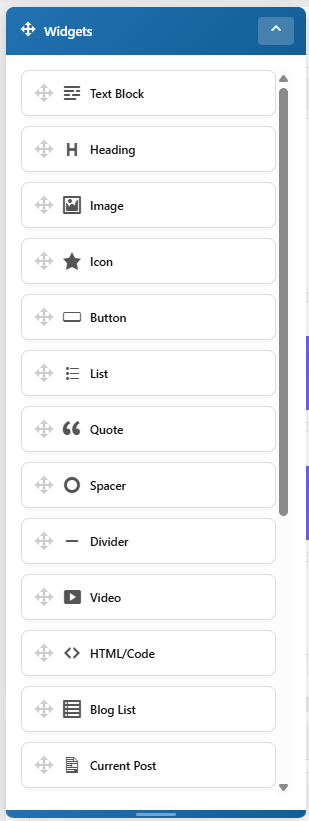
Widget sidebar with 17 widget types 
Plugin settings page for template overrides 
Responsive column layouts (1-4 columns)
Installation
Automatic Installation
- Log in to your WordPress admin panel
- Navigate to Plugins > Add New
- Search for “DPLab Page Studio”
- Click “Install Now” and then “Activate”
Manual Installation
- Download the plugin ZIP file
- Log in to your WordPress admin panel
- Navigate to Plugins > Add New > Upload Plugin
- Choose the ZIP file and click “Install Now”
- Activate the plugin
After Activation
- Go to DPLab Page Studio in your WordPress admin menu
- Click “Create New Layout” to start building
- Use the drag-and-drop interface to add rows and widgets
- Save your layout and use it with the shortcode or template override
FAQ
-
Is it really 100% free?
-
Yes! DPLab Page Studio is completely free with all 17 widgets, responsive design, template override, and global settings. No hidden premium features.
-
How do I add a layout to my homepage?
-
Go to DPLab Page Studio > Page Layouts and select your layout from the “Layout for Homepage” dropdown. Save the settings and your homepage will use the custom layout.
-
How do I use a custom layout for blog posts?
-
Go to DPLab Page Studio > Page Layouts, select your layout from “Layout for Single Posts” dropdown. Make sure your layout includes a “Current Post” widget to display the post content.
-
Can I embed a layout in a page or post?
-
Yes! Use the shortcode
[dplab_pagestudio_layout id="X"]where X is your layout ID. You can find the layout ID in the Layout Manager. -
Is the plugin responsive?
-
Absolutely! All layouts automatically adapt to mobile, tablet, and desktop screens with smart column stacking on smaller devices.
-
Can I customize widget styles?
-
Yes! Each widget has a “General Settings” panel where you can customize:
* Background color
* Border color and radius
* Padding and margins
* Text color
* Cover images
* Custom CSS classes -
Does it work with my theme?
-
DPLab Page Studio is designed to work with any well-coded WordPress theme. The layouts render using clean HTML and CSS that adapts to your theme’s styling.
-
Is there a limit to how many layouts I can create?
-
No! Create as many layouts as you need for different pages, posts, or sections of your site.
-
Can I extend it with custom widgets?
-
Yes! PageStudio has an external widget API. Plugins like DP Slider Pro, DP Gallery Pro, and DP Contact Form Pro add new widgets seamlessly. Developers can register custom widgets via PHP.
Reviews
There are no reviews for this plugin.
Contributors & Developers
“DPLab Page Studio” is open source software. The following people have contributed to this plugin.
Contributors
Translate “DPLab Page Studio” into your language.
Interested in development?
Browse the code, check out the SVN repository, or subscribe to the development log by RSS.
Changelog
1.0.12
- Changed: Categories widget now uses slugs instead of IDs for include/exclude fields
1.0.11
- Fix: Resolved coding standards issues for WordPress.org compliance
1.0.10
- New: Sticky Column option (with offset control)
- New: Custom Mobile Size controls (width, height, object-fit) for Image Widget
- New: ID attribute support for Image Widget
- Fix: Z-index improvements for editor modals
- Fix: Sticky Column offset adjustment for Admin Bar
- Fix: Text Widget paragraph spacing
1.0.9
- Fix: Critical regression – CSS appearing as text on frontend (wp_kses_post stripping style tags)
1.0.8
- Improved: WordPress Plugin Check compliance – all coding standards errors resolved
- Fixed: Text domain corrected from ‘PageStudio’ to ‘dp-PageStudio’ across all files
- Fixed: Proper output escaping (esc_html__, wp_kses_post, esc_url, esc_attr_e)
- Fixed: Input sanitization with wp_unslash() before sanitize functions
- Fixed: Resource versioning in wp_enqueue_style() calls
- Removed: Debug code (error_log, ini_set, error_reporting)
1.0.7
- New: Blog List widget – “Use current archive category” option to automatically display posts from the current category or tag on archive pages
1.0.6
- Changed: Shortcode renamed from [custom_layout] to [dplab_pagestudio_layout] to avoid conflicts with other plugins
- Improved: Updated readme with complete 17 widgets documentation
1.0.5
- Fix: Critical bug causing incorrect row/column nesting in frontend layouts
- Fix: External widgets (Slider Pro, Gallery Pro) not rendering on frontend
1.0.4
- Fix: Critical error with external widgets
- Improved: Color settings now include “Clear” button and hex input
- New: H1 Color setting
1.0.3
- New: Live Preview – See changes in real-time as you edit
- New: Interactive Preview Mode – Test links and sliders directly in the editor
- New: Draggable Settings Panel – Move the settings window anywhere on screen
- Improved: Silent saving mechanism for smoother experience
- Fix: Solved infinite update loop in preview
- Fix: Corrected “Save” button reverting changes bug
1.0.2
- Fix: Editor layout issues
- Improvement: Better sidebar handling
1.0.1
- Initial public release
- Added shortcode support
1.0.0
- First Version