

Description
Course Booking & Registration connects your website directly to your Cloudapps course management system. Accept online registrations, display course schedules, and let customers book classes—all without leaving your site.
Who is this for?
- Fitness studios & gyms – Schedule classes and accept bookings
- Training providers – Manage corporate training registration
- Sports clubs – Handle team signups and event registration
- Freelance instructors – Yoga teachers, tutors, coaches
- Educational institutions – Workshops, seminars, continuing education
Key Features
- Gutenberg block – Drag and drop course listings into any page
- Real-time availability – Always shows current seat availability
- Online payment – Customers pay when they register
- Mobile responsive – Works perfectly on phones and tablets
- Customizable display – Filter by date, seats, title, and more
Inspired by the need of a self-employed midwife to save countless hours per week on course management, Cloudapps was built to empower professionals by streamlining the registration process and the publication of courses.
Support and Documentation
For support, troubleshooting, or feature requests, please:
- Email us at [email protected]
- Visit our website at texperience.de for detailed documentation and updates.
- Check the WordPress support forum for community assistance and developer contributions.
Requirements
- WordPress 5.6 or later
- PHP 7.0 or later
- An active Cloudapps account
External services
This plugin allows you to embed any number of configurable widgets (blocks in the WordPress editor) to display course information on your website pages. Visitors can browse the displayed courses and register for them directly on your website. Technically, the widgets are implemented as iframes that show the embeddable Cloudapps user interfaces. Visitors provide their required personal data for registration explicitly over the Cloudapps user interface. The plugin doesn’t receive or store any personal data of the visitors.
The plugin admin interface connects to the service using an API key. This API key is retrieved over a secure connection after the user provides their Cloudapps account credentials. The user can then select the tenant and preview the currently available courses of this tenant. API key and tenant selection are stored in the WordPress database. The plugin doesn’t retrieve or store any personal data of the connected user. The tenant selection serves as global setting for all widgets.
This service is provided by texperience (https://www.texperience.de) and is subject to their terms of service (https://www.texperience.de/nutzungsbedingungen) and privacy policy (https://www.texperience.de/datenschutz).
Screenshots

Quick setup – Connect your Cloudapps account in seconds with secure login 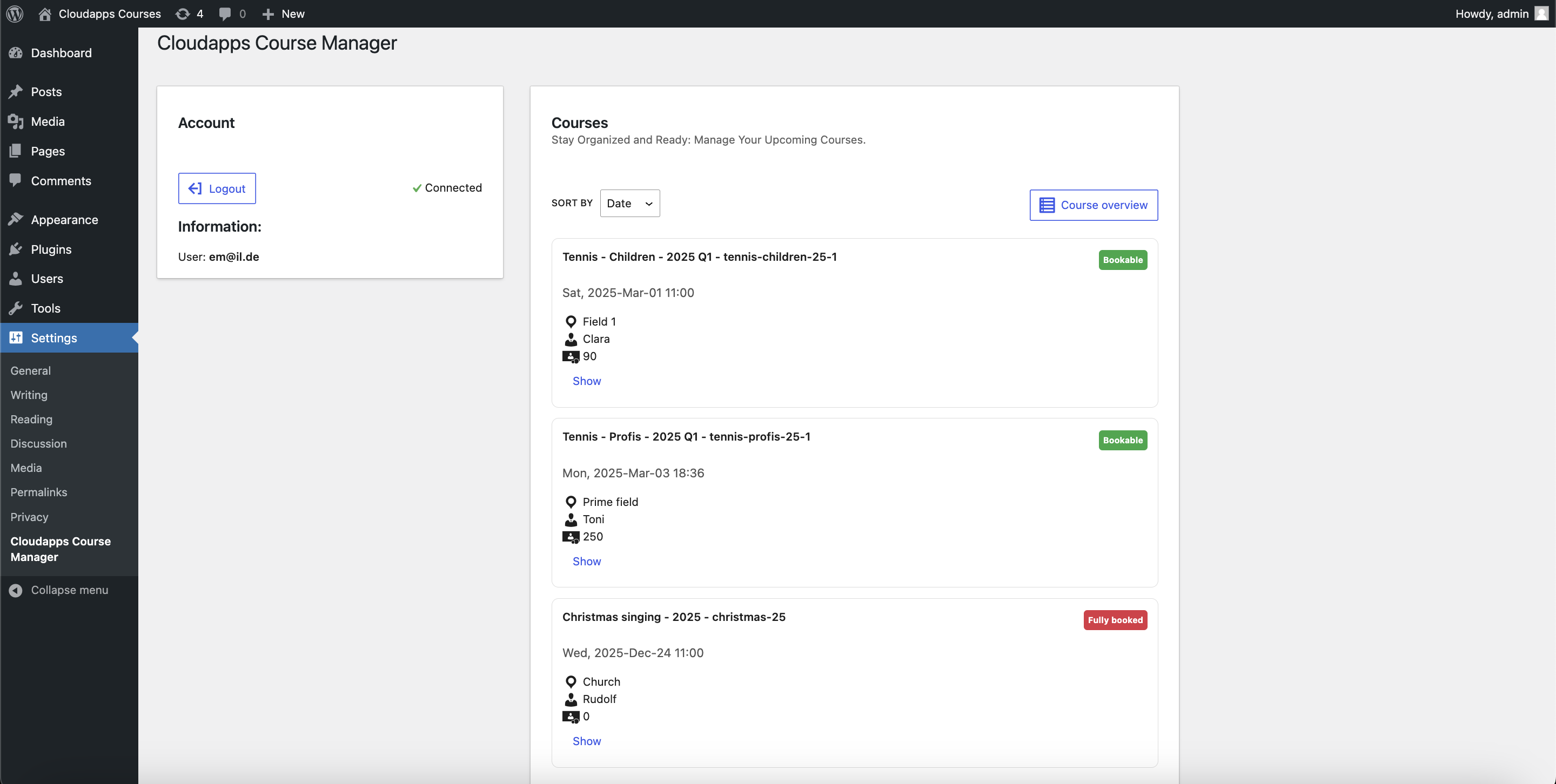
Course dashboard – View all upcoming courses, registrations, and availability at a glance 
Gutenberg block editor – Add course listings to any page with the drag-and-drop block 
Frontend course display – Beautiful, responsive course listings that match your theme
Blocks
This plugin provides 1 block.
- Course List This block is part of the Cloudapps Course Manager plugin. It allows you to list your upcoming courses.
Installation
Note: An active Cloudapps account is required. Visit Cloudapps for account setup or register directly through the plugin admin interface.
- Upload the plugin files to the
/wp-content/plugins/cloudapps-course-managerdirectory, or install the plugin through the WordPress plugin installer. - Activate the plugin via the ‘Plugins’ screen in your WordPress dashboard.
- Go to Settings > Cloudapps Course Manager and follow the on-screen instructions to configure the plugin and connect it to your Cloudapps account.
FAQ
-
How do I add a course booking form to my page?
-
Use the “Course List” Gutenberg block. Simply add the block to any page or post, and your courses will appear automatically.
-
Can I filter which courses are displayed?
-
Yes! The block settings let you filter by title, dates, available seats, and more. You can show only bookable courses or exclude waitlisted ones.
-
Does this work with WooCommerce?
-
Payments are handled through Cloudapps’ secure payment system, not WooCommerce. This keeps your course management separate from your shop.
-
Why do I need a Cloudapps account?
-
An active Cloudapps account allows you to manage courses, track registrations, communicate with your attendees, and process payments seamlessly—reducing the time spent on manual administrative tasks.
-
What payment methods are supported?
-
Payments are handled through Cloudapps. For detailed information on supported payment options, please refer to the Cloudapps documentation.
-
I’m experiencing connectivity issues. What should I do?
-
Verify that your credentials are correct and ensure that your hosting environment meets the required PHP version. If issues persist, please contact our support team.
Reviews
There are no reviews for this plugin.
Contributors & Developers
“Cloudapps Course Manager” is open source software. The following people have contributed to this plugin.
Contributors


“Cloudapps Course Manager” has been translated into 4 locales. Thank you to the translators for their contributions.
Translate “Cloudapps Course Manager” into your language.
Interested in development?
Browse the code, check out the SVN repository, or subscribe to the development log by RSS.
Changelog
1.1.0
- Security: Improved input sanitization and output escaping
- Fixed: React rendering issues in block editor
- Fixed: Internationalization textdomain consistency
- Improved: First-run setup experience with welcome screen
- Improved: Auto-redirect to settings on plugin activation
- Improved: Persistent setup reminder until configured
- Improved: WordPress native admin styling
- Enhanced: Block metadata with keywords and supports
1.0.1
- Improve UI wording
1.0.0
- Add the plugin admin interface for Cloudapps connection and course management
- Provide the Courselist block to integrate courses in your website