

Description
Termin-Kalender is your easy monthly planner. This calendar app provides a clear, monthly overview to keep you organized.
Easy Termin-Kalender Calendar
VERSION 1.2 Lite
Plan your month with ease!
Monthly overview: Get a quick picture of your schedule.
Features:
- Flexible categories: Customize labels for a clear organized schedule view
- Add, edit, and move calendar entries directly
- Multiple calendar views: Yearly, monthly, weekly, and list views
- Add website links and images
- Gutenberg Blocks for calendar and simple list in the Lite Version
- Save to iCal, Google, Yahoo, and Outlook Calendar
Ideal for:
- Small businesses, teams, personal use
- Customer appointments, resource management, room bookings (and more!).
- Simple setup & intuitive interface for a streamlined workflow.
Get organized today!
- PRO: Recurring Appointments
- PRO: To-Do list
- PRO: Gutenberg block Request Form: Allow visitors to submit appointments or reservation requests.
- PRO: Gutenberg List Block: Display specific category entries on your website.
- PRO: Backup and restore
- PRO: User rights management
- PRO: iCal Feed for Google, Yahoo, Outlook, and other calendars
- PRO: Enhanced Gutenberg Blocks
*PRO features require upgrade.
Termin-Kalender: Your all-in-one monthly planning solution.
Credits
This plugin uses the following libraries:
Bootstrap: https://getbootstrap.com/
flatpickr: https://github.com/flatpickr/
Fullcalendar: https://fullcalendar.io/
rrule: https://github.com/jkbrzt/rrule
Inspired by ajax-event-calendar from Eran Miller, a discontinued plugin, last updated in 2015 for WordPress 4.2 https://wordpress.org/plugins/ajax-event-calendar/#description
My easy Termin-Kalender calendar is a complete code redo and enhancement, based on the most recent WordPress 6.+, Fullcalendar 6.+ and PHP 8.+ as of 2024.
Screenshots

After Installation: Look for the menu called “Termin-Kalender.” If you don’t see it right away, refresh the page 
You can find help by visiting the website: termin-kalender.pro 
Termin-Kalender PRO dashboard – start organizing in minutes 
Help & Info panel – instant tips and documentation 
Custom categories – label appointments, tasks, or resources your way 
Appointment window – add details, images & links 
PRO Recurrences – set repeat appointments with one click 
PRO options – weekly, monthly & yearly repeats 
Assign each appointment to a category 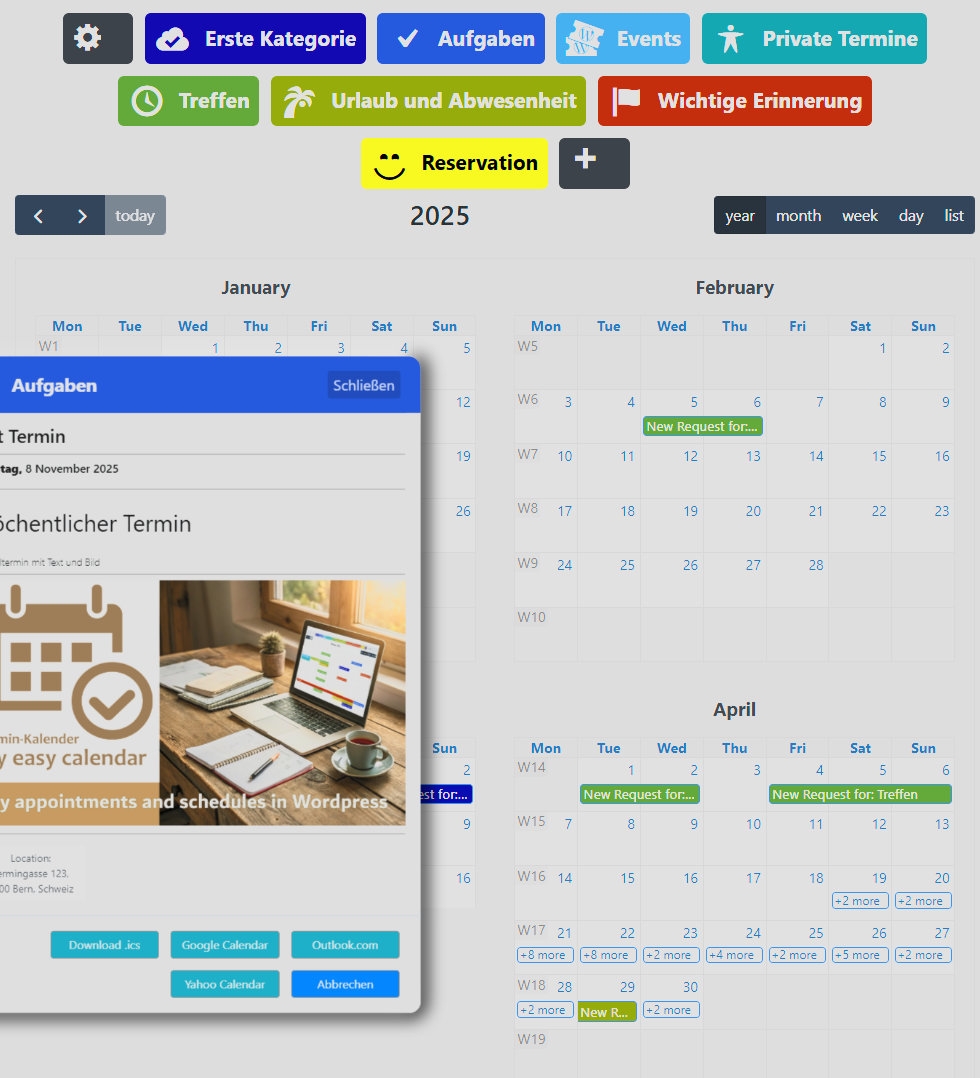
Yearly overview – view all your schedules at a glance 
Monthly grid – track appointments and resources 
Weekly view – focus on your coming week 
Day view – detailed daily tasks & meetings 
Admin list view – all entries in one simple list 
PRO To-Do List – manage priorities and collect form submissions 
Gutenberg Block: embed a calendar view on your site 
Gutenberg Block: display calendar entries as a list 
PRO Gutenberg Block: filter by category (e.g. appointments or events only) 
PRO Gutenberg Block: custom form for requests, reservations & bookings 
PRO iCal Integration – three ways to sync your calendars • Gutenberg PRO Block: embed any external .ics feed (Google, Yahoo, Outlook) into your site’s Termin-Kalender view • iCal Feed Generator: publish your Termin-Kalender as an .ics URL so anyone can subscribe in Google, Yahoo or Outlook • Admin Google Sync: import your personal Google Calendar into the Termin-Kalender dashboard for one-place schedule management 
PRO Backup & Restore – export, download and transfer your data 
PRO User Management – Admins & Editors get full access by default; assign other roles edit-only or full (including delete) permissions 
PRO Website Reservation Form – take bookings directly on your site 
PRO Website To-Do List – manage tasks from the front-end 
Website Calendar – display your schedule to visitors 
PRO Website iCal Calendar – embed external calendars via iCal 
Website List View – show entries in a clean list format 
PRO Website Category List – display selected or all categories in different list designs 
PRO Website Category List – different list designs 
PRO Website Category List – different list designs 
Gutenberg: search for “Termin” to find all calendar blocks • Free: Calendar & List View • PRO: Reservation Form, Category List, iCal Feed & To-Do List 
Examples for Contact and Reservation Forms 
Examples for Contact and Reservation Forms 
Examples for Contact and Reservation Forms 
Examples for Contact and Reservation Forms
Blocks
This plugin provides 2 blocks.
- Termin-Kalender Simple List
- Termin-Kalender
Installation
- Search for “Termin-Kalender” in the WordPress plugin repository and install it.
- Activation:
Go to the “Plugins” menu in your WordPress dashboard and activate the Termin-Kalender plugin. - Initial Setup:
Upon activation (refresh the admin page), you’ll find the Termin-Kalender menu in the Admin area. - Adding Your First Entry:
Click an empty date. A pop-up form will appear, allowing you to create your calendar entries. - Enjoy!
We hope you enjoy using the easy Termin-Kalender plugin! - On your WordPress Site (Frontend)
Use the Termin-Kalender Blocks and Shortcodes to display calendar data for the users of your site
FAQ
-
Where can I find Help and Information about Termin-Kalender
-
Visit our Website: termin-kalender.pro
Reviews


Contributors & Developers
“Termin-Kalender” is open source software. The following people have contributed to this plugin.
Contributors
“Termin-Kalender” has been translated into 8 locales. Thank you to the translators for their contributions.
Translate “Termin-Kalender” into your language.
Interested in development?
Browse the code, check out the SVN repository, or subscribe to the development log by RSS.
Changelog
1.2.4.4
- Show and hide categories in frontend calendar.
1.2.4.2
- Location link reset corrected.
1.2.4.1
- Minor optimizations.
- Delete appointment error resolved.
1.2.4
- Termin-Kalender Data update.
- Multiple calendar and list instances optimized.
- Code and Style structure optimized.
1.2.3.1
- Important fix if PRO is missing.
1.2.3
- WordPress 6.9 compatible.
- Frontend Kalender is now Widget ready.
- Frontend Simple List is now Widget ready.
- Assets loading optimized.
- Time show/hide now in free calendar and list available.
1.2.2.9
- Language enhancements.
- Short weekdays in list language fix.
1.2.2.8
- Language fix for non de_ en_ fr_ languages once again.
1.2.2.7
- Important language fix for scrambled i18n.
- Important fix for cleanup old data at update.
- Removed language auto load old translations from repo.
1.2.2.3
- Minor language updates.
- Copy button visibility update.
1.2.2.2
- Minor language updates.
- Assets images updates.
1.2.2.1
- Code cleanup
1.2.2
- Code cleanup.
- Upcoming list first entries update.
- Options combined.
1.2.1.12
- Translation updates.
1.2.1.11
- Enhanced repeat interval and occurrence on first/last etc.
1.2.1.10
- Translation fix.
- Translation updates.
1.2.1.9
- Recurring exclusion fix
1.2.1.8
- Fullcalendar update 6.1.19
- Minor list and calendar updates for PRO and Fullcalendar compatibility
1.2.1.7
- Exclude Dates enhancement for Pro downgrade compatibility
- Improved appointment export, fixed Outlook dates, etc.
- Optimized files for plugin check
- List view title is now: Weekday, then Day Month or Month Day. Depending on language settings
1.2.1.6
- Minor language corrections
- Removed ‘Shows upcoming Termin-Kalender entries’ for simple list
1.2.1.5
- Added Plugin rating request
1.2.1.4
- Added end time to list views
- Minor updates in list compatibility
- SVG image cleanup
1.2.1.3
- Demo data enhanced for first run
1.2.1.2
- Cookie consent added
1.2.1.1
- Minor fix for download link
1.2.1
- Fixed deprecated code issue.
1.2.0.10
- Updated translations.
- Various minor code improvements.
1.2.0.9
- Enhanced user interface with appointment details preview.
- Gutenberg block improvements.
- Better user access control for Termin-Kalender.
1.2.0.8
- Improved old data cleanup.
- Updated pictures and PRO Info.
- Preparing for PRO 1.2 launch.
- Added save to iCal, Google, Yahoo, and Outlook Button.
1.2.0.7
- Improved mobile list view.
- Returned to FullCalendar stable version 6.1.17 from Beta 7.
1.2.0.6
- Updated date check.
- WordPress 6.8 update.
1.2.0.5
- Implemented legacy mode for old shortcodes.
1.2.0.4
- Improved handling of recurring appointments when downgrading from Pro version.
- Resolved critical issue with Gutenberg block when used in nested content.
1.2.0.3
- No data displayed in calendar frontend without login: issue resolved.
1.2.0.1
- Minor text enhancements.
- Improved update process and cleanup of legacy versions.
- Firefox compatibility enhanced.
1.2.0
- Major update for compatibility with templates.