

Aprašymas
Make your WordPress site AI-ready in one click.
GetMD transforms your WordPress content into clean, structured Markdown that AI systems love. Whether you’re feeding content to ChatGPT, Claude, or building RAG pipelines, GetMD ensures your content is optimized for machine consumption.
AI Discovery & Consumption
- Public Markdown View — Add
?view=mdto any post URL for instant Markdown access - AI-Friendly Headers — Automatic
X-AI-Friendly: trueheaders for AI crawler identification - Automatic Discovery —
<link rel="alternate" type="text/markdown">tags help AI systems find your content - YAML Frontmatter — Structured metadata including title, date, author, and categories
Export & Migration
- Export posts, pages, and custom post types to Markdown format
- Media bundling — Download and bundle images (featured, inline, galleries, attachments)
- Image optimization — Optional resize and compression
- Relative paths — Automatic path conversion for portable exports
- Organized archives — ZIP exports with media/ folders and manifests
- Advanced content filtering by post type, date, and status
- Export history tracking and management
- Preserve formatting (bold, italic, lists, code blocks, tables)
- Convert WordPress content to clean CommonMark
- Database health monitoring
- Batch processing with Action Scheduler
- Simple and intuitive React-based interface
- Fast and scalable (100 posts < 60s)
Use Cases:
- AI & LLM Integration — Feed your content to ChatGPT, Claude, Gemini, or custom LLMs
- RAG Pipelines — Structured Markdown perfect for retrieval-augmented generation
- Knowledge Bases — Build searchable AI-powered knowledge systems
- Content Indexing — Let AI crawlers easily discover and index your content
- Migrating to static site generators (Hugo, Jekyll, Gatsby)
- Creating portable backups of your content
- Preparing content for external editing
- Archiving posts in a universal format
Privacy & Security
Security Highlights:
- 4-layer download protection (nonces, capabilities, ownership, path validation)
- All inputs sanitized, outputs escaped, queries prepared
- REST API endpoints require authentication
- No external data transmission – exports stay on your server
Privacy: This plugin does not collect, store, or transmit personal data externally. Full GDPR compliance.
For detailed security documentation, see SECURITY.md or visit our GitHub repository.
Building from Source
Source code is included in src/ for WordPress.org compliance. Build instructions and prerequisites are available at: https://github.com/Summix-io/GetMD
Credits
Developed by Summix (https://summix.io)
Ekrano nuotraukos

Main export interface with content filters and export options 
Settings tab showing database health and default configurations 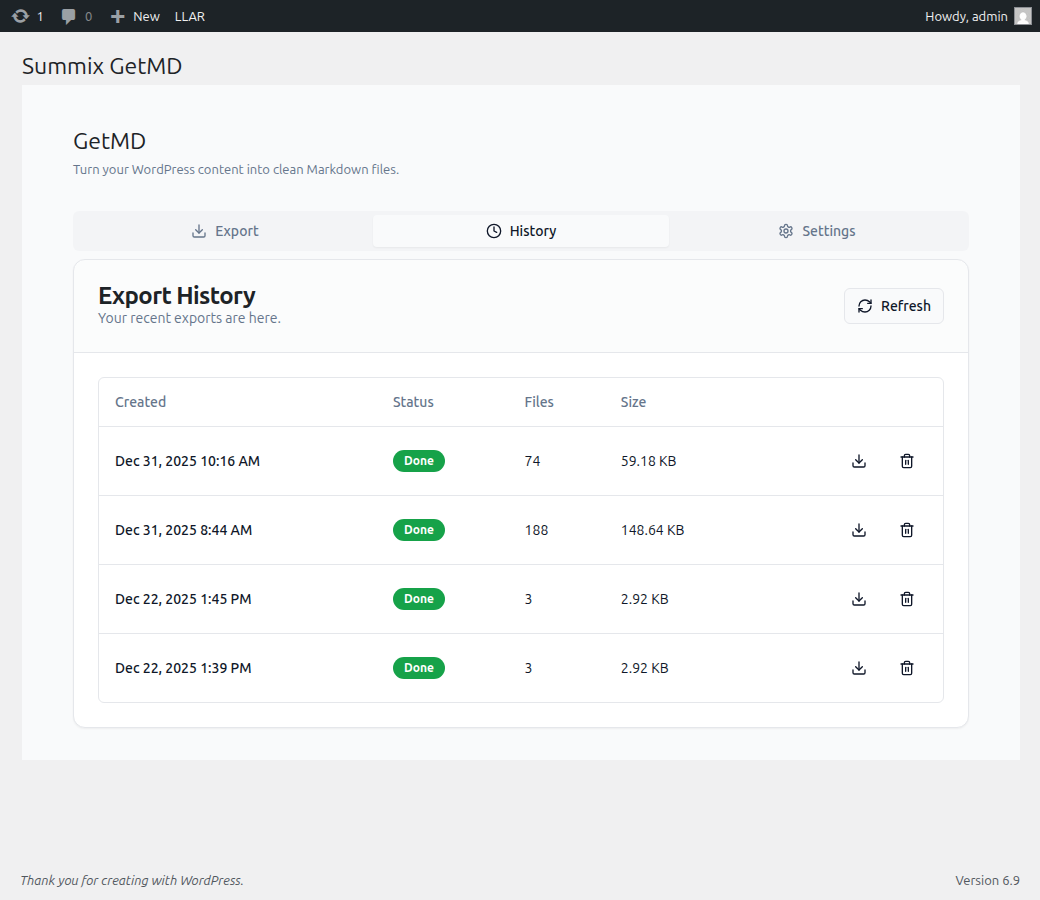
Export history view displaying completed exports with download and delete actions 
Export interface with active filter applied showing filtered content
Diegimas
- Upload the
summix-getmdfolder to the/wp-content/plugins/directory - Activate the plugin through the ‘Plugins’ menu in WordPress
- Navigate to Tools GetMD by Summix to start exporting
DUK
-
What content types can I export?
-
You can export posts, pages, and media attachments. The plugin includes flexible filtering options to select specific content types for export.
-
What Markdown flavor does this plugin use?
-
The plugin exports to CommonMark format, which is widely compatible with most Markdown processors.
-
Are images included in the export?
-
Yes! Version 0.5.0 includes comprehensive media export. You can choose to bundle featured images, inline images, galleries, and attachments. Images are automatically downloaded, deduplicated, and organized in a media/ folder with relative path references in your Markdown files.
-
Can I export my entire site at once?
-
Yes! You can export all content at once, or use the content filter system to narrow down your export to specific post types. The plugin exports everything (including media) to a convenient ZIP archive with organized folders.
-
Can I optimize images during export?
-
Absolutely! Version 0.5.0 includes optional image optimization. You can choose to resize images to specific dimensions and apply compression. You can also select which WordPress image size to export (thumbnail, medium, large, or full).
-
What does the exported ZIP contain?
-
The ZIP archive includes:
* Markdown files with YAML frontmatter
* media/ folder with organized images (featured/, inline/, attachments/)
* media-manifest.json with complete inventory
* media-inventory.csv for human-readable reference
* README.txt with export details and media statistics
* media-errors.log (only if downloads failed)
Atsiliepimai
Įskiepis neturi atsiliepimų.
Programuotojai ir komandos nariai
“Summix GetMD” yra atviro kodo programa. Prie jos sukūrimo prisidėję žmonės surašyti toliau.
Autoriai
Įskiepis “Summix GetMD” išverstas į 6 kalbas. Dėkojame vertėjams už jų darbą.
Išverskite “Summix GetMD” į savo kalbą.
Domina programavimas?
Peržiūrėkite kodą, naršykite SVN repozitorijoje, arba užsiprenumeruokite kodo pakeitimų žurnalą per RSS.
Pakeitimų istorija
0.5.0
- Major Feature: Media Export System — Comprehensive media bundling with featured images, inline images, galleries, and attachments
- Image optimization with optional resize and compression
- Automatic relative path conversion for portable exports
- Smart deduplication prevents duplicate downloads across batches
- Organized ZIP structure with media/ folders (featured/, inline/, attachments/)
- Export manifests in JSON and CSV formats for RAG pipelines
- Enhanced README.txt with detailed media statistics
- MediaHandler, MediaRegistry, PathConverter, and MediaSettings components
- 39 new automated tests (98.9% pass rate)
- Performance validated: 100 posts with media < 60s, memory < 128MB
- Zero breaking changes — fully backward compatible
0.4.1
- Added WordPress Playground Blueprint for one-click plugin previews
- Fixed plugin tags to comply with WordPress.org 5-tag limit
0.4.0
- AI-Ready WordPress — New positioning emphasizing AI/LLM integration capabilities
- Public Markdown View (
?view=md) for instant AI-consumable content - AI-friendly HTTP headers (
X-AI-Friendly: true,X-Content-Source: wordpress) - Automatic
<link rel="alternate" type="text/markdown">discovery tags - YAML frontmatter with structured metadata for AI parsing
- Updated plugin tags and description for AI/LLM discoverability
0.3.2
- Fixed deprecated
load_plugin_textdomain()call - Added PHPCS linting to CI workflow
0.3.1
- Fixed missing changelog on WordPress.org plugin page
0.3.0
- Added RTL (right-to-left) layout support for Persian and Arabic
- Added Spanish (es_ES) translation
- Added French (fr_FR) translation
- Added Brazilian Portuguese (pt_BR) translation
- Added Persian (fa_IR) translation
- New teal styleguide with semantic color palette
- UI/UX improvements for admin interface
- Improved micro copy throughout the plugin
- Fixed RTL punctuation issues in Persian translation
- Updated WordPress.org screenshots
0.2.4
- Fixed stable tag reference in README.txt
0.2.3
- Fixed deploy workflow cleanup (node_modules)
0.2.2
- Fixed Composer setup-standards for production builds
0.2.1
- Default to all public post types when no filter specified
- Editors and admins can now export all post statuses by default
- Improved filter UI with inline add filter button
- Enhanced export state management
- Various bug fixes and improvements
0.2.0
- BREAKING: Plugin rebranded from „Summix Markdown Export” to „GetMD”
- New plugin slug: summix-getmd (previously getmd)
- Updated text domain, function prefixes, and namespaces
- Database tables automatically migrated to new naming convention
- All existing export configurations preserved during upgrade
0.1.3
- Enhanced security documentation with inline code comments
- Added comprehensive SECURITY.md file documenting all security measures
- Added Privacy & Security section to README explaining 4-layer download protection
- Clarified nonce verification, capability checks, ownership validation, and path traversal prevention
- Improved documentation for WordPress.org security review transparency
- All security features were already implemented in 0.1.0 – this release only enhances documentation
0.1.2
- Added WordPress.org plugin screenshots
- Achieved 100% WordPress Coding Standards compliance
- Added internationalization support (POT translation file)
- Enhanced security with WPINC guards
- Added distribution build script for WordPress.org submission
- Optimized vendor dependencies for production
0.1.1
- Added database health monitoring system
- Added export history tracking
- Added automatic cleanup functionality
- Enhanced error handling and user feedback
- Added REST API endpoints for database operations
- Improved database table creation with verification
0.1.0
- Initial release
- Basic Markdown export functionality
- Export posts and pages
- Content filtering by post type
- Multiple export format options (single/multiple files)
- Export to ZIP archive