

Aprašymas
Is the Admin Bar in the way while designing the site? Enter control-shift-a while logged into the front end of the site to toggle the admin bar on/off. You will see a temporary dialog confirming if the admin bar is on or off. Refresh the page to see the result.
You can enable or disable this feature by user role from the admin under Settings => SBL Admin Bar
Ekrano nuotraukos
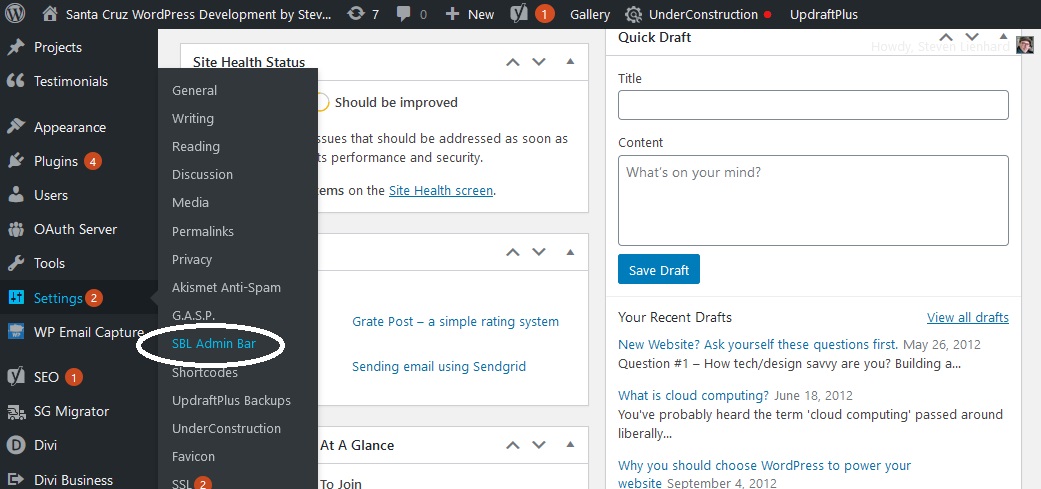
SBL Admin Bar settings can be found in the Settings menu 
Enable or disable the hotkey CONTROL-SHIFT-A by user role in settings 
Popup to acknowledge admin bar OFF after entering control-shift-a 
Popup to acknowledge admin bar ON after entering control-shift-a
Diegimas
- Log in to your WordPress admin panel and go to Plugins -> Add New
- Type SBL Admin Bar in the search box and click on search button.
- Find SBL Admin Bar plugin.
- Then click on Install Now and after that activate the plugin.
OR
- Download and save the SBL Admin Bar plugin to your hard disk.
- Login to your WordPress and go to the Add Plugins page.
- Click Upload Plugin button to upload the zip.
- Click Install Now to install and activate the plugin.
Atsiliepimai

14 gruodžio, 2020
Works great and easy to set up.

14 gruodžio, 2020
Great plugin, makes it very easy – thank you!

13 gruodžio, 2020
Solved my problem nicely
Programuotojai ir komandos nariai
“SBL Admin Bar” yra atviro kodo programa. Prie jos sukūrimo prisidėję žmonės surašyti toliau.
Autoriai
Išverskite “SBL Admin Bar” į savo kalbą.
Domina programavimas?
Peržiūrėkite kodą, naršykite SVN repozitorijoje, arba užsiprenumeruokite kodo pakeitimų žurnalą per RSS.