
ຂ້າມໄປທີ່ເນື້ອຫາ
WordPress.org

ລາວ

  • ທິມ
  • ປັກອິນ
  • ຂ່າວ
  • ກ່ຽວກັບ
  • ທິມລາວ
  • ຕິດຕໍ່
  • ດາວໂຫລດ WordPress
ດາວໂຫລດ WordPress
WordPress.org

Plugin Directory

Uix UserCenter

  • ສົ່ງປລັກອິນ
  • ທີ່ມັກຂອງຂ້ອຍ
  • ເຂົ້າສູ່ລະບົບ
  • ສົ່ງປລັກອິນ
  • ທີ່ມັກຂອງຂ້ອຍ
  • ເຂົ້າສູ່ລະບົບ

Uix UserCenter

ໂດຍ UIUX Lab
ດາວໂຫຼດ
  • ລາຍລອຽດ
  • ການຣີວິວ
  • ການຕິດຕັ້ງ
  • ການພັດທະນາ
ການຊ່ວຍເຫຼືອ

ຄຳອະທິບາຍ

This plugin is a simple way to build, organize and display Sign-in, registration and publishing system with AJAX into any existing WordPress theme. Using template file to embed your theme.

ພາບໜ້າຈໍ
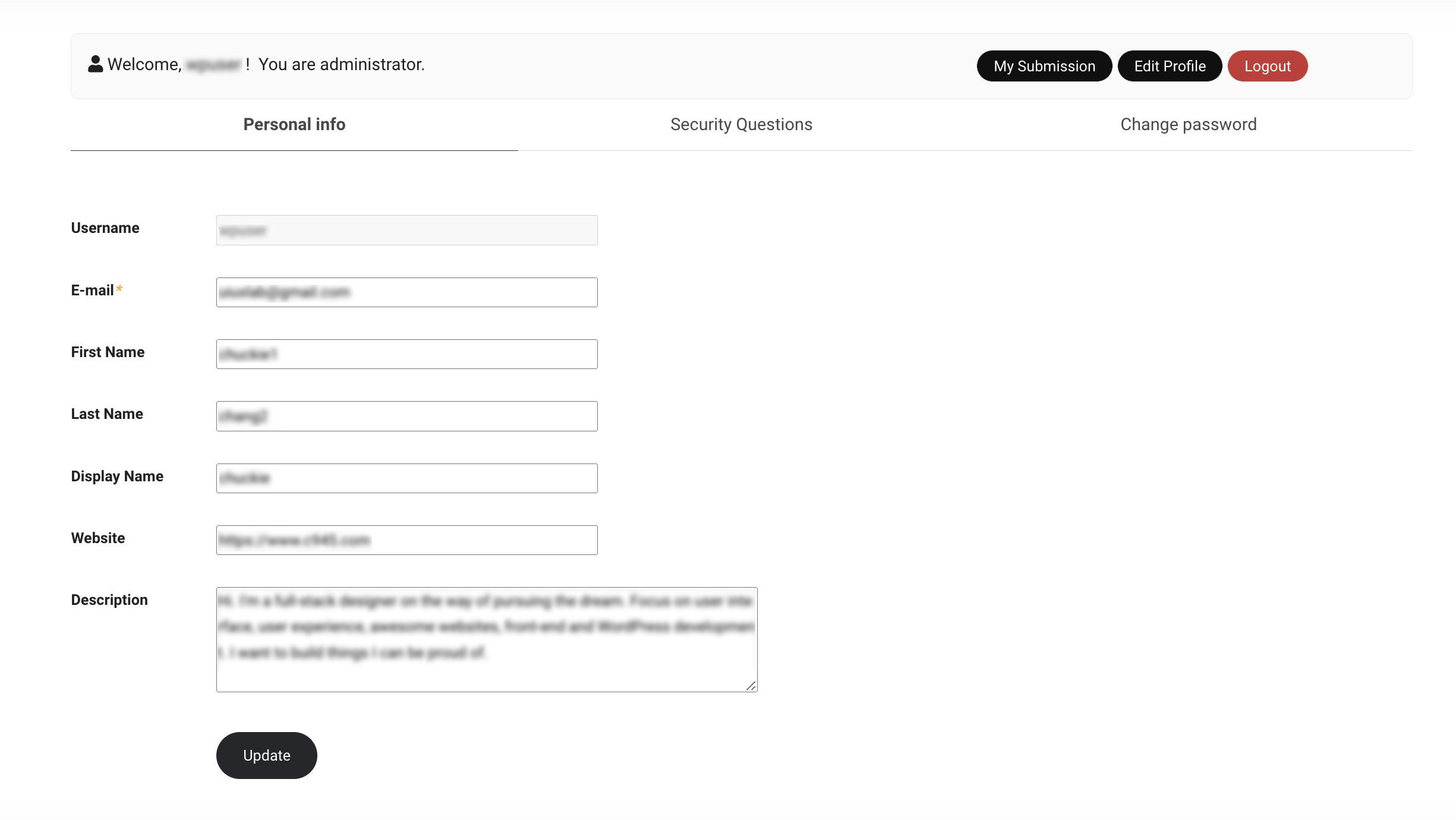
screenshot-1.jpg
screenshot-1.jpg
screenshot-2.jpg
screenshot-2.jpg
screenshot-3.jpg
screenshot-3.jpg
screenshot-4.jpg
screenshot-4.jpg
screenshot-5.jpg
screenshot-5.jpg

ການຕິດຕັ້ງ

1.After activating your theme, you can see a prompt pointed out as absolutely critical. Go to “Appearance -> Install Plugins”. Or, upload the plugin to wordpress, Activate it. (Access the path (/wp-content/plugins/) And upload files there.)

2.You need to create Uix Products template files in your templates directory. You can create the files on the WordPress admin panel. As a workaround you can use FTP, access the Uix Products template files path (/wp-content/plugins/uix-usercenter/theme_templates/) and upload files to your theme templates directory (/wp-content/themes/{your-theme}/).

ຄຳຖາມທີ່ພົບເລື້ອຍ

FAQ 1: How to customize the Login(Sign in), Register, Profile, and other templates by your theme location?

Occasionally you may wish to edit one of the templates that come with Uix UserCenter. Instead of editing the templates right in the plugin you should move them to your theme, so that your changes aren\’t lost when you update the Uix UserCenter plugin. As a workaround you can use FTP, access the Uix UserCenter template files path (/wp-content/plugins/uix-usercenter/theme_templates/) and upload files to your theme templates directory (/wp-content/themes/{your-theme}/).

FAQ 2: How to set CORS, CAPTCHA, JavaScript and other options?

Go to “Uix UserCenter -> Settings -> General Settings”

ການຣີວິວ

It works, thanks

UIUX Lab 8 ພະຈິກ 2023
Hi, there. I’m sorry to reply slowly. Use password recovery with caution, it is the original question answer mode, this plugin just provides a method. 1.After activating your theme, you can see a prompt pointed out as absolutely critical. Go to “Appearance -> Install Plugins”. Or, upload the plugin to wordpress, Activate it. (Access the path (/wp-content/plugins/) And upload files there.) 2.You need to create Uix Products template files in your templates directory. You can create the files on the WordPress admin panel. As a workaround you can use FTP, access the Uix Products template files path (/wp-content/plugins/uix-usercenter/theme_templates/) and upload files to your theme templates directory (/wp-content/themes/{your-theme}/).

a bunch of bugs and security holes, the plugin has obviously not been tested

kursoof 1 ພຶດສະພາ 2023
I will say right away that the profile page is not edited, plus it is not Ajax. Password recovery is a black hole.The idea is cool, the product is raw
ອ່ານການຣີວິວທັງໝົດ 1 ລາຍການ

ຜູ້ຮ່ວມພັດທະນາ ແລະ ຜູ້ພັດທະນາ

“Uix UserCenter” ແມ່ນຊອຟແວໂອເພັນຊອດ (Open Source). ບຸກຄົນຕໍ່ໄປນີ້ໄດ້ມີສ່ວນຮ່ວມໃນການພັດທະນາປລັກອິນນີ້.

ຜູ້ຮ່ວມພັດທະນາ
  • UIUX Lab

ແປ “Uix UserCenter” ເປັນພາສາຂອງເຈົ້າ.

ສົນໃຈຮ່ວມພັດທະນາບໍ່?

ເບິ່ງລະຫັດ, ກວດເບິ່ງ ຄັງເກັບ SVN, ຫຼື ຕິດຕາມ ບັນທຶກການພັດທະນາ ຜ່ານ RSS.

ບັນທຶກການປ່ຽນແປງ

1.0.3 (April 24, 2025)

  • Fix: Avoid the error “Function _load_textdomain_just_in_time was called incorrectly”.

1.0.2 (November 6, 2023)

  • Tweak: compatible with WP 6.4.

1.0.1 (November 11, 2022)

  • Tweak: Creation of captcha and nonce only allows post method.

1.0.0 (October 8, 2022)

  • First release.

ຂໍ້ມູນກຳກັບ (Meta)

  • ເວີຊັນ 1.0.3
  • ອັບເດດຫຼ້າສຸດເມື່ອ 1 ປີ ທີ່ຜ່ານມາ ທີ່ຜ່ານມາ
  • ການຕິດຕັ້ງທີ່ໃຊ້ງານຢູ່ ໜ້ອຍກວ່າ 10
  • ເວີຊັນ WordPress 4.2 ຫຼື ສູງກວ່າ
  • ທົດສອບເຖິງເວີຊັນ 6.8.5
  • ເວີຊັນ PHP 5.6 ຫຼື ສູງກວ່າ
  • ພາສາ
    English (US)
  • ແທັກ
    custom apiloginmemberregisterusers
  • ມຸມມອງຂັ້ນສູງ

ການໃຫ້ຄະແນນ

2.5 ຈາກທັງໝົດ 5 ດາວ.
  • ການວິຈານ 5 ດາວ ຈຳນວນ 0 ລາຍການ 5 ດາວ 0
  • ການວິຈານ 4 ດາວ ຈຳນວນ 0 ລາຍການ 4 ດາວ 0
  • ການວິຈານ 3 ດາວ ຈຳນວນ 1 ລາຍການ 3 ດາວ 1
  • ການວິຈານ 2 ດາວ ຈຳນວນ 1 ລາຍການ 2 ດາວ 1
  • ການວິຈານ 1 ດາວ ຈຳນວນ 0 ລາຍການ 1 ດາວ 0

Your review

ເບິ່ງ ຄຳຄິດເຫັນ ທັງໝົດ

ຜູ້ຮ່ວມພັດທະນາ

  • UIUX Lab

ການຊ່ວຍເຫຼືອ

ມີຄຳຖາມ ຫຼື ຕ້ອງການຄວາມຊ່ວຍເຫຼືອບໍ່?

ເບິ່ງຟໍຣັມການຊ່ວຍເຫຼືອ

ບໍລິຈາກ

ເຈົ້າຕ້ອງການສະໜັບສະໜູນການພັດທະນາຂອງປລັກອິນນີ້ບໍ່?

ບໍລິຈາກໃຫ້ປລັກອິນນີ້

  • ກ່ຽວກັບ
  • ຂ່າວສານ
  • ໂຮສຕິງ
  • ຄວາມເປັນສ່ວນຕົວ
  • ງານທີ່ໂດດເດັ່ນ
  • ທີມ
  • ປລັກອິນ
  • ຮູບແບບບລັອກ
  • ຮຽນຮູ້
  • ຊ່ວຍເຫຼືອ
  • ນັກພັດທະນາ
  • WordPress.tv ↗
  • ມີສ່ວນຮ່ວມ
  • ກິດຈະກຳ
  • ບໍລິຈາກ ↗
  • Five for the Future
  • WordPress.com ↗
  • Matt ↗
  • bbPress ↗
  • BuddyPress ↗
WordPress.org
WordPress.org

ລາວ

  • ຢ້ຽມຊົມບັນຊີ X (ຊື່ເກົ່າ Twitter) ຂອງພວກເຮົາ
  • ຢ້ຽມຊົມບັນຊີ Bluesky ຂອງພວກເຮົາ
  • ຢ້ຽມຊົມບັນຊີ Mastodon ຂອງພວກເຮົາ
  • ຢ້ຽມຊົມບັນຊີ Threads ຂອງພວກເຮົາ
  • ຢ້ຽມຊົມໜ້າ Facebook ຂອງພວກເຮົາ
  • ຢ້ຽມຊົມບັນຊີ Instagram ຂອງພວກເຮົາ
  • ຢ້ຽມຊົມບັນຊີ LinkedIn ຂອງພວກເຮົາ
  • ຢ້ຽມຊົມບັນຊີ TikTok ຂອງພວກເຮົາ
  • ຢ້ຽມຊົມຊ່ອງ YouTube ຂອງພວກເຮົາ
  • ຢ້ຽມຊົມບັນຊີ Tumblr ຂອງພວກເຮົາ
Code is Poetry.
The WordPress® trademark is the intellectual property of the WordPress Foundation.