
ຄຳອະທິບາຍ
Displays a list of the last two posts, plus the scheduled posts on the Edit/New Post page to allow you to plan your posts schedules.
ພາບໜ້າຈໍ
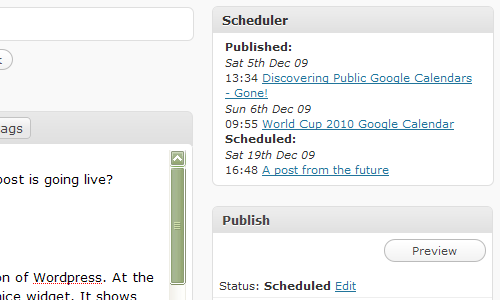
How it appears on your Edit/New Post page
ການຕິດຕັ້ງ
Recommend you use the built in plugin uploader which comes with WordPress, but if you prefer the manual way
- Upload
scheduler-planner.phpto the/wp-content/plugins/directory - Activate the plugin through the ‘Plugins’ menu in WordPress
ຄຳຖາມທີ່ພົບເລື້ອຍ
- Can I change the number of posts shown
-
At present there are no settings, you can manually change the values in the PHP if you are confident though
ການຣີວິວ
ບໍ່ມີການຣີວິວສຳລັບປລັກອິນນີ້.
ຜູ້ຮ່ວມພັດທະນາ ແລະ ຜູ້ພັດທະນາ
“Schedule Planner” ແມ່ນຊອຟແວໂອເພັນຊອດ (Open Source). ບຸກຄົນຕໍ່ໄປນີ້ໄດ້ມີສ່ວນຮ່ວມໃນການພັດທະນາປລັກອິນນີ້.
ຜູ້ຮ່ວມພັດທະນາ
ແປ “Schedule Planner” ເປັນພາສາຂອງເຈົ້າ.
ສົນໃຈຮ່ວມພັດທະນາບໍ່?
ເບິ່ງລະຫັດ, ກວດເບິ່ງ ຄັງເກັບ SVN, ຫຼື ຕິດຕາມ ບັນທຶກການພັດທະນາ ຜ່ານ RSS.
ບັນທຶກການປ່ຽນແປງ
0.2
- Have used Javascript and CSS to only show the first 5 scheduled posts, with a link to show the rest.
0.1
- First stab at making a plugin