
ຄຳອະທິບາຍ
Plugin Name: WP E-commerce Postcode Shipping Module
This plugin provides postcode/zipcode shipping module for the WP E-Commerce system.
You can easily add postcode shipping in wp e-commerce shipping tab, on front end, when user go to checkout page, users can specify shipping location in “Calculate Shipping Price” box to calculate their shipping costs.
How To Use:
WP E-commerce Postcode Shipping Module is a simple & quick & light wp e-commerce postcode/zipcode solution, you can setting your postcode and shipping price at admin panel -> settings -> store ->shipping, you will find “postcode rate” in Shipping Modules, just setting your post code and shipping price and click update button, everyting is okay.
On front end, user will be asked to enter their postcode/zipcode in “Calculate Shipping Price” box to calculate their shipping costs, if you has set up this postcode and shipping price, our plugin will calculate the “Total Shipping” and add it to the “Total Price”, if there are a postcode which postcode entered by the customer that is not supported by your setting on the back end, the user will get the notification “Sorry, online ordering is unavailable to this destination and/or weight. Please double check your destination details”.
Feature Request & Plugin Support URI: http://tomas.zhu.bz/my-wordpress-plugin-wp-ecommerce-postcode-shipping.html/
ພາບໜ້າຈໍ
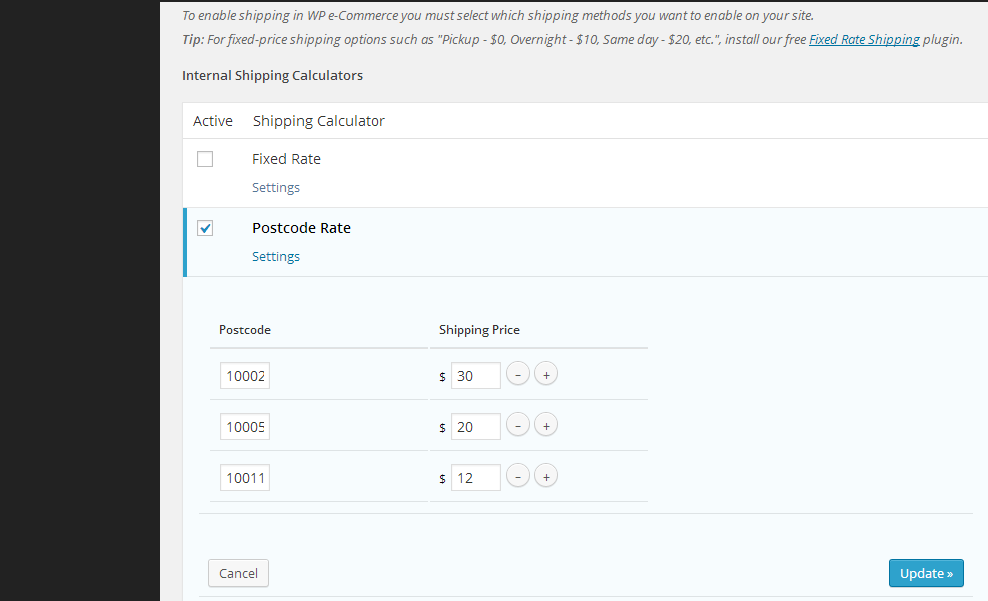
Backend Postcode Shipping Setting 
Front End Postcode Shipping Calculator 
If you did not add this postcode at back end, users will get error notification
ການຕິດຕັ້ງ
1:Upload the WP E-commerce Postcode Shipping Module plugin to your wordpress
2:Activate it
3: setting your postcode and shipping price at admin panel -> settings -> store ->shipping, you will find “postcode rate” in Shipping Modules, just setting your post code and shipping price and click update button
That’s all
ຄຳຖາມທີ່ພົບເລື້ອຍ
FAQs can be found here: http://tomas.zhu.bz/my-wordpress-plugin-wp-ecommerce-postcode-shipping.html/
ການຣີວິວ
ບໍ່ມີການຣີວິວສຳລັບປລັກອິນນີ້.
ຜູ້ຮ່ວມພັດທະນາ ແລະ ຜູ້ພັດທະນາ
“WP E-commerce Postcode Shipping Module” ແມ່ນຊອຟແວໂອເພັນຊອດ (Open Source). ບຸກຄົນຕໍ່ໄປນີ້ໄດ້ມີສ່ວນຮ່ວມໃນການພັດທະນາປລັກອິນນີ້.
ຜູ້ຮ່ວມພັດທະນາ

ແປ “WP E-commerce Postcode Shipping Module” ເປັນພາສາຂອງເຈົ້າ.
ສົນໃຈຮ່ວມພັດທະນາບໍ່?
ເບິ່ງລະຫັດ, ກວດເບິ່ງ ຄັງເກັບ SVN, ຫຼື ຕິດຕາມ ບັນທຶກການພັດທະນາ ຜ່ານ RSS.
ບັນທຶກການປ່ຽນແປງ
Version 1.4.0
follow wordpress security standard to use sanitize_text_field function check and filter all $_POST and _SESSION
this plugin developed in many years before, please do a check to make sure the postcode shipping module works well in your section after you upgraded to this version
Version 1.2.0
Enhanced wordpress security and plugin security
Version 1.0.0
WP E-commerce Postcode Shipping Module Published