

ຄຳອະທິບາຍ
The plugin uses a CSS hack to show the date – your visitors see it, but Google takes it for the “title” parameter of a “span” element and does not consider it to be a part of the page content. Therefore, the publishing date is not shown in the search snippet.
The plugin works with ALL themes now (from version 2.00).
If you liked my plugin, please rate it.
ພາບໜ້າຈໍ
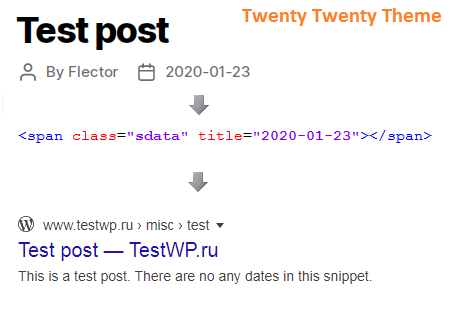
Example post.
ຄຳຖາມທີ່ພົບເລື້ອຍ
-
Installation Instructions
-
- Visit “Plugins\Add New”.
- Search for “Hide My Dates”.
- Install and activate the plugin.
- That’s all.
Plugin settings are available in “Settings\Hide My Dates”.
-
Does the plugin support localization?
-
Yes, please use translate.wordpress.org.
ການຣີວິວ


ຜູ້ຮ່ວມພັດທະນາ ແລະ ຜູ້ພັດທະນາ
“Hide My Dates” ແມ່ນຊອຟແວໂອເພັນຊອດ (Open Source). ບຸກຄົນຕໍ່ໄປນີ້ໄດ້ມີສ່ວນຮ່ວມໃນການພັດທະນາປລັກອິນນີ້.
ຜູ້ຮ່ວມພັດທະນາ
“Hide My Dates” ໄດ້ຖືກແປເປັນ 1 ພາສາທ້ອງຖິ່ນ. ຂໍຂອບໃຈ ທີມງານຜູ້ແປ ສຳລັບການປະກອບສ່ວນຂອງເຂົາເຈົ້າ.
ແປ “Hide My Dates” ເປັນພາສາຂອງເຈົ້າ.
ສົນໃຈຮ່ວມພັດທະນາບໍ່?
ເບິ່ງລະຫັດ, ກວດເບິ່ງ ຄັງເກັບ SVN, ຫຼື ຕິດຕາມ ບັນທຶກການພັດທະນາ ຜ່ານ RSS.
ບັນທຶກການປ່ຽນແປງ
2.00
- now the plugin works with all themes.
1.50
- minor bug fixes.
1.03
- minor bug fixes.
1.02
- removed the bundled languages in favour of language packs from translate.wordpress.org.
1.01
- first public version.