

ຄຳອະທິບາຍ
The Delete Delete Site Plugin removes the “Delete site” link from your WordPress multisite admin panel.
The creation of this plugin was sponsored by the Norwegian Government Administration Services (G.A.S.) and Metronet.
Note: This plugin is intended for WordPress multisite only and is of no use for a single site installation of WordPress.
History
Version 1.0.1: Improved documentation and coding standards compliance
Version 1.0: Initial release
Credits
Thanks to the following for help with the development of this plugin:
* Metronet – Plugin sponsor
* Norwegian Government Administration Services (G.A.S.) – Plugin sponsor
* Lasse Olsen – Reporting of documentation errors
ພາບໜ້າຈໍ
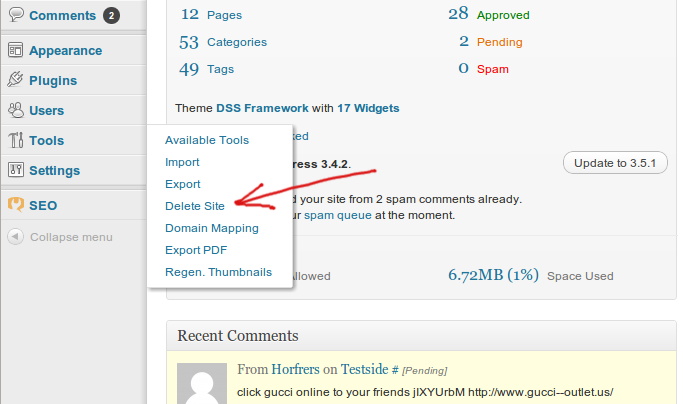
The delete site button that is removed by this plugin for regular admins on multisite
ການຕິດຕັ້ງ
After you’ve downloaded and extracted the files:
- Upload the complete ‘delete-delete-site’ folder to the ‘/wp-content/plugins/’ directory OR install via the plugin installer
- Activate the plugin through the ‘Plugins’ menu in WordPress
- That’s it, all non-“WordPress Super Admins” will no longer be able to see the “delete site” link.
Note: This plugin does not remove the ability to delete the site, it just removes the link from the admin panel which should prevent users from inadvertently deleting their site. This plugin intentionally does not work if you are a “WordPress Super Administrator”. This
ensures that you as the owner of the site have full control over the admin panel, yet anyone at a lower userlevel (ie:
“WordPress Administrator”) will not see the link.
ການຣີວິວ
ບໍ່ມີການຣີວິວສຳລັບປລັກອິນນີ້.
ຜູ້ຮ່ວມພັດທະນາ ແລະ ຜູ້ພັດທະນາ
“Delete Delete Site” ແມ່ນຊອຟແວໂອເພັນຊອດ (Open Source). ບຸກຄົນຕໍ່ໄປນີ້ໄດ້ມີສ່ວນຮ່ວມໃນການພັດທະນາປລັກອິນນີ້.
ຜູ້ຮ່ວມພັດທະນາ

ແປ “Delete Delete Site” ເປັນພາສາຂອງເຈົ້າ.
ສົນໃຈຮ່ວມພັດທະນາບໍ່?
ເບິ່ງລະຫັດ, ກວດເບິ່ງ ຄັງເກັບ SVN, ຫຼື ຕິດຕາມ ບັນທຶກການພັດທະນາ ຜ່ານ RSS.