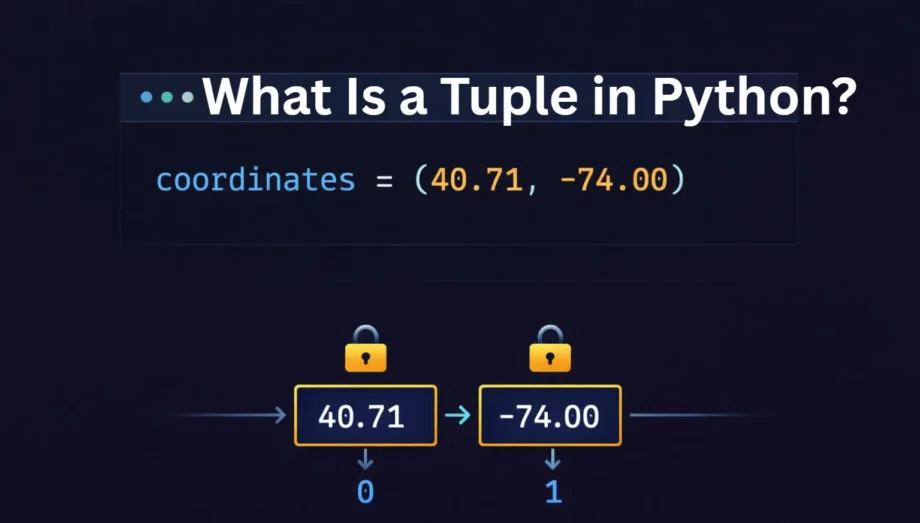
A tuple in Python is an ordered, immutable collection of elements. Once you create a tuple, you cannot change, add, or remove its items. That single characteristic — immutability — is what separates tuples from lists and makes them one of the most misunderstood data structures in the language.
If you’ve worked with Python lists and wondered why tuples exist at all, you’re not alone. Most beginners treat tuples as “lists you can’t edit” and never look deeper. But tuples serve a specific purpose in Python’s design: they represent fixed collections of data where the structure itself carries meaning. Coordinates, database rows, RGB colors, and function return values — these are all naturally tuple-shaped data.
This article explains what tuples are, how to create and use them, how they differ from lists in practical terms, and when choosing a tuple over a list actually matters for your code’s performance and reliability.
Quick Answer: What Is a Tuple in Python?
A tuple is a built-in Python data type that stores an ordered sequence of elements inside parentheses (). Tuples are immutable (cannot be modified after creation), ordered (maintain insertion order), and allow duplicate values. They can hold elements of any data type, including other tuples, lists, and mixed types.
# Creating a tuple
coordinates = (40.7128, -74.0060)
person = ("Alice", 30, "Engineer")
single = (42,)     # Note the trailing comma for single-element tuples
empty = ()
How to Create a Tuple in Python
There are four ways to create a tuple, and each has a specific use case.
1. Using parentheses (most common)
fruits = ("apple", "banana", "cherry")
print(fruits)   # Output: ('apple', 'banana', 'cherry')
2. Without parentheses (tuple packing)
Python treats any comma-separated sequence of values as a tuple, even without parentheses. This is called tuple packing.
colors = "red", "green", "blue"
print(type(colors))   # Output: <class 'tuple'>
This works because it’s the commas that define a tuple, not the parentheses. The parentheses are just there for readability.
3. Using the tuple() constructor
You can convert any iterable — a list, string, set, or range — into a tuple using the tuple() function.
from_list = tuple([1, 2, 3])
from_string = tuple("hello")
from_range = tuple(range(5))

print(from_list)     # Output: (1, 2, 3)
print(from_string)   # Output: ('h', 'e', 'l', 'l', 'o')
print(from_range)    # Output: (0, 1, 2, 3, 4)
4. Single-element tuple (watch the comma)
This is one of the most common mistakes in Python. A single value inside parentheses is not a tuple — it’s just that value. You must include a trailing comma.
not_a_tuple = ("hello")
is_a_tuple = ("hello",)

print(type(not_a_tuple))   # Output: <class 'str'>
print(type(is_a_tuple))    # Output: <class 'tuple'>
Forgetting the trailing comma is a bug that won’t raise an error — Python silently treats it as a string (or integer, or whatever type the value is). This is a subtle issue that trips up even experienced developers.
Accessing Tuple Elements
Tuples support the same indexing and slicing operations as lists and strings.
Indexing (starts at 0)
languages = ("Python", "Java", "C++", "Rust")

print(languages[0])    # Output: Python
print(languages[2])    # Output: C++
print(languages[-1])   # Output: Rust (last element)
print(languages[-2])   # Output: C++ (second to last)
Slicing
numbers = (0, 1, 2, 3, 4, 5, 6, 7, 8, 9)

print(numbers[2:5])     # Output: (2, 3, 4)
print(numbers[:3])      # Output: (0, 1, 2)
print(numbers[7:])      # Output: (7, 8, 9)
print(numbers[::2])     # Output: (0, 2, 4, 6, 8)
print(numbers[::-1])    # Output: (9, 8, 7, 6, 5, 4, 3, 2, 1, 0)
Nested tuple access
matrix = ((1, 2, 3), (4, 5, 6), (7, 8, 9))

print(matrix[1])        # Output: (4, 5, 6)
print(matrix[1][2])     # Output: 6
Tuple Unpacking
Unpacking is one of the most useful features of tuples and something Python developers use constantly in real code.
Basic unpacking
person = ("Alice", 30, "Engineer")
name, age, role = person

print(name)    # Output: Alice
print(age)     # Output: 30
print(role)    # Output: Engineer
The number of variables on the left must match the number of elements in the tuple. If they don’t, Python raises a ValueError.
Extended unpacking with the * operator
When you don’t know the exact length or only need the first and last elements:
scores = (95, 88, 76, 91, 84, 72)
first, *middle, last = scores

print(first)     # Output: 95
print(middle)    # Output: [88, 76, 91, 84]
print(last)      # Output: 72
The * variable collects all remaining elements into a list. This is particularly useful when processing data rows where you care about specific positions but want to capture everything else.
Swapping variables
Tuple unpacking enables Python’s elegant variable swap syntax:
a, b = 1, 2
a, b = b, a
print(a, b)    # Output: 2 1
No temporary variable needed. Under the hood, Python creates a tuple (b, a) and unpacks it.
Why Tuples Are Immutable (And Why That Matters)
Immutability means you cannot change a tuple after it’s created. Any attempt to modify, add, or remove elements raises a TypeError.
colors = ("red", "green", "blue")
colors[0] = "yellow"
# TypeError: 'tuple' object does not support item assignment
You also cannot use append(), remove(), insert(), or any method that modifies the collection. Tuples only have two built-in methods: count() and index().
numbers = (1, 3, 7, 3, 9, 3, 2)

print(numbers.count(3))    # Output: 3
print(numbers.index(7))    # Output: 2 (first occurrence)
Why does immutability matter?
It serves three practical purposes.
First, tuples are hashable (as long as all their elements are also hashable), which means you can use them as dictionary keys and set members. Lists cannot do this.
# Tuple as dictionary key — works
locations = {}
locations[(40.71, -74.00)] = "New York"
locations[(51.50, -0.12)] = "London"

# List as dictionary key — fails
locations[[40.71, -74.00]] = "New York"
# TypeError: unhashable type: 'list'
Second, immutability guarantees data integrity. When you pass a tuple to a function, you know the function cannot accidentally modify your original data. This is important in larger codebases where data flows through many functions.
Third, tuples use less memory and are faster to create than lists. Python can make internal optimizations because it knows the size and contents will never change.
Tuple vs List: The Real Differences
The “tuples are immutable lists” explanation is technically accurate but misses the practical picture. Here’s when each data type is the right choice.
| Feature | Tuple | List |
|---|---|---|
| Syntax | () parentheses | [] square brackets |
| Mutable | No | Yes |
| Hashable | Yes (if elements are hashable) | No |
| Methods available | 2 (count, index) | 11+ (append, sort, remove, etc.) |
| Memory usage | Lower | Higher (over-allocates for growth) |
| Creation speed | Faster | Slower |
| Use as dict key | Yes | No |
| Iteration speed | Slightly faster | Slightly slower |
Memory difference in practice:
import sys

my_list = [1, 2, 3, 4, 5]
my_tuple = (1, 2, 3, 4, 5)

print(sys.getsizeof(my_list))    # Output: 104 bytes
print(sys.getsizeof(my_tuple))   # Output: 80 bytes
Lists over-allocate memory to allow for future growth (like append()). Tuples allocate exactly the memory needed, nothing more. For a single tuple, 24 bytes is negligible. But if you’re storing millions of records — say, loading rows from a database — the memory difference adds up.
Creation speed difference:
import timeit

list_time = timeit.timeit("[1, 2, 3, 4, 5]", number=1_000_000)
tuple_time = timeit.timeit("(1, 2, 3, 4, 5)", number=1_000_000)

print(f"List:  {list_time:.4f}s")    # ~0.05s
print(f"Tuple: {tuple_time:.4f}s")   # ~0.006s
Tuple creation is roughly 5-10x faster for small collections. This happens because Python caches small tuples and reuses them, while lists must always allocate fresh memory.
When to use a tuple:
- Fixed data that shouldn’t change (coordinates, database records, configuration values)
- Dictionary keys or set members that need compound values
- Function return values (Python functions returning multiple values use tuples by default)
- Data you want to protect from accidental modification
When to use a list:
- Collections that grow, shrink, or get reordered
- Data that needs sorting in place
- Stacks, queues, or any structure that requires
append()andpop()
Common Tuple Operations
Concatenation and repetition
tuple_a = (1, 2, 3)
tuple_b = (4, 5, 6)

combined = tuple_a + tuple_b
print(combined)    # Output: (1, 2, 3, 4, 5, 6)

repeated = tuple_a * 3
print(repeated)    # Output: (1, 2, 3, 1, 2, 3, 1, 2, 3)
Note that concatenation and repetition create new tuples — they don’t modify the originals.
Membership testing
colors = ("red", "green", "blue")

print("red" in colors)       # Output: True
print("yellow" in colors)    # Output: False
print("yellow" not in colors)  # Output: True
Length, min, max, sum
numbers = (15, 8, 42, 23, 4)

print(len(numbers))    # Output: 5
print(min(numbers))    # Output: 4
print(max(numbers))    # Output: 42
print(sum(numbers))    # Output: 92
Iterating through a tuple
fruits = ("apple", "banana", "cherry")

for fruit in fruits:
    print(fruit)

# With index using enumerate
for index, fruit in enumerate(fruits):
    print(f"{index}: {fruit}")
Sorting a tuple (creates a new list)
Since tuples are immutable, you cannot sort them in place. The sorted() function returns a new sorted list, which you can convert back to a tuple.
numbers = (42, 15, 8, 23, 4)
sorted_numbers = tuple(sorted(numbers))
print(sorted_numbers)    # Output: (4, 8, 15, 23, 42)
Deleting a tuple
You cannot delete individual elements from a tuple, but you can delete the entire tuple using del.
temp = (1, 2, 3)
del temp
# print(temp) would raise NameError: name 'temp' is not defined
Workaround: How to “Modify” a Tuple
Since tuples are immutable, the standard workaround is to convert the tuple to a list, make your changes, and convert it back.
original = ("apple", "banana", "cherry")

# Convert to list, modify, convert back
temp_list = list(original)
temp_list[1] = "mango"
modified = tuple(temp_list)

print(modified)    # Output: ('apple', 'mango', 'cherry')
This creates a new tuple — the original remains unchanged. If you find yourself doing this frequently, it’s a sign you should be using a list instead of a tuple in the first place.
Real-World Use Cases for Tuples
Tuples aren’t just a theoretical concept. Here are practical situations where they are the correct choice over lists.
Returning multiple values from a function
def get_user():
    return "Alice", 30, "[email protected]"

name, age, email = get_user()
Python functions that return multiple values return them as a tuple by default. The return statement return a, b, c is equivalent to return (a, b, c).
Using tuples as dictionary keys
# Storing data by (latitude, longitude) coordinates
weather_data = {
    (28.6139, 77.2090): "Delhi - 35°C",
    (19.0760, 72.8777): "Mumbai - 30°C",
    (13.0827, 80.2707): "Chennai - 32°C",
}

print(weather_data[(28.6139, 77.2090)])    # Output: Delhi - 35°C
This works because tuples are hashable. You cannot do this with lists.
Storing records from a database
# Each row is a tuple — fixed structure, shouldn't change
employees = [
    (101, "Alice", "Engineering", 95000),
    (102, "Bob", "Marketing", 78000),
    (103, "Carol", "Engineering", 102000),
]

for emp_id, name, dept, salary in employees:
    print(f"{name} works in {dept}")
Named tuples for cleaner code
When tuples get complex, accessing elements by index becomes hard to read. Python’s namedtuple from the collections module solves this.
from collections import namedtuple

Point = namedtuple("Point", ["x", "y"])
p = Point(11, 22)

print(p.x)    # Output: 11
print(p.y)    # Output: 22
print(p[0])   # Output: 11 (still supports indexing)
Named tuples give you the readability of a class with the memory efficiency and immutability of a tuple.
Frequently Asked Questions
A: A tuple is an ordered collection of values that cannot be changed after creation. Think of it as a read-only list. You write it with parentheses — (1, 2, 3) — and you can store any type of data inside it, including numbers, strings, other tuples, and mixed types.
A: Yes. A tuple can contain any data type as an element, including lists. The tuple itself remains immutable (you can’t swap out the list for something else), but the list inside it can still be modified. However, a tuple containing a mutable element like a list is no longer hashable and cannot be used as a dictionary key.
A: Use a tuple when your data is fixed and shouldn’t change: coordinates, database records, configuration values, function return values, and dictionary keys. Use a list when you need to add, remove, sort, or change elements. If you’re unsure, ask yourself: “Will this collection ever need to be modified?” If no, use a tuple.
A: Yes, for creation and iteration. Tuple creation is roughly 5-10x faster than list creation for small collections because Python caches and reuses small tuples. Tuples also use about 15-20% less memory than equivalent lists. For element access (reading a value by index), the difference is negligible. The speed advantage matters most when you’re creating millions of small collections, like processing database rows or CSV records.
A: This error occurs when you try to change an element of a tuple using index assignment, like my_tuple[0] = "new_value". Tuples are immutable — they cannot be modified after creation. If you need to change the data, either convert to a list first or create a new tuple with the desired values.
Conclusion
A tuple in Python is an ordered, immutable sequence that holds any type of data. You create tuples with parentheses () or just commas, access elements with indexing and slicing, and unpack them into individual variables. The two key things that separate tuples from lists are immutability (you can’t change them) and hashability (you can use them as dictionary keys).
In practice, use tuples for fixed-structure data like coordinates, database records, and function return values. Use lists when your collection needs to grow, shrink, or change. And if you’re working with large datasets where memory or creation speed matters, tuples offer a measurable performance advantage over lists.