Hosting a webinar and seeking software that supports this feature on Linux systems? Here are some available webinar Linux software options.
Whether you’re hosting team meetings, educational sessions, or promotional events, finding the right webinar software for Linux can feel like searching for a penguin in a snowstorm—they’re out there, but you need to know where to look.
As someone who has tested dozens of webinar platforms on various Linux distributions (and lived to tell the tale), I’ve compiled this updated 2025 guide to help you navigate the options. From free open-source gems to feature-rich premium offerings, we’ll explore 22 solutions that respect both your freedom and your need for reliable communication tools.
What Makes Good Webinar Software for Linux?
Let’s quickly discuss what software should offer to be considered as a good one, rather than just being a merely functional one in the Linux webinar software ecosystem.
Great Linux webinar software should:
- Run natively or through the web without compatibility headaches
- Offer stable performance without excessive resource consumption
- Include essential features like screen sharing, chat, and recording
- Provide a reasonably straightforward setup and configuration
- Maintain privacy and security standards that Linux users expect
Top Free Webinar Software for Linux
1. Nextcloud Talk – meetings, chat and webinars
Best for: Organizations already using the Nextcloud ecosystem

For the many Linux-based organizations already invested in the Nextcloud ecosystem, Nextcloud Talk provides integrated webinar functionality that leverages existing user accounts and permissions.
The High Performance Back-end subscription has dramatically improved scalability in recent versions, making Talk suitable for webinars with dozens of participants. Integration with Nextcloud Files streamlines document sharing during presentations, while the familiar interface reduces training time for hosts and participants.
2. Google Meet (Free Tier)
Best for: Simple webinars with mainstream participants

Google Meet’s free tier deserves a spot at the top of our list for its reliability and accessibility. While not open-source, it works flawlessly on Linux through any modern browser and has become a universally recognized platform that participants can join without technical confusion.
The free tier offers surprisingly capable webinar features:
- Up to 100 participants for up to 60 minutes
- Screen sharing and presentation mode
- In-meeting chat and hand raising
- Grid and focused view options
- Background blur and virtual backgrounds
For Linux users, Meet’s browser-based approach means zero compatibility issues across distributions. Integration with Google Workspace makes it particularly convenient if you’re already using Google Calendar for scheduling.
The main limitations of the free tier are the 60-minute time cap and the lack of recording, although many users work around this by using external screen recording tools.
3. Jitsi Meet
Best for: Small to medium-sized meetings with basic webinar needs

When it comes to open-source webinar solutions, Jitsi Meet remains the gold standard in 2025. This browser-based platform requires no account creation and offers end-to-end encryption for your webinars.
What makes Jitsi particularly appealing for Linux users is its respect for freedom and privacy, core values in the Linux community. The platform offers HD video conferencing, screen sharing, and even live streaming to YouTube for broader reach.
Setting up your first Jitsi webinar takes seconds:
- Visit meet.jit.si (or set up your own instance)
- Create a meeting room with a unique name
- Share the link with participants
- Begin your webinar with instant access to features
While Jitsi lacks some advanced features, such as breakout rooms or extensive audience analytics, its simplicity and focus on core functionality make it a reliable choice for straightforward webinars.
4. BigBlueButton
Best for: Educational webinars and virtual classrooms

If you’re in academia or need more structured educational features, BigBlueButton (BBB) offers perhaps the most comprehensive free solution for Linux users. Originally designed for distance learning, BBB has evolved into a powerful webinar platform that runs beautifully on Linux systems.
What sets BigBlueButton apart is its focus on engagement tools:
- Multi-user whiteboard collaboration
- Breakout room functionality
- Polling and quiz features
- Detailed moderator controls
- LMS integration options
Installing BBB on your own server requires some technical knowledge, but the payoff is a highly customizable webinar environment that you control entirely. For those not wanting to self-host, several service providers offer BBB instances with a simple setup.
5. OpenMeetings
Best for: Organizations needing integration with other open-source tools

Apache OpenMeetings might look a bit dated compared to some flashier options, but don’t let the interface fool you—this mature project offers robust webinar capabilities for Linux users who prioritize integration with other open-source tools.
OpenMeetings excels at document collaboration during presentations, with built-in document conversion and a whiteboard system that lets multiple participants annotate simultaneously. The recording functionality is also particularly strong, saving webinars in various formats for later distribution.
The learning curve is steeper than with some alternatives, but the extensive documentation makes setup manageable for users with basic Linux administration skills.
6. Element (Matrix)
Best for: Security-conscious organizations and privacy advocates
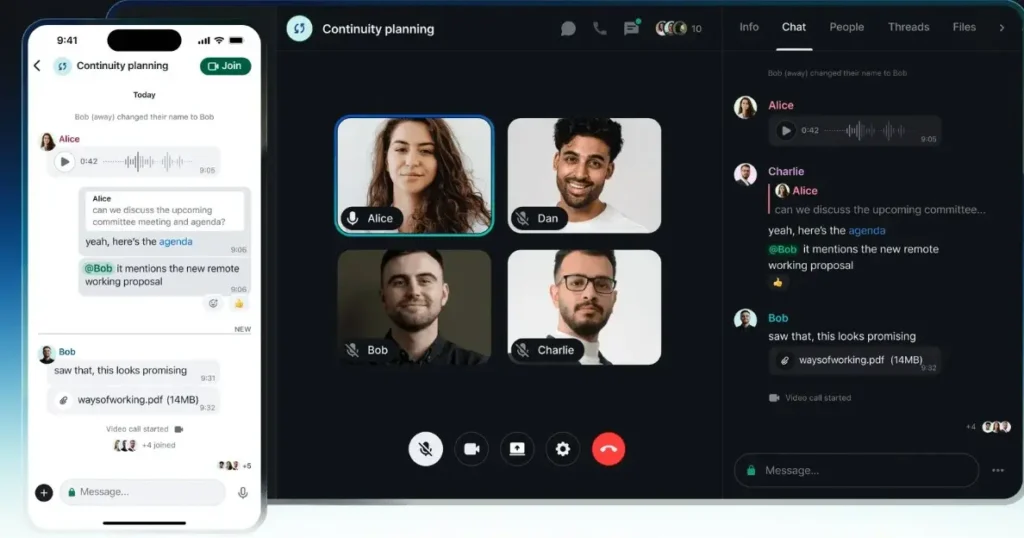
Element (formerly Riot) deserves special mention as the most security-focused option on our list. Built on the Matrix protocol, Element offers encrypted video conferencing that can scale from small meetings to webinar-style events.
What makes Element unique is its decentralized architecture—unlike most webinar platforms that rely on central servers, Matrix spreads communication across a network of servers, enhancing both privacy and resilience.
Linux users will appreciate the native desktop client that integrates seamlessly with notifications and system resources. While primarily designed for team collaboration, recent updates have added features specifically for webinar scenarios, including improved presenter controls and audience management.
7. Galene
Best for: Technical users who need bandwidth efficiency

If you’ve never heard of Galene, you’re not alone—this relatively new entrant in the Linux webinar space has been quietly winning fans among technical users who need to host webinars in bandwidth-constrained environments.
Galene’s claim to fame is its highly efficient resource usage. Think of it as the electric bicycle of webinar tools—it’ll get you where you’re going without wasting energy along the way. The software requires minimal server resources while delivering surprisingly good video quality, even on slower connections.
Written in Go and utilizing modern WebRTC standards, with a minimalist interface that may confuse non-technical participants, still this hidden open-source Webinar software for Linux is worth exploring for the right audience.
8. LiveKit
Best for: Developers building custom webinar experiences

LiveKit represents a new generation of open-source communication infrastructure. While not a turnkey webinar solution, this toolkit allows developers to build custom webinar experiences with remarkable flexibility.
The project provides server software and client SDKs that handle the complex media handling aspects of webinars, letting you focus on creating the exact user experience you want. For Linux-focused organizations with development resources, LiveKit provides a compelling foundation for custom-tailored webinar systems that precisely meet your needs.
Recent improvements to the documentation and example applications have made LiveKit more accessible to organizations without extensive WebRTC expertise. An example of video conferencing software built on Livekit can be seen on GitHub…
9. Jami
Best for: Small organizations prioritizing privacy and decentralization
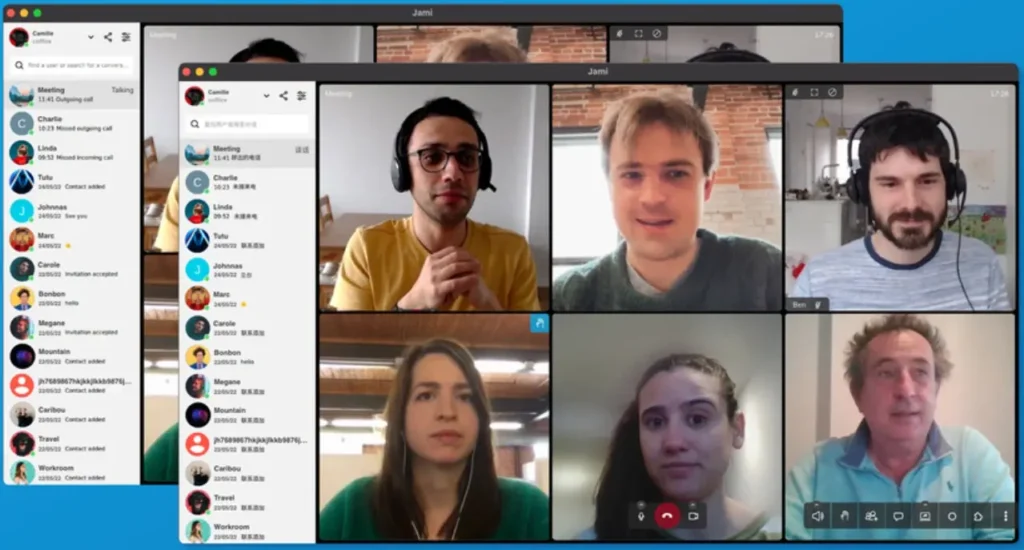
Jami takes the decentralization concept even further with its distributed architecture that requires no central servers at all. This GNU project provides encrypted communication with video conferencing capabilities, making it suitable for smaller webinars.
Linux users will appreciate the thoughtfully designed native application that follows desktop environment conventions. The software handles screen sharing, file transfers, and recording while maintaining a commitment to user freedom and privacy.
While Jami isn’t designed specifically for large-scale webinars, its reliable performance for groups up to 20 participants makes it suitable for team presentations and smaller public events.
10. OBS Studio + YouTube Live
Best for: Content creators who need production-quality webinars

While not a webinar platform per se, the combination of OBS Studio and YouTube Live can create a powerful webinar solution that gives Linux users complete control over their presentation. By streaming using the OBS Studio, Linux users can reach hundreds of people. It is a professional-grade, open-source broadcasting application with a robust, native Linux client that integrates seamlessly with YouTube’s streaming infrastructure.
This DIY approach offers unique advantages:
- Complete control over layout, transitions, and visual elements
- Multi-camera switching and scene composition
- Integration of pre-recorded content alongside live presentation
- Professional audio mixing with filters and processing
- No participant limits (beyond what your channel allows)
Setting up your first OBS + YouTube webinar requires more technical preparation than turnkey solutions, but the payoff is a broadcast-quality presentation that can rival professional productions. Many Linux users appreciate the complete control this approach provides, especially when branding and production values.
11. Owncast
Best for: Organizations wanting a self-hosted streaming solution
If you’re looking for an alternative to traditional webinar formats and OBS, Owncast offers an intriguing open-source option for self-hosted live streaming with integrated chat. Think of it as building your own private streaming platform similar to Twitch or YouTube Live.
Owncast shines for presentations where audience chat engagement is a central component. The platform provides:
- Complete data ownership and privacy
- Customizable branding and appearance
- Integrated chat with moderation tools
- Multi-bitrate streaming for varying connection speeds
- No limits on duration or viewers (beyond your server capacity)
While more suited to live streaming than traditional webinars with slides and presenter focus, Owncast provides a unique solution for organizations that value self-hosting and want to build a community around regular broadcasts or presentations.
What Features Do You Actually Need in Webinar Software?
Let’s pause to consider what features are truly essential for your specific webinar needs. After testing countless platforms, I’ve found that many users overestimate the complexity required for effective webinars.
Ask yourself these questions:
- How many concurrent participants will you typically host?
- Do you need interactive features or mostly a one-way presentation?
- Is recording and later distribution important?
- Do you require integration with other tools, such as CRM systems?
- How technical are your typical participants?
Your answers should guide your selection process. Remember that simpler tools often lead to fewer technical problems during live events—an important consideration when your reputation is on the line during a webinar.
Top Paid Webinar Software for Linux
12. Zoom
Best for: Professional webinars with mainstream audience expectations

Love it or hate it, Zoom has maintained strong Linux support through native clients that work reliably across distributions. The familiar interface means participants rarely struggle with technical issues, while hosts gain access to comprehensive webinar-specific features in paid plans.
Zoom Webinar, their dedicated webinar product, supports events with up to 10,000 view-only attendees and offers robust registration, polling, and Q&A features. The Linux client provides nearly all the functionality of the Windows and Mac versions, although some advanced features may occasionally arrive a bit later.
Pricing starts at approximately $79 per month for basic webinar functionality, with higher tiers available for larger audiences and additional features.
13. Webex
Best for: Enterprise environments with existing Cisco infrastructure
Cisco has maintained consistent Linux support for Webex, with a native client that provides most functionality available to Windows and Mac users. For organizations already invested in Cisco networking or communication tools, Webex offers tight integration and unified administration.
The Webex Webinar product (formerly Webex Events) handles large-scale presentations with broadcast quality options and extensive host controls. Enterprise features like single sign-on, managed domains, and compliance recording make Webex appealing for larger organizations with strict IT policies. It offers both free (up to 100 attendees) and paid plans.
14. GoToWebinar
Best for: Large corporate webinars with compliance requirements

GoToWebinar brings enterprise-grade webinar capabilities to Linux through its web application. Organizations with strict compliance requirements appreciate GoToWebinar’s SOC 2 compliance and robust security features.
The platform excels in large-scale events due to its reliable infrastructure and comprehensive administrative controls. The registration management system is particularly robust, featuring custom fields, automatic reminders, and seamless integration with major CRM platforms.
Linux users should note that, while the attendee experience is identical across platforms, hosts receive the best experience by using Chrome or Firefox on their Linux systems. Its Lite plan is available at $49 per month if billed manually.
15. ClickMeeting
Best for: Educational webinars and marketing events with engagement focus

ClickMeeting has earned its place among the top browser-based webinar platforms with robust Linux compatibility. The platform strikes an excellent balance between ease of use and advanced functionality, with particular strengths in engagement and monetization features.
What makes ClickMeeting stand out is its versatility across various webinar formats:
- Educational sessions with tests and certificates
- Marketing events with calls-to-action and paid webinars
- On-demand and automated webinars for scalable content
- Interactive sessions with polls, surveys and whiteboard collaboration
Linux users will appreciate the seamless browser experience, with no noticeable feature limitations compared to other operating systems. The platform’s custom branding options are particularly strong, allowing organizations to maintain consistent visual identity throughout the attendee experience. Itoffes both free and paid plans.
16. Demio
Best for: Marketing teams prioritizing ease of use

Demio has earned a reputation for exceptional user experience—both for hosts and attendees. Their browser-based platform works seamlessly on Linux distributions and offers a marketing-focused approach to webinars.
The no-download experience means higher attendance rates, while the intuitive presenter interface reduces stress during live events. Recent additions like automated webinars and embedded registration forms have made Demio increasingly popular with content marketers on all platforms, including Linux. It offers a starter plan at $63/month with 50 attendee room.
17. WebinarJam
Best for: Marketing and sales webinars with engagement focus

While WebinarJam does not offer a native Linux client, its browser-based platform works flawlessly on Linux systems using Chrome or Firefox. For businesses focused on conversion-oriented webinars, WebinarJam provides specialized tools designed to engage audiences and drive action.
The platform excels at engagement features like:
- Highlighted comments and on-screen participant spotlighting
- One-click offers and call-to-action buttons
- Detailed analytics on participant behavior
- Automated replay systems for evergreen content
Pricing starts at around $49 per month for their basic package, positioning WebinarJam as an investment for businesses that seriously leverage webinars as a marketing channel.
18. EverWebinar
Best for: Creating automated evergreen webinar funnels

If your webinar strategy includes automated presentations that run without live presenters, EverWebinar provides specialized tools that work well on Linux systems through any modern browser. Created by the same team behind WebinarJam, this platform focuses exclusively on the pre-recorded webinar experience. Its plan start at $99 per month.
What makes EverWebinar unique is the attention to creating the illusion of liveness:
- Dynamic attendee numbers and comments
- Just-in-time scheduling that creates urgency
- Simulated live chat that can be pre-programmed
- Real-time offers timed to presentation moments
- Poll and surverys
For businesses building automated marketing funnels, EverWebinar’s specialized focus offers advantages over general-purpose webinar tools.
19. WorkCast
Best for: Large-scale virtual events beyond simple webinars

When your needs expand beyond traditional webinars to full-scale virtual events, WorkCast another paid Webinar software for Linux in the list that offers a browser-based platform and can scale impressively. Their Present+ and Universe products support Linux users creating anything from webinars to multi-day virtual conferences.
WorkCast distinguishes itself with broadcast-quality streaming options and extensive branding customization. The platform handles registration for complex events with multiple sessions while providing comprehensive analytics across the entire audience journey. Its pland start from $95 per month.
20. BigMarker
Best for: Integrating webinars into your website and marketing stack

BigMarker’s browser-based approach, ofcourse can be used on Linux as well. It offers unique embedding capabilities that let you host webinars directly on your website—maintaining your branding and keeping attendees in your digital environment.
The platform’s extensive API and integration options make it particularly valuable for organizations looking to connect webinar activities with other business systems. Their webinar landing page builder includes A/B testing capabilities to optimize registration rates before your events even begin.
21. Livestorm
Best for: Companies needing an all-in-one event platform

Livestorm has emerged as a strong contender in the browser-based webinar space, with an elegant interface that works perfectly on Linux. Their platform handles the entire webinar lifecycle, from registration to follow-up emails, without requiring any software installation.
What sets Livestorm apart is its attention to the entire event process:
- Customizable registration pages with qualification questions
- Engaging waiting rooms with content and chat
- Interactive polls, questions, and calls-to-action
- Automated email sequences for attendance optimization
- Detailed analytics on engagement and conversion
For Linux users wary of installation issues, Livestorm’s browser-based approach removes compatibility concerns entirely. Its plan starts at $79/month billed annually.
22. Airmeet
Best for: Interactive conferences and networking-focused events

Rounding out our list is Airmeet, a relatively new platform that’s gained popularity for its focus on interaction and networking. Their browser-based platform works well on Linux and offers unique features designed to recreate the social aspects of physical events.
Airmeet’s Social Lounge feature lets attendees move between virtual tables for networking conversations before and after the main presentations. This approach works particularly well for conferences and events where connection between participants is as important as the formal content. As compared to others Airmeet is slightly costly, it starts at $167/month, however, at this price it offers a wide range features as well.
FAQ: Linux Webinar Software
Most mainstream distributions handle webinar software equally well. Still, I’ve found that Ubuntu and Linux Mint offer the smoothest experience for newer Linux users, with excellent hardware compatibility and straightforward package management.
For more experienced users, Arch-based distributions like Manjaro provide access to the latest versions of browser technologies through the rolling release model, potentially benefiting browser-based webinar platforms.
If you’re running webinar software on older hardware:
1. Use a lightweight desktop environment like XFCE or LXQt
2. Close unnecessary browser tabs and applications
3. Consider browser-based platforms rather than resource-intensive native applications
4. Use wired internet connections when possible
5. Disable desktop effects and animations during presentations
These adjustments can significantly improve performance, particularly when sharing screens or using video.
The Future of Linux Webinar Software
As we look ahead, several trends are shaping the future of webinar software on Linux:
- WebRTC maturation continues to improve browser-based options, reducing the need for native applications
- Decentralized architectures are gaining traction, aligning with the Linux philosophy of user control
- AI-enhanced features like transcription and content summarization are becoming standard
- Low-bandwidth optimizations are improving access for participants with connection limitations
For Linux users specifically, the growing popularity of browser-based applications has been a positive development, reducing historical compatibility issues while providing access to cutting-edge features.
Conclusion: Finding Your Perfect Linux Webinar Solution
Linux-compatible webinar software has never been stronger than in 2025. Whether you prioritize freedom, features, or fiscal responsibility, there’s a solution that matches your specific needs.
For most Linux users, I recommend starting with Google Meet or Jitsi Meet for simple needs, or BigBlueButton for more structured requirements. These free options deliver remarkable functionality without compromising your Linux principles. For those wanting complete creative control, the OBS Studio + YouTube Live combination offers unmatched flexibility. When specific business requirements demand commercial features, browser-based platforms like Zoom, GoTowebinar and Click Mettings offer excellent Linux compatibility without installation headaches.
Remember that the best webinar platform is ultimately the one that becomes invisible during your presentation—letting you focus on connecting with your audience rather than wrestling with technology. Test thoroughly, practice with your chosen tool, and you’ll find that Linux provides a stable, secure foundation for webinars of any scale.
Have you found another Linux-friendly webinar platform worth mentioning? Or do you have tips for getting the most from these tools? Share your experiences in the comments below!