Edit by Field
Add or Edit by Common Fields
-
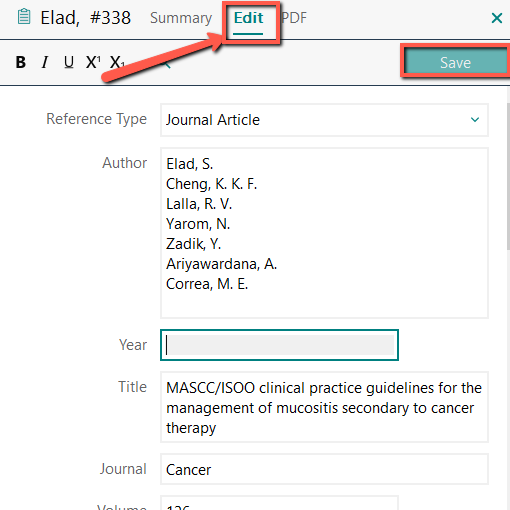
Click on the reference you would like to edit (within the the middle panel)
-
In the right panel, click on Edit tab
-
Click on the field that you would like to edit and make the changes
-
Once you are done, click on Save
-
Preview the reference by clicking the Summary Tab, then scroll to the bottom to review.
Tips for Updating Common Fields
Update by field
Names
Name fields are labelled differently within EndNote depending on the Reference Type selected. Some examples include, Author, Editor, Investigators, Reporters, Created By, Interviewee, Artist, etc.
- Enter one name per line. Hit the Enter key to start a new line.
- Enter ALL the names listed on the resource. EndNote will display the correct number of names per the citation style
- Enter the full name.It helps to distinguish between authors with the same surname. EndNote will abbreviate first and middle names per the citation style rules
- Options available include:
- Brown, John Peter
- Brown, J.P. (initials should be entered with a space or a full stop between them)
- John Peter Brown (no comma)
More Tips:
- Enter authors with titles, such as "Jr.", as
Smith, John, Jr.
- Enter multiple word last names as
de Gaulle, Charles
- Enter company or organization names followed by a comma
Centers for Disease Control and Prevention,
Journal Names: Full Name vs Abbreviated Name
- Some databases import only the abbreviated journal name while your style may call for the full journal name – and vice versa.
- Let EndNote solve the problem! EndNote provides a Journals Term List, so the journal names in your references automatically format correctly, as your style requires without you manually changing the name!
- If you have not already downloaded the Journals Term List, follow Step 6 in this guide.
What if it didn't work?
This may occur if the title is not on the list, or if it is on the list but there are differences with spelling, punctuation or spacing. It has to be an exact match or EndNote will not recognize it.
Correct the journal title:
First, confirm the correct full name or abbreviated name and then follow one of the two methods below.
Tips:
- Locating the full name :
Check the full text article OR copy and paste the abbreviation into Google
- Locating the abbreviation:
Check on the full text article OR the AMA Manual OR check NLM's Journals List
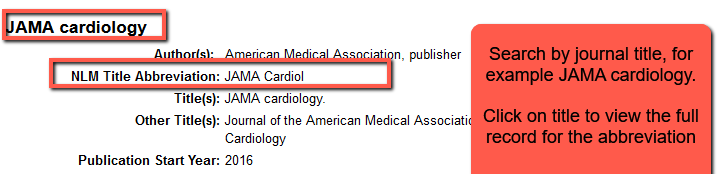
Method 1: Manually correct the title.
- Pro: quick solution
- Con: If you have other references with that journal name, you will need to adjust them. If you are switching between citation styles, you will have to constantly go back and adjust the individual titles.
Method 2: Add the journal to the list!
- Pro: Fix it and forget it
- Con: More work initially
- Go to Library > Open Term Lists > Journal Term list
- You can add New Terms for journals that aren't in the list, and you can also Edit existing terms and delete terms.
- To edit an individual journal, start typing the name and the list should show the title you want. Once you locate it click the Edit Term button.
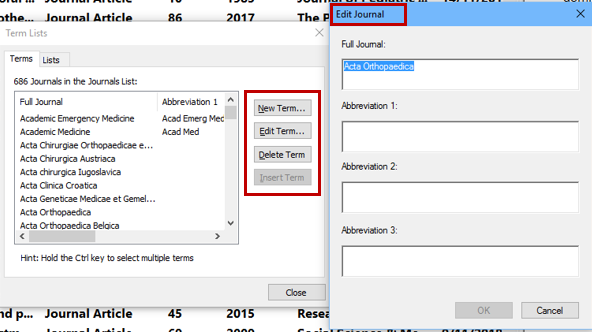
- Make changes to the title of the journal and add abbreviations if required.
- Click OK to save your changes
- Click Close to shut the Terms List window.
Title Field
- Title capitalization is the most common problem with records imported from databases, Google Scholar, etc.
- Some citation styles have title formatting rules for different reference types (journals, articles, books, book chapters, reports, dissertations, etc.)
- When in doubt double-check the rules.
Option 1:
- Click on the correct field
- Manually correct the title
Option 2:
- Click on the title field
- Highlight the title
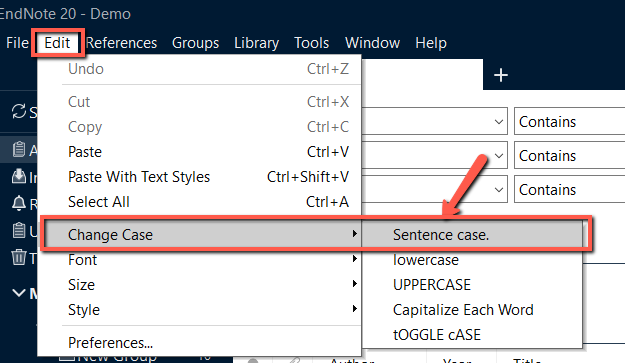
- Click on Edit > Change Case
- Select the case from the options displayed
APA Tip: Uses sentence case for most titles
AMA Tip: Uses a "version" of sentence case for most titles If there is a subtitle, manually remove the capitalization of the first word of the subtitle!
Digital Object Identifier (DOI)
-
DOIs are very common for journal articles but can also be assigned to books, reports, etc.
-
Most citation styles require DOIs to be included in the reference
Double Check:
Missing DOI:
- It is fairly common for the DOI to be missing from the reference when importing from the databases, Google Scholar, etc.
- Check the document (PDF) for the DOI and manually add it. Only add the DOI (starting with 10) EndNote will add the correct prefix per your citation style
Incorrect DOI Format:
- REMOVE all information in the field except the DOI (starting with 10.....)
- Let EndNote format the DOI correctly. It will add the correct prefix per the citation style
Volume and Issue Numbers
Follow these tips if you are manually adding or correcting numbers in these common fields
- Only include the numbers. EndNote will add anything else that is needed for your chosen style
- Do not use commas in numbers in the thousands.
Editions
- Enter 1st, 2nd, 3rd, as appropriate for the source.
- Do not add ed, eds, etc. If that information was imported into EndNote remove it. EndNote will insert that information per the reference style selected
Page Numbers
- Only include the page number(s). EndNote will automatically add additional information if required by the citation style.
- The full page number must be provided. For example 232-35 needs to be changed to 232-235
Dates
Publication Dates
Year: Add to the Year field
Month & Day: The correct field can vary by reference type and citation style. Here is the typical method but if it isn't displaying correctly, check the Output Style templates
-
APA: Add year in the year field but month & day in a separate Date field (or Issue Date) as January 10
-
AMA: Usually add the entire date to the Date field (or Issue Date field) field as January 10, 2020 .
Accessed Dates/Retrieval Dates (if required by citation style)
- Add to the Access Date field in the format: January 21, 2002