> For clean Markdown content of this page, append .md to this URL. For the complete documentation index, see https://learning.postman.com/llms.txt.
# Navigating Postman
Postman has a variety of tools, views, and controls to help you manage your API projects. This guide is a high-level overview of Postman's primary interface areas:
* [Header](#header)
* [Sidebar](#sidebar)
* [Workbench](#workbench)
* [Tabs](#tabs)
* [Environment selector and variables pane](#environment-selector-and-variables-pane)
* [Right sidebar](#right-sidebar)
* [Footer](#footer)
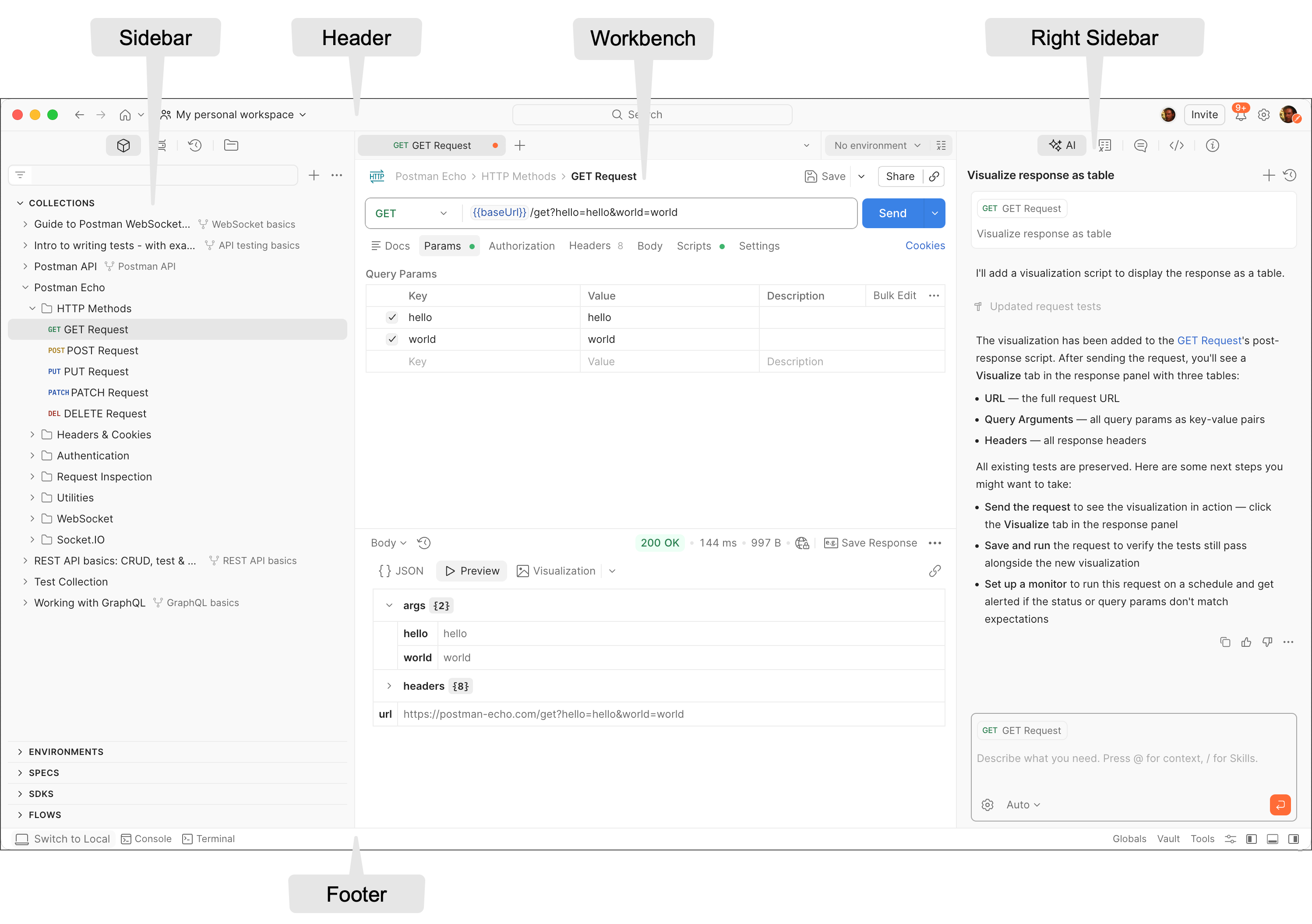
## Header
The header enables you to create workspaces, explore the Postman API Network, search in Postman, view sync status and notifications, and access your settings, account, and [Postman plan](/docs/billing/buying/).
*  **Go back** or
  **Go forward** — *(Available on the [Postman desktop app](/docs/getting-started/installation/install-app/))* Navigate backward and forward through pages you've visited within Postman.
*
**Go forward** — *(Available on the [Postman desktop app](/docs/getting-started/installation/install-app/))* Navigate backward and forward through pages you've visited within Postman.
*  **Home** — Open a menu to navigate Postman, including your personal [home page](#home-page), Workspaces, [Application Inventory](/docs/tests-and-scripts/test-applications/overview/), [API Catalog](/docs/api-catalog/overview/), [Private API Network](/docs/collaborating-in-postman/private-api-network/overview/), [Public API Network](/docs/postman-api-network/explore/overview/), [Integrations](/docs/integrations/available-integrations/postman-integrations), and [Reports](/docs/reports/reports-overview/). Your home page includes your recently visited workspaces, resources for [your team](/docs/administration/managing-your-team/manage-team-workspaces/) (if applicable), and links to explore the Public API Network.
* **Workspaces** — Search for workspaces, view your recently visited workspaces, or [create a new workspace](/docs/collaborating-in-postman/using-workspaces/create-workspaces/).
*
**Home** — Open a menu to navigate Postman, including your personal [home page](#home-page), Workspaces, [Application Inventory](/docs/tests-and-scripts/test-applications/overview/), [API Catalog](/docs/api-catalog/overview/), [Private API Network](/docs/collaborating-in-postman/private-api-network/overview/), [Public API Network](/docs/postman-api-network/explore/overview/), [Integrations](/docs/integrations/available-integrations/postman-integrations), and [Reports](/docs/reports/reports-overview/). Your home page includes your recently visited workspaces, resources for [your team](/docs/administration/managing-your-team/manage-team-workspaces/) (if applicable), and links to explore the Public API Network.
* **Workspaces** — Search for workspaces, view your recently visited workspaces, or [create a new workspace](/docs/collaborating-in-postman/using-workspaces/create-workspaces/).
*  **Search Postman** — Search all workspaces, collections, requests, APIs, flows, and teams in Postman. For more details on searching in Postman, see [Search Postman](#search-postman).
* **People in the Workspace** — Collaborators who are currently or have recently been in the workspace.
* **Invite** — If you have an [Admin role](/docs/administration/roles-and-permissions/#workspace-roles) on a workspace, you can invite other users to collaborate.
*
**Search Postman** — Search all workspaces, collections, requests, APIs, flows, and teams in Postman. For more details on searching in Postman, see [Search Postman](#search-postman).
* **People in the Workspace** — Collaborators who are currently or have recently been in the workspace.
* **Invite** — If you have an [Admin role](/docs/administration/roles-and-permissions/#workspace-roles) on a workspace, you can invite other users to collaborate.
*  **Notifications** — View recent activity from your team, get notifications about Postman updates, and see pull requests, comment activity, and other important information.
*
**Notifications** — View recent activity from your team, get notifications about Postman updates, and see pull requests, comment activity, and other important information.
*  **Settings** — Access [Postman settings](/docs/getting-started/installation/settings/settings-overview/) and other Postman resources.
* **Your avatar** — Access your [personal](/docs/getting-started/installation/account/settings/) and [team settings](/docs/administration/managing-your-team/team-settings/), such as active sessions for your account, your resource usage, billing, and other account management tools.
### Home page
The home page helps you get started, discover relevant content, and stay on top of important updates.
* **Agent Mode** (if enabled) — Type or select a prompt from the recommendations. Clicking **Let's Go** takes you to the latest visited workspace where you have edit access. Agent Mode opens and the prompt runs.
* **Pick up where you left off** — View your most recently visited elements and starred workspaces.
* **Needs your attention** — View the pending actions depending on your role:
* Team join requests — Open requests to join your team (or organization, if enabled).
* Requests for access — Open request for access to your collections and workspaces.
* Request to edit — Open requests to edit your collections and workspaces.
* PRs waiting for your review — Open pull requests that are waiting for your review.
* PRs opened by you — Your pull requests that are under review.
* **Add Widgets** (Admin users only) — Add widgets to your home page to orient your team members and display important information.
* **ReadMe** — Help your teammates get started the right way. Add notes, links, and guidance to important workspaces or resources. This README appears on every team member's homepage.
* **Announcements** — Share organization-wide updates, breaking changes, mandatory migrations, or reminders with your teammates on their homepage.
### Search Postman
To search in Postman, do the following:
1. Click **Search Postman** in the header, then enter your search terms. You can also use the keyboard shortcut **⌘+K** or **Ctrl+K**. Search results contain an additional line of information such as the creator or last updated information to help you scan and identify relevant results.
2. You can search for APIs in your [Private API Network](/docs/collaborating-in-postman/private-api-network/overview/) using the **Private API Network** filter. A checkmark next to the results indicates they're trusted internal APIs that are approved for use.
3. You can filter the scope of your search by [workspace type](/docs/collaborating-in-postman/using-workspaces/overview#workspace-types). Click the **Visibility** dropdown list under the search bar and select **Internal**, **Partner**, or **Public** to set the scope for your search.
4. You can search for an element type within the selected workspace type. Click the **Type** dropdown list and select **Workspaces**, **Collections**, **API**, **Request**, **Folder**, or **Publisher**. The options available in the list depend on the selected workspace type.
5. You can also use the **In**, **By**, **Tag**, and **Org** filters to narrow down results. When you select a filter, suggested values for each type of filter display in a dropdown list. You can select one or more values for each filter type.
6. You can search within your active workspace or collection by selecting it from the options that display under the **Visibility** and **Type** dropdown lists. Click **Search Postman** and your current workspace is the first option. If you're working in a collection when you search, then both your current workspace and the collection are displayed as options. You can also enter "in:" and select a workspace or collection.
To search the [Postman API Network](/docs/postman-api-network/overview/), click **Public** from the **Visibility** dropdown list and select an element in the **Type** dropdown list.
For signed-out users, search results only include public resources.
If you don't find what you are looking for in the list of results, click **View all results** to view all the results on one page.
### Command palette
The command palette uses keystrokes and natural language to navigate features and interface elements in the search bar. For example, instead of pointing and clicking, you can enter "Open runner" to display a Collection Runner tab or enter "Create: New Mock" to create a new mock server.
To use the Postman command palette, press **⌘+Shift+P** or **Ctrl+Shift+P**, or enter ">" in the search bar, then enter an interface navigation command. The search bar expands to suggest features you may be looking for.
## Sidebar
The Postman sidebar provides access to the fundamental [elements of Postman](/docs/getting-started/basics/postman-elements/).
The sidebar groups elements into four tabs: Items, Services, History, and Local Files. Click a tab to switch to that set of elements.
Each element offers more actions for you to choose from. Click an element in the sidebar and hover over an item to expose
**Settings** — Access [Postman settings](/docs/getting-started/installation/settings/settings-overview/) and other Postman resources.
* **Your avatar** — Access your [personal](/docs/getting-started/installation/account/settings/) and [team settings](/docs/administration/managing-your-team/team-settings/), such as active sessions for your account, your resource usage, billing, and other account management tools.
### Home page
The home page helps you get started, discover relevant content, and stay on top of important updates.
* **Agent Mode** (if enabled) — Type or select a prompt from the recommendations. Clicking **Let's Go** takes you to the latest visited workspace where you have edit access. Agent Mode opens and the prompt runs.
* **Pick up where you left off** — View your most recently visited elements and starred workspaces.
* **Needs your attention** — View the pending actions depending on your role:
* Team join requests — Open requests to join your team (or organization, if enabled).
* Requests for access — Open request for access to your collections and workspaces.
* Request to edit — Open requests to edit your collections and workspaces.
* PRs waiting for your review — Open pull requests that are waiting for your review.
* PRs opened by you — Your pull requests that are under review.
* **Add Widgets** (Admin users only) — Add widgets to your home page to orient your team members and display important information.
* **ReadMe** — Help your teammates get started the right way. Add notes, links, and guidance to important workspaces or resources. This README appears on every team member's homepage.
* **Announcements** — Share organization-wide updates, breaking changes, mandatory migrations, or reminders with your teammates on their homepage.
### Search Postman
To search in Postman, do the following:
1. Click **Search Postman** in the header, then enter your search terms. You can also use the keyboard shortcut **⌘+K** or **Ctrl+K**. Search results contain an additional line of information such as the creator or last updated information to help you scan and identify relevant results.
2. You can search for APIs in your [Private API Network](/docs/collaborating-in-postman/private-api-network/overview/) using the **Private API Network** filter. A checkmark next to the results indicates they're trusted internal APIs that are approved for use.
3. You can filter the scope of your search by [workspace type](/docs/collaborating-in-postman/using-workspaces/overview#workspace-types). Click the **Visibility** dropdown list under the search bar and select **Internal**, **Partner**, or **Public** to set the scope for your search.
4. You can search for an element type within the selected workspace type. Click the **Type** dropdown list and select **Workspaces**, **Collections**, **API**, **Request**, **Folder**, or **Publisher**. The options available in the list depend on the selected workspace type.
5. You can also use the **In**, **By**, **Tag**, and **Org** filters to narrow down results. When you select a filter, suggested values for each type of filter display in a dropdown list. You can select one or more values for each filter type.
6. You can search within your active workspace or collection by selecting it from the options that display under the **Visibility** and **Type** dropdown lists. Click **Search Postman** and your current workspace is the first option. If you're working in a collection when you search, then both your current workspace and the collection are displayed as options. You can also enter "in:" and select a workspace or collection.
To search the [Postman API Network](/docs/postman-api-network/overview/), click **Public** from the **Visibility** dropdown list and select an element in the **Type** dropdown list.
For signed-out users, search results only include public resources.
If you don't find what you are looking for in the list of results, click **View all results** to view all the results on one page.
### Command palette
The command palette uses keystrokes and natural language to navigate features and interface elements in the search bar. For example, instead of pointing and clicking, you can enter "Open runner" to display a Collection Runner tab or enter "Create: New Mock" to create a new mock server.
To use the Postman command palette, press **⌘+Shift+P** or **Ctrl+Shift+P**, or enter ">" in the search bar, then enter an interface navigation command. The search bar expands to suggest features you may be looking for.
## Sidebar
The Postman sidebar provides access to the fundamental [elements of Postman](/docs/getting-started/basics/postman-elements/).
The sidebar groups elements into four tabs: Items, Services, History, and Local Files. Click a tab to switch to that set of elements.
Each element offers more actions for you to choose from. Click an element in the sidebar and hover over an item to expose  **View more actions**. The options vary based on the element type.
To delete or move multiple collections, folders, and requests inside a collection and in **History**, press and hold **⌘** or **Ctrl**, then select the items. For collections and their contents, you can also use [keyboard shortcuts](/docs/getting-started/installation/settings/shortcut-settings/) for tasks like copying, pasting, and deleting.
To create new instances of Postman elements, requests and workspaces, click **+** next to the sidebar's search bar.
To hide the sidebar, click
**View more actions**. The options vary based on the element type.
To delete or move multiple collections, folders, and requests inside a collection and in **History**, press and hold **⌘** or **Ctrl**, then select the items. For collections and their contents, you can also use [keyboard shortcuts](/docs/getting-started/installation/settings/shortcut-settings/) for tasks like copying, pasting, and deleting.
To create new instances of Postman elements, requests and workspaces, click **+** next to the sidebar's search bar.
To hide the sidebar, click  in the [footer](#footer) and deselect **Left Sidebar**.
### Change sidebar elements
By default, the sidebar shows only **Collections**, **Environments**, **Documents**, **Specs**, **SDKs**, **Datasets**, and **Flows**. You can add other elements to the sidebar. To add or remove an element to the sidebar, do the following:
1. In the sidebar, click the menu and choose **Customize sidebar**.
2. In **Workspace settings**, choose **Restore panel** or **Delete panel** next to the element you want to change.
If you have admin privileges in other types of workspaces, you can choose which elements to make visible in the sidebar for all members in a workspace.
To view all the elements you created in one place, click your avatar in the Postman header, then click **View Profile**.
### History
To access the requests you've made, click the
in the [footer](#footer) and deselect **Left Sidebar**.
### Change sidebar elements
By default, the sidebar shows only **Collections**, **Environments**, **Documents**, **Specs**, **SDKs**, **Datasets**, and **Flows**. You can add other elements to the sidebar. To add or remove an element to the sidebar, do the following:
1. In the sidebar, click the menu and choose **Customize sidebar**.
2. In **Workspace settings**, choose **Restore panel** or **Delete panel** next to the element you want to change.
If you have admin privileges in other types of workspaces, you can choose which elements to make visible in the sidebar for all members in a workspace.
To view all the elements you created in one place, click your avatar in the Postman header, then click **View Profile**.
### History
To access the requests you've made, click the  **History tab** in the sidebar. When you're signed in to Postman, your history [syncs](/docs/getting-started/basics/syncing/) across your devices.
Click a request to open it again in a new tab. To select more than one request, press and hold **⌘** or **Ctrl**, then select the requests.
Your history also includes [collection runs](/docs/tests-and-scripts/running-collections/intro-to-collection-runs/). These remain as the summarized version of the run and aren't logged as single requests.
* Click
**History tab** in the sidebar. When you're signed in to Postman, your history [syncs](/docs/getting-started/basics/syncing/) across your devices.
Click a request to open it again in a new tab. To select more than one request, press and hold **⌘** or **Ctrl**, then select the requests.
Your history also includes [collection runs](/docs/tests-and-scripts/running-collections/intro-to-collection-runs/). These remain as the summarized version of the run and aren't logged as single requests.
* Click  **Save request** to save the request to a collection.
* Click
**Save request** to save the request to a collection.
* Click  **Delete** to remove the request from your history.
* Click **View more actions** to access other actions, including creating a monitor, documentation, or mock server for the request.
When you make requests in a [shared workspace](/docs/collaborating-in-postman/using-workspaces/create-workspaces/), your request history is visible to you but not to other team members in the workspace.
#### Clearing your history
To remove all requests from your history, click **View more actions** next to the History search bar, then click **Clear all**.
#### Saving responses in history
To save request responses in your history, click **History**, then click **View more actions** and turn on **Save Responses**.
You must also turn on **Save Responses** to [share an HTTP request and its response](/docs/collaborating-in-postman/sharing/#share-a-request-with-its-response) from your request's history with collaborators. If this is turned off when you send a request, you won't be able to view or share the response from your request's history.
You can't use the **Save Responses** option with requests from [Collection Runner](/docs/tests-and-scripts/running-collections/intro-to-collection-runs/).
## Workbench
Whether you're working with a collection, an API, or another element type, the Postman workbench is where you do the majority of your work. [Tabs](#tabs) enable you to organize your work, while the [right sidebar](#right-sidebar) gives you access to element-specific tools like comments. The [environment selector and variables pane](#environment-selector-and-variables-pane) enable you to manage variables.
### Tabs
Tabs let you organize and work between requests.
This section describes how tabs work in the Postman desktop app. By default, tabs in the Postman web app work this way as well. You can choose to use browser tabs instead, which enables you to use a different tab for each open Postman element. For more information, see [Browser tabs in the Postman web app](#browser-tabs-in-the-postman-web-app).
#### Opening a new tab
To open a new tab, click
**Delete** to remove the request from your history.
* Click **View more actions** to access other actions, including creating a monitor, documentation, or mock server for the request.
When you make requests in a [shared workspace](/docs/collaborating-in-postman/using-workspaces/create-workspaces/), your request history is visible to you but not to other team members in the workspace.
#### Clearing your history
To remove all requests from your history, click **View more actions** next to the History search bar, then click **Clear all**.
#### Saving responses in history
To save request responses in your history, click **History**, then click **View more actions** and turn on **Save Responses**.
You must also turn on **Save Responses** to [share an HTTP request and its response](/docs/collaborating-in-postman/sharing/#share-a-request-with-its-response) from your request's history with collaborators. If this is turned off when you send a request, you won't be able to view or share the response from your request's history.
You can't use the **Save Responses** option with requests from [Collection Runner](/docs/tests-and-scripts/running-collections/intro-to-collection-runs/).
## Workbench
Whether you're working with a collection, an API, or another element type, the Postman workbench is where you do the majority of your work. [Tabs](#tabs) enable you to organize your work, while the [right sidebar](#right-sidebar) gives you access to element-specific tools like comments. The [environment selector and variables pane](#environment-selector-and-variables-pane) enable you to manage variables.
### Tabs
Tabs let you organize and work between requests.
This section describes how tabs work in the Postman desktop app. By default, tabs in the Postman web app work this way as well. You can choose to use browser tabs instead, which enables you to use a different tab for each open Postman element. For more information, see [Browser tabs in the Postman web app](#browser-tabs-in-the-postman-web-app).
#### Opening a new tab
To open a new tab, click  **Create new request** in the workbench.
You can also press **⌘+T** or **Ctrl+T** to open a new tab.
If you open a request and don't edit or send it, then open another request, the second tab replaces the first tab. When the tab is in preview mode, it displays in italics.
You can set whether Postman opens requests and other sidebar items in new tabs. Click **Settings** in the header and select **App settings**. In the **General** tab under **User interface**, turn on or off the **Always open sidebar item in new tab** setting.
#### Saving or discarding changes
If a tab has unsaved changes, Postman displays a dot next to the tab name. Click
**Create new request** in the workbench.
You can also press **⌘+T** or **Ctrl+T** to open a new tab.
If you open a request and don't edit or send it, then open another request, the second tab replaces the first tab. When the tab is in preview mode, it displays in italics.
You can set whether Postman opens requests and other sidebar items in new tabs. Click **Settings** in the header and select **App settings**. In the **General** tab under **User interface**, turn on or off the **Always open sidebar item in new tab** setting.
#### Saving or discarding changes
If a tab has unsaved changes, Postman displays a dot next to the tab name. Click  **Save** to save the changes. To discard changes, click
  and click **Don't save**.
#### Renaming and linking elements
To rename an element, click the element's name and enter a new name.
You can also click a collection or its elements (folders, requests, and examples) in the sidebar and press the **Enter** or **Return** key to rename it.
To copy a link to an element to the clipboard, click
and click **Don't save**.
#### Renaming and linking elements
To rename an element, click the element's name and enter a new name.
You can also click a collection or its elements (folders, requests, and examples) in the sidebar and press the **Enter** or **Return** key to rename it.
To copy a link to an element to the clipboard, click  **Copy link**. Or click **Share** to invite others to your workspace and view the element. To learn more about inviting people to collaborate in a workspace, see [Share workspaces](/docs/collaborating-in-postman/using-workspaces/internal-workspaces/manage-workspaces/#share-workspaces).
#### Viewing conflicts
If you're making changes to the same request in two different tabs, the tab alerts you to a conflict before you can save the changes. Clicking the tab displays a message that the request was modified since the last time you opened it. When you save your changes, you can choose override the previous change or save the request as a new one.
#### Managing tabs
You can have many tabs open at the same time. To rearrange your open tabs, click and drag them in the desired order.
To manage your open tabs, right-click the open tab to activate a menu with action options:
* **New Request** — Creates a new request.
* **Duplicate Tab** — *(Available on the [Postman desktop app](/docs/getting-started/installation/install-app/))* Duplicates the current tab. This doesn't create a copy of the request, so when you duplicate a tab any edits you make are reflected in the original request.
* **Close Tab** — Closes the current tab. If the tab has unsaved changes, Postman asks if you want to save before closing.
* **Force Close Tab** — Closes the current tab without saving any changes.
* **Close Other Tabs** — Closes all tabs except the one you're working in.
* **Close All Tabs** — Closes all tabs. If any tabs contain unsaved changes, Postman will ask if you want to save before closing.
* **Force Close All Tabs** — Closes all tabs without saving any changes.
* **Reveal in Sidebar** — Opens the element in the sidebar.
**Closing unsaved tabs.** You can set whether Postman asks you to save when you close a tab that has changes. Click **Settings** in the header and select **App settings**. In the **General** tab under **User interface**, turn on or off the **Always ask when closing unsaved tabs** setting.
#### Tab search
To search open tabs or access recently closed tabs, click
**Copy link**. Or click **Share** to invite others to your workspace and view the element. To learn more about inviting people to collaborate in a workspace, see [Share workspaces](/docs/collaborating-in-postman/using-workspaces/internal-workspaces/manage-workspaces/#share-workspaces).
#### Viewing conflicts
If you're making changes to the same request in two different tabs, the tab alerts you to a conflict before you can save the changes. Clicking the tab displays a message that the request was modified since the last time you opened it. When you save your changes, you can choose override the previous change or save the request as a new one.
#### Managing tabs
You can have many tabs open at the same time. To rearrange your open tabs, click and drag them in the desired order.
To manage your open tabs, right-click the open tab to activate a menu with action options:
* **New Request** — Creates a new request.
* **Duplicate Tab** — *(Available on the [Postman desktop app](/docs/getting-started/installation/install-app/))* Duplicates the current tab. This doesn't create a copy of the request, so when you duplicate a tab any edits you make are reflected in the original request.
* **Close Tab** — Closes the current tab. If the tab has unsaved changes, Postman asks if you want to save before closing.
* **Force Close Tab** — Closes the current tab without saving any changes.
* **Close Other Tabs** — Closes all tabs except the one you're working in.
* **Close All Tabs** — Closes all tabs. If any tabs contain unsaved changes, Postman will ask if you want to save before closing.
* **Force Close All Tabs** — Closes all tabs without saving any changes.
* **Reveal in Sidebar** — Opens the element in the sidebar.
**Closing unsaved tabs.** You can set whether Postman asks you to save when you close a tab that has changes. Click **Settings** in the header and select **App settings**. In the **General** tab under **User interface**, turn on or off the **Always ask when closing unsaved tabs** setting.
#### Tab search
To search open tabs or access recently closed tabs, click  **Search tabs** in the workbench, or press **Shift+⌘+A** or **Shift+Ctrl+A**. Enter a search term to filter the list of open tabs. Click a tab in the list to open it.
#### Browser tabs in the Postman web app
By default, the Postman web app uses in-app tabs like the Postman desktop app does. You can optionally choose to use browser tabs instead. When enabled, there's only one collection overview or request in the main work area at a time, and you can open more Postman elements in new browser tabs. This lets you to work across workspaces or to use different environments in the same workspace.
To remove tabs in the Postman web app, click
**Search tabs** in the workbench, or press **Shift+⌘+A** or **Shift+Ctrl+A**. Enter a search term to filter the list of open tabs. Click a tab in the list to open it.
#### Browser tabs in the Postman web app
By default, the Postman web app uses in-app tabs like the Postman desktop app does. You can optionally choose to use browser tabs instead. When enabled, there's only one collection overview or request in the main work area at a time, and you can open more Postman elements in new browser tabs. This lets you to work across workspaces or to use different environments in the same workspace.
To remove tabs in the Postman web app, click  **Settings** in the header, then select **App settings**. In the **General** tab, turn on **Remove tabs** in the **User interface** section.
If you've saved changes to a request, when you click a new element Postman opens it in the main work area. If the request has unsaved changes, Postman prompts you to save or discard your changes.
To open a workspace, environment, or request in a new browser tab, press and hold **⌘+Shift** or **Ctrl+Shift** and click the element you want to open.
To open an in-app link in a new browser tab, press and hold **⌘** or **Ctrl** and click the link you want to open.
#### Environment selector and variables pane
The environment selector enables you to choose which [environment](/docs/use/send-requests/variables/managing-environments/) to use in your work. Click an environment from the menu to set it as the active environment, which gives you access to the variables in that environment. You can [pin environments](/docs/use/send-requests/variables/pinned-environments/) to collections to show other Postman users which environments work with that collection.
You can also click **Create environment** in the environment selector to create a new environment and set it as the active environment.
Use the variables pane to view the variables and vault secrets used in and that you can access from your Postman elements. Click
**Settings** in the header, then select **App settings**. In the **General** tab, turn on **Remove tabs** in the **User interface** section.
If you've saved changes to a request, when you click a new element Postman opens it in the main work area. If the request has unsaved changes, Postman prompts you to save or discard your changes.
To open a workspace, environment, or request in a new browser tab, press and hold **⌘+Shift** or **Ctrl+Shift** and click the element you want to open.
To open an in-app link in a new browser tab, press and hold **⌘** or **Ctrl** and click the link you want to open.
#### Environment selector and variables pane
The environment selector enables you to choose which [environment](/docs/use/send-requests/variables/managing-environments/) to use in your work. Click an environment from the menu to set it as the active environment, which gives you access to the variables in that environment. You can [pin environments](/docs/use/send-requests/variables/pinned-environments/) to collections to show other Postman users which environments work with that collection.
You can also click **Create environment** in the environment selector to create a new environment and set it as the active environment.
Use the variables pane to view the variables and vault secrets used in and that you can access from your Postman elements. Click  **Variables** in the upper-right of the workbench to open the variables pane. To learn more about the variables pane, see [Viewing and editing variables in an element](/docs/use/send-requests/variables/variables/#viewing-and-editing-variables-in-an-element).
## Right sidebar
The right sidebar gives you access to more tools, including comments, code snippets, and request information, based on which kind of Postman element you choose.
| Icon | Tool | Available for | Description |
| ---------------------------------------------------------------------------------------------------------------------------------------------------------- | ------------------------ | ------------------------------------- | --------------------------------------------------------------------------------------------------------------------------------------------------------------------------------------------------------------- |
|
**Variables** in the upper-right of the workbench to open the variables pane. To learn more about the variables pane, see [Viewing and editing variables in an element](/docs/use/send-requests/variables/variables/#viewing-and-editing-variables-in-an-element).
## Right sidebar
The right sidebar gives you access to more tools, including comments, code snippets, and request information, based on which kind of Postman element you choose.
| Icon | Tool | Available for | Description |
| ---------------------------------------------------------------------------------------------------------------------------------------------------------- | ------------------------ | ------------------------------------- | --------------------------------------------------------------------------------------------------------------------------------------------------------------------------------------------------------------- |
|  | **AI** | All Postman elements | Use Agent Mode. |
| | **Variables in request** | All Postman elements | Review the variables in the current request. |
|
| **AI** | All Postman elements | Use Agent Mode. |
| | **Variables in request** | All Postman elements | Review the variables in the current request. |
|  | **Pull Requests** | Collections, environments | View any [pull requests](/docs/collaborating-in-postman/using-version-control/creating-pull-requests/) for a Postman element. |
|
| **Pull Requests** | Collections, environments | View any [pull requests](/docs/collaborating-in-postman/using-version-control/creating-pull-requests/) for a Postman element. |
|  | **Forks** | Collections, environments | View any [forks](/docs/collaborating-in-postman/using-version-control/forking-elements/) of a Postman element. |
|
| **Forks** | Collections, environments | View any [forks](/docs/collaborating-in-postman/using-version-control/forking-elements/) of a Postman element. |
|  | **Info** | All Postman elements | View element details, including its ID, when it was created, who created it, and more. |
|
| **Info** | All Postman elements | View element details, including its ID, when it was created, who created it, and more. |
|  | **Comments** | Collections, requests, specifications | Leave [comments](/docs/collaborating-in-postman/comments/) on a specific part of a request or an API. |
|
| **Comments** | Collections, requests, specifications | Leave [comments](/docs/collaborating-in-postman/comments/) on a specific part of a request or an API. |
|  | **Code** | Requests | Generate [code snippets](/docs/use/send-requests/create-requests/generate-code-snippets/) in a variety of languages and frameworks that you can use in other apps. |
|
| **Code** | Requests | Generate [code snippets](/docs/use/send-requests/create-requests/generate-code-snippets/) in a variety of languages and frameworks that you can use in other apps. |
|  | **Live Preview** | Specifications | Preview the documentation for your specification in your workspace. |
|
| **Live Preview** | Specifications | Preview the documentation for your specification in your workspace. |
|  | **Changelog** | Collections, specifications | Use the changelog to see changes that you and your collaborators have made in [collections](/docs/use/use-collections/manage-collections/#use-the-changelog) and [specifications](/docs/design-apis/overview/). |
|
| **Changelog** | Collections, specifications | Use the changelog to see changes that you and your collaborators have made in [collections](/docs/use/use-collections/manage-collections/#use-the-changelog) and [specifications](/docs/design-apis/overview/). |
|  | **Activity feed** | Monitors | View the activity feed for a [monitor](/docs/monitoring-your-api/intro-monitors/). |
|
| **Activity feed** | Monitors | View the activity feed for a [monitor](/docs/monitoring-your-api/intro-monitors/). |
|  | **Flow Element Info** | Flows | View the input and output of a single block. |
|
| **Flow Element Info** | Flows | View the input and output of a single block. |
|  | **Released Versions** | Flows | View your released flows. |
|
| **Released Versions** | Flows | View your released flows. |
|  | **Execution issues** | Flows | View a flow's execution issues, if any. |
## Footer
The footer on the bottom of Postman enables you to find and replace text, open the Console, capture requests and cookies, and access several other tools.
| Icon | Element | Description |
| --------------------------------------------------------------------------------------------------------------------------------------------------------------------- | --------------------------------------------------- | ----------------------------------------------------------------------------------------------------------------------------------------------------------------------------------------------------------------------------------------------------------------------------------------------------------------------------------------------------------------------------------------------------------------------------------------------------------------------------------------------------------------------------------------------------------------------------------------------------------------------------------------------------------------------------------------------------------------------------------------------------------------------------------------------------------------------------------------------------------------------------------------------------------------------------------------------------------------------------------------------------------------------------------------------------------------------------------------------------------------------------------------------------------------------------------------------------------------------------------------------------------------------------------------------------------------------------------------------------------------------------------------------------------------------------------------------------------------------------------------------------------------------------------------------------------------------------------------------------------------------------------------------------------------------------------------------------------------------------------------------------------------------------------------------------------------------------------------------------------------------------------------------------------------------------------------------------------------------------------------------------------------------------------------------------------------------------------------------------------------------------------------------------- |
| | **Local View** and **Switch to Local** | Toggles between the view of files on your local machine or the Postman Cloud when using [Native Git](/docs/use/native-git/overview/). |
| | **Connect to Git** | *(Available on the [Postman desktop app](/docs/getting-started/installation/install-app/) with [Native Git](/docs/use/native-git/overview/))* Connect to a Git repository. |
|
| **Execution issues** | Flows | View a flow's execution issues, if any. |
## Footer
The footer on the bottom of Postman enables you to find and replace text, open the Console, capture requests and cookies, and access several other tools.
| Icon | Element | Description |
| --------------------------------------------------------------------------------------------------------------------------------------------------------------------- | --------------------------------------------------- | ----------------------------------------------------------------------------------------------------------------------------------------------------------------------------------------------------------------------------------------------------------------------------------------------------------------------------------------------------------------------------------------------------------------------------------------------------------------------------------------------------------------------------------------------------------------------------------------------------------------------------------------------------------------------------------------------------------------------------------------------------------------------------------------------------------------------------------------------------------------------------------------------------------------------------------------------------------------------------------------------------------------------------------------------------------------------------------------------------------------------------------------------------------------------------------------------------------------------------------------------------------------------------------------------------------------------------------------------------------------------------------------------------------------------------------------------------------------------------------------------------------------------------------------------------------------------------------------------------------------------------------------------------------------------------------------------------------------------------------------------------------------------------------------------------------------------------------------------------------------------------------------------------------------------------------------------------------------------------------------------------------------------------------------------------------------------------------------------------------------------------------------------------- |
| | **Local View** and **Switch to Local** | Toggles between the view of files on your local machine or the Postman Cloud when using [Native Git](/docs/use/native-git/overview/). |
| | **Connect to Git** | *(Available on the [Postman desktop app](/docs/getting-started/installation/install-app/) with [Native Git](/docs/use/native-git/overview/))* Connect to a Git repository. |
|  | **Console** | [Inspect and debug](/docs/use/send-requests/response-data/troubleshooting-api-requests/#debugging-in-the-console) your Postman requests. |
|
| **Console** | [Inspect and debug](/docs/use/send-requests/response-data/troubleshooting-api-requests/#debugging-in-the-console) your Postman requests. |
|  | **Terminal** | *(Available on the [Postman desktop app](/docs/getting-started/installation/install-app/) with [Native Git](/docs/use/native-git/overview/))* Open a terminal in your local Postman environment. |
|
| **Terminal** | *(Available on the [Postman desktop app](/docs/getting-started/installation/install-app/) with [Native Git](/docs/use/native-git/overview/))* Open a terminal in your local Postman environment. |
|  | **Git branch icon** | For APIs using a Git repository, switch branches and open the **Source Control** pane. |
|
| **Git branch icon** | For APIs using a Git repository, switch branches and open the **Source Control** pane. |
|  | **Desktop Agent** (or the currently selected agent) | *(Available on the [Postman web app](/docs/getting-started/installation/install-app/#use-the-postman-web-app))* Displays the currently selected [Postman Agent](/docs/getting-started/basics/about-postman-agent/). Click to switch between the Cloud Agent, Desktop Agent, Browser Agent, or Interceptor Agent, or toggle **Auto-select** to let Postman choose the best agent for your requests. |
| | **Globals** | View your global variables. |
| | **Vault** | Store vault secrets in your [Postman Vault](/docs/use/postman-vault/postman-vault-secrets/). Choose your Postman Local Vault or Postman Shared Vault. |
| | **Library** | Click to access your [Postman Library](/docs/use/postman-library/overview/) packages or components. |
| | **Tools** | Displays the following tools:
| **Desktop Agent** (or the currently selected agent) | *(Available on the [Postman web app](/docs/getting-started/installation/install-app/#use-the-postman-web-app))* Displays the currently selected [Postman Agent](/docs/getting-started/basics/about-postman-agent/). Click to switch between the Cloud Agent, Desktop Agent, Browser Agent, or Interceptor Agent, or toggle **Auto-select** to let Postman choose the best agent for your requests. |
| | **Globals** | View your global variables. |
| | **Vault** | Store vault secrets in your [Postman Vault](/docs/use/postman-vault/postman-vault-secrets/). Choose your Postman Local Vault or Postman Shared Vault. |
| | **Library** | Click to access your [Postman Library](/docs/use/postman-library/overview/) packages or components. |
| | **Tools** | Displays the following tools:  **Runner** — Open the [Collection Runner](/docs/tests-and-scripts/running-collections/intro-to-collection-runs/).
 **Browser** — *(Available on the [Postman desktop app](/docs/getting-started/installation/install-app/))* Open the [Postman Browser Tool](/docs/use/capturing-request-data/browser-tool/overview) to interact with web applications directly inside Postman and capture network traffic.
 **Proxy** — *(Available on the [Postman desktop app](/docs/getting-started/installation/install-app/))* Start the [Postman proxy](/docs/use/capturing-request-data/capture-overview/).
 **Cookies** — View, manage, and sync [cookies](/docs/use/send-requests/response-data/cookies/).
 **Find and replace** — *(Available on the [Postman desktop app](/docs/getting-started/installation/install-app/))* Search the current workspace. You can also use the shortcuts **⌘+Shift+F** or **Ctrl+Shift+F**. Enter your search string then click **Find**. You can search for all elements, or restrict your search to specific elements. You can also replace results that match your search string with a new string.
  **Trash** — Recover or permanently delete any deleted collections.
|
|  | **Layout** | Change the visibility and layout of Postman. |
|
| **Layout** | Change the visibility and layout of Postman. |
|  | **Toggle left sidebar** | Close or reopen the left [sidebar](#sidebar). |
|
| **Toggle left sidebar** | Close or reopen the left [sidebar](#sidebar). |
|  | **Toggle right sidebar** | Close or reopen the right sidebar. |