

وەسف
Track website’s users by their login related information like Last login Date/Time, Environment/Server IP address,Country/City/Continent/Timezone, Lat-long, Browser, Platform, Currency code/symbol and many more.
Features And Options:
- Display Logged in users Details.
- Add new Column to user listing oage.
- Mantain Login history from user profile page.
- Clear History of users.
- Compatible with WordPress multisite network
Track user’s login details with the following attributes:
- Login – Login Date-Time
- IP Address – Environment/Server IP address
- Country (Based on IP Address)
- City (Based on IP Address)
- Continent (Based on IP Address)
- Timezone (Based on IP Address)
- Latitude (Based on IP Address)
- Longitude (Based on IP Address)
- Browser – Name and Version
- Operating System
- Currency – Code and Symbol
Compatible With
Keywords
Logged user detail, Login Log, user log, log, tracker, admin, subscriber, editor, geo location, manager, report, statistics, activity
سکرین شۆتەکان
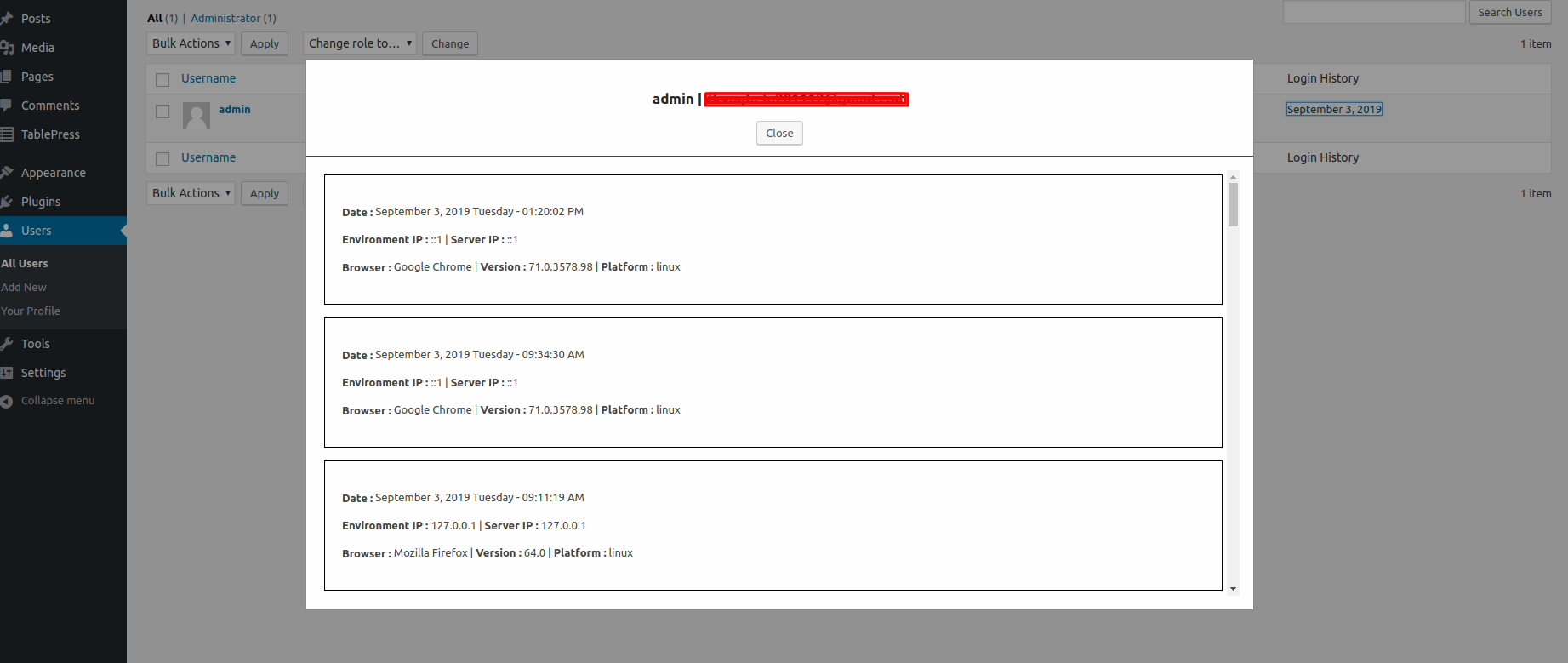
User Detail From User Listing Page. 
Manage User Login History from User Detail Page. 
User Detail From User Detail Page.
دامەزراندن
- Upload the plugin files to the
/wp-content/plugins/plugin-namedirectory, or install the plugin through the WordPress plugins screen directly. - Activate the “WP Users Login History” plugin through the ‘Plugins’ screen in WordPress
- Click on “Users” on the dashboard.
پێداچوونەوەکان
هیچ پێداچوونەوەیەک نەنووسراوە بۆ ئەم پێوەکراوە.
بەشداربووان و گەشەپێدەران
“WP Users Login History” نەرمەواڵەیەکی سەرچاوە کراوەیە. ئەم کەسانەی خوارەوە بەشدارییان تێدا کردووە.
بەشداربووان
“WP Users Login History” وەربگێڕە بۆ زمانەکەی خۆت.
دەتەوێت بەشداربیت لە گەشەپێدان؟
گەڕان لە کۆدەکەدا بکە، سەیری تەمارگەی (SVN) بکە، یان بەشداربە لە ڕووداوتۆماری گەشەپێدان لە ڕێگەی (RSS).
ڕووداوتۆمارگەریی گۆڕین
1.0.0
- Initial Public Release.