

وەسف
The Site Options plugin is a simple and free product for adding your custom site options on default page Settings -> Reading.
Just define needed settings in your functions file. More instructions.
Adding your custom options
    add_action( 'init', 'custom__site_options', 10 );
    function custom__site_options(){
        global $wpto;
        if ( $wpto )
        $wpto->fields = array (
            'section_one'   =>  array( array( 'Header - First Settings', 'description will come' ), array(
                'f_number'  => array( 'number', 'A Number' ),
                'f_text'    => array( 'text', 'Simple text' ),
                )),
            'section_two'   =>  array( array( 'Header - Additional settings', 'description will soon' ), array(
                'f_gallery' => array( 'gallery', 'Awesome gallery' ),
                'f_chbox'   => array( 'checkbox', 'Are u checked?' ),
                )),
        );
    }
Access in the theme files
        global $wpto;
        echo $wpto->getOption( 'section_one::f_text' ) ;
Field types support
- text
- textarea
- wysiwyg
- checkbox
- number
- select
- image
- gallery
- colorpicker
سکرین شۆتەکان

Define your custom fields in your file function’s. 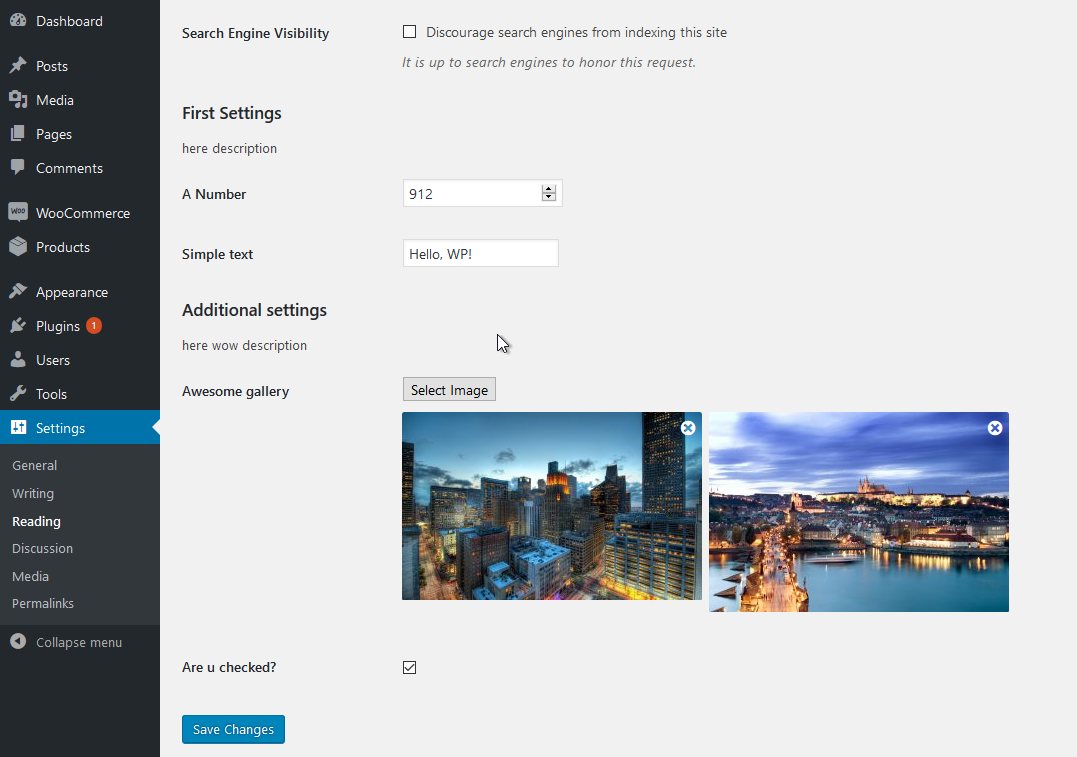
Allow to Settings – Reading and specify field values.
دامەزراندن
- Just setup and activate the plugin through the ‘Plugins – Add’ menu in WordPress
پهد
-
How do I create settings for my own theme?
-
Please, read instructions.
-
What types options are available to use?
-
- text
- textarea
- wysiwyg
- checkbox
- select
- number
- image
- gallery
- colorpicker
You can define custom fieldtype by special filter, if no one this types was detected, see inc/fields.php, filter ‘wpto_echo_field’.
پێداچوونەوەکان
هیچ پێداچوونەوەیەک نەنووسراوە بۆ ئەم پێوەکراوە.
بەشداربووان و گەشەپێدەران
“WP Site Options” نەرمەواڵەیەکی سەرچاوە کراوەیە. ئەم کەسانەی خوارەوە بەشدارییان تێدا کردووە.
بەشداربووان
“WP Site Options” وەربگێڕە بۆ زمانەکەی خۆت.
دەتەوێت بەشداربیت لە گەشەپێدان؟
گەڕان لە کۆدەکەدا بکە، سەیری تەمارگەی (SVN) بکە، یان بەشداربە لە ڕووداوتۆماری گەشەپێدان لە ڕێگەی (RSS).
ڕووداوتۆمارگەریی گۆڕین
1.2.1 – 05/03/17
- GALLERY field type henceforth return array instead string
1.2 – 05/03/17
- SELECT field type added
- Added ability to request clear field value without filtering
- Bugs fix
1.1 – 26/02/17
- Added default values