
وەسف
Displays a list of the last two posts, plus the scheduled posts on the Edit/New Post page to allow you to plan your posts schedules.
سکرین شۆتەکان
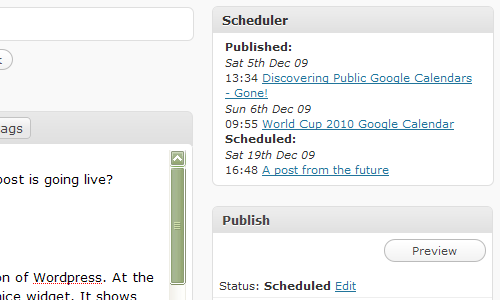
How it appears on your Edit/New Post page
دامەزراندن
Recommend you use the built in plugin uploader which comes with WordPress, but if you prefer the manual way
- Upload
scheduler-planner.phpto the/wp-content/plugins/directory - Activate the plugin through the ‘Plugins’ menu in WordPress
پهد
- Can I change the number of posts shown
-
At present there are no settings, you can manually change the values in the PHP if you are confident though
پێداچوونەوەکان
هیچ پێداچوونەوەیەک نەنووسراوە بۆ ئەم پێوەکراوە.
بەشداربووان و گەشەپێدەران
“Schedule Planner” نەرمەواڵەیەکی سەرچاوە کراوەیە. ئەم کەسانەی خوارەوە بەشدارییان تێدا کردووە.
بەشداربووان
“Schedule Planner” وەربگێڕە بۆ زمانەکەی خۆت.
دەتەوێت بەشداربیت لە گەشەپێدان؟
گەڕان لە کۆدەکەدا بکە، سەیری تەمارگەی (SVN) بکە، یان بەشداربە لە ڕووداوتۆماری گەشەپێدان لە ڕێگەی (RSS).
ڕووداوتۆمارگەریی گۆڕین
0.2
- Have used Javascript and CSS to only show the first 5 scheduled posts, with a link to show the rest.
0.1
- First stab at making a plugin