
وەسف
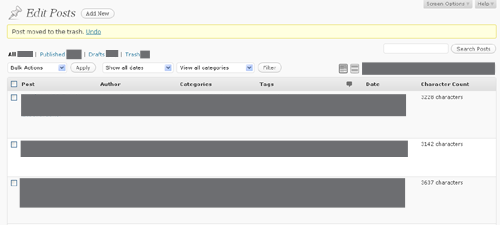
This plugin adds a column with the character count for each post to the posts overview in the Manage Posts SubPanel.
Additionally it informs about the character count for each post in the Edit Posts SubPanel (near the Word Count). So you
are up to date with the word and the character count while writing or editing your posts (after saving).
سکرین شۆتەکان

دامەزراندن
- Unzip the ZIP plugin file
- Copy the
posts-character-count-adminfolder into yourwp-content/plugins/directory - Activate the plugin through the ‘Plugins’ menu in WordPress.
پێداچوونەوەکان
هیچ پێداچوونەوەیەک نەنووسراوە بۆ ئەم پێوەکراوە.
بەشداربووان و گەشەپێدەران
“Posts Character Count Admin” نەرمەواڵەیەکی سەرچاوە کراوەیە. ئەم کەسانەی خوارەوە بەشدارییان تێدا کردووە.
بەشداربووان
“Posts Character Count Admin” وەربگێڕە بۆ زمانەکەی خۆت.
دەتەوێت بەشداربیت لە گەشەپێدان؟
گەڕان لە کۆدەکەدا بکە، سەیری تەمارگەی (SVN) بکە، یان بەشداربە لە ڕووداوتۆماری گەشەپێدان لە ڕێگەی (RSS).
ڕووداوتۆمارگەریی گۆڕین
2.1
- Bugfix release: german localization missing
2.0
- Now supporting pages
- Code refactoring
1.3
- Now using jQuery in the Edit Posts Subpanel
1.2
- New maintainer (thanks Crazy Girl)
- Code refactoring
1.1
- Name and URL update
1.0
- Initial release