

وەسف
This plugin lets you send automatic WooCommerce follow-up emails after a purchase, without complex automation tools.
Easily configure the sender, subject, content, and delay from a simple settings screen. Preview your email live, send test emails, and fine-tune the timing to match your workflow.
Ideal for order confirmations, thank-you emails, review requests, or simple post-purchase follow-ups.
Need help choosing the right timing or writing your email?
You can find practical guides and examples in our resources section: https://pixelmole.com/wordpress-plugins/follow-up-emails/resources/
Requires WooCommerce to be installed and active.
Features
✅ Send automatic follow-up emails after WooCommerce orders
✅ Choose when to send: immediately or after a custom delay
✅ Live email preview while editing
✅ Send test emails before going live
✅ Custom sender name, sender email, subject, and message
✅ Use placeholders like {{site_name}}, {{site_url}}, {{customer_first_name}}, {{customer_last_name}}
✅ Enable or disable follow-up emails at any time
✅ View follow-up email status directly in the WooCommerce orders table
✅ Built-in feedback button to share ideas or report issues
✅ Works with WP Mail SMTP, Mailpit, or any SMTP setup
What makes this plugin different?
You may have seen other plugins that offer email automation or follow-up emails for WooCommerce. This plugin takes a different approach:
✅ Built for simplicity
This plugin focuses on one thing: sending clear, reliable follow-up emails after a purchase, without complex automation builders or marketing jargon.
✅ Modern and lightweight
Designed for current versions of WordPress and WooCommerce, with clean, modern code and minimal overhead.
✅ No unnecessary features
Every feature is added with care to keep the plugin fast, easy to understand, and easy to maintain.
✅ Live preview and test emails
See exactly how your email looks before sending it, and send test emails to verify your setup.
✅ WooCommerce-first experience
Follow-up email status is visible directly in the WooCommerce orders table, so everything stays where store owners expect it.
✅ No nags or admin ads
No banners, upsells, or review nags cluttering your WordPress admin: just a clean, focused interface.
This plugin is actively developed and improved based on real user feedback.
Have questions or ideas? Use the built-in feedback button, your input helps shape the plugin!
Support
If you need help setting up the plugin or troubleshooting email delivery,
you’ll find step-by-step guides and common solutions here:
https://pixelmole.com/wordpress-plugins/follow-up-emails/resources/
Disclaimer
Use this plugin at your own risk. Always test on a staging site first.
سکرین شۆتەکان

Configure follow-up emails with live preview 
Send a test email before activating follow-ups 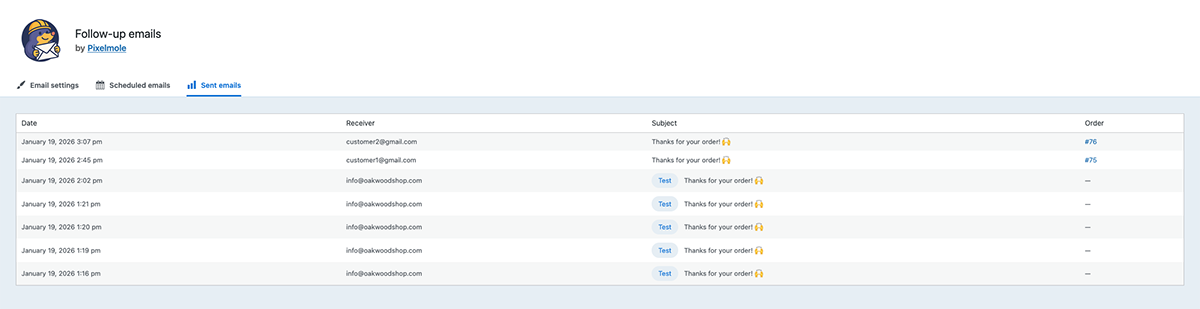
View a clear overview of all sent follow-up emails 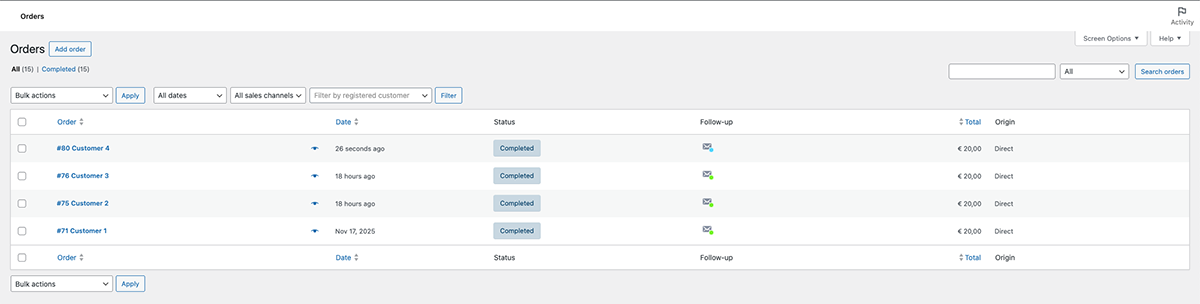
See follow-up email status directly in the WooCommerce orders table
دامەزراندن
- Upload
pixelmole-follow-up-emailsto the/wp-content/plugins/directory. - Activate the plugin through the Plugins menu in WordPress.
- Go to WooCommerce Settings Follow-up emails to configure.
پێداچوونەوەکان
هیچ پێداچوونەوەیەک نەنووسراوە بۆ ئەم پێوەکراوە.
بەشداربووان و گەشەپێدەران
“Pixelmole – Follow-up emails” نەرمەواڵەیەکی سەرچاوە کراوەیە. ئەم کەسانەی خوارەوە بەشدارییان تێدا کردووە.
بەشداربووان
“Pixelmole – Follow-up emails” وەرگێڕدراوە بۆ 1 زمان. سوپاسی وەرگێڕەکان دەکەین بۆ بەشداریکردنیان.
“Pixelmole – Follow-up emails” وەربگێڕە بۆ زمانەکەی خۆت.
دەتەوێت بەشداربیت لە گەشەپێدان؟
گەڕان لە کۆدەکەدا بکە، سەیری تەمارگەی (SVN) بکە، یان بەشداربە لە ڕووداوتۆماری گەشەپێدان لە ڕێگەی (RSS).
ڕووداوتۆمارگەریی گۆڕین
1.0.3
- Add settings link on plugin overview page
- Make admin pages responsive
- Small bugfixes
1.0.2
- Add live e-mail preview
- Add site_url parameter
- Layout fixes
- Add feedback button
- Add follow-up status column to WooCommerce orders table
1.0.1
- Navigation: CSS fix
- Better defaults on plugin installation
1.0.0
- Initial release.