

وەسف
Customers don’t just want a tracking number — they want confidence.
When someone places an order, the next questions are almost always:
“Has it shipped yet?”, “How many parcels is this coming in?”, “Which courier is it with?”, and “Can I track it right now?”
Kitgenix Order Tracking for WooCommerce gives your store a clean, reliable way to handle WooCommerce shipment tracking without bloated dashboards or complicated shipping suites.
You can add multiple tracking numbers to an order (perfect for split shipments, replacements, multi-parcel deliveries, or using different carriers), show a customer-friendly tracking view, include tracking in key WooCommerce emails, and offer a self-service tracking page to reduce support tickets.
On top of that, the plugin includes a Tracking Analytics dashboard so you can understand how quickly you ship, how often customers check tracking, and where exceptions happen — all from inside WooCommerce.
Built for real-world shipping workflows
This plugin is especially useful if you:
– ship orders in more than one box (multi-parcel / multi-shipment),
– sometimes part-ship items while the rest are backordered,
– use multiple couriers (DPD, Royal Mail, DHL, An Post, Parcelforce, etc),
– want to stop answering “where is my order?” emails all day,
– want a branded tracking page instead of sending customers to random courier sites,
– want tracking shown in email receipts the right way (clean, readable, and not duplicated).
What the plugin does (high level)
- Add one or more shipments to a WooCommerce order (carrier + tracking number + optional shipped date + per-item quantities).
- Automatically generate tracking links for supported couriers (and support a custom “Other” courier link).
- Display tracking details for customers:
- inside order emails,
- inside the customer’s order screen,
- and on a public “Track Your Order” page using a shortcode.
- Optionally show a delivery route map using Leaflet + OpenStreetMap (no Google Maps, no API key, no CDN).
- Track store performance with a WooCommerce admin Tracking Analytics dashboard (KPIs, breakdowns, recent shipments, lookup totals).
Key features (written for humans, not sales robots)
Multiple shipments and multiple tracking numbers
Many WooCommerce tracking plugins assume “one order = one parcel”. Real stores aren’t like that.
This plugin lets you add as many shipments as needed to a single order, and each shipment can include:
– the carrier,
– the tracking number,
– an optional shipped date,
– and (when relevant) which items and quantities shipped.
That means you can accurately handle part shipments, replacements, and split deliveries.
Built-in courier presets (UK & Ireland friendly)
The plugin includes a carrier registry with common couriers and tracking URL patterns, so customers get direct “Track shipment” links.
Includes presets such as:
DPD UK, DPD Ireland, DHL, Royal Mail, An Post, Parcelforce, Woodside Distribution, and an “Other” option for anything else.
A customer tracking page you control
Add a tracking page anywhere using:
[kitgenix_tracking_form]
Customers can look up tracking using:
– Order number + billing email, or
– Tracking number (handy when they only have the parcel details).
This reduces support tickets and gives customers a consistent, branded experience.
Tracking in WooCommerce emails (done cleanly)
Tracking details are appended to:
– the WooCommerce Completed Order email, and
– the plugin’s own Partially Shipped email.
The plugin includes duplicate-guarding so you don’t get repeated tracking blocks if email templates/hooks are customised.
“Partially Shipped” email (included)
When an order status changes to partially-shipped, the plugin can trigger a dedicated Kitgenix Partially Shipped email.
This is ideal if you ship items as they become available and you want customers to receive tracking early, without marking the entire order completed.
Optional delivery route map (OpenStreetMap + Leaflet)
If enabled, the tracking view can show an approximate route map using:
– Leaflet (bundled locally, no CDN),
– OpenStreetMap tiles,
– and Nominatim geocoding.
No Google Maps API key required.
Nominatim endpoint and contact email are filterable for responsible usage.
Tracking Analytics dashboard inside WooCommerce
The plugin adds a Tracking Analytics dashboard under the Kitgenix hub, focused on practical store ops metrics such as:
– shipped vs unshipped orders,
– total shipments,
– exceptions,
– average/median time-to-ship,
– carrier/status breakdowns,
– recent shipments,
– and total customer tracking lookups.
Analytics calculations are batched for performance and cached briefly (transient caching) so the dashboard stays fast.
How it works (quick overview)
-
Add tracking in the WooCommerce order screen
Open an order in wp-admin and use the Kitgenix Order Tracking meta box to add shipments.
You can choose items/quantities, set the carrier, and optionally update the order status (no change / partially shipped / completed). -
Customers receive tracking in emails
If tracking exists, customers see a clear “Shipment Tracking” section in key order emails. -
Customers can check tracking themselves
Add a “Track Your Order” page with the shortcode. Customers can search by order details or tracking number. -
You get visibility as a store owner
Use the Tracking Analytics dashboard to monitor shipping speed and customer tracking behaviour.
Quick Start
- Install and activate the plugin.
- Create a page called “Track Your Order” (or similar).
- Add this shortcode to the page:
[kitgenix_tracking_form] - Edit any WooCommerce order and add a tracking number from the Kitgenix Order Tracking meta box.
- Send a Completed Order email (or use Partially Shipped) and confirm tracking appears.
Developers
This plugin is modular and HPOS-aware.
Highlights:
– Tracking shipments are stored on the order as meta (array) and also indexed for performance.
– Tracking lookup supports both order+email and tracking number flows.
– Map uses bundled Leaflet (no CDN) and OpenStreetMap tiles. Nominatim endpoint and email are filterable.
Key files (for orientation):
– Admin meta box + save flow: includes/Admin/Order_Meta_Box.php
– Shipment storage/lookup: includes/Orders/Order_Tracking.php
– Carriers registry: includes/Support/Carriers.php
– Shortcode + tracking page: includes/Frontend/Shortcodes.php
– Email output + duplicate-guarding: includes/Emails/Email_Hooks.php
– Partially Shipped email class/templates: includes/Emails/ and templates/emails/
– Analytics dashboard: includes/Admin/Analytics.php
Text domain:
kitgenix-order-tracking-for-woocommerce
Data Handling
- Tracking shipments are stored as order meta.
- No custom database tables are created.
- The plugin can index tracking numbers to improve lookup performance.
- A tracking lookup counter is stored for analytics reporting.
- Uninstall does not automatically remove order meta (store owners may prefer to retain historical tracking).
External Services
This plugin can connect to external services in two situations:
-
When customers click courier tracking links
Tracking links open carrier tracking pages such as DPD, DHL, Royal Mail, An Post, Parcelforce, Woodside Distribution, or a custom carrier URL. -
When the optional map is enabled
The map can request:
– OpenStreetMap tiles
– Nominatim geocoding requests (to convert addresses to coordinates)
Leaflet assets are bundled locally (no CDN).
No personal data is sold or shared by this plugin. Where external services are used (carriers, OpenStreetMap, Nominatim), requests may include data required to perform the function (e.g., a tracking number in the tracking URL, or an address being geocoded for the map). Review the relevant provider policies for your use case.
Trademark Notice
All carrier names and logos are trademarks of their respective owners. This plugin is not affiliated with or endorsed by any courier or carrier.
Support Development
If this plugin reduces “where is my order?” tickets and helps customers self-serve tracking, you can support ongoing development here:
https://buymeacoffee.com/kitgenix
Credits
Built with ❤︎ by @kitgenix – https://kitgenix.com
سکرین شۆتەکان

Admin order screen: Add shipments with carrier, tracking number, shipped date, and item quantities. 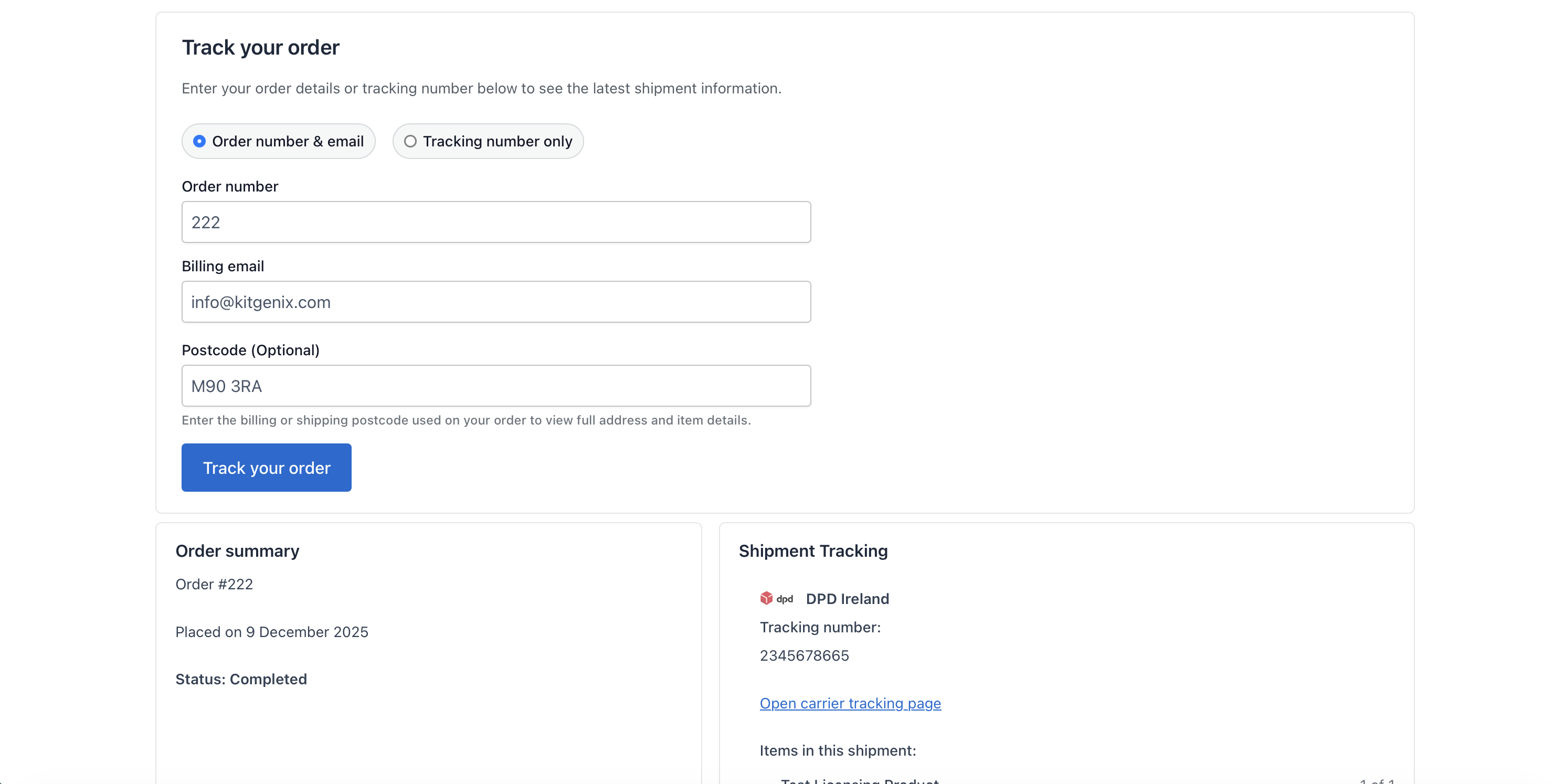
Customer tracking page: Track your WooCommerce order using order number + email or tracking number. 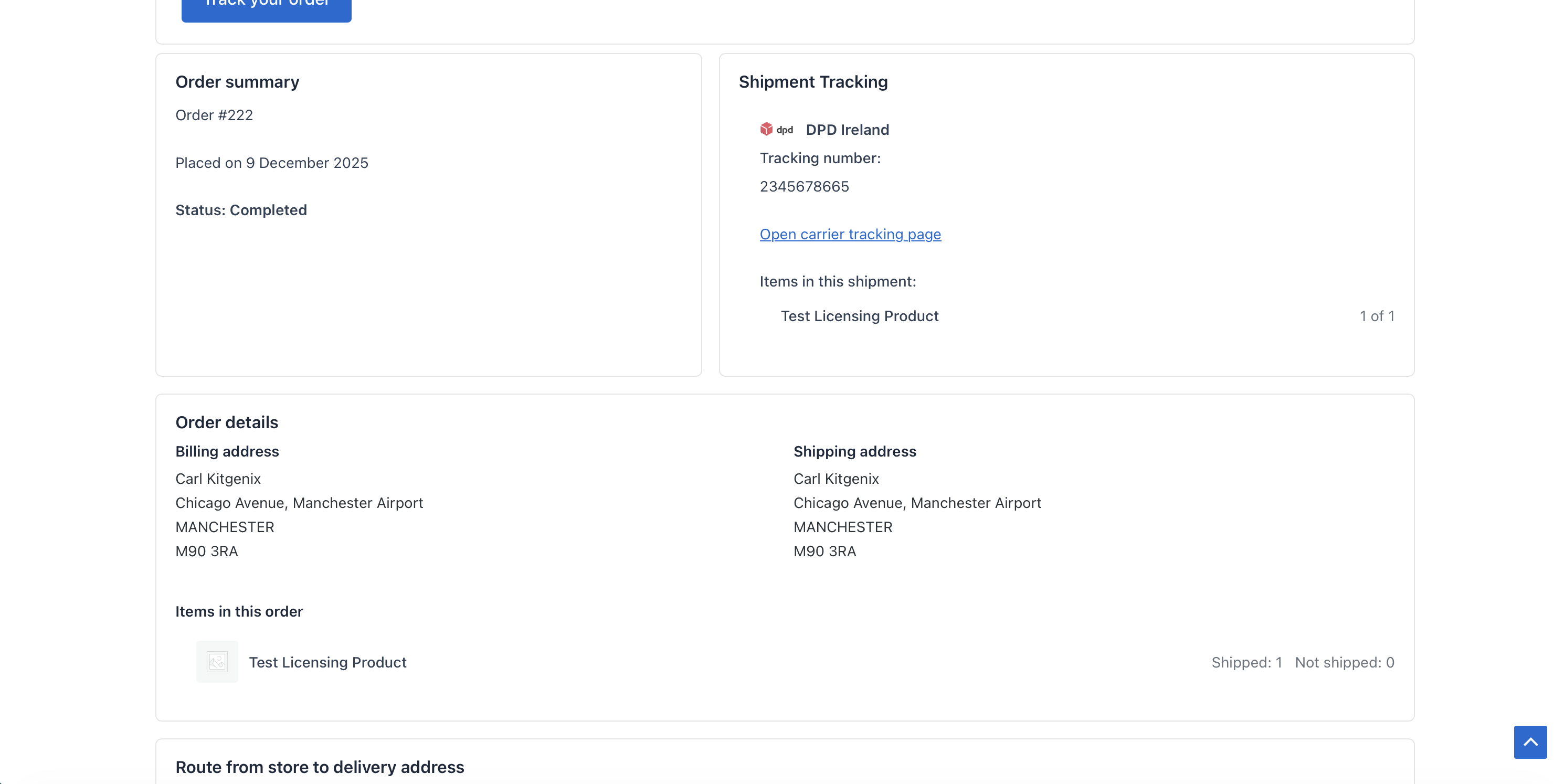
Tracking results view: carrier icons, tracking numbers, and direct “Track shipment” links. 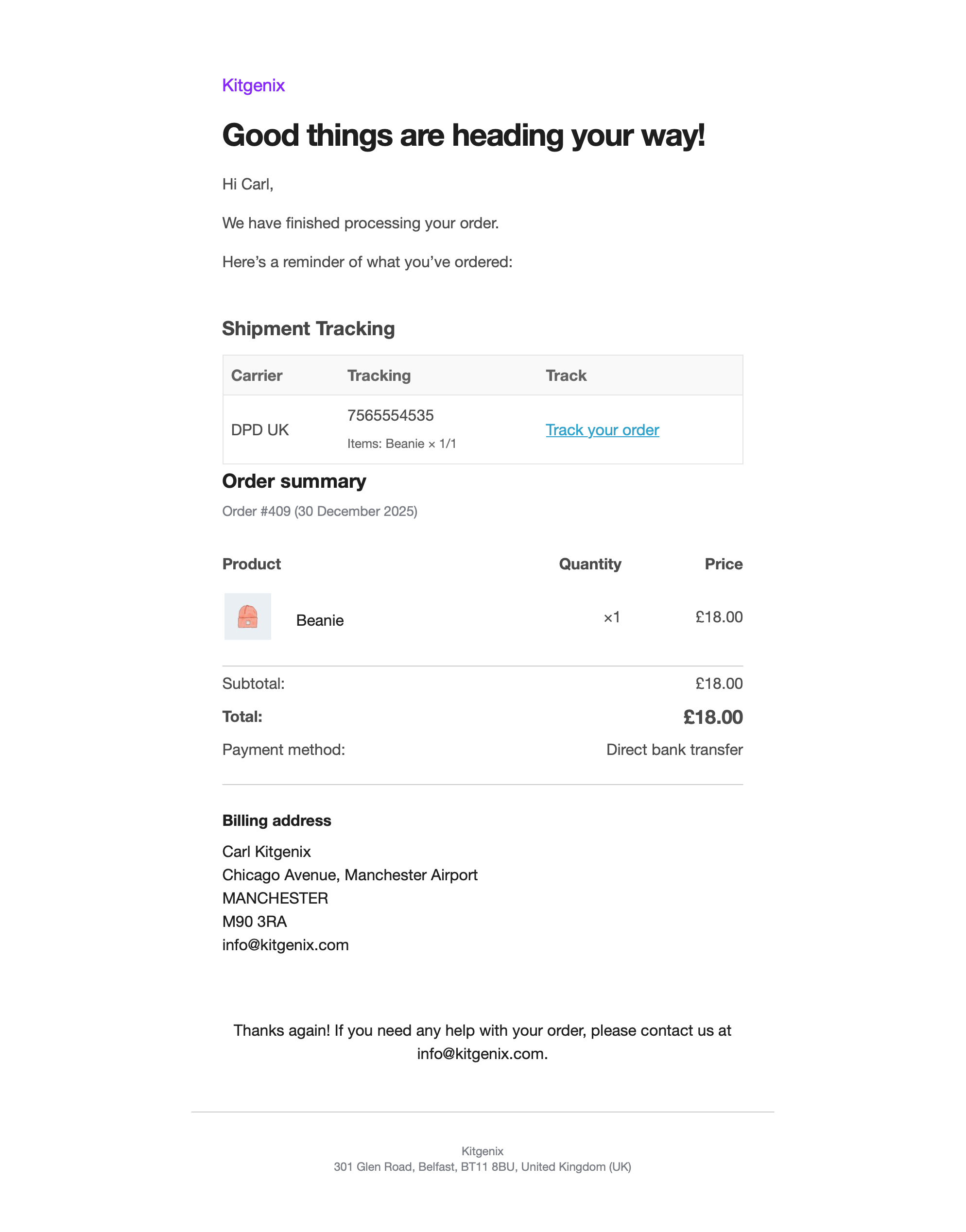
Completed Order email: clean Shipment Tracking section (mobile-friendly). 
Partially Shipped email: tracking shown alongside the shipped items context. 
Optional route map: Leaflet + OpenStreetMap delivery route preview. 
Tracking Analytics dashboard: shipped vs unshipped, shipments, exceptions, time-to-ship, and lookup totals.
دامەزراندن
- Install via Plugins Add New and search for “Kitgenix Order Tracking for WooCommerce”, or upload the ZIP to /wp-content/plugins/.
- Activate the plugin.
- Create a tracking page and add:
[kitgenix_tracking_form] - Add tracking to an order in WooCommerce Orders.
پهد
-
Can I add multiple tracking numbers to one WooCommerce order?
-
Yes. The plugin supports multiple shipments per order, including split parcels and partial shipments.
-
Can different shipments use different couriers?
-
Yes. Each shipment can have its own carrier and tracking number.
-
Which couriers are supported?
-
The plugin includes a built-in carrier registry with common couriers (UK & Ireland focused) such as DPD (UK/IE), Royal Mail, DHL, An Post, Parcelforce, Woodside Distribution, plus an “Other” option for custom courier links.
-
Can I use a courier that isn’t listed?
-
Yes. Choose “Other” and paste your own tracking URL, or extend carriers via developer hooks/filters.
-
Do customers get tracking in emails automatically?
-
Yes. When tracking exists, the tracking block appears in the Completed Order email and in the plugin’s Partially Shipped email.
-
Why isn’t tracking showing in the Completed Order email?
-
Common causes:
Tracking hasn’t been saved on the order yet, the Completed Order email is disabled in WooCommerce settings, or another plugin/theme overrides the email template and removes hooks. You can also test by sending the Partially Shipped email. -
What is the “Partially Shipped” email?
-
It’s a dedicated WooCommerce email included with the plugin, designed for stores that ship orders in stages. It can be triggered when an order status changes to partially-shipped.
-
Can customers track without logging in?
-
Yes. The tracking page is public. Customers can look up tracking using order number + billing email, or by tracking number.
-
Can customers track by tracking number only?
-
Yes. The tracking form supports lookup by tracking number (useful if the customer only has courier details).
-
Does the plugin work with HPOS?
-
Yes. Admin workflows are HPOS-aware and use WooCommerce hooks designed to work with modern order storage.
-
Do I need Google Maps for the route map feature?
-
No. The optional map uses Leaflet + OpenStreetMap. No API key required.
-
The map is blank — what should I check?
-
Check for a strict Content Security Policy, blocked tile requests, or aggressive script optimisation. Also ensure the tracking page is allowed to load OpenStreetMap tiles and that the required frontend assets are not being stripped.
-
Does this plugin create shipments in WooCommerce?
-
It stores tracking shipment data as order meta and displays it in the right places. It doesn’t replace full shipping/fulfilment suites or create WooCommerce Shipping labels.
-
Is this GDPR friendly?
-
The plugin doesn’t add tracking cookies. It uses WooCommerce order details (order number/email) to show tracking results. Carrier links and map tiles are external services; review their policies for your needs.
پێداچوونەوەکان
هیچ پێداچوونەوەیەک نەنووسراوە بۆ ئەم پێوەکراوە.
بەشداربووان و گەشەپێدەران
“Kitgenix Order Tracking for WooCommerce” نەرمەواڵەیەکی سەرچاوە کراوەیە. ئەم کەسانەی خوارەوە بەشدارییان تێدا کردووە.
بەشداربووان
“Kitgenix Order Tracking for WooCommerce” وەربگێڕە بۆ زمانەکەی خۆت.
دەتەوێت بەشداربیت لە گەشەپێدان؟
گەڕان لە کۆدەکەدا بکە، سەیری تەمارگەی (SVN) بکە، یان بەشداربە لە ڕووداوتۆماری گەشەپێدان لە ڕێگەی (RSS).
ڕووداوتۆمارگەریی گۆڕین
1.0.4 (27 January 2026)
- Maintenance: Minor bug fixes, i18n and PHPCS improvements; analytics and email template refinements.
- Tweak: Declared PHP requirement as 8.1.
- Maintenance: PHPCS/i18n/security fixes across admin and core files (output escaping, translator comments, optional nonce checks).
- Fix: Hardened analytics/admin asset enqueue detection to prefer $_GET[‘page’] then fallback to hook-suffix so analytics and hub assets load on existing installs.
- Tweak: Standardised allowed HTML and escaping in the admin hub and analytics views for consistent safe output.
1.0.3 (05 January 2026)
- Improvement: Updated the email hook to align with WooCommerce’s modern email template structure.
- Improvement: Implemented minor code refinements and cleanup for better consistency and maintainability.
1.0.2 (01 January 2026)
- Added a new top-level Kitgenix admin hub menu to manage Kitgenix plugins from one place (install/activate/open).
- Tracking Analytics is now available under Kitgenix Tracking Analytics, with a refreshed branded header and quick links to documentation/support/reviews.
- Analytics: added a Support tab and a new (privacy-safe) “tracking numbers added” metric; ranklist percentage bars now render reliably via a small admin script.
- Admin order screen: refactored the “Add tracking” modal markup/CSS class naming and improved modal show/hide behaviour.
- Admin styling updates: introduced shared Kitgenix design tokens (including better dark-mode support) and added bundled hub styles/logos.
- Developer-facing: renamed some internal actions/filters/options to match the full plugin slug (e.g. AJAX action, Nominatim filters, lookup counter option). Update any custom code that targets the old names.
1.0.1 (18 December 2025)
- Shortcode tracking page now shows a full order summary and item statuses when an order has not yet shipped (no shipments) — including optional addresses after postcode verification and the map when available.
- Added WooCommerce admin Tracking Analytics dashboard (WooCommerce Tracking Analytics) with KPIs for shipped/unshipped orders, total shipments, exceptions, average/median time-to-ship (days), and all-time tracking lookups.
- Added carrier and status reporting, including ranked breakdowns with percentage bars plus an improved recent shipments view.
- Redesigned Tracking Analytics into a modern, branded reporting dashboard (hero header, tabs, KPI cards with context text, insights panel, trend sparkline, quick date-range presets, and status pills).
- Improved Analytics performance and stability: orders are fetched in batches (avoids limit => -1), analytics calculations are transient-cached, and assets are enqueued using the correct admin hook for reliable loading.
- Minor UX/copy improvements for the unshipped state (“not shipped yet” messaging) and consistent rendering parity with shipped view.
- Email templates, placement, and styling updates to better match WooCommerce and site branding.
- Updated the Partially Shipped HTML and plain templates to align with WooCommerce’s modern email structure (header/footer hooks, intro block, and additional content handling).
- Guarded template variables to prevent undefined variable notices (e.g., $additional_content).
- Centralised tracking output into a single renderer (Email_Hooks::append_tracking_to_email) to remove duplication and improve maintainability.
- Updated the Partially Shipped template to call the renderer in the correct placement (above the order summary) and rely on hook-aware logic.
- Styling improvements: tracking tables and links now use WooCommerce email colour settings (per-email where available, global fallbacks otherwise) with automatic accessible link contrast when needed.
- Improved CTA behaviour and item display.
- Backwards-compatible changes that avoid modifying WooCommerce core templates — honours WooCommerce Settings Emails colours and remains compatible across WooCommerce versions.
- Analytics table polish: sticky headers, compact rows, zebra striping, truncation for long cells, and improved hover/readability.
1.0.0 (7 December 2025)
- Initial release
- Add multiple tracking numbers to WooCommerce orders
- Customer tracking page via
[kitgenix_tracking_form]shortcode - Carrier logos and automatic tracking URLs
- Optional OpenStreetMap delivery route display
- Custom “Kitgenix Partially Shipped” WooCommerce email
- Tracking details included in Completed Order email