

وەسف
Collect more mailing list subscribers with the Emercury for Elementor PRO plugin! Directly integrate all of your forms with Emercury to collect more mailing list subscribers and push your email marketing to the next level.
سکرین شۆتەکان
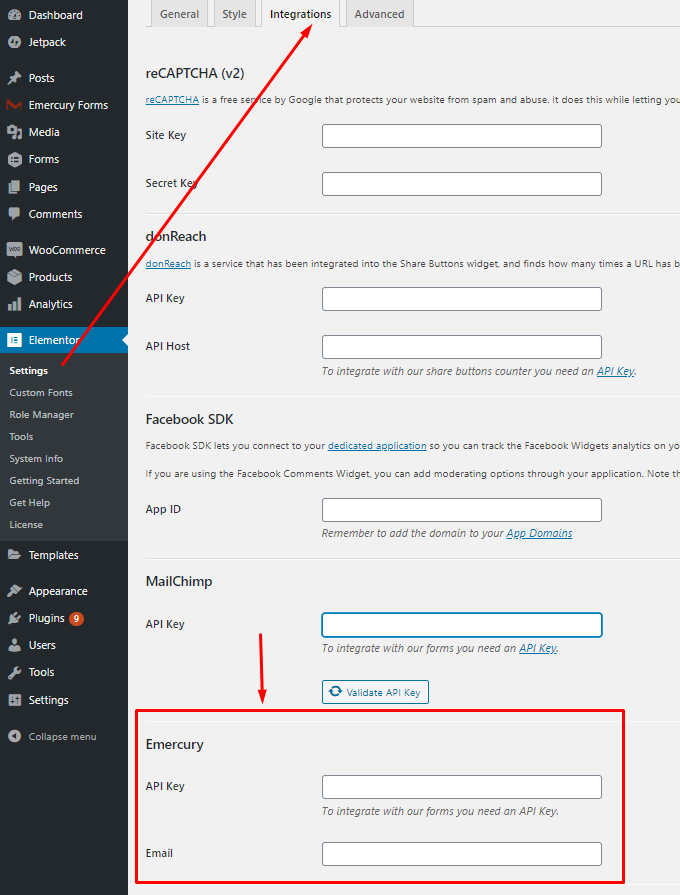
Elementor -> Settings -> Integrations. 
You can’t use Emercury without filled in API keys. 
Create widget form. 
Select Action after Submit “Emercury”. 
Mapping Emercury fields to Form.
دامەزراندن
This section describes how to install the plugin and get it working.
- Upload the plugin files to the
/wp-content/pluginsdirectory, or install the plugin through the WordPress plugins screen directly. - Install and activate plugin. Emercury add-on will work only with installed Elementor Pro plugin.
- Go to Elementor -> Settings -> Integrations section and enter the data for the Emercury API Settings, screen – 1.
- Сreate widget form, screen – 3.
- Select Action after Submit “Emercury”, screen – 4.
- You are done!
پێداچوونەوەکان
هیچ پێداچوونەوەیەک نەنووسراوە بۆ ئەم پێوەکراوە.
بەشداربووان و گەشەپێدەران
“Emercury Add-on for Elementor PRO” نەرمەواڵەیەکی سەرچاوە کراوەیە. ئەم کەسانەی خوارەوە بەشدارییان تێدا کردووە.
بەشداربووان
“Emercury Add-on for Elementor PRO” وەربگێڕە بۆ زمانەکەی خۆت.
دەتەوێت بەشداربیت لە گەشەپێدان؟
گەڕان لە کۆدەکەدا بکە، سەیری تەمارگەی (SVN) بکە، یان بەشداربە لە ڕووداوتۆماری گەشەپێدان لە ڕێگەی (RSS).
ڕووداوتۆمارگەریی گۆڕین
VER 1.0.4 – 26/08/2020
- Fixed: Conflict with other Emercury plugins
VER 1.0.3 – 26/06/2020
- Fix: Compatible with new version of Elementor
- Fix: Deactivation error
VER 1.0 – 31/03/2020
- Released