

وەسف
Adds a new option in the Media Settings page to select a different folder organization for your uploads.
Simply visit your /wp-admin/options-media.php page and select the desired folder structure.
Important: Not tested in Multisite.
Acknowledgements
Based on the following WordPress Answers
- Organize uploads by year, month and day
- How Can I Organize the Uploads Folder by Slug (or ID, or FileType, or Author)?
Localizations
- Português
- Español
سکرین شۆتەکان
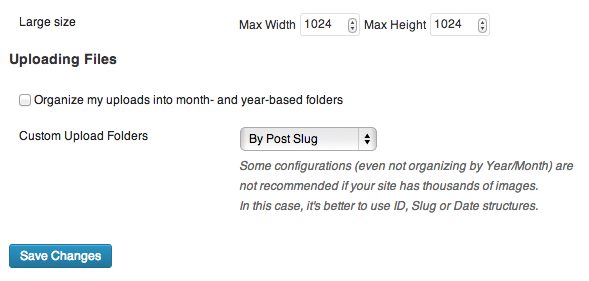
Settings page
دامەزراندن
- Upload
custom-upload-folders.zipto the/wp-content/plugins/directory. - Activate the plugin through the Plugins menu in WordPress.
- Go to Settings -> Media and set the desired folder structure.
Uninstall
The plugin option will be deleted via unsinstall.php.
پهد
- Doubts, bugs, suggestions
-
Don’t hesitate in posting a new topic here in WordPress support forum.
پێداچوونەوەکان
هیچ پێداچوونەوەیەک نەنووسراوە بۆ ئەم پێوەکراوە.
بەشداربووان و گەشەپێدەران
“Custom Upload Folders” نەرمەواڵەیەکی سەرچاوە کراوەیە. ئەم کەسانەی خوارەوە بەشدارییان تێدا کردووە.
بەشداربووان
“Custom Upload Folders” وەربگێڕە بۆ زمانەکەی خۆت.
دەتەوێت بەشداربیت لە گەشەپێدان؟
گەڕان لە کۆدەکەدا بکە، سەیری تەمارگەی (SVN) بکە، یان بەشداربە لە ڕووداوتۆماری گەشەپێدان لە ڕێگەی (RSS).
ڕووداوتۆمارگەریی گۆڕین
Version 1.2
- Fixed typo in plugin URL. Props to GermanKiwi.
- Updated translations.
Version 1.1
- Bug fix: better handling of the option
Add Year-Month to the subfolder -> /custom-folder/year-month/
Version 1.0
- Plugin launched