
설명
Allows users to change their password from a page (but the admin view)
Donations
스크린샷
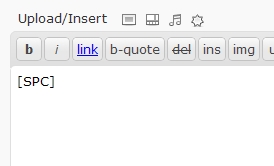
Shortcode example

Form
설치
- Download ‘WP-SimplePasswordChange.zip’.
- Unzip it.
- Upload the folder ‘WP-SimplePasswordChange’ directory to the /wp-content/plugins/ directory.
- Activate the plugin through the ‘Plugins’ menu in WordPress.
- Add the shortcode [SPC] in your page content.
- Optionnaly add url=”http://yourredirection.com” in the shortcode. Ex.: [SPC url=”http://www.disney.com”]
FAQ
- How to use the plugin?
-
Create a new page/post, and add the shortcode [SPC]
- How can I redirect the user to another website?
-
use the url parameter in the shortcode. Ex.: [SPC url=”http://www.disney.com”]
후기
이 플러그인에 대한 평가가 없습니다.
기여자 & 개발자

자국어로 “wp-simplepasswordchange”(을)를 번역하세요.
개발에 관심이 있으십니까?
변경이력
2010/10/05 – v1.1
- Added url as a parameter of the shortcode
2010/08/25 – v1.0
- Initial release