

설명
GetGenie is an All-in-one WordPress AI SEO & Content Assistant that lets you write content faster and optimize content smarter. It helps your content rank higher in SERPs, so you can drive qualified traffic & convert them. You can also use the AI tool’s ChatGPT-like AI Chat Assistant, Genie Chat for ideation, research, and getting instant responses.
The AI content writer is developed by Open AI’s advanced language models like GPT-3.5, GPT-4, GPT-4o, DaVinci, and more. This enables GetGenie to understand user prompts optimally and generate context-aware & human-like content.
With GetGenie, you can perform NLP & semantic keyword research, SERP analysis, & H2H competitor analysis, and create SEO-optimized blog posts in minutes.
The AI Content Writer and SEO plugin comes with 37+ AI writing templates that you can utilize to generate diverse content and copy types. WooCommerce product descriptions, social media copies, and product ad copies, to name a few.
| GetGenie Home Page | Template Page | Blog | Documentation | Need Support? | How to get License Key | Claim Free Credits |
Key Features of GetGenie AI
✅ NLP & Semantic Keyword Suggestions
✅ SERP & Competitor Analysis
✅ Visual Topical Map Builder
✅ One-click Blog Generation
✅ SEO Performance Insights
✅ 37+ AI content & Copywriting Templates
✅ 100% Unique & Plagiarism-free Content
✅ Multi-language Support (33+ languages)
✅ AI Image generation with Genie Image
✅ Free 2,500 AI Content Writing Words Credit/Month
✅ Genie Mode for Prompt-based Output
✅ Genie Chat (AI Chatbot) for Chatting with 22+ Personalities
✅ WooCommerce Product Description Generator
✅ Plagiarism Detector Integration
✅ Webview Editor (Playground) for Non-WordPress Users
GetGenie AI Writer’s Exclusive SEO & Content Features
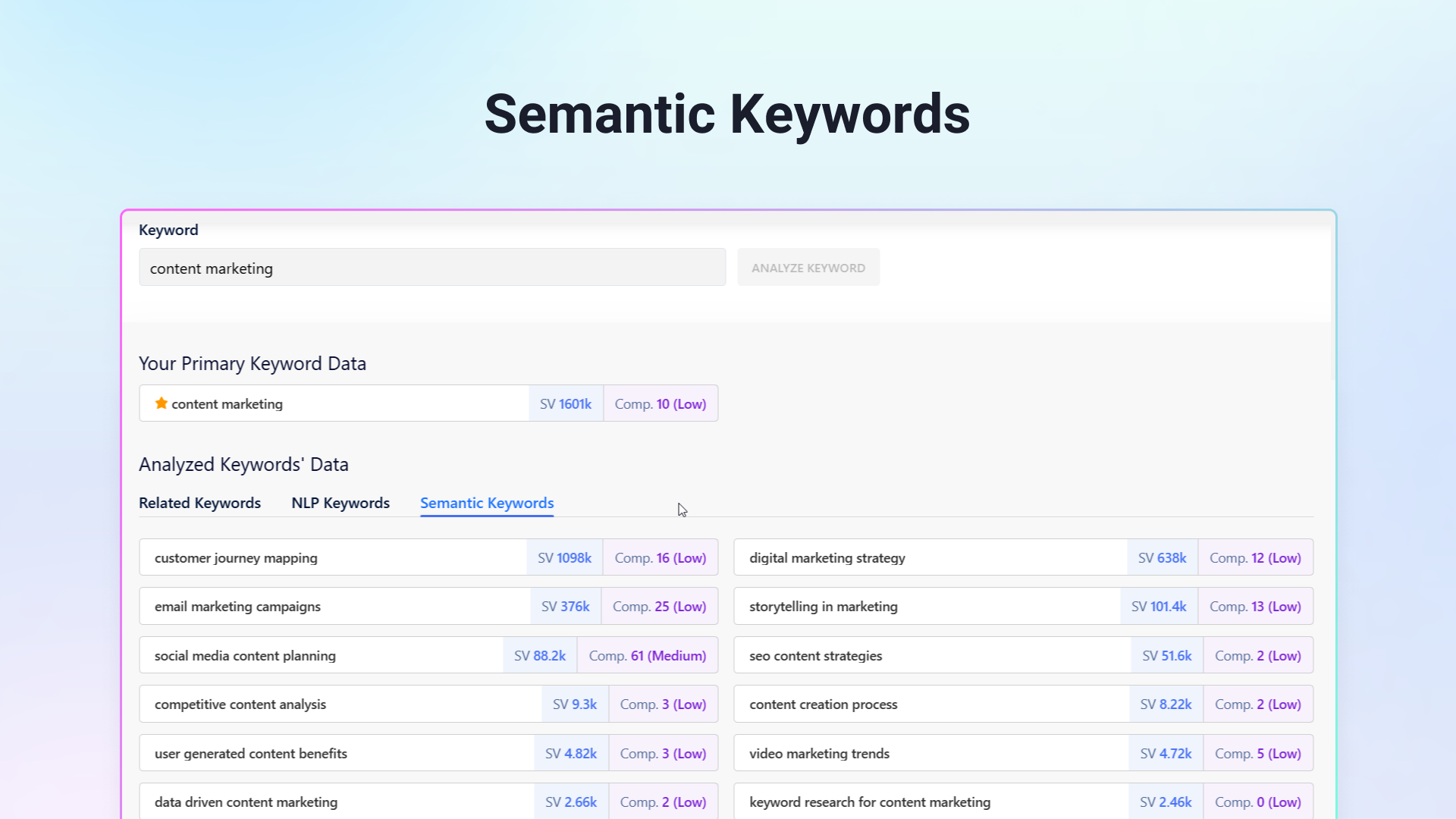
GetGenie AI SEO content writer displays high-intent NLP, semantic & related keywords on your input given keyword. This allows you to add depth to your content, satisfy search intent, and create high-quality content.
Besides generating long-form content, you can create a diverse range of short-form content, including product titles, headlines, descriptions, taglines, summary bullets, meta descriptions, content outlines, Call to actions, etc.
Also, the AI SEO tool shows useful AI keyword suggestions & valuable competitor data that will add value to your content.
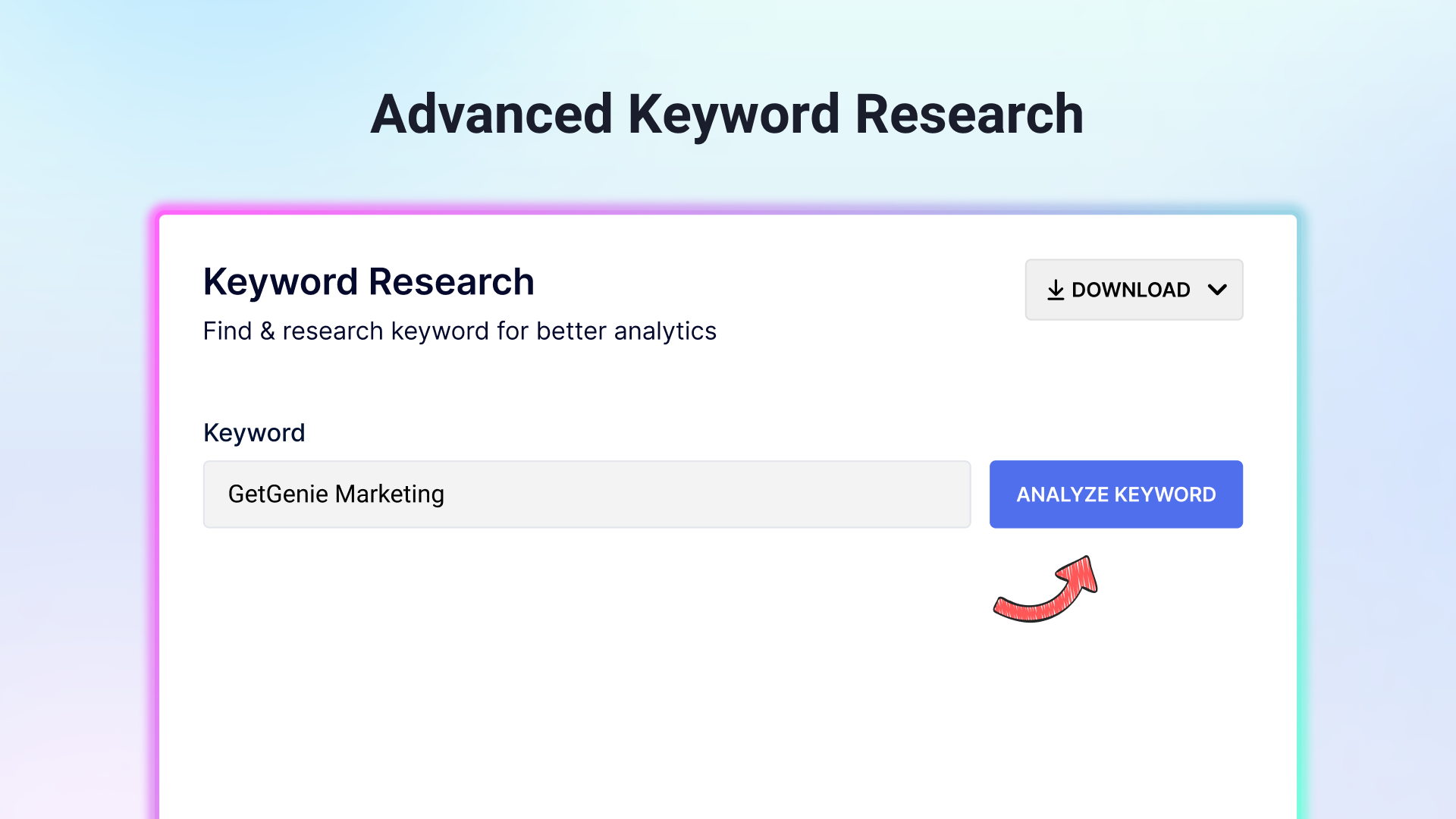
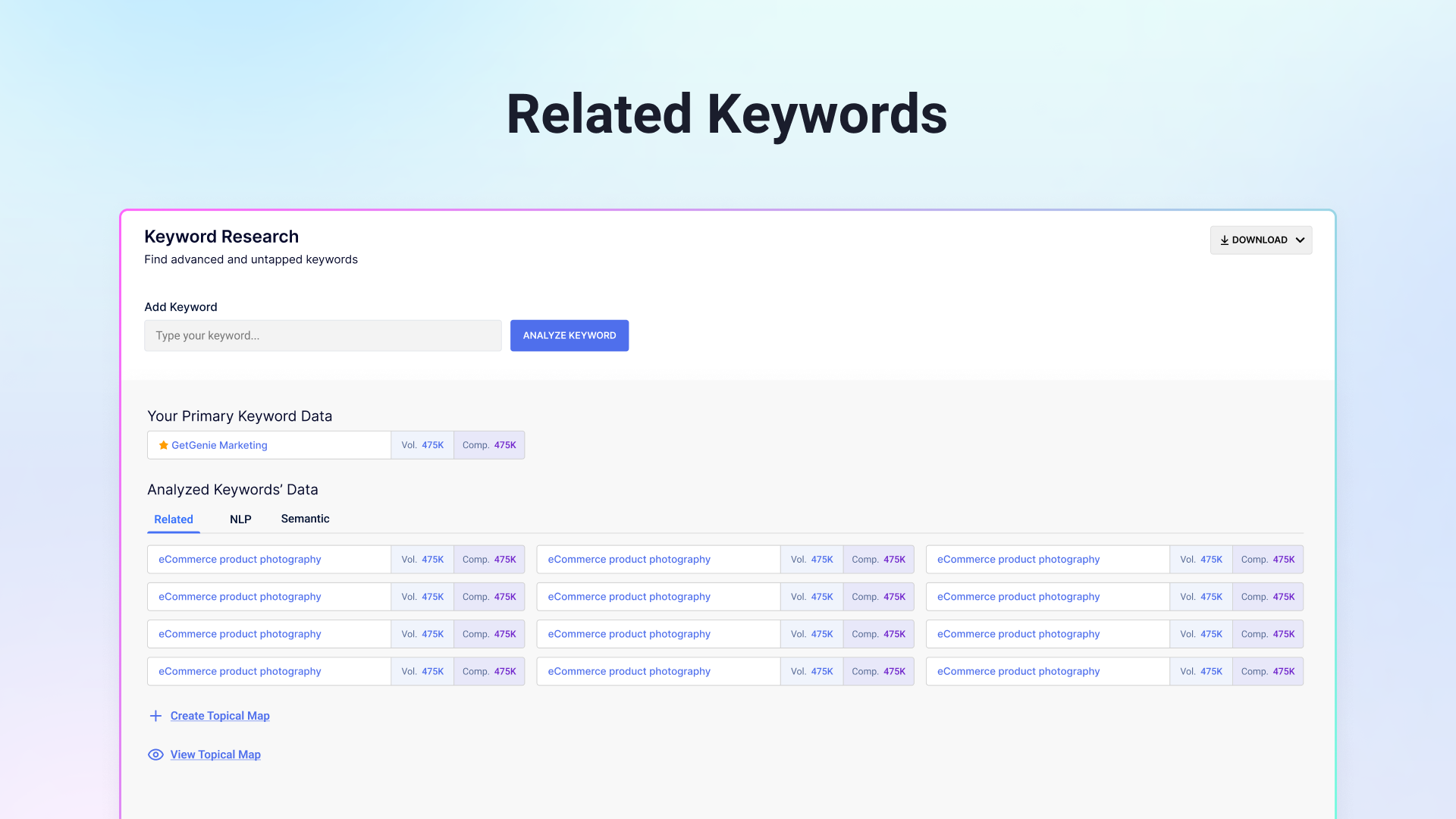
GetGenie’s AI-powered keyword research feature will strengthen your keyword discovery efforts! You can find Related, NLP, and Semantic keywords, to optimize your content & enhance your SERP ranking chances.
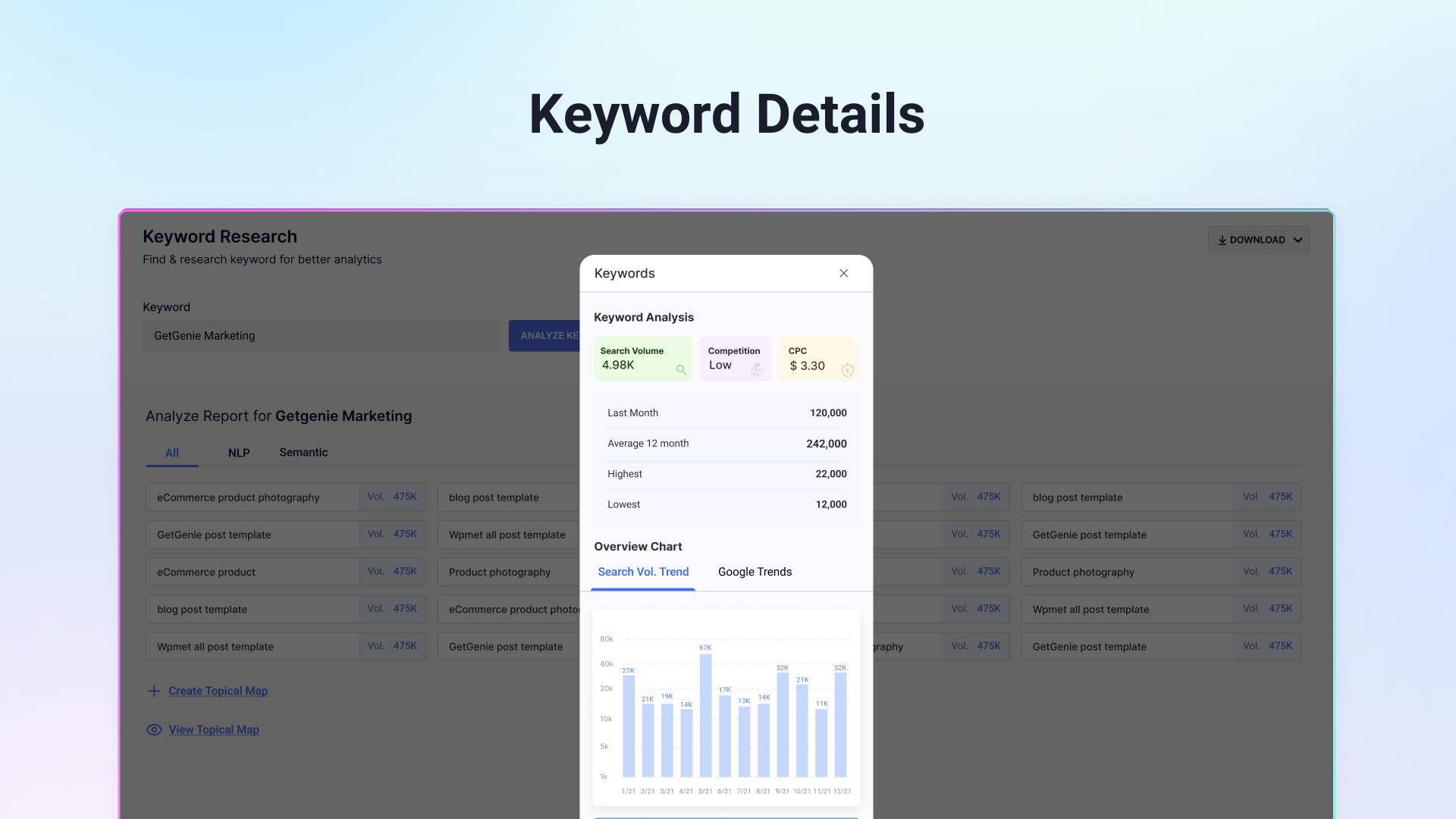
Also, find out the search volume, competition level, CPC, Google Trends, and more of your target & secondary keywords with GetGenie’s intuitive interface. The keyword research feature allows for creating a thorough Topical Map for your target keyword, outlining subtopics, second-level topics, and related keywords for them. This will make your content ideation & creation tasks easy & effective.
To view all the topical map data in table format and copy them to your work area, export the Topical Map as a PNG or CSV file.
Not just that, once the keyword research part is done, you can head straight to GetGenie’s “Blog Wizard” to write engaging & keyword-optimized blog posts in both one click and step-by-step process.
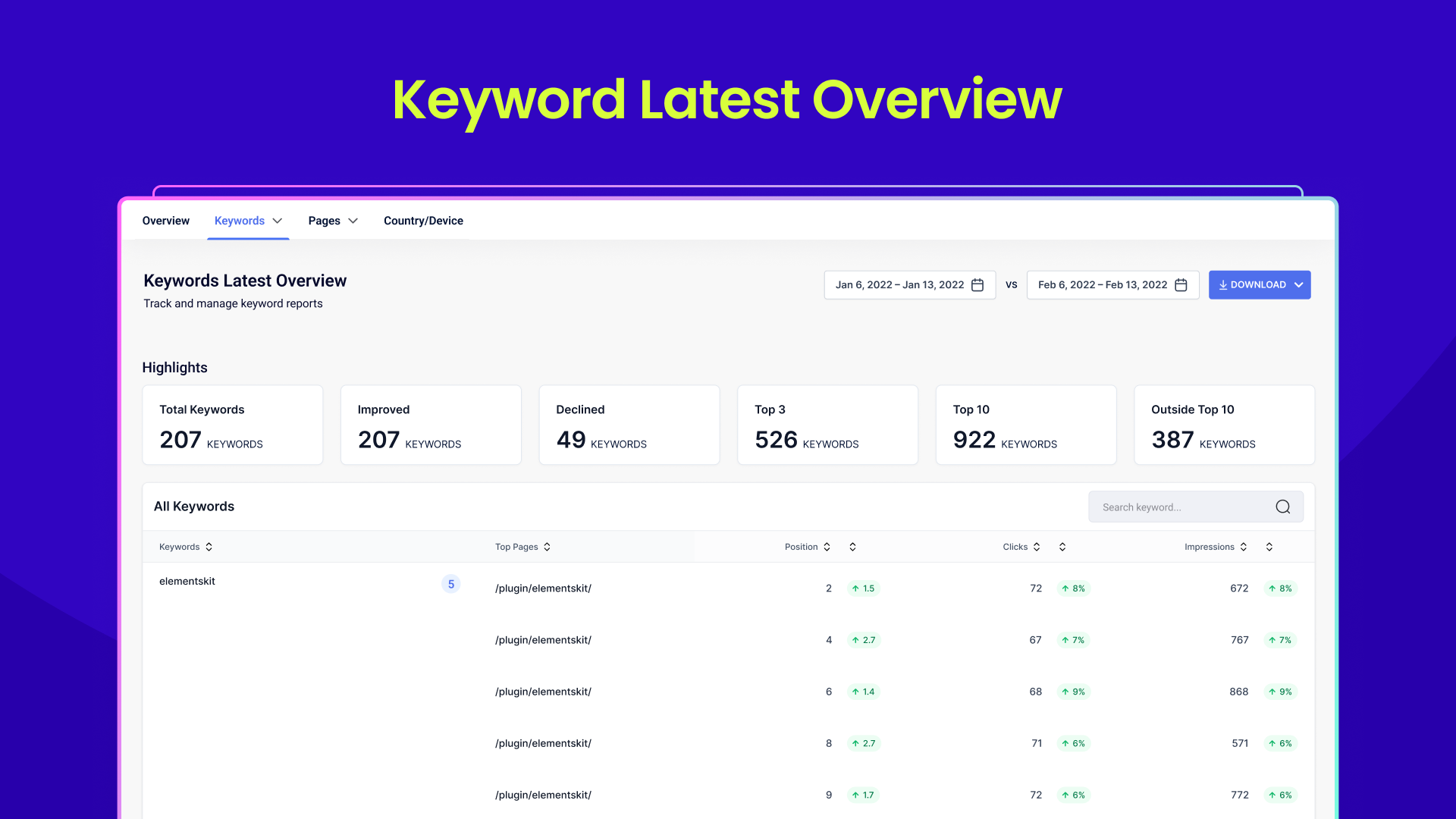
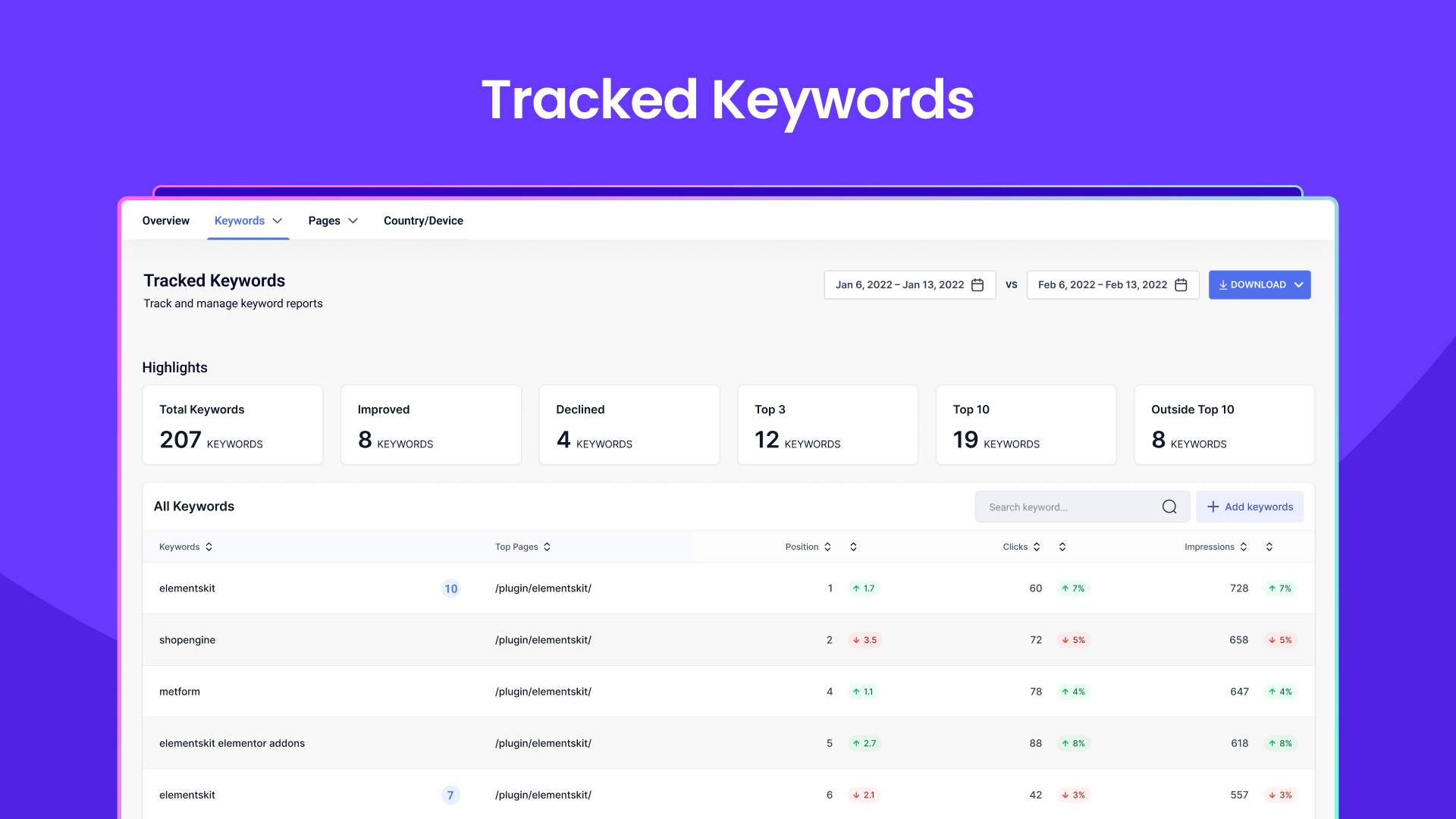
GetGenie provides historical organic data from Google so you can track and optimize your website’s SEO performance. With its SEO Insights feature, analyze existing content’s SEO metrics, including impressions, clicks, CTR, and positions over time to optimize your site.
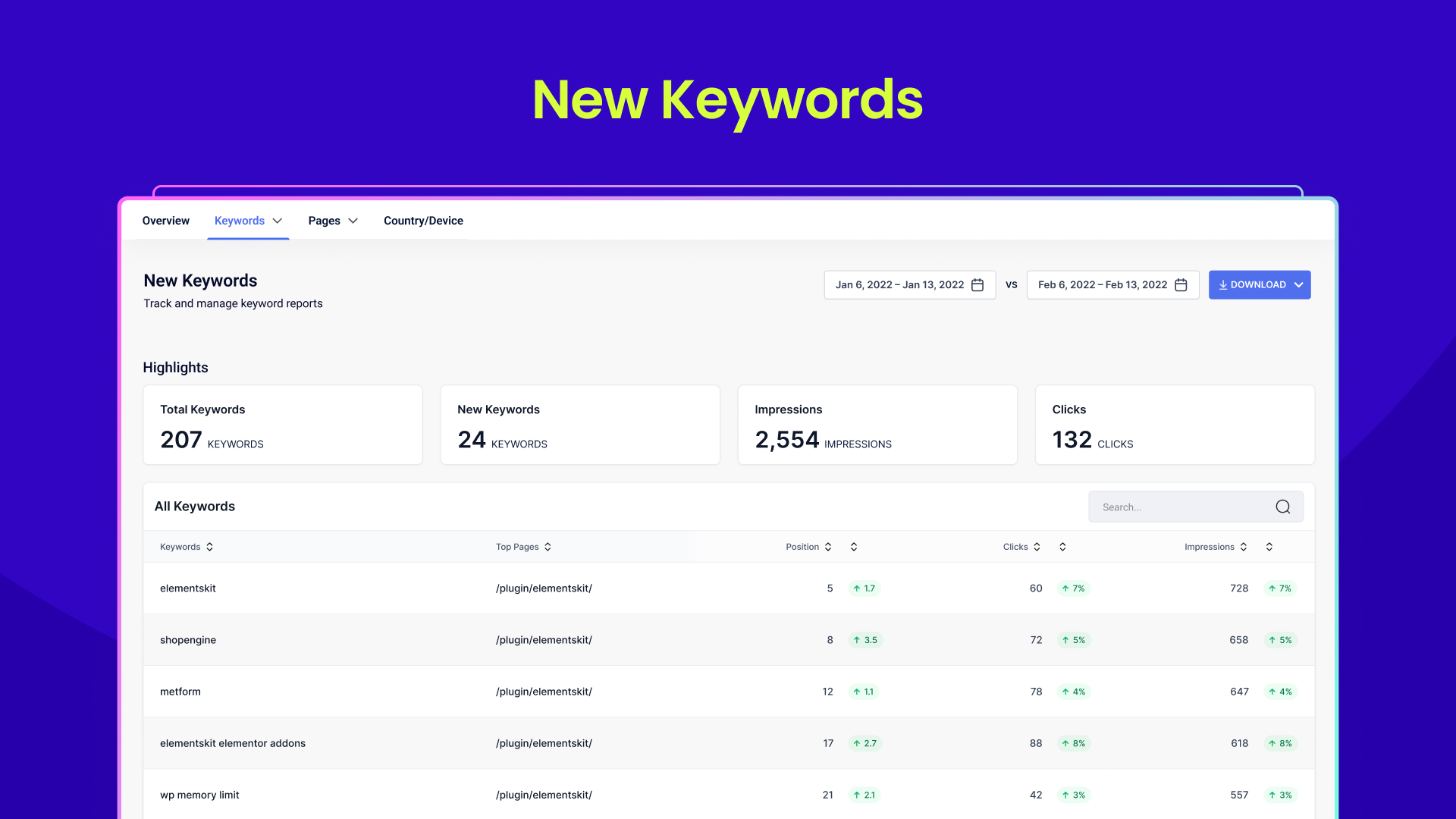
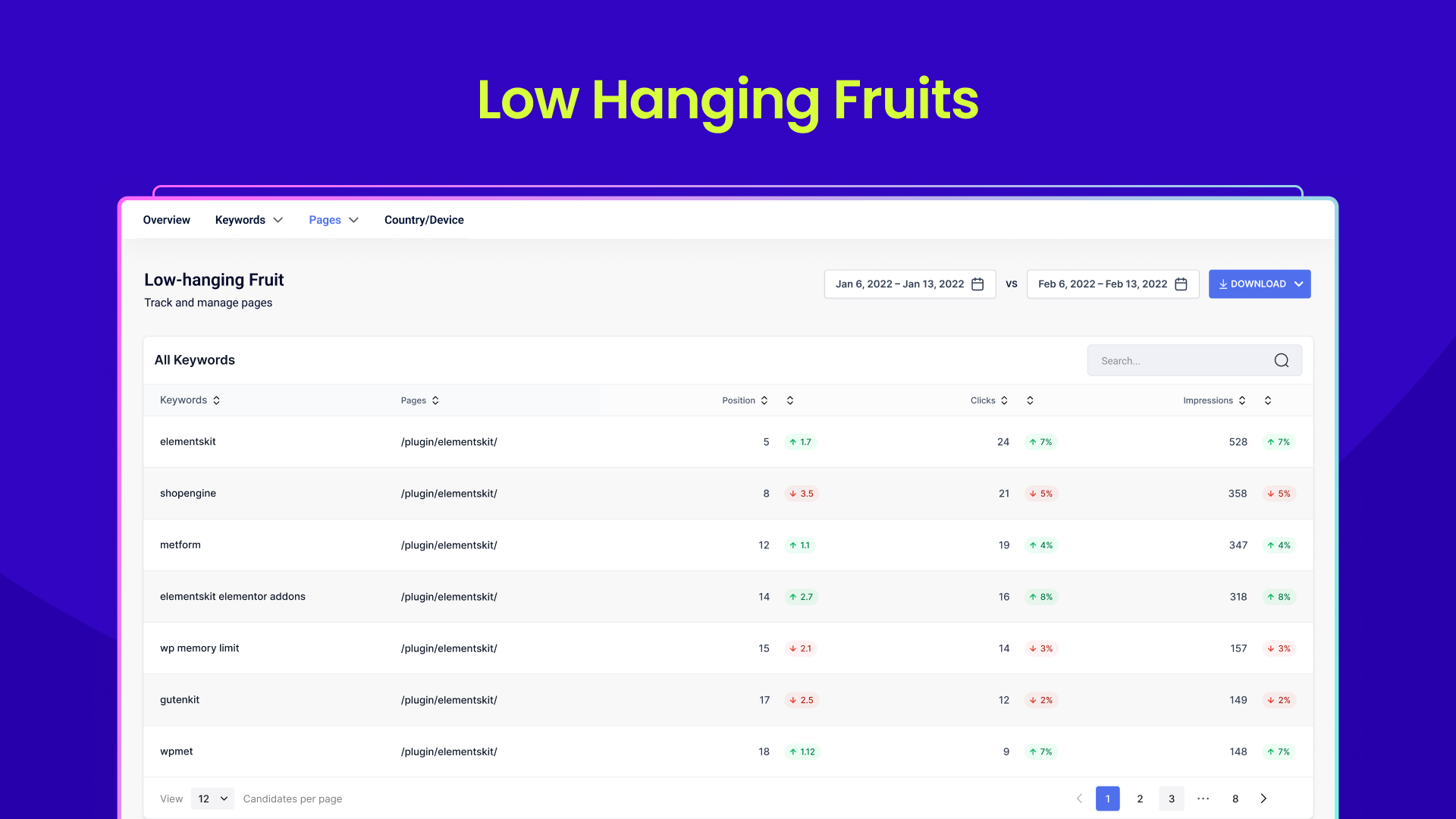
Also, find out the lost and new keywords in Google for a specified period. Explore opportunities to optimize with “low-hanging fruit keywords”.
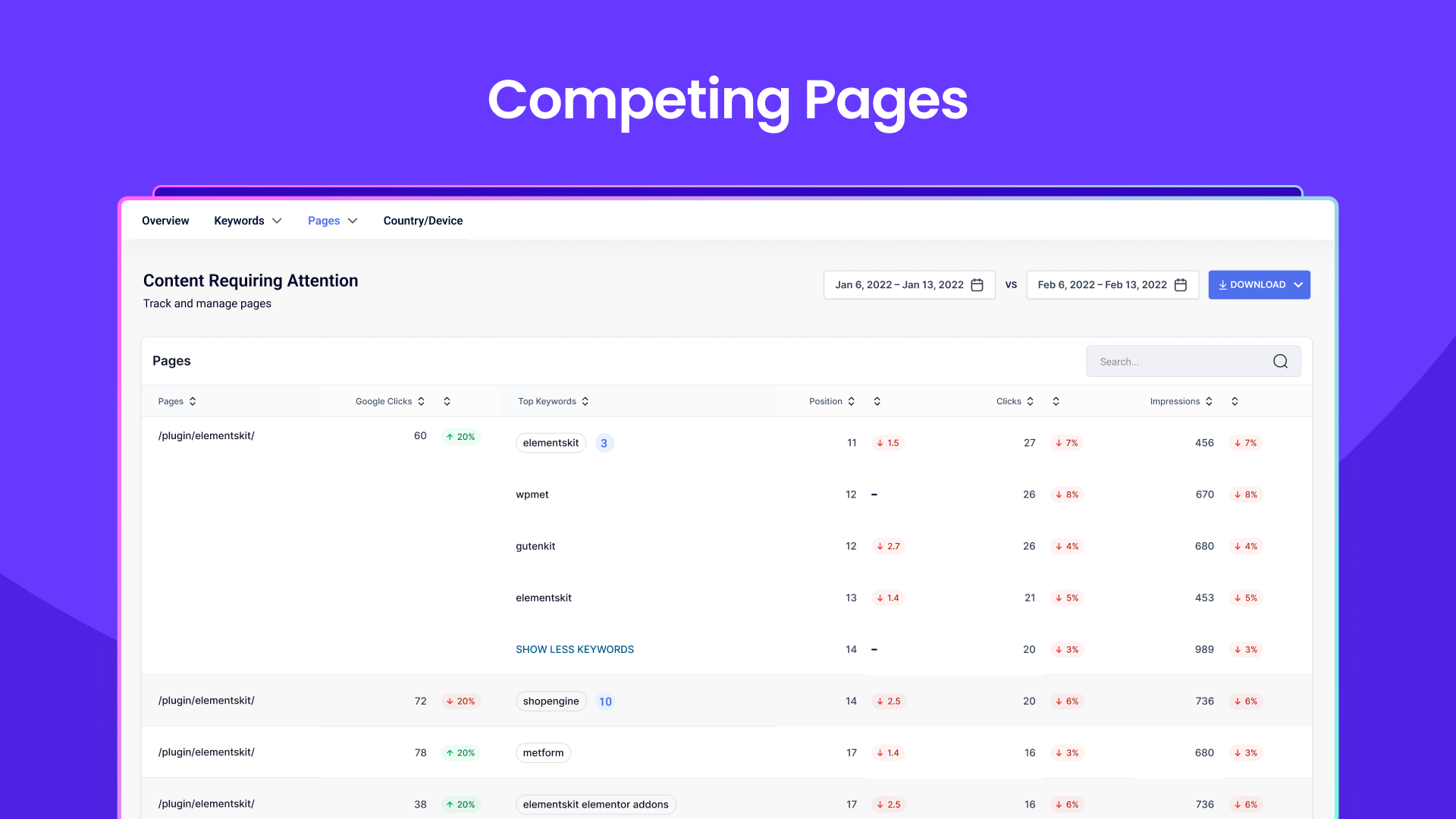
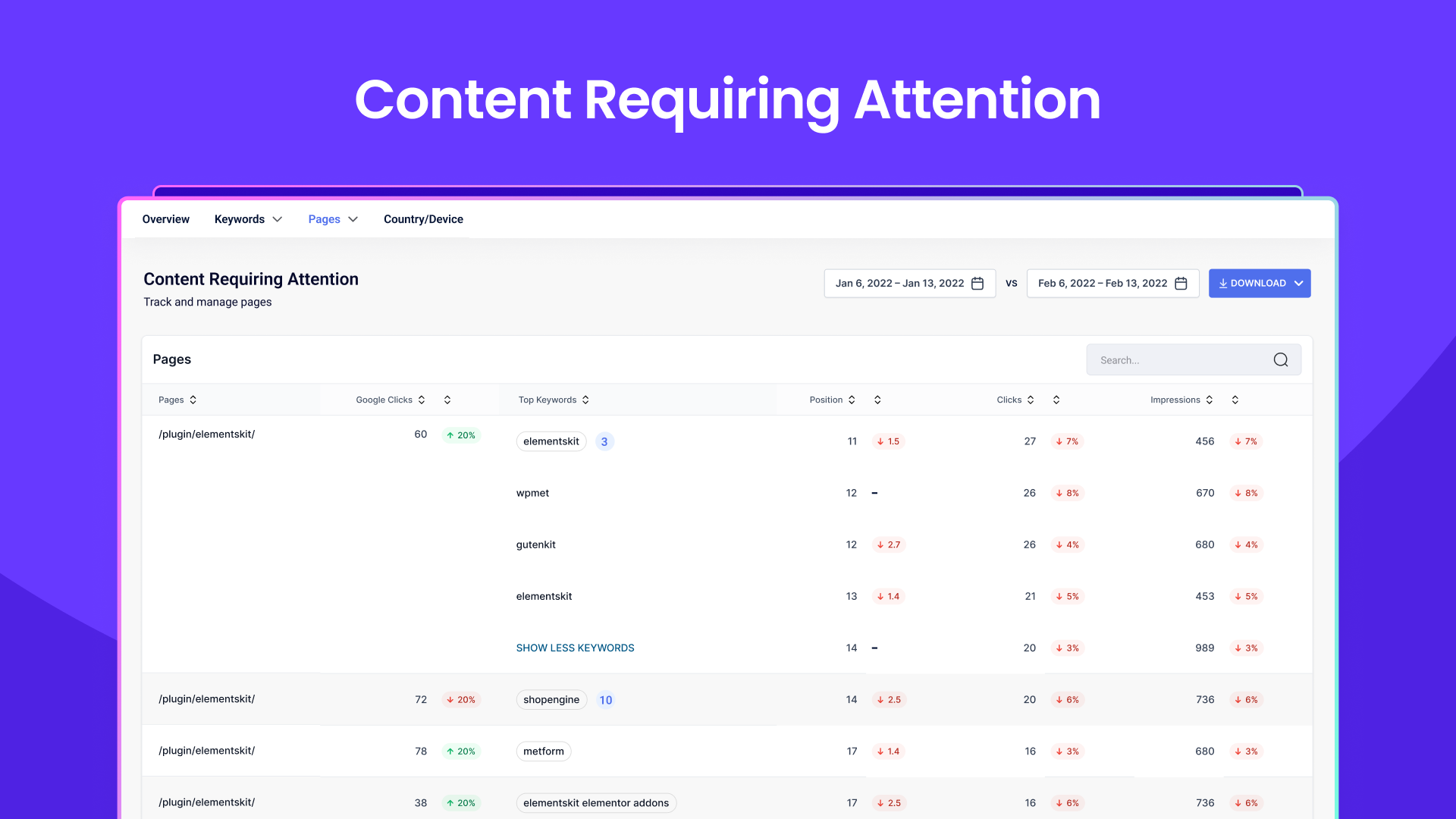
In addition, you can use the feature to identify high-performing pages, along with low-performing pages that need SEO improvements. Also, it shows you the competing pages that you can analyze and avoid keyword cannibalization.
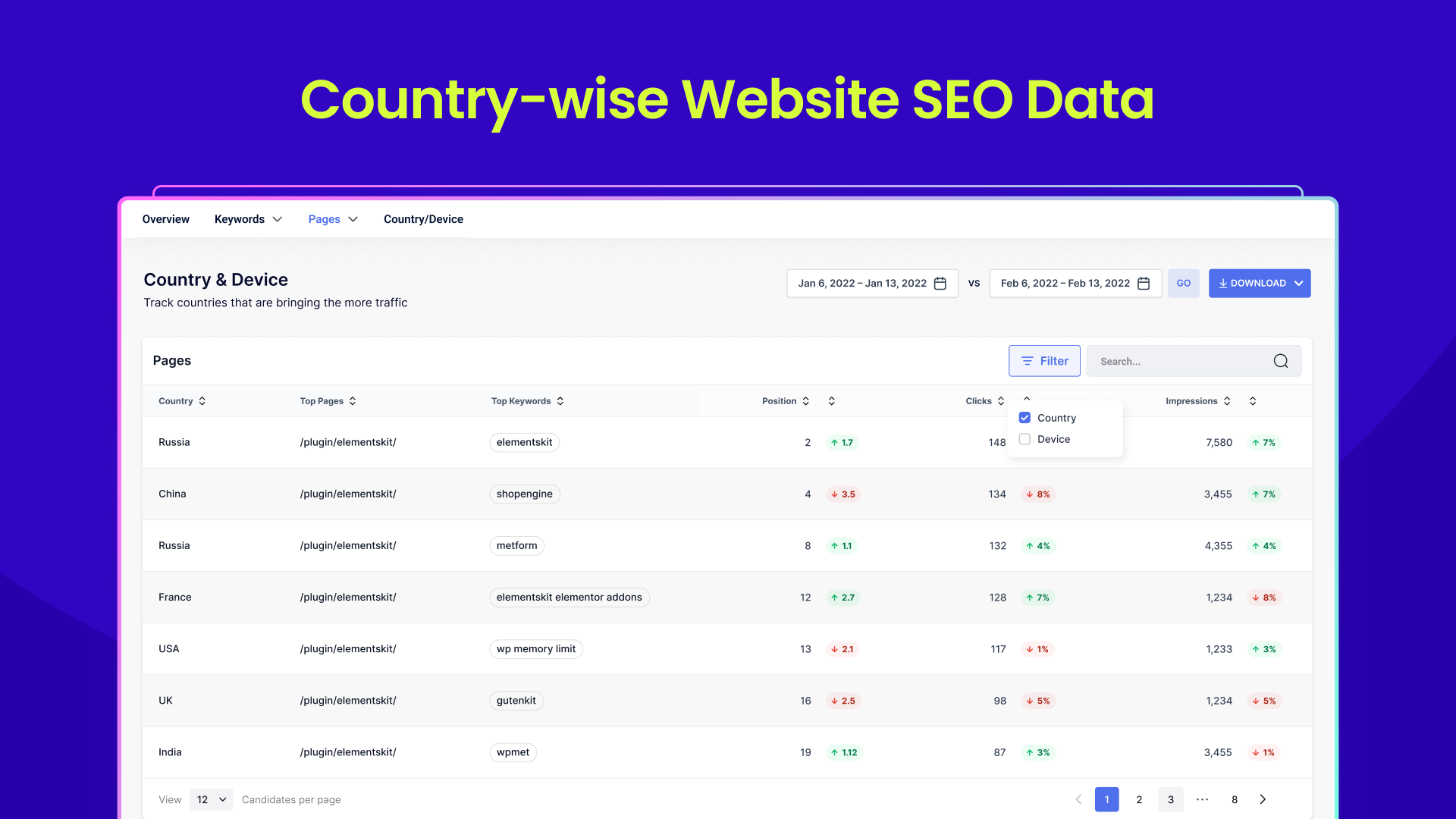
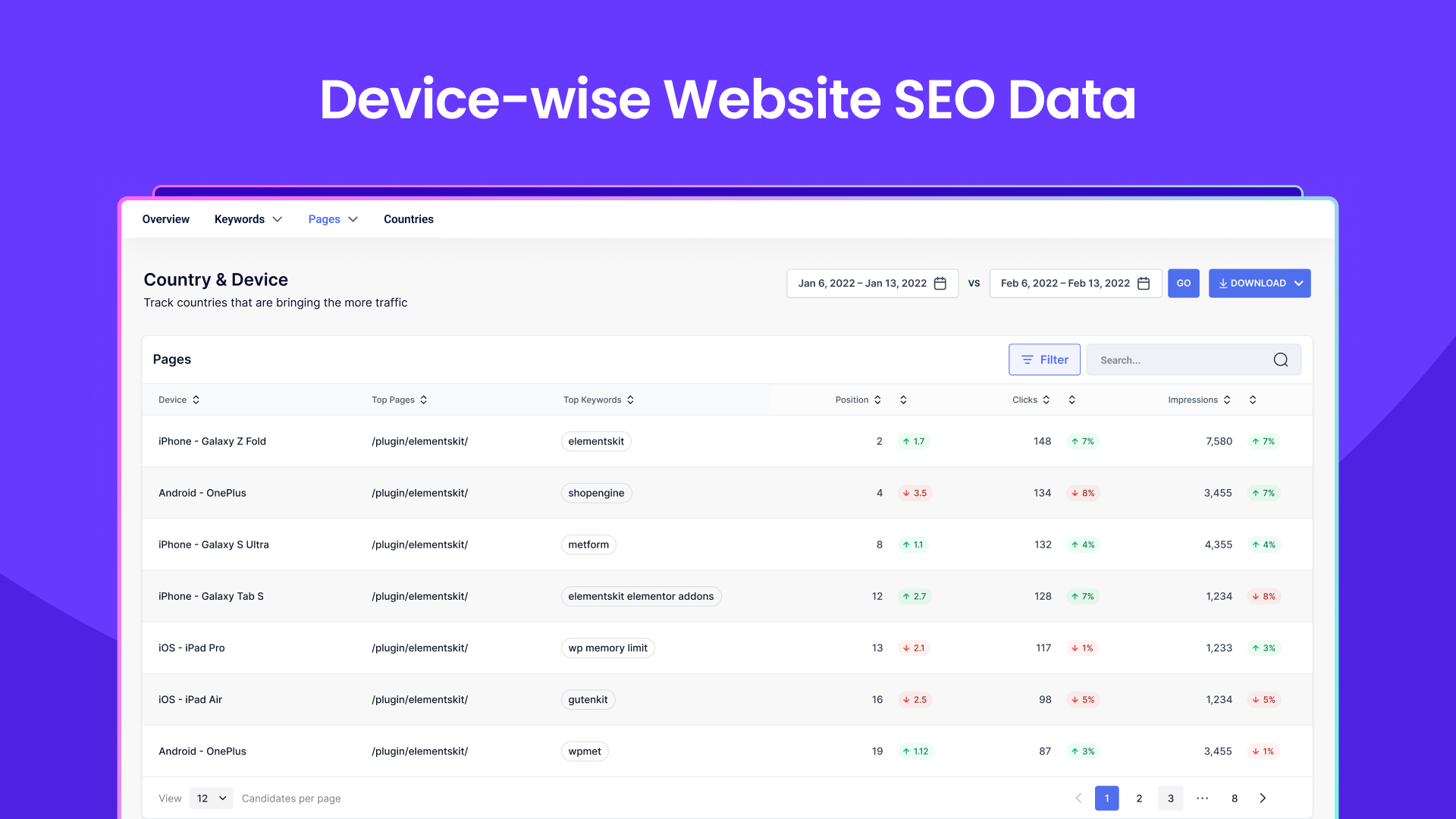
The SEO Insights feature lets you track the regions and devices your content generates the most traffic for. Plus, find out which keywords and pages rank highest in those regions.
With the competitor H2H analysis feature of this SEO plugin, you can easily access competitor analysis data and discover ranked competitor blogs on specific keywords! Such a time-saving feature for content writers, keyword researchers, and SEO users
NLP 키워드 제안
GetGenie AI SEO 플러그인은 NLP 알고리즘을 사용하여 텍스트를 분석하고 관련 키워드를 추천합니다. 이는 검색 엔진 최적화를 활성화하고 콘텐츠의 명확성과 간결성을 보장합니다.
With the AI SEO assistant, you can conduct head-to-head competitor analysis using Natural Language Processing technology, identifying LSIs and weaknesses to optimize your blog post and surpass specific competitors on the SERP.
You will also get a score for your blog post (GetGenie-generated or otherwise) based on various factors like keywords, word count, and more using GetGenie AI . Also, this SEO plugin also offers suggestions to improve on-page SEO and NLP for better search engine ranking.
WordPress Blog Wizard:
Its Blog Wizard template simplifies SEO-optimized blog post creation on WordPress with features like personalized language selection, creativity levels, and output quantity.
You can generate six outputs at once, customize outlines, rewrite content, and assess content quality with the in-built SEO Mode.
One Click Blog Generation:
GetGenie’s Blog Wizard template introduces a one-click blog generation feature! This feature helps to generate an entire SEO-optimized blog post in just one click.
This 1-click blog generator of GetGenie AI SEO content writer is compatible with WordPress Gutenberg as well as the classic editor. You can find this AI feature in GetGenie’s web editor too.
GenieChat – Real-time AI Chatbot:
GenieChat, AI chatbot (Open AI ChatGPT alternative) is another outstanding addition to GetGenie AI content writer and SEO tool. This advanced AI copilot chatbot comes with 22+ AI chat personalities to give you a seamless live chatting experience such as Professional AI Writer, AI Product Manager, AI Tech Writer, etc.
Genie Mode:
The Genie Mode, a special feature in the plugin, helps in content creation, generating SEO-optimized content quickly upon providing prompts.
🛒 GetGenie AI 우커머스 템플릿:
- WooCommerce Product Title: Create catchy titles for your WooCommerce products.
- WooCommerce Product Short Description: Generate concise product descriptions.
- WooCommerce Product Long Description: Craft detailed descriptions for your products.
📝 GetGenie AI 카피라이팅 템플릿:
- AIDA Framework: Craft attention-grabbing copy using the AIDA framework.
- BAB Framework: Generate persuasive AI copy with the Before-After-Bridge model.
- PAS Framework: Create high-converting AI copy using the Problem-Agitate-Solution formula.
- Product Ad Copy: Generate compelling ad copy for your products.
- Taglines: Craft memorable taglines to captivate your audience and promote your brand.
🌐 GetGenie AI 소셜 미디어 템플릿:
- Social Media Post/Copy Generator: Effortlessly create engaging AI-powered social media content.
- Instagram Bio Generator: Craft captivating bios for your Instagram profile.
- Instagram Caption Generator: Generate catchy captions to accompany your Instagram posts.
- LinkedIn Post Generator: Create professional and engaging content for LinkedIn.
- Twitter Post Generator: Craft concise and impactful tweets for your Twitter feed.
- Twitter Thread Generator: Easily create threaded tweets for longer conversations on Twitter.
🎖️ Access More Templates of GetGenie AI Assistant:
- Title Ideas: Generate captivating titles for your content.
- Related Topics: Explore related topics to enrich your content.
- Outline: Generate structured outlines for your articles.
- Meta Description: Craft compelling meta descriptions for improved SEO.
- Content Rewriter: Rewrite existing AI or human-written content to make it unique and engaging.
- Bullet Point to Answer: Convert ideas into concise bullet points.
- Explain Why: Generate explanations for complex topics.
- List of Questions: Create lists of questions to guide your content.
- Next Paragraph: Generate the next paragraph based on your content.
- Paragraph for Heading: Create paragraphs suitable for headings.
- Summary Bullets: Summarize content into bullet points.
- Next Sentence: Generate the following sentence for your content.
- Feature – Benefit: List product features along with their benefits.
- Feature Snippet: Make snippets to highlight product features.
- Pros and Cons: Create lists of pros and cons for comparison.
- Listicle Ideas: Get unique ideas for creating Ai-powered listicle articles.
- Short Answer: Generate short answers for FAQs section.
- Call to Action: Craft compelling calls to action (CTA) text to engage your audience.
- Paragraph Answer: Generate paragraphs to answer specific questions.
- Paragraph Compression: Compress paragraphs for concise content.
- Definition: Generate definitions for terms.
- Conclusion: Create compelling conclusions to your content pieces.
🧩 GetGenie AI 통합 및 호환성:
✅ 표절 검사기: GetGenie AI의 통합 Copyscape 표절 검사기로 AI 콘텐츠의 독창성 보장
✅ Elementor 호환성: SEO 작성 템플릿을 Elementor와 원활하게 통합하여 최적화된 콘텐츠 제작
✅ Bricks Builder 호환성: Bricks Builder에서 개요 생성, 콘텐츠 재작성 및 랜딩 페이지 카피 작성 원활 수행
✅ Oxygen Builder 호환성: Oxygen Builder 내에서 원클릭 블로그 솔루션 및 카피라이팅 도구 활용
✅ FluentCRM 통합: FluentCRM에서 바로 사용할 수 있는 이메일 마케팅 템플릿으로 이메일 마케팅 강화
🧞 Genie Image – AI Image Generator
Another killer addition to the GetGenie AI’s family is the Genie Image WordPress plugin. Powered by Open AI’s DALL-E 2, it revolutionizes AI image creation with high-resolution, context-aware images directly to your WordPress media library.
Genie AI image is also compatible with any WordPress theme or builder, it saves time and design expenses by eliminating the need for stock photo services and design collaborations.
📢 웹뷰 플레이그라운드 – GetGenie Ai
If you want to use GetGenie without accessing WordPress, explore its Webview Playground SaaS interface. You will get access to all the core features of the AI tool through the interface, including content generation, keyword research, SEO, and competitor analysis.
This intuitive interface of ensures a seamless content writing experience and you can generate SEO-optimized posts with ease. Simply copy the output and paste it into your preferred editor or feed.
🎯 GetGenie AI를 시작할 시간입니다
GetGenie AI SEO Plugin and content writing tool utilizes the API from OpenAI along with advanced artificial intelligence algorithms. As a result, GetGenie AI not only creates SEO content automatically but also optimizes it to rank well on search engines.
The best part is you can claim 2500 words free credits for using GetGenie AI content writer and SEO tool to generate free SEO-optimized content.
👨💻 »SOCIAL CHANNELS, DOCUMENTATION AND SUPPORT
- ✅ Contact Out Support Team
- 🟢 Check Documentation
- 🌐 페이스북에서 좋아요 눌러주세요
- 🌐 Join Our Facebook Community
- 🌐 인스타그램에서 저희를 팔로우하세요
- 🌐 트위터에서 저희를 팔로우하세요
- 🌐 LinkedIn에서 연결하세요
- 🌎 Subscribe Our YouTube Channel
- ⭐️ WordPress에서 GetGenie에 평점 남기기
☂️ 저희의 다른 플러그인
✨ ElementsKit
✨ ShopEngine
✨ MetForm
✨ Wp Social
✨ Wp Fundraising
✨ Wp Ultimate 리뷰
✨ EmailKit
✨ GutenKit
스크린샷





설치
Installation Process->1: Go to the WordPress Dashboard ➔ Plugins ➔ Add New ➔ Search for ➔ “GetGenie Ai” ➔ Install and Activate it.
OR
Step->1: Unzip the Getgenie Folder if it is Zipped ➔ Upload it to the /wp-content/plugins/plugin-name directory.
Step->2: After successful installation, just go to Installed Plugins ➔ click on the “activate” button to activate GetGenie Ai.
Step->3: 모든 설정은 GetGenie Ai 메뉴에서 찾을 수 있습니다.
Step->4: 블로그를 작성하려면 게시물 -> 새 글 추가로 이동하세요. 상단에 “Write for me” 버튼이 보입니다.
FAQ
-
GetGenie 문서는 어디에서 찾을 수 있나요?
-
You can find all documentation of GetGenie’s installation, activation, features, and 37+ templates in the documentation section.
-
누가 GetGenie Ai를 사용하나요?
-
GetGenie Ai content writer and SEO tool is suitable for any user associated with SEO content creation for blogs, WordPress websites, WooCommerce, Copywriting, SEO analysis, and even increased social media engagements.
Our diverse range of users includes content writers, content managers, SEO strategists, editors, business owners as well as agencies and organizations to fulfill their needs of content and SEO optimizers.
-
Who owns the GetGenie Ai-generated copy?
-
The user of the GetGenie Ai SEO writer owns the generated copy via GetGenie Ai. The generated copy using GetGenie is open to use for personal and commercial purposes by the associate user.
-
GetGenie Ai의 콘텐츠는 독창적인가요?
-
Yes, the content you generate from the GetGenie Ai content writer and SEO tool is absolutely original and unique. The advanced Ai technology and Natural Language Processing (NLP) system can understand and analyze your given topics and queries for optimizing WordPress SEO content.
After that, GetGenie Ai produces unique, non-repetitive content and creative copies that are free to publish anywhere you wish.
-
GetGenie의 환불 정책은 어떻게 되나요?
-
GetGenie Ai offers a 100% Hassle-free Money-back Guarantee if you feel any issues or if it isn’t the best aligned for your needs.
-
팀원을 추가하는 데 추가 비용이 드나요?
-
No, all the monthly and yearly packages of GetGenie Ai are accessible by UNLIMITED account user logins. You just need to invite your team members to collaborate and use GetGenie Ai together.
-
무료 체험을 제공하나요?
-
YES, GetGenie Ai SEO content writer offers a free trial of 2500 words credit. You can install the GetGenie WordPress plugin to your WordPress website and claim a free license. Then, you can generate content using 37+ templates of GetGenie Ai and it won’t require credit cards.
-
NO! There are no hidden charges or contractual bindings. GetGenie Ai team keeps everything transparent with the users.
-
요금제의 단어 제한에 도달하면 어떻게 되나요?
-
You can upgrade your plan or buy monthly or bonus packs if you hit your plan’s word limits.
-
GetGenie Ai에 대한 지원 시스템이 있나요?
-
YES! GetGenie Ai has a 24/4 dedicated support system to solve any issues by the users. You can reach out to [email protected] anytime for any issues/questions or to upgrade your plans. GetGenie Ai’s expert support team will help you via live chat, email, doc, or video tutorial.
-
사용 가능한 결제 수단은 무엇인가요?
-
We accept all major credit cards and debit cards, wire transfers, and PayPal.
-
How can I report security bugs?
-
You can report security bugs through the Patchstack Vulnerability Disclosure Program. The Patchstack team help validate, triage and handle any security vulnerabilities. Report a security vulnerability.
후기


기여자 & 개발자
“GetGenie – AI Content Writer with Keyword Research & SEO Tracking Tools”(은)는 오픈 소스 소프트웨어입니다. 다음의 사람들이 이 플러그인에 기여하였습니다.
기여자

변경이력
Version 4.3.2 – 19/01/2026
Improved: Renamed “GBP Post Generator” to “Google Business Profile Post Generator” for clearer feature discovery.
Improved: Refined output formatting for the AI Overview Answer Builder and AI FAQ Generator.
Improved: Added a prominent banner to highlight new features and updates.
Version 4.3.1 – 11/01/2026
Fixed: Security issue in clear endpoint (IDOR) — users can now only delete their own GetGenie Chat posts.
Version 4.3.0 – 04/01/2026
Added: 4 New AI Writing Templates (2 for AI Search Visibility & 2 for Local SEO):
– AI Overview Answer Builder – Craft answers optimized for Google’s AI Overview.
– AI FAQ Generator – Generate relevant FAQs for your content.
– GBP Post Generator – Create engaging Google Business Profile posts.
– Local Service Page Copy Generator – Build high-converting local service pages.
Note: All new templates available in both WordPress plugin & Genie Playground.
Improved: Improved clarity and guidance in the “Insert text in editor” instruction message.
Improved: User can insert text on editor again on failure attempt.
버전 4.2.5 – 2025-12-18
수정: 템플릿 사이드바 사용 시 쓰기 문제 해결.
버전 4.2.4 – 2025/12/15
추가: 배지가 있는 새로 출시되는 템플릿에 대한 강조.
버전 4.2.3 – 2025/10/19
개선: 제한 데이터 가져오기 시 원활한 처리를 위해 비활성화 상태 및 로딩 스피너 추가.
개선: 라이선스 활성화 알림 개선.
버전 4.2.2 – 2025-03-08
추가: 여러 개의 Google Search Console(GSC) 사이트 추가 옵션 및 데이터 가져오기 지원
추가: 사이트별 추적 키워드 관리
추가: 모든 SEO 인사이트 페이지 전반에 걸친 상황별 도움말 텍스트
개선: Google 계정 제거 시 확인 대화상자
개선: 플러그인 전반의 사용자 경험 향상을 위한 모달 및 표 인터페이스
개선: 상위 페이지의 키워드 보이기 확장(현재 10개 키워드 표시)
수정: 표의 페이지 수 배지 표시
버전 4.1.6 – 2025-06-24
개선: 새 키워드 및 손실 키워드에 대한 위치, 노출수, 클릭수를 포함한 키워드 성과 지표 표시 향상.
개선: 새/손실 키워드 페이지의 열 이름을 더 명확하게 변경.
개선: 국가/디바이스 페이지의 열 순서 변경으로 더 나은 사용자 경험 제공.
개선: 상위 페이지 및 주의가 필요한 페이지에서 페이지 클릭수 및 노출수 열 제거.
버전 4.1.5 – 2025-06-18
개선: 보다 정확한 결과를 위한 향상된 키워드 분석 로직.
버전 4.1.4 – 2025-11-06
개선: 더 나은 사용자 경험을 위한 라이선스 누락 토스트.
수정: Google 인증 중 라이선스 유효성 검사 팝업이 잘못 표시되는 문제 수정.
버전 4.1.3 – 2025-06-01
수정: 키워드를 분석할 때 검색량 차트 표시.
버전 4.1.2 – 2025-05-28
추가: 무료 구독에서 사용할 수 있는 GSC 페이지 결과 수를 관리하는 기능.
개선: 더 나은 사용자 경험을 위한 GSC 페이지의 업그레이드 툴팁 개선.
버전 4.1.1 – 2025-05-25
추가: 포괄적인 Genie SEO 기능 강조(강조) 추가.
개선: SEO 페이지 데이터용 리다이렉트 메커니즘 및 URL 복사 기능 향상.
버전 4.1.0 – 2025-05-18
추가: Google Search Console(GSC) 통합을 통한 SEO 인사이트 기능.
버전 4.0.2 – 2025-08-04
개선: 더 나은 정리를 위해 플러그인 접두사를 사용하여 라이선스 페이지 키 이름을 업데이트함.
버전 4.0.1 – 2025-08-04
개선됨: 더 나은 사용자 경험을 제공하는 라이선스 페이지.
버전 4.0.0 – 2025-03-18
추가: 관련 키워드, NLP 및 의미론적 키워드를 포함한 키워드 분석.
추가: 분석된 키워드에 대한 토픽 맵 메커니즘 도입.
추가: Genie SEO 라이선스 카드.
추가: 프로모션 배너 숨기기/표시 선택란(입력란) 추가.
수정: 작성 도구 표시줄 깜박임 및 사이드바 닫힘 문제 해결.
버전 3.10.1 – 2025-03-03
수정: 플러그인 일괄 활성화 시 자동 리다이렉트 문제 수정.
버전 3.10.0 – 2025-01-21
추가: Yoast SEO 메타를 사용한 점수 분석 지원.
수정: Genie 채팅 버튼 모양 문제.
버전 3.9.9 – 2024/12/18
개선: 블로그 위자드의 점수 분석 결과.
버전 3.9.8 – 2024년 11월 24일
추가: 최신 워드프레스 버전 지원사항 추가.
버전 3.9.7 – 2024-08-18
수정: 블로그 마법사 도구 표시줄 문제.
버전 3.9.6 – 2024-07-25
추가: 워드프레스 6.6 호환성.
수정: 블로그 마법사 상단 버튼 모양.
버전 3.9.5 – 2024-05-28
개선: SERP 분석 결과.
개선: NLP 키워드 결과.
개선: 전체 블로그 점수 시스템.
수정: 점수 버튼 표시 문제.
버전 3.9.4 – 2024-04-21
개선: 최신 PHP 8.0, 8.2 및 8.3과의 호환성.
수정: PHP 폐기 예정 경고.
버전 3.9.3 – 2024-03-21
추가: 핀란드어 지원.
버전 3.9.2 – 2024-01-31
수정: 원클릭 블로그 콘텐츠 서식 문제.
버전 3.9.1 – 2023-12-18
개선: SERP 분석 결과.
수정: WooCommerce 마법사 열기 문제.
버전 3.9.0 – 2023-12-13
수정: NLP 키워드 문제.
수정: 플레이그라운드 소개 삽입 문제.
버전 3.8.9 – 2023-12-12
추가: 플러그인 번역을 위한 누락된 문자열을 추가했습니다. 이제 플러그인은 완전히 번역 가능합니다.
버전 3.8.8 – 2023-12-04
개선: 번역 메커니즘.
수정: 블로그 마법사 UI 문제.
버전 3.8.7 – 2023/11/29
수정: Genie 채팅 플러그인의 번역 문제.
버전 3.8.6 – 2023-11-26
추가: 워드프레스 6.4 호환성.
수정: 템플릿 작성 시 콘텐츠 문제.
수정: SERP 분석 문제.
버전 3.8.5 – 2023-10-24
추가: Fluent CRM에 AI 이메일 작성 기능 추가.
개선: Genie 채팅 이력 내비게이션.
버전 3.8.4 – 2023-10-10
추가: 플러그인 번역 메커니즘.
추가: 번역용 새 pot 파일.
수정: NLP 키워드 리서치 및 생성 문제.
버전 3.8.3 – 2023-10-01
수정: SERP 데이터가 사라지는 문제.
수정: NLP 키워드 리서치 툴팁 문제.
수정: LearnDash 플러그인과의 충돌 문제.
버전 3.8.2 – 2023-09-27
개선: 템플릿 목록 시각화.
수정: Genie 채팅 UI 문제.
버전 3.8.1 – 2023-09-25
추가: SERP 분석에 재가져오기 기능 추가.
개선: 블로그 마법사 개요 화면의 UI 개선.
수정: 히브리어에 대한 원클릭 블로그 콘텐츠 문제 수정.
수정: 서랍 깜박임 문제 수정.
버전 3.8.0 – 2023-12-09
추가: 더 나은 이해를 위한 WooCommerce 마법사 내 플레이스홀더 텍스트.
개선: 점수 분석의 Ai 생성 NLP 키워드 리서치 및 키워드 목록.
수정: 플레이그라운드에서 GetGenie Ai 작가 UI 문제.
수정: Firefox 및 Safari 브라우저에서의 드로어 문제.
수정: Ai 생성 개요의 체크박스 UI 문제.
수정: 플레이그라운드에서 블로그 마법사 푸터 버튼 모양.
버전 3.7.3 – 2023/08/23
추가: Ai 키워드 연구 및 분석에 대한 모든 국가 및 언어 지원.
개선: Genie 모드 SEO 콘텐츠 품질.
수정: Genie 채팅 Ai 코파일럿 UI 문제.
수정: 브라우저 콘솔 경고.
버전 3.7.2 – 2023/08/20
수정: Opera 브라우저에서 원클릭 블로그 삽입 문제.
버전 3.7.1 – 2023-08-16
추가: 트윗(트위터 게시물) 및 트위터 스레드 AI 템플릿 작성(모든 언어 지원).
개선: 블로그 마법사 제목, 소개, 개요 및 고급 SEO 작성 콘텐츠 품질 향상.
수정: 원클릭 블로그 빈 콘텐츠 문제 해결.
수정: AI 우커머스 상품 상세 설명 장문 작성 문제 해결.
버전 3.7.0 – 2023-08-02
추가: GetGenie Ai의 One Click 블로그 기능에 대한 모든 언어 지원.
개선: One Click 블로그 SEO 콘텐츠 품질 향상.
수정: 구텐베르크 편집기에서 Ai 게시물 콘텐츠의 줄바꿈 문제.
버전 3.6.4 – 2023/07/23
향상: 블로그 콘텐츠 점수 분석 및 화면 시각화 개선 — 이제 GetGenie AI가 생성한 실시간 점수 업데이트 화면이 글 작성 중에도 계속 표시됩니다.
수정: 일부 언어에서 원클릭 블로그 생성 문제 해결.
버전 3.6.3 – 16/07/2023
추가: 모든 Ai 콘텐츠 작성 템플릿에 대한 새로운 언어(덴마크어, 그리스어 및 스웨덴어) 호환성 추가.
추가: Head to Head Ai 키워드 리서치 분석 화면에 도움말 텍스트 추가.
추가: 더 나은 이해를 위한 SERP 시각화 도구에 사이트 이름 표시.
개선: 페이지 로드 속도 향상을 포함한 전반적인 성능 개선.
수정: Ai 콘텐츠 이력 사이드바의 시간대 관련 문제 수정.
수정: SERP 시각화 화면의 사이트 수 카운트 문제 수정.
버전 3.6.2 – 19/06/2023
개선: 원클릭-블로그 모달 단계 UI.
수정: AI 콘텐츠 작성 템플릿 목록 화면 모양 문제.
수정: 시작하기 페이지 URL 리다이렉트 문제.
버전 3.6.1 – 2023-06-18
추가: 모든 Ai 콘텐츠 작성 템플릿에 대한 새로운 언어(베트남어, 루마니아어, 러시아어, 헝가리어) 호환성 추가.
수정: Ai 콘텐츠 이력 사이드바 문제.
수정: GetGenie Ai 라이선스 페이지 URL 리다이렉트 문제.
버전 3.6.0 – 2023-05-23
추가: One-Click-블로그 기능으로 Ai SEO 블로그 글 생성.
추가: Ai 콘텐츠 작성기 및 SEO 도구 템플릿 — Instagram 바이오 생성기, Instagram 캡션 생성기, LinkedIn 게시물.
개선: Ai 단락 화면 UI 및 기능성.
수정: SEO 블로그 점수 분석 문제.
버전 3.5.4 – 2023-05-14
수정: AI 생성 개요 화면 모양.
수정: Genie 채팅(OpenAi ChatGPT 대체) 복사하여 붙여넣기 문제.
버전 3.5.3 – 2023-08-05
추가: 통계 키워드 리서치 화면의 도움말 텍스트 추가.
개선: SEO 블로그 점수 분석 개선.
개선: Ai 키워드 리서치 및 목록 선택/선택해제 기능 UI 개선.
수정: Ai 아웃라인 화면 편집 메뉴 사라짐 문제 수정.
수정: Ai 생성된 콘텐츠 툴팁 위치 문제 수정.
버전 3.5.2 – 2023년 4월 27일
수정: AI SEO 콘텐츠 분석 화면의 제목 개수 문제 수정.
수정: Elementor 새 버전에서 사이드바 위치 문제 수정.
버전 3.5.1 – 2023-04-17
수정: Yabe Webfont 플러그인과의 충돌 문제.
버전 3.5.0 – 2023-04-17
추가: Copyscape와의 Ai 표절 검사기 통합.
개선: 전반적인 성능.
수정: Ai 상품 설명 작성을 위한 woo 마법사 열기 문제.
버전 3.4.8 – 2023-04-13
수정: GetGenie Ai 라이선스 알림 사라짐 문제.
버전 3.4.7 – 2023-11-04
추가: 이력 사이드바에 AI 콘텐츠 단어 수 정보 추가.
추가: 사전 작성 컨트롤러 섹션에 AI 출력 크기 입력란 추가.
수정: 알림 해제(해당 공지 닫기) 기능이 작동하지 않던 문제 수정.
버전 3.4.6 – 2023-03-30
수정: GetGenie Ai 라이선스가 활성화되지 않는 문제.
버전 3.4.5 – 2023-03-30
수정: 클래식 편집기에서 AI 콘텐츠 삽입 문제.
버전 3.4.4 – 2023-03-30
수정: 워드프레스 ChatBot 플러그인과의 충돌 문제 및 OpenAI ChatGPT 기능이 React 최신 버전과 충돌하던 문제 수정.
버전 3.4.3 – 2023-03-23
추가: 통계 화면에 Ai SEO NLP 키워드 선택/해제 기능 추가.
수정: 컨텍스트 메뉴의 Ai 아이콘 문제 수정.
수정: 질문 탭의 SEO SERP 분석 문제 수정.
수정: 여러 Ai 단락 화면 생성 문제 수정.
버전 3.4.2 – 2023-03-16
수정: Genie Chat (OpenAI ChatGPT) UI 문제 해결.
수정: Ai paragraph 탭 푸터 UI 문제 해결.
버전 3.4.1 – 2023-03-15
개선: genie 채팅 gpt-3.5 UI
수정: Rank Math SEO 제목, 설명 개수 문제(통계 화면).
수정: SEO 문단 작성 시 AI 생성 결과 개수 문제.
버전 3.4.0 – 2023-03-14
추가: GenieChat Ai 코파일럿(ChatGPT OpenAI 대안) 및 모든 기능.
개선: Ai 기술을 활용한 경쟁사 데이터 저장 방식.
개선: 안정성 및 성능.
수정: GetGenie 관리자 페이지에서 콘솔에 출력되던 OpenAI API 호출 오류.
수정: Ai 단락 작성 화면 UI 문제.
수정: 다른 언어에서 Ai 펼치기 아웃라인 템플릿 결과 문제.
버전 3.3.0 – 2023-06-03
추가: AI 생성 SERP 데이터 더 불러오기 기능 추가.
추가: 블로그 마법사 4단계에서 GetGenie AI 콘텐츠 작성기 및 SEO 툴의 개요/문단 작성 템플릿을 더 간단히 펼치기 방법 추가.
개선: AI SEO 콘텐츠 이력 사이드바 더 불러오기 기능 개선.
추가: 개요에 따른 AI 문단 작성용 선택적 키워드 및 지시사항 추가.
수정: AI 개요 화면에서 재열기 경고 수정.
버전 3.2.3 – 2023-02-19
추가: SEO 최적화 도구의 국가 지원(멕시코, 노르웨이).
수정: 원격 연결 타임아웃 문제.
버전 3.2.2 – 2023-02-13
수정: 아웃라인 화면 자동 알림 문제 수정.
버전 3.2.1 – 2023/09/02
추가: 불가리아에 대한 SEO 분석 국가 지원.
버전 3.2.0 – 2023/08/02
추가: 브릭스 빌더에 GetGenie Ai 작가 및 SEO 도구 지원 추가.
추가: 옥시젠 빌더에 GetGenie Ai SEO 작가 지원 추가.
개선: 선택한 Ai 콘텐츠와 수동으로 입력한 콘텐츠 모두에 대해 작성 가능한 genie 모드 입력 기능 개선.
수정: Ai 아웃라인 화면 체크박스 문제 수정.
수정: GetGenie Ai 블로그 마법사 빈 화면 문제 수정.
수정: 클래식 편집기 초반 단락 삽입 문제 수정.
버전 3.1.3 – 2023-05-02
추가: SEO 분석 국가 지원 (독일, 포르투갈, 스페인, 베트남, 인도네시아, 말레이시아, 대한민국, 일본, 중국, 터키, 우크라이나, 이탈리아, 프랑스, 폴란드, 네덜란드, 리투아니아, 헝가리, 덴마크, 체코, 태국, 라트비아, 슬로바키아, 그리스, 스웨덴, 사우디아라비아, 러시아).
수정: Rank Math SEO 플러그인과의 충돌 문제 해결.
버전 3.1.2 – 2023년 2월 1일
수정: 구텐베르크에서 GetGenie Ai 블로그 마법사 열기 문제 수정.
버전 3.1.1 – 2023-02-01
추가: 계속 Ai 작성 및 펼치기 개요를 위한 컨텍스트 입력 옵션.
추가: Elementor에서 조건부 마법사 열기 시스템.
개선: 더 빠른 로드를 위한 gpt 스크립트 로딩 메커니즘.
수정: 구텐베르크에서 Astra 테마와의 Ai 충돌 문제.
수정: Divi 테마와의 충돌 문제.
수정: 클래식 편집기에서 Ai SEO 콘텐츠 점수 업데이트 문제.
버전 3.1.0 – 2023-01-30
추가: 블로그 위저드 화면에서 더 부드러운 내비게이션 시스템 추가.
개선: SERP 데이터 가져오기 메커니즘 개선.
수정: 콘솔의 축소(minify) 오류 수정.
수정: BAB 독일어 언어 문제 수정.
버전 3.0.3 – 2023-01-26
수정됨: GP 프리미엄 플러그인과의 충돌 문제.
개선됨: 경쟁사의 데이터에서 키워드 발견 메커니즘.
개선됨: 블로그 분석 점수 계산.
버전 3.0.2 – 2023-01-24
수정: SEO 블로그 분석에서 외부 링크 수 계산 문제 수정.
개선: 경쟁사 화면의 AI 키워드 탐지 메커니즘 개선.
추가: SERP 시각화 도구에 찾을 수 없음 메시지 추가.
버전 3.0.1 – 2023/01/19
향상: 키워드 클러스터링 성능.
버전 3.0.0 – 2023-01-19
추가: 경쟁사 통계용으로 가장 필요한 고급 시각화 차트 추가.
추가: 모든 SERP 데이터를 기반으로 한 키워드 히트맵 통계 추가.
추가: 블로그 분석 화면에 SEO 콘텐츠 NLP 키워드 점수 추가.
추가: 경쟁사 내에서 키워드 추출 및 수집(2-그램 ~ 5-그램) 추가.
추가: 블로그 분석 화면에 경쟁사 점수 추가.
추가: 블로그 분석에 AI 콘텐츠 가독성 점수 및 코멘트 추가.
추가: 클래식 편집기에서 AI 콘텐츠 SEO 점수 분석 화면 지원 추가.
추가: 경쟁사 데이터용 SEO 키워드 클러스터링 추가.
추가: 블로그 분석에 AI 콘텐츠 가독성 점수 구현.
추가: 하위 호환성을 위한 모든 플러그인 컨트롤러의 플러그인 버전 확인 기능 구현.
추가: AI 콘텐츠 이력 정리 버튼 추가.
개선: 키워드 상세 섹션 UI 개선.
개선: 이력 화면 기능 개선 — 이제 사용자가 모든 이력 데이터를 지울 수 있음.
개선: 이력 화면의 이전 상태로 이동 기능 개선.
개선: 블로그 분석 계산 기법 개선.
개선: 블로그 분석 화면 UI 개선.
개선: 블로그 분석 화면 내 맞춤 키워드 관리 개선.
개선: 다중 리라이터 AI 템플릿 개선 — 단락 및 문장 리라이터가 더 나은 사용성을 위해 콘텐츠 리라이터로 전환됨.
수정: AI 콘텐츠 SEO 점수 분석 제목 계산 문제 수정.
수정: WP 글로벌 쿼리에 대한 AI 콘텐츠 이력 개인정보 문제 수정 — 이제 다른 플러그인이 어떤 AI 콘텐츠 이력 데이터도 가져오지 않음.
버전 2.0.1 – 2022-12-14
추가: 이제 템플릿 작성 목록에서 GetGenie 모드를 찾을 수 있습니다.
추가: 전체 CPT 지원이 추가되었습니다. 이제 블로그 마법사가 클래식 편집기에서 사용 가능합니다.
개선: 참조 요소에서의 컨텍스트 메뉴 위치 지정이 개선되었습니다.
개선: 이제 사용자는 선택에 따라 블로그 마법사에서 개요를 추가하거나 교체할 수 있습니다.
개선: 더 나은 CPT 및 메타박스 지원.
수정: Ai 작성 계속하기, 펼치기(확장) 개요 삽입 문제 수정.
수정: Elementor에서 Ai 문단 삽입 문제 수정.
수정: WooCommerce 상품 장기 Ai 설명 삽입 문제 수정.
버전 2.0.0 – 2022/04/12
추가: GetGenie SEO 라이터에 Genie 지시 모드 도입! 완전히 새로운 가능성을 엽니다. 진정한 보스급 작성 경험입니다.
추가: Genie 모드에 33개 이상의 언어(다국어) 지원 추가.
추가: Genie의 메인 작성 엔진으로 “GPT3 Davinci 003”(OpenAI ChatGPT) 채택. “GPT3 Davinci 003 OpenAI ChatGPT”는 대대적인 성능 향상입니다.
추가: 구텐베르크와 Elementor에 컨텍스트 메뉴 추가. 이제 사용자들은 그곳에서 재작성, 펼치기-개요, 계속 작성 Ai 템플릿과 Genie 모드를 사용할 수 있습니다.
추가: Ai 콘텐츠 이력 화면을 새로운 UI와 기능을 갖춘 사이드바로 이동.
추가: 프라이버시 중심 이력 로깅 추가. 이제 사용자는 자신의 작성 이력만 볼 수 있습니다.
추가: 이제 블로그 마법사와 키워드 분석 결과도 이력에서 확인할 수 있습니다.
추가: 이제 Ai 콘텐츠 이력 및 사용 데이터는 관리자 패널 어디에서나 확인할 수 있습니다.
추가: GetGenie Ai 콘텐츠 라이터 및 SEO 도구 사용 내역을 새로운 디자인의 모달로 이동.
추가: 이제 Ai 사용 한도 섹션에 여러 구독 제한이 표시됩니다.
추가: “음성 톤”의 첫 단계 추가, 더 많은 톤이 곧 추가될 예정입니다.
추가: RTL 지원
추가: 선택한 언어(33개 이상)에 따라 사이드바에서 자동으로 LTR/RLT 전환.
추가: 프랑스어, 포르투갈어, 아랍어 및 히브리어 지원 추가. 더 많은 언어가 곧 추가됩니다.
추가: 이제 사용자는 펼치기-개요, 계속 작성 및 콘텐츠 재작성 Ai SEO 콘텐츠 라이터 템플릿의 결과 수를 변경할 수 있습니다.
개선: JS 최적화.
개선: 각 Ai 생성 결과의 최대 결과 수 및 최대 단어 수 증가.
개선: 이력 화면의 페이지 매김.
개선: 사이드바의 컴팩트 UI 디자인.
개선: 이제 SERP 결과가 더 나은 출력을 위해 동적으로 Ai 제목 텍스트를 가져옵니다.
수정: SERP 결과의 잘못된 제목 수 카운트 수정.
수정: Yoast SEO 플러그인과의 PHP 충돌 해결.
수정: 도움말 페이지의 링크 마우스 오버 문제 해결.
버전 1.2.2 – 22/10/31
개선: GetGenie Ai 블로그 마법사 경쟁사 통계 계산 개선.
수정: DOM 요소 생성을 방해했던 Directorist 플러그인과의 충돌 문제 수정.
버전 1.2.1 – 2022-10-19
개선: 사람들이 함께 검색한 항목, 키워드 및 SERP 섹션의 데이터 중복 문제 개선.
개선: JS 번들 크기 감소를 위한 코딩 메커니즘 최적화.
수정: 블러 시 아웃라인 화면 입력란이 닫히지 않는 문제 수정.
수정: Ai 블로그 마법사에서 다른 OpenAi ChatGPT 플러그인과의 키보드 이벤트 충돌로 인해 사용자가 더 이상 문자를 입력하지 못하던 문제 수정.
버전 1.2.0 – 2022/10/10
추가: 다국어 지원(스페인어, 독일어) 등 추가 예정.
추가: Ai SEO 콘텐츠 작성기 템플릿 및 페이지에서의 고급 작성 기능 추가.
추가: Ai 콘텐츠 작성 템플릿 및 고급 작성 기능을 위한 워드프레스 전체 사이트 편집기 지원 추가.
개선: 접근성 향상을 위해 시작하기 메뉴 재배치.
개선: 통계 점수 계산 방식 개선.
개선: 블로그 마법사의 Ai SEO 콘텐츠 피드백 메커니즘 개선.
수정: 경미한 CSS 문제 수정.
수정: 블로그 마법사에서 드래그 앤 드롭 UI 업데이트 문제 수정.
버전 1.1.6 – 2022-09-21
수정: 라우터 자동 리다이렉트 문제.
버전 1.1.5 – 20/09/2022
추가: SEO 최적화기로서 사용자 정의 SEO 키워드 추가/제거 기능
추가: SEO 포커스 키워드 기반 블로그 콘텐츠 점수 업데이트.
향상: Ai WooCommerce 상품 설명 및 콘텐츠 작성 템플릿 결과.
향상: Ai 블로그 콘텐츠 점수 계산.
향상: 이제 작성자 레벨 사용자도 genie를 사용할 수 있습니다. 역할 기반 사용자 정의 권한은 곧 출시됩니다.
향상: 더 빠른 로딩을 위해 js 파일을 작은 청크로 분할.
향상: 디자인 일관성을 위한 새로운 아이콘 팩.
수정: 라이선스 페이지 CSS 문제.
수정: elementor 편집기에서 GetGenie Ai 작성기 및 SEO 어시스턴트 드로어 위치 문제.
수정: GetGenie Ai SEO 도구 및 작성기에서 elementor 편집기로 자동 삽입되지 않던 문제.
Version 1.1.4 – 2022-09-08
개선: GetGenie Ai 작성기 및 SEO 도우미의 성능 및 콘텐츠 최적화.
개선: 더 많은 통계를 얻기 위해 이제 구독 데이터 저장.
버전 1.1.3 – 2022/08/09
추가: 조건부 SEO 키워드 디자인.
개선: SEO 키워드 UI 디자인 수정.
개선: Ai SEO 콘텐츠 성능 개선.
개선: Ai SEO 콘텐츠 통계 점수 디자인.
수정: GetGenie Ai 블로그 마법사에서 삽입 버튼 모양(appearance) 문제 수정.
수정: 사람들이 함께 검색한 SEO 키워드 모양(appearance) 문제 수정.
버전 1.1.2 – 2022-08-30
개선: SEO 키워드용 구글 트렌드 차트.
개선: JS 성능 향상.
수정: Elementor 텍스트 삽입 작동하지 않음 문제.
수정: 관리자 패널의 깨진 URL.
수정: 고급 AI 콘텐츠 작성 및 SEO 템플릿 필터.
버전 1.1.1 – 2022-08-25
추가: SEO 키워드 탭의 ‘사람들이 함께 검색한 항목’ 섹션.
추가: 사이드바 자동 열기와 함께 AI 마법사 페이지 리다이렉트.
추가: AI 콘텐츠 작성 템플릿 목록의 검색 옵션.
개선: 위치 기반 SEO 키워드 분석 결과.
개선: AI 콘텐츠 라이터 및 SEO 도구 템플릿 검색 쿼리.
개선: 이전보다 향상된 AI 도구 사용자 경험.
수정: 엘리멘터 다크 모드에서 AI 아이콘 디자인 문제.
수정: 엘리멘터 섹션 열림/닫힘 시 GetGenie AI 아이콘이 표시되지 않는 문제.
버전 1.1.0 – 2022/08/24
추가: 새로운 Ai SEO 상품 설명 작성 템플릿 추가 – WooCommerce 상품 제목, WooCommerce 상품 요약 설명, WooCommerce 상품 상세 설명.
추가: 더 나은 작성 결과를 위해 다중 입력을 받도록 개선.
추가: GetGenie Ai 작성기 및 SEO 도구 시작 안내 페이지 추가로 온보딩 개선.
추가: 상품 정보를 섬세하게 작성하는 Ai 우커머스 마법사 추가.
추가: 상단 바에 새로운 “AI 작성” 메뉴 추가. 이제 사용자는 wp-admin 어디서나 GetGenie Ai 작성기 및 SEO 도구로 작성 가능.
추가: 새로운 Elementor 통합. 이제 사용자는 Elementor 편집기에서 자동으로 작성하고 삽입 가능.
개선: Ai 플러그인 페이지 로딩 속도 향상.
개선: 경쟁사 데이터 시각화 gpt 모델 개선.
개선: js 파일 크기를 최소화하기 위해 차트 라이브러리 변경.
수정: 블로그 통계 UI 디자인 문제 수정.
수정: 게시물로 인한 WP 관리자 메뉴 덮어쓰기 문제 수정.
버전 1.0.6
개선: AI 데이터 시각화.
추가: 사용량 제한 통계 캐싱 시스템.
수정: 작성 UI 디자인 문제.
버전 1.0.5
개선: AI 글쓰기 UI.
추가: 구독 통계 테이블.
수정: PHP 7.2 지원.
버전 1.0.4
수정: Ai 블로그 작성 템플릿 페이지의 사소한 CSS 문제 수정.
수정: PHP8 지원.
버전 1.0.3
수정: GetGenie Ai SEO 도구 라이선스 활성화 오류.
수정: 플러그인 페이지로 이동할 때 콘솔 오류 및 빈 페이지.
Version 1.0.0
- Initial release