

설명
The GB Quick launch plugin gives you the most simple way to showcase a lot of information in a small space.
It helps you promote products and important parts of your website while also providing the easiest access to
the contact details. One main Icom holds all the information, the user will hover the icon and will have a
display of other icons, each of those can be a URL, a shortcode, content, a promotion to one of your products,
a social media or anything else you see fit to promote.
There are design options,
It is mobile-friendly and RTL-supported.
Docs and support
Features
- 1 main button, when the user hovers over it other buttons/icons appear.
- Content: insert any text/image/background and basically any content you like.
- Shortcode: the Shortcode option is similar to the content option only it contains the Shortcode in the display window. Recommended for Contact forms.
- Inner Link: Choose any link in your website
- URL: as the inner link option this allows you to promote certain content only this option is for links outside your website
- Social Media: insert any Social Media by using your page’s name.
Translations
You can translate GB Quick launch via Poedit
스크린샷

GB Quick Launch admin page. 
Quick Launch Custom post type page. 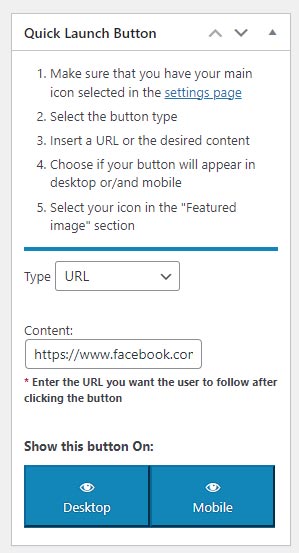
Quick Launch meta box. 
Frontpage GB Quick Launch view
설치
How to install via FTP
Upload the entire gb-quick-launch folder to the /wp-content/plugins/ directory via FTP.
Activate the plugin through the Plugins screen (Plugins > Installed Plugins).
you will find the GB Quick Launch menu in your WordPress admin screen.
How to install via WP admin panel
Go to Plugins Add > New > Upload.
Click “Choose file” (“Browse”) and select the downloaded gb-quick-launch.zip file.
Click the “Install Now” button.
Click the “Activate Plugin” button to activate the plugin.
후기
이 플러그인에 대한 평가가 없습니다.
