

설명
Booking Calendar – Booking Plugin for Appointments, Reservations, Rentals, Events
WP Booking Calendar is a flexible WordPress booking plugin for appointments, reservations, rentals, and events. Add a responsive availability calendar and booking form to your website, accept online bookings, and manage them from a modern admin panel.
Use Booking Calendar for full-day bookings, time-slot appointments, service scheduling, event registration, inquiry forms, request forms, or even as a simple multi-steps contact form with built-in request listing and email notifications.
Features | See Demos | FAQ | Get Support
Key Features
- Accept full-day and time-slot bookings
- Show calendar availability on your website
- Create booking, contact, and inquiry forms
- Use the new Drag & Drop Booking Form Builder
- Build multi-step forms with rows and columns
- Customize form fields and email notifications
- Prevent double bookings
- Manage bookings in a clear admin panel
- Sync bookings with external services using .ics feeds
- Import Google Calendar events
- Works for properties, services, rentals, and events
New Drag & Drop Booking Form Builder
Create booking forms visually without manually editing complex shortcodes or form code. Simply drag fields from the sidebar, drop them into the canvas, organize them into rows and columns, edit settings in the sidebar, and preview changes instantly.
The new builder also makes it easy to create contact and inquiry forms where the calendar is optional.
With the new interface, you can:
- drag and drop fields into the form layout,
- organize fields into sections and columns,
- create multi-step form pages,
- resize columns for better layout control,
- edit field settings in the right sidebar,
- instantly preview the form while building.
This new functionality brings a more modern, user-friendly, and flexible way to create forms in Booking Calendar, making form setup faster, clearer, and much more convenient for website owners.
모든 예약 로직에 완벽한 솔루션
워드프레스 최초의 예약 시스템인 만큼 특정 예약 요구사항에 맞는 다양한 기능을 만들었습니다.
이용 가능한 날짜를 쉽게 정의하고 방문자가 숙소나 서비스를 종일 또는 시간대별로 예약할 수 있도록 하세요.
고급 기능이 필요한 분들을 위해 프리미엄 버전에서는 에어비앤비 포털처럼 사용자가 직접 예약 가능 여부를 관리할 수 있는 다양한 숙소, 계절별 가격, 조건부 날짜 선택, 예약 가능 여부 검색, 다중 사용자 시스템까지 제공하는 광범위한 시스템을 이용할 수 있습니다.
예약 캘린더는 다음과 같은 경우에 유용합니다.
숙소를 임대하는 사업자나 서비스 예약을 자동화하려는 개인 사업자 모두에게 예약 캘린더가 도움이 될 수 있습니다.
– 리소스 예약(숙박 및 아침 식사, 주택, 아파트 등)
– 고객 예약(사진작가, 변호사, 미용실, 스파 등)
– 회의 예약(코칭, 전화 상담)
– 환자 스케줄링(의사, 치과, 클리닉, 의료)
– 장비 대여(요트, 보트, 자동차, 자전거, 테크닉 등)
– 이벤트 예약(컨퍼런스, 강좌, 피트니스 센터, 요가 수업, 체육관)
– 또는 특정 시간 예약이 필요한 기타 서비스
Full Day Bookings – Drag and Drop Booking Form Builder
Easily configure Booking Calendar for full-day bookings with the new Drag and Drop Booking Form Builder. The new Booking Calendar Form Builder makes it much easier to create flexible booking forms without manually editing form code. It is a simple and visual way to build booking forms for different use cases directly inside WordPress.
Appointment Forms with Time Slots or Start Time + Service Duration Selection
Create a time-slot booking form in just a few minutes with the new Booking Calendar Form Builder. Visually add the calendar, time fields, and contact fields, adjust the layout, and preview changes instantly — without manually editing form code.
Changeover Multi-Day Bookings – Setup Wizard (Pro)
Configure multi-day bookings with specific check-in and check-out days, clearly marked with diagonal or vertical lines. Perfect for bookings that require split days.
Available Pro versions.
스크린샷
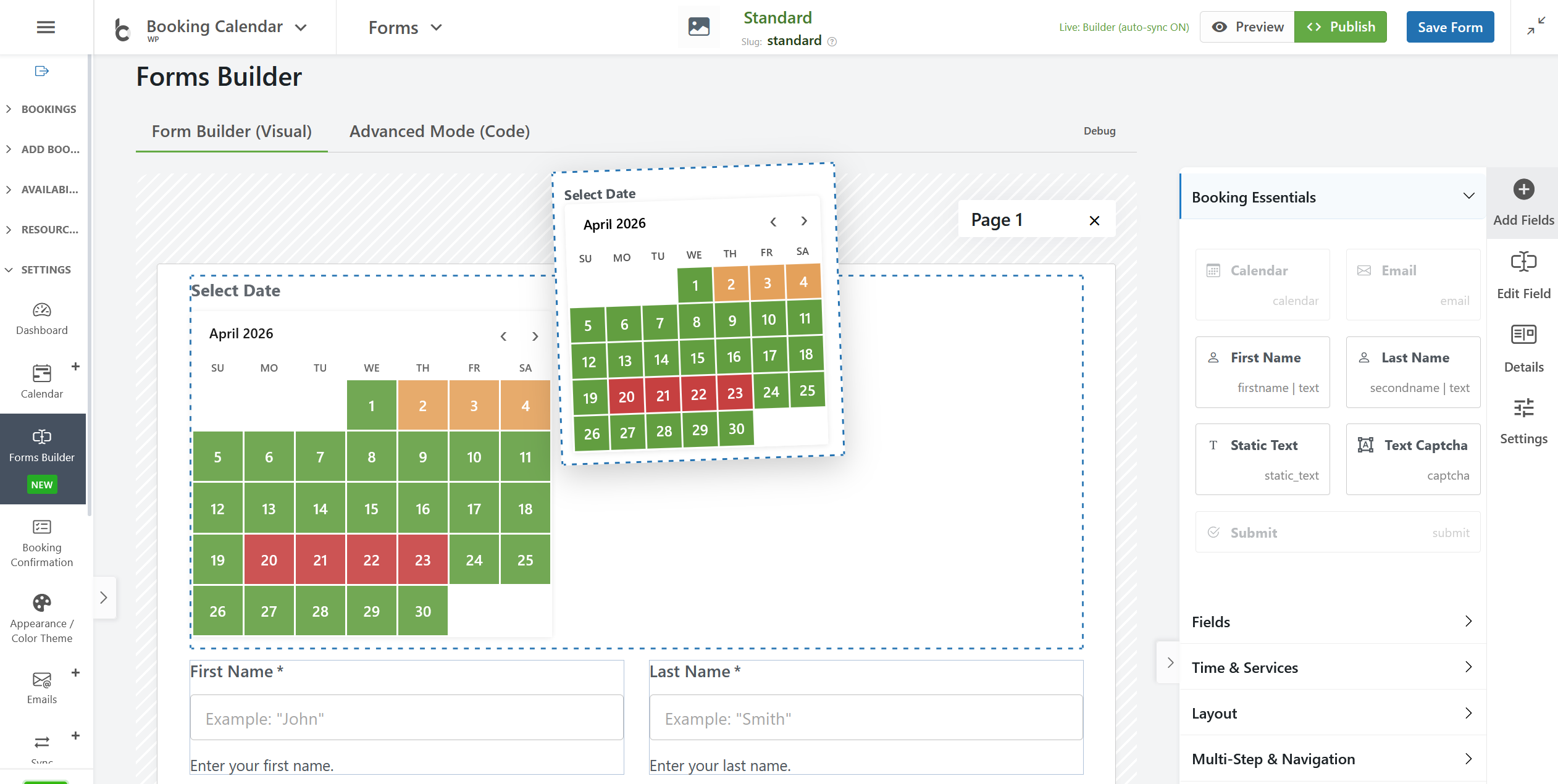
Drag & Drop Booking Form Builder: Create booking forms visually without manually editing complex shortcodes or form codes. 
Full-Day Bookings: In this screenshot, you can see the front-end booking form. It enables users to select and book multiple days in the calendar without time fields. 
Time-Slot Appointment Bookings: This screenshot displays the front-end booking form. It allows users to select single day in the calendar and times (time-slots or start time and duration of service) in the booking form. 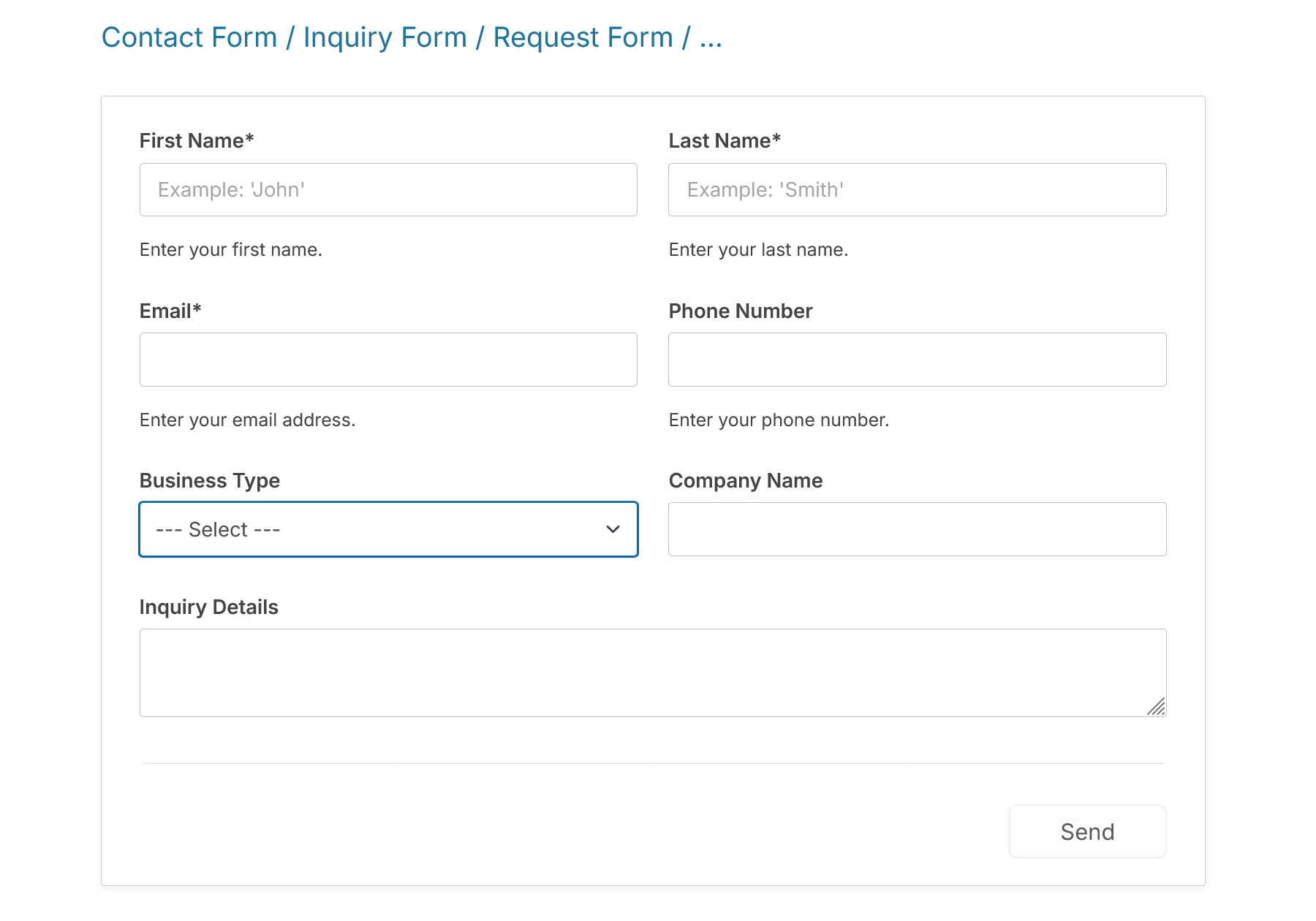
Contact Form. Easy to create contact form, request forms, inquiry forms … where the calendar is optional. 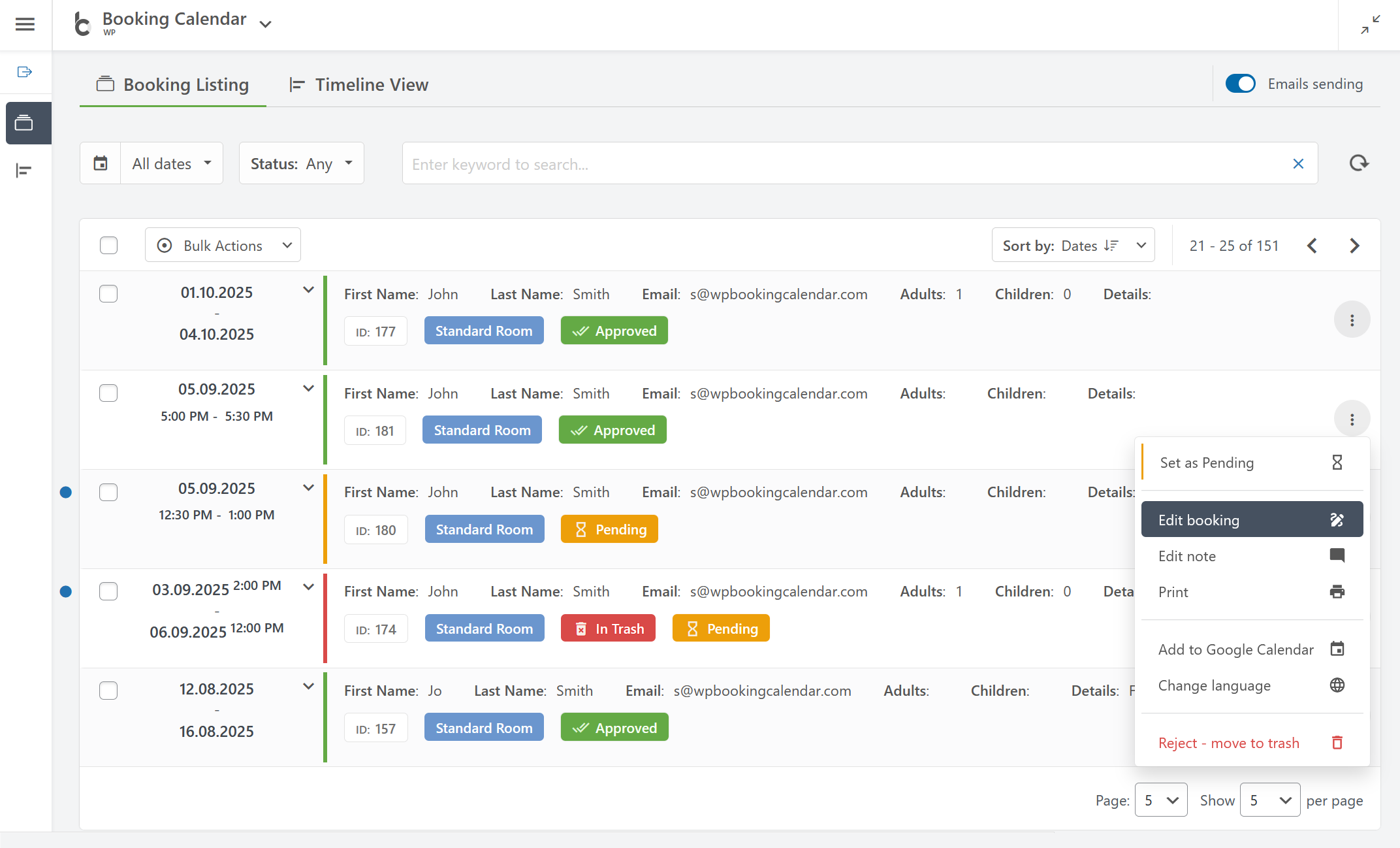
예약 목록: 키워드, 날짜, 상태 및 기타 매개변수로 예약을 검색하여 모든 예약을 한곳에서 쉽게 관리할 수 있습니다. 
예약 목록 패널은 페이지 새로 고침 없이 즉시 작동하여 원활한 사용자 경험을 제공합니다. 
타임라인 보기: 모든 예약에 대한 명확한 개요를 확인하세요. 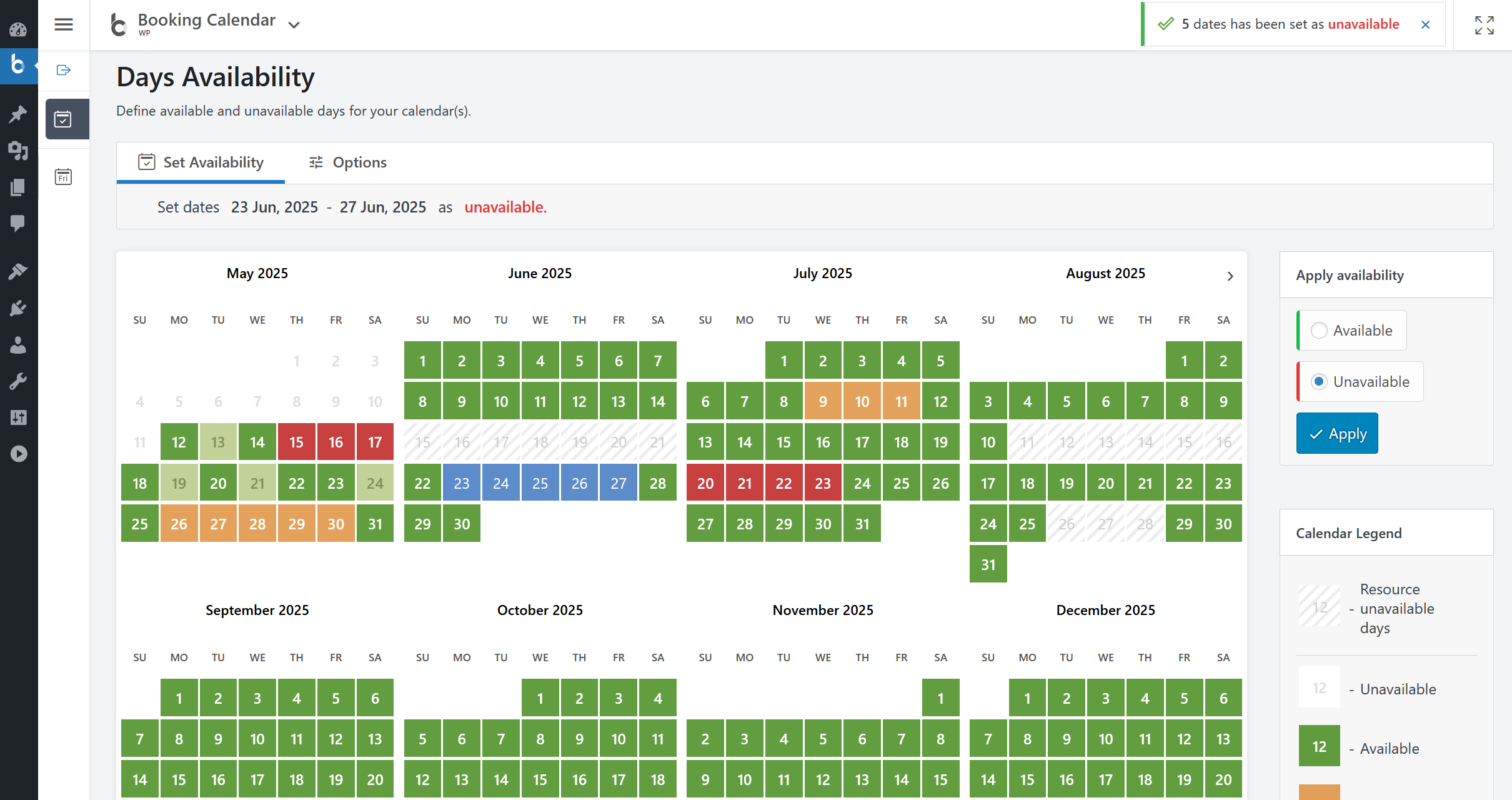
캘린더 사용 가능 여부: 마우스 클릭 3번으로 캘린더에서 사용 가능하거나 사용 불가능한 날짜를 매우 쉽게 설정할 수 있습니다. 
예약 양식을 페이지에 게시. 또는 WP 예약 캘린더에서 예약 양식 또는 예약 가능 일정을 기존 또는 새 페이지에 쉽게 게시할 수 있습니다.
블록
이 플러그인은 1개의 블록을 제공합니다.
- Booking Calendar
설치
플러그인 설치는 간단합니다. 다음 방법 중 하나를 따르세요:
워드프레스 내에서 예약 캘린더 설치
- 대시보드 내 플러그인 페이지로 이동하여 ‘새로 추가’를 선택합니다.
- 오플러그인 예약 캘린더를 검색합니다.
- 플러그인 페이지에서 예약 캘린더 활성화
- 완료되었습니다!
수동으로 예약 캘린더 설치
- 사이트의 대시보드에서 플러그인 –>새롭게 추가 –>로 이동합니다.
- 업로드 옵션을 선택하고 “파일 선택”을 누릅니다.
- 팝업이 나타나면 데스크톱에서 예약.zip 또는 예약-x.x.zip 파일을 선택합니다. (‘x.x’는 현재 버전 번호에 따라 변경됩니다).
- 화면의 안내에 따라 업로드가 완료될 때까지 기다립니다.
- 완료되면 프롬프트에서 플러그인을 활성화하세요. 활성화가 성공적으로 완료되었다는 메시지가 표시됩니다.
이제 끝입니다! 설정을 구성하고 페이지에 예약 양식 단축코드 삽입을 입력하기만 하면 예약을 받을 수 있습니다. 시작하는 데 도움이 필요하신가요? 설정 및 기능에 대한 도움말은 FAQ와 동영상 가이드에서 확인하세요.
FAQ
FAQ를 참조하세요.
-
예약 프로세스에 대해 알아야 할 모든 것
-
1단계: 원하는 날짜 선택 고객은 예약하고자 하는 날짜를 선택할 수 있습니다. 예약 캘린더 플러그인은 해당 날짜의 숙소 또는 서비스 이용 가능 여부를 표시하는 사용하기 쉬운 캘린더 시스템을 제공합니다.
2단계: 시간대 선택(선택 사항) 특정 시간에 약속이나 예약을 제공하는 경우 고객이 이용 가능한 시간대를 선택할 수 있도록 예약 양식을 구성할 수 있습니다. 설정 방법을 알아보려면 이 비디오를 시청하세요.
3단계: 예약 양식 필드 입력 양식에서는 예약을 승인하는 데 필요한 이름, 연락처 정보 및 기타 세부 정보를 요청합니다. 예약 양식 필드는 사용자 지정이 가능하므로 예약에 필요한 필드를 구성할 수 있습니다.
4단계: 예약 제출 및 새 예약 알림 받기 예약 양식을 작성한 후 고객은 예약을 제출할 수 있습니다. 예약 캘린더 플러그인은 관리자에게 새 예약에 대해 알리고 고객에게 예약이 접수되었다는 확인 이메일을 보냅니다.
5단계: 예약 관리 관리자는 현대적이고 사용하기 쉬운 관리자 예약 패널에서 모든 예약을 관리할 수 있습니다. 필요한 예약을 쉽게 찾고, 예약 세부 정보를 확인하고, 필요한 경우 예약을 수정한 다음, 예약을 승인하거나 거부할 수 있습니다. 고객은 예약 승인 또는 취소에 대한 확인 이메일을 받게 됩니다.
-
간단한 시작 단계
-
워드프레스 블록이나 사이드바용 예약 캘린더 위젯을 사용하여 웹사이트의 모든 페이지에 예약 양식을 쉽게 삽입하거나 엘리멘터 같은 페이지 빌더에서 단축코드 블록을 구성하세요. 자세한 내용은 여기를 참조하세요.
2. Set initial unavailable days with just few clicks
You can define days availability in just a 3 mouse clicks at Booking > Availability page. Simply select a range of days on the calendar, choose ‘available’ or ‘unavailable’ status, and apply. It’s that simple!예약 양식 필드를 쉽게 사용자 지정하고 필요한 경우 시간대를 추가할 수 있습니다. 이메일 알림 및 캘린더 모양, 예약 관리자 패널 기능 등과 같은 기타 설정을 구성합니다….
새로운 예약에 대한 알림을 받고 최신 관리자 패널에서 예약을 관리하세요. 특정 예약을 승인, 거절 또는 수정할 수 있습니다. 또한, 일별, 주별 또는 월별 보기 모드에서 캘린더 개요를 통해 일정을 전체적으로 파악할 수 있습니다.
가져오기 에어비앤비, 부킹닷컴, VRBO, 홈어웨이, 트립어드바이저, 플립키 등 다양한 서비스와 .ics 피드를 사용하여 Google 캘린더 이벤트를 가져오거나 2가지 방법으로 이벤트를 동기화하세요…. 예약 관리자 플러그인과의 기본 통합 덕분입니다.
-
멋진 기능:
-
간편한 예약 시간 구성
2.5분 이내에 약속 예약 시스템을 설정하세요. 사용자 친화적인 흐름으로 설계된 마법사는 예약 유형 선택, 캘린더 표시, 예약 가능 여부 기본 설정 등 주요 설정을 단계별로 안내합니다. 이 단계별 설정을 통해 빠르고 쉽게 예약 시스템을 비즈니스에 맞게 준비할 수 있습니다.Set Days Availability
– Super easy set available/unavailable dates in calendar with just three mouse clicks.
– In Booking Calendar you can define days as available or unavailable in just a few clicks. Simply select a range of days on the calendar, choose ‘available’ or ‘unavailable’ status, and apply. It’s that simple!General
– Modern and easy to use interface.
– The plugin is designed to be a suitable for a vast array of businesses.
– 100% mobile-friendly and looks amazing on any device.
– All booking data is stored in your DB. You don’t need other accounts.
– Multi language support. Check all available languages at this page.예약 캘린더는 예약 수신을 시작하는 쉬운 솔루션입니다. 워드프레스 블록 또는 단축코드를 사용하여 글이나 페이지에 예약 캘린더를 빠르게 추가할 수 있습니다. 또한 예약 캘린더를 사이트의 사이드바에 위젯으로 추가할 수도 있습니다. 대부분의 설정에는 미리 정의된 값과 설명이 포함되어 있습니다.
Bookings
– Prevention of double bookings – one booking per day or time slot.
– Alternatively, you can allow unlimited bookings for the same date and time within the same calendar.
– You can enable pending bookings as available in the calendar, which lets you receive multiple bookings for the same date until you manually approve one of them. You can receive as many bookings as you need to and stop receiving bookings on specific dates once you have approved a booking.시간대 예약은 예약 캘린더 무료 버전에서 사용할 수 있으며, 선택한 날짜 중 예약 가능한 시간대에 대한 예약을 받을 수 있습니다. 고객은 설정 일반 페이지의 ‘시간대’ 섹션에서 설정에 따라 시간 선택기 또는 드롭다운 목록에서 시간대를 선택할 수 있습니다.
Calendar
Select a calendar skin that matches your website design.
Or customize the calendar colors by editing the CSS styles.
Choose to display one or several months in the calendar view.
Easily set the width of the calendar and the number of months in a row, such as 3×2 months.
Choose between single day or multiple days selection mode.
Set the number of unavailable days in the calendar, starting from today.
Specify particular weekdays as unavailable.
Show a legend on the calendar to help visitors understand the status of each day.예약 양식 필드를 간편하게 사용자 지정하여 각 예약에 필요한 모든 정보를 캡처하세요. 필수 입력란과 선택 입력란을 선택하고 필요에 따라 필드 레이블을 사용자 지정하세요. 또한, 예약 양식에는 스팸 제출을 방지하기 위해 CAPTCHA가 지원됩니다.
타임라인 보기를 사용하면 웹사이트 프론트엔드에 모든 예약을 연간, 월간 또는 일일 보기로 표시하여 방문자에게 일정을 빠르고 종합적으로 파악할 수 있도록 할 수 있습니다.
Booking Admin Panel
– Easily manage your bookings with a modern and clear Booking Listing panel or with the intuitive Calendar Overview mode.
– The Booking Listing makes it very simple to find the required reservations. It provides searching by different criteria and immediate results based on keywords.
– Get a complete picture of your schedule with the Calendar Overview in day, week, or month view mode.
– Approve, decline, or edit details in required bookings.
– Print a list of your bookings.
– Get the number of new bookings on the booking dashboard section.Google Calendar Integration
– Import events from your Google Calendar to the Booking Calendar plugin.
– With just one click, add bookings to Google Calendar from the Booking Listing page using export button near each booking(s).Sync bookings
– Easily import and export events using .ics feeds or files with native integration with our Booking Manager plugin.
– Import events from various sources, such as Airbnb, Booking.com, HomeAway, TripAdvisor, VRBO, FlipKey, and any other calendar that uses the .ics format.
– Customize parameters such as date conditions and maximum number of items to import in the import shortcodes.
– Export bookings by configuring custom URL for your.ics feed. This feed can then be imported into services that use the .ics (iCal) format, such as Google Calendar or Airbnb, etc…새 예약 생성, 예약 승인 또는 거절과 같은 특정 예약 작업에 대해 사이트 관리자와 방문자에게 전송할 이메일 확인을 구성할 수 있습니다. 이메일의 콘텐츠와 형식을 사용자 지정하고 알림을 받을 관리자 이메일 주소도 변경할 수 있습니다.
Other settings
Customizable date format for your bookings.
Restriction of access to plugin menus for standard WordPress user roles.And much more… Check ton of features in premium versions of plugin.
-
Booking Calendar Personal (or higher versions)
– Multiple booking resources (calendars) – create an unlimited number of booking resources (calendars), which can be your services, properties, or any other items that can be booked by visitors in separate unique calendars.
– Advanced configuration of booking form and emails – fully customize the appearance of your booking form and email templates.
– Manage bookings – perform various actions such as CSV export, adding notes, editing, duplicating, changing resources, and much more…Booking Calendar Business Small (or higher versions)
– Online Payments – accept online payments for your bookings, with support for various payment gateways like Stripe, PayPal, Authorize.Net, Redsys, and more.
– Changeover Days – enable split bookings marked by vertical or diagonal lines, allowing visitors to check out and check in on the same date.
– Range days selection – easily enable week(s) or any specific number of days selection with 1 or 2 mouse clicks, and configure minimum and maximum number of days, as well as specific start weekdays for selections.
– Auto Approval / Cancellation – set up automatic cancellation of unpaid pending bookings after a specific time, or enable auto-approval for incoming bookings.
– Advanced Hourly Bookings – increase the flexibility of your Booking Calendar by allowing visitors to book specific start and end times or duration of time, ensuring precise scheduling for your services.Booking Calendar Business Medium (or higher versions)
– Seasonal Prices – customize the daily cost (rates) for different seasons or week days with fixed costs per day or as a percentage from original daily cost.
– Multi-Day Pricing – set different cost of booking based on the number of selected days, and the ability to apply these costs only if the “Check In” day falls within a specific season.
– Last Minute Booking Discount – offer a discount for bookings, if the difference between the booking date and the check-in date is less than a specified number of days.
– Early Booking Discounts – set a discount for bookings made in advance, if the difference between the booking date and the check-in date is greater than a specified number of days.
– Advanced cost – configure the booking cost based on the options selected in the form, by adding extra charges such as taxes, additional services, or by adjusting the cost based on the number of visitors.
– Deposit payments – allows visitors to pay a part of the booking cost such as a fixed deposit value or percentage of the original booking cost after creating a booking.
– Multiple Custom Forms – create multiple form configurations, allowing you to use different forms with different form fields for each of your booking resources.
– Advanced days selection – customize the specific number of days that can be selected on specific weekdays or during certain seasons or allow specific start week days on certain season.
– Different time-slots on different days – configure different time slots for different week days or seasons.
– Advanced Season Availability – set unavailable days for specific seasons, such as holidays or weekends during summer, using conditional season filters.
– Availability from Today – limit or define the number of available/unavailable days starting from today.
– Unavailable time before or after a booking – setting the number of minutes, hours, or days needed for cleaning or other services, applicable to bookings with time slots or change-over days feature.Booking Calendar Business Large (or higher versions)
– Capacity and Availability – set the the maximum number of bookings that can be made per full day or time slots in calendar, and ensure that dates in the calendar are only available until the capacity is reached.
– Search Availability – allows your website visitors to quickly search for available booking resources such as properties or services by entering check-in/out dates and other criteria like the number of guests or specific amenities.
– Coupons for Discounts – offer discounts to your visitors by creating coupon codes that can be entered in the booking form.
– Auto-Cancel Pending Bookings – enable automatic cancellation of pending bookings for specific dates when you approve booking for the same resource.Booking Calendar MultiUser version
– MultiUser Booking Admin Panels – enable each registered WordPress user to have their own individual booking admin panel, where they can see and manage only their own bookings, resources, and settings. This includes the ability to configure their own booking form, receive notifications to own separate emails, and activate payment gateways for their own payment accounts. -
개인정보 고지
-
- 예약 캘린더 플러그인은 모든 예약 세부 정보를 회원님의 서버에 있는 워드프레스 데이터베이스에 저장합니다. 예약 세부 정보를 당사 서버로 전송하지 않으며 예약 세부 정보와 같은 정보를 당사 서버에 저장하지 않습니다. 이에 대한 자세한 내용은 여기에서 확인하세요.
- 또한 예약 ‘설정’ 페이지의 예약 양식에 ‘필수 확인란’을 추가하여 이용약관에 동의할 수 있습니다.
-
지원 언어(현지)
-
- 영어
- French (France) 100.00% [ 3353 / 3353 ], fuzzy 0, not translated 0
- Danish 76.08% [ 2551 / 3353 ], fuzzy 299, not translated 503
- Dutch 67.85% [ 2275 / 3353 ], fuzzy 576, not translated 502
- Norwegian (Bokmål) 62.90% [ 2109 / 3353 ], fuzzy 346, not translated 898
- German 62.87% [ 2108 / 3353 ], fuzzy 683, not translated 562
- Hungarian 58.07% [ 1947 / 3353 ], fuzzy 769, not translated 637
- Korean 58.04% [ 1946 / 3353 ], fuzzy 765, not translated 642
- Spanish (Spain) 53.41% [ 1791 / 3353 ], fuzzy 784, not translated 778
- Portuguese (Brazil) 50.40% [ 1690 / 3353 ], fuzzy 892, not translated 771
- Greek 50.07% [ 1679 / 3353 ], fuzzy 900, not translated 774
- Turkish 49.42% [ 1657 / 3353 ], fuzzy 916, not translated 780
- Italian 48.17% [ 1615 / 3353 ], fuzzy 825, not translated 913
- Spanish (Mexico) 46.29% [ 1552 / 3353 ], fuzzy 970, not translated 831
- Finnish 46.02% [ 1543 / 3353 ], fuzzy 979, not translated 831
- Polish 45.96% [ 1541 / 3353 ], fuzzy 968, not translated 844
- Romanian 45.57% [ 1528 / 3353 ], fuzzy 980, not translated 845
- Swedish 45.33% [ 1520 / 3353 ], fuzzy 989, not translated 844
- Arabic 44.89% [ 1505 / 3353 ], fuzzy 1006, not translated 842
- Russian 44.83% [ 1503 / 3353 ], fuzzy 1231, not translated 619
- Bulgarian 43.48% [ 1458 / 3353 ], fuzzy 1022, not translated 873
- Slovenian 43.36% [ 1454 / 3353 ], fuzzy 1027, not translated 872
- Chinese (Taiwan) 42.20% [ 1415 / 3353 ], fuzzy 1067, not translated 871
- Portuguese (Portugal) 41.87% [ 1404 / 3353 ], fuzzy 1051, not translated 898
- Japanese 41.28% [ 1384 / 3353 ], fuzzy 558, not translated 1411
- Chinese (China) 40.50% [ 1358 / 3353 ], fuzzy 1050, not translated 945
- Ukrainian 40.20% [ 1348 / 3353 ], fuzzy 1062, not translated 943
- Catalan 39.55% [ 1326 / 3353 ], fuzzy 990, not translated 1037
- Thai 39.46% [ 1323 / 3353 ], fuzzy 1099, not translated 931
- Hebrew 39.22% [ 1315 / 3353 ], fuzzy 1087, not translated 951
- Galician 38.20% [ 1281 / 3353 ], fuzzy 1139, not translated 933
- Slovak 35.52% [ 1191 / 3353 ], fuzzy 1058, not translated 1104
- Croatian 34.39% [ 1153 / 3353 ], fuzzy 1074, not translated 1126
- Czech 34.27% [ 1149 / 3353 ], fuzzy 1021, not translated 1183
- Chinese (Hong Kong) 20.28% [ 680 / 3353 ], fuzzy 374, not translated 2299
플러그인을 사용하기 전에 각 번역의 상태를 다시 확인하세요. 새로운 번역을 하거나 기존 번역을 수정하는 데 도움을 주시기 바랍니다. 이 번역 튜토리얼을 사용하여 새로운 언어로 번역하거나 기존 번역을 업데이트할 수 있습니다.
-
기술 지원
-
FAQ에서 찾지 못한 질문이 있는 경우 기술 도움말 게시판에 게시할 수 있습니다.
후기


기여자 & 개발자


변경이력
10.15.4
- Changes in all versions:
- Fix: Showing options for the “Booking Quantity Control” field, regarding custom booking forms in the new Forms Builder. This fix related to the Booking Calendar Business Large or higher version. (10.15.4.1)
10.15.3
- Changes in all versions:
- Fix: Exclude the Preview page from nav menus (10.15.3.1)
10.15.2
- Changes in all versions:
- Fix: Force a safe template for the BFB Preview page. (10.15.2.1)
10.15.1
- Changes in all versions:
- New: 3 new shortcodes for email templates on the WP Booking Calendar > Settings > Emails page: [days_count], [nights_count], [days_count_plus1day] for showing number of booked dates/nights. (10.15.1.3.)
- Fix: Responsive columns for rows section in booking form for mobile devices. (10.15.1.1.)
- Support: Improved CSS for compatibility with latest WordPress 7.0 release. (10.15.1.7.)
10.15
- NEW / BETA Introduced the new Drag & Drop Booking Form Builder for visually creating booking forms without manually editing form code.
- Build forms by dragging fields directly into the canvas.
- Edit layouts visually with instant live preview.
- Create modern booking forms faster and more easily.
- NEW Added support for Contact Forms / Inquiry Forms / Request Forms — the calendar is now optional.
- Create forms without booking dates when you only need contact, inquiry, or request submissions.
- Use Booking Calendar as a flexible alternative to traditional contact form plugins.
- Keep all submissions managed inside Booking Calendar with a powerful request listing and admin workflow.
- NEW Booking Calendar now supports multiple custom booking form configurations in all versions, including the Free version.
- Create and use different forms for different pages, services, or booking scenarios.
- Manage multiple form layouts from one place more easily.
- NEW Added ready-to-use form templates for faster form creation.
- Start with predefined templates for booking, contact, and inquiry forms.
- Or begin with a blank canvas for full flexibility.
- NEW Added support for importing existing legacy booking forms into the new Form Builder.
- Helps you move existing form setups into the new visual editing workflow more easily.
- NEW Added preview page / live front-end preview for testing forms before publishing.
- Check how the form looks and works on the front end before using it on your website.
- NEW Booking Form Builder supports both Builder mode and Advanced Form mode (Pro).
- Work visually in the Builder, or use manual form configuration when needed.
- Gives more flexibility for different workflows and advanced customizations.
- NEW The Drag & Drop Booking Form Builder includes powerful layout and editing tools:
- Drag & drop fields from the Fields palette directly into the form canvas.
- Live visual preview while building and editing the form.
- Multi-page forms for creating step-by-step wizard-style booking forms.
- Rows and columns layout for clean and structured form designs.
- Nested sections (up to 5 levels) for advanced multi-row and multi-column layouts.
- Ready section layouts with 1, 2, 3, or 4 columns.
- Column resizing with visual resizers for precise control of field and layout widths.
- Drag & drop sorting of sections to quickly reorder the form layout.
- Move Up / Move Down controls for easier section management.
- Field usage limits that automatically prevent adding one-time fields, such as the Calendar field, more than once.
- Right sidebar inspector for easy editing of field and section settings.
- Responsive-friendly column width control with layout protection for better form structure.
- Improved visual editing controls for easier field, section, and layout management directly inside the canvas.
- NEW Added flexible form configuration management tools.
- Save and restore complete form layouts, including pages, sections, columns, and fields.
- Load previously saved form structures with full layout restoration.
- Duplicate existing form configurations to create similar forms faster.
- Use Save As to create a new form based on an existing layout and settings.
- Organize and preview custom form setups more easily.
- NEW Added support for form details management.
- Set a custom form title, slug, description, and image.
- Use media library integration to select a custom image for each form configuration.
- NEW Added support for blank form creation in Builder mode.
- New forms can now start immediately in the visual Builder workflow.
- NEW Added section presets for faster layout building.
- Quickly insert commonly used layout structures into the form.
- NEW Added support for a modern visual form editing workflow instead of manual shortcode-based configuration.
- IMPROVED Easier creation of complex booking forms with a more user-friendly and modern builder interface.
- IMPROVED Faster form setup and editing thanks to visual drag & drop controls and instant preview updates.
-
NOTE This beta feature can still be disabled at any time in this update. You can return to the previous legacy booking form configuration via Form Builder > Settings in the right sidebar by disabling the “Drag & Drop Form Builder” option.
-
자세한 내용은 이 페이지에서 확인하세요.