

설명
This plugin allows one to create footnotes by using markdown notation.
It is for footnotes only. No other markdown tag is taken into account
예:
I have more [^1] to say up here.

[^1]: To say down here.
If used with jetpack and enabled markdown, it only shows the buttons without modifying the text content.
Unlike jetpack-markdown, footnotes will appear in the exact point where they have been inserted. To go back to text mode click on the footnote number.
N.B
This plugin also works with Gutenberg. But the button only appears in the Classic Editor.
For now with Gutenberg enter the codes directly.
환경설정
No configuration is necessary.
Considering that this plugin, like others working with “markdown”, parsing the page every time I load it, I highly recommend using a caching plugin.
Customizing Footnote Layout
If you want the footnote number to be logically separated from the note (for CSS targeting) but want to prevent unwanted line breaks or extra spacing caused by WordPress’s automatic paragraphs, you can add the following CSS to your theme:
/* Ensure the footnote stays inline or as a specific block */
p > span.footnote {
    display: inline-block;
}

/* Remove extra spacing from the paragraph containing the footnote */
p:has(> span.footnote) {
    margin-bottom: 0;
    margin-top: 0;
    padding: 0;
}
스크린샷
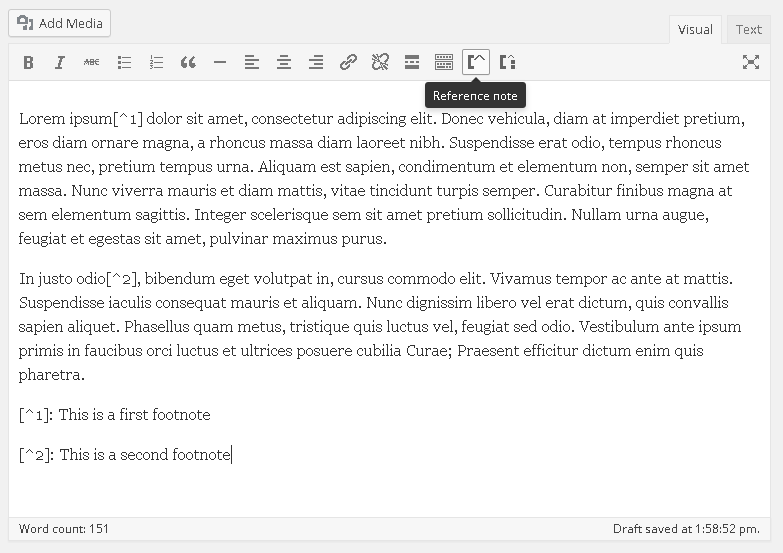
Visual Editor TinyMCE with plugin actived 
Popup where you can enter note number 
Example with the footnotes display
설치
This section describes how to install the plugin and get it working.
- Upload the plugin files to the ‘/wp-content/plugins/blank-footnotes’ directory, or install the plugin through the WordPress plugins screen directly.
- Activate the plugin through the ‘Plugins’ screen in WordPress
FAQ
-
Does this plugin work with any theme?
-
Yes, it is designed to work with all standard WordPress themes.
-
Does it work with Gutenberg?
-
Yes, this plugin works with the Gutenberg editor. However, the dedicated button only appears in the Classic Editor. For now, when using Gutenberg, you can enter the shortcodes directly into the blocks.
-
How do I install it?
-
Please refer to the “Installation” tab for step-by-step instructions.
-
How can I customize it?
-
You can use CSS to style the
.footnoteclass. Usespan.footnotefor the notes themselves andsup.footnotefor the reference numbers.
후기


기여자 & 개발자

변경이력
1.7
- Refactor: Modularized filter registration logic for better compatibility and future maintenance.
- Improvement: Updated PHP version requirements and confirmed compatibility with PHP 8.5.
- Update: Tested up to WordPress 7.0.
- Added FAQ and CSS note.
1.6.7
- Updated readme.
1.6.6
- Changed strings translation
1.6.5
- Fixed version
1.6.4
- Fixed typo
1.6.3
- Fixed plugin name
1.6.2
- Added note for Gutenberg
- Tested with WordPress 5.0.1
1.6.1
- Added note for Gutenberg.
- Fixed style according to WordPress Coding Standards for PHP_CodeSniffer.
- Tested with WordPress 5.0 classic editor
1.6
- Add domain path
1.5
- Fix typo
1.4
- Fix translation
1.3
- Fix jetpack detection
1.1
- Fix english language
- Fix text editor string
- Fix syntax for WordPress coding standard
1.0
- First version in WordPress plugins directory
0.4
- Added Documentation in PHPDoc format.
- Renamed some function with bfn_ preposition
0.3
- Added localization (in langs)
- Added italian language
0.2
- Added button for text editor
- Added button for TinyMCE
0.1
- 초기 릴리즈
- Regex to convert Markdown footnotes to HTML