

설명
Advanced Clean Master is a powerful WordPress optimization plugin designed to clean and maintain your website for maximum performance. Is your WordPress site slowing down? Are you struggling with database bloat and unnecessary files? Advanced Clean Master provides a complete solution to these common WordPress problems.
🚀 Comprehensive WordPress Cleanup & Optimization
This all-in-one WordPress cleaner and optimizer helps you:
- Speed up your WordPress site by removing unnecessary data
- Reduce database size through intelligent cleanup operations
- Free up server space by removing orphaned media and unused files
- Improve overall performance with database table optimization
- Automate maintenance with scheduled cleanup tasks
💯 Complete WordPress Cleaning Solution
Advanced Clean Master provides a comprehensive set of cleaning tools:
💡 Why Choose Advanced Clean Master?
– 🧹 Clean Post Data: Remove unused drafts, auto-drafts, trashed posts, and unnecessary revisions
– 🗑️ Comment Cleanup: Delete spam and unapproved comments that clutter your database
– 🖼️ Media Optimization: Remove orphaned media files not linked to any content
– 🔄 Transient Cleanup: Clear expired transients that bloat your options table
– 🗃️ Database Optimization: Optimize database tables for better performance
– 💾 Backup Management: Automatic backups before cleanup operations with restore functionality
– ⏰ Automated Maintenance: Schedule daily or weekly cleanups
– 📋 Activity Tracking: View detailed logs of all cleanup activities
– 📊 Performance Dashboard: Monitor your site’s optimization with real-time stats
🔍 Perfect For All WordPress Sites
Whether you run a small blog, business website, WooCommerce store, or large content site, Advanced Clean Master helps maintain optimal performance with minimal effort.
Boost your website’s speed and performance with Advanced Clean Master – the ultimate WordPress cleanup and optimization solution!
Features
✅ Powerful WordPress Cleanup & Optimization Tools
-
Post Cleanup
- Remove unused draft posts that clutter your wp_posts table
- Clean auto-saved drafts created by WordPress automatically
- Delete trashed posts permanently to free up database space
- Clean up post revisions to streamline your database
-
Comment Management
- Remove spam comments detected by Akismet or other filters
- Delete unapproved comments to reduce database bloat
- Improve site security by removing potential spam content
-
Media Optimization
- Identify and remove orphaned media files not linked to any content
- Free up valuable server storage space
- Reduce backup size and improve site migration speed
-
Database Optimization
- Clean expired transients that slow down database queries
- Optimize database tables to improve query performance
- Reduce database overhead for faster page loading
⏰ Smart Automation & Scheduling
-
Flexible Scheduling Options
- Set up daily cleanup for high-traffic sites
- Configure weekly maintenance for most WordPress sites
- All cleanup operations run automatically in the background
-
Intelligent Processing
- Optimized algorithms to minimize server load
- Smart detection of truly unused content
- Safety checks to prevent accidental data loss
📋 Comprehensive Reporting & Monitoring
-
Detailed Activity Logs
- Track all cleanup activities with timestamps
- Monitor which cleanup tasks removed the most items
- Keep a complete history of all optimization actions
-
Performance Metrics
- See total space saved through cleanup operations
- Monitor database size reductions
- Track optimization impact over time
📊 User-Friendly Dashboard
-
Modern Interface
- Clean, responsive design works on all devices
- Intuitive controls for all cleanup operations
- Visual indicators of optimization status
-
Real-Time Stats
- Live counters show items that need cleanup
- Clear success messages after operations complete
- At-a-glance overview of site optimization status
스크린샷

*Dashboard Overview: A clean and modern interface with real-time stats. 
Automatic Scheduling: Set Daily and Weekly Scheduling. 
Activity Logs: View detailed logs of all cleanup actions. 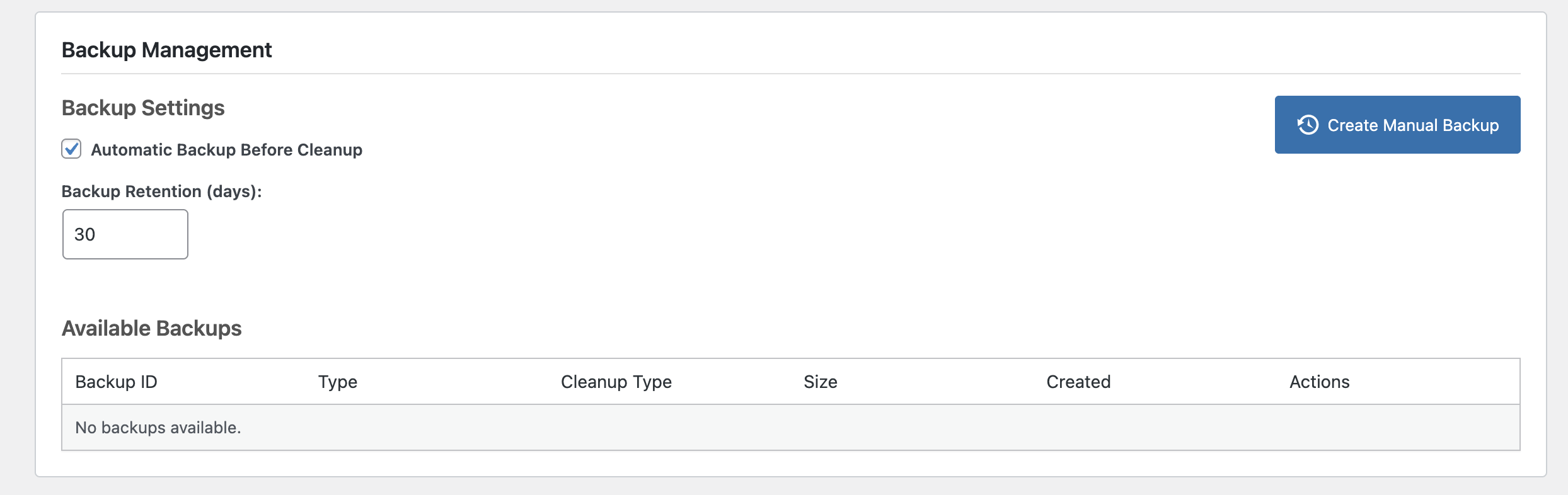
Backup Management: Backup Management system with automatic backups before cleanup operations
설치
Easy Installation
-
🚀 Automatic Installation:
- Log in to your WordPress dashboard
- Navigate to Plugins > Add New
- Search for “Advanced Clean Master”
- Click “Install Now” and then “Activate”
-
🔌 Manual Installation:
- Download the plugin ZIP file
- Log in to your WordPress dashboard
- Navigate to Plugins > Add New > Upload Plugin
- Choose the downloaded ZIP file and click “Install Now”
- After installation, click “Activate Plugin”
-
🛠️ Getting Started:
- After activation, find “Advanced Clean Master” in your WordPress admin menu
- Review the dashboard to see what items need cleaning
- Click any “Clean Now” button to start optimizing your site
- For automatic maintenance, enable the daily or weekly scheduling options
FAQ
-
Will this plugin delete important content?
-
No, Advanced Clean Master only deletes unused and redundant data. The plugin is designed with safety in mind and only removes content that is genuinely no longer needed, such as trashed posts, spam comments, auto-saved drafts, and orphaned media files not linked to any content. Your essential content remains completely safe.
-
Can I schedule automatic cleanups?
-
Yes! Advanced Clean Master offers both daily and weekly scheduling options. Simply visit the plugin dashboard and toggle the scheduling switches to enable automatic cleanups. This “set it and forget it” approach ensures your site stays optimized without manual intervention.
-
Is it safe to use on a live website?
-
Absolutely. Advanced Clean Master has been thoroughly tested on various WordPress configurations to ensure safety and reliability. The plugin only removes data that is genuinely unused, and all operations are performed with appropriate database transactions to prevent data corruption.
-
Will this plugin speed up my WordPress site?
-
Yes, by removing unnecessary data and optimizing database tables, Advanced Clean Master can significantly improve your site’s performance. Cleaning up post revisions, transients, and optimizing database tables reduces database bloat, which leads to faster query execution and improved page load times.
-
How much space can I expect to save?
-
The amount of space saved depends on your site’s specific situation. Sites with a long history, many revisions, or lots of media uploads typically see the most dramatic improvements. The plugin dashboard shows you exactly how much space you’ve saved through cleanup operations.
-
What are auto-drafts and is it safe to delete them?
-
Auto-drafts are automatically saved versions of posts that WordPress creates while you’re editing content. These are different from regular drafts and are created every few seconds as a backup. Over time, these can accumulate and take up database space. It’s completely safe to delete auto-drafts as they’re only temporary backups and not your actual content.
-
Does it work with WordPress multisite?
-
Yes, Advanced Clean Master is fully compatible with WordPress multisite installations. It will clean and optimize each site in your network individually.
-
Will this plugin help with SEO?
-
Indirectly, yes. Faster websites tend to rank better in search engines, and by optimizing your database and cleaning unnecessary data, Advanced Clean Master helps improve your site’s overall performance, which can positively impact your SEO efforts.
-
How often should I run the cleanup tools?
-
For most websites, a weekly cleanup schedule is sufficient. However, high-traffic sites with frequent content updates may benefit from daily cleanups. The plugin’s scheduling feature makes it easy to set up the right frequency for your specific needs.
-
Is Advanced Clean Master suitable for large websites?
-
Absolutely! Advanced Clean Masteris built for performance and safety, making it ideal for both small and large WordPress sites.
-
Does it work with multisite installations?
-
Yes, Advanced Clean Masteris fully compatible with WordPress multisite.
후기
이 플러그인에 대한 평가가 없습니다.
기여자 & 개발자
“Advanced Clean Master – Complete Site Cleanup & Database Optimizer”(은)는 오픈 소스 소프트웨어입니다. 다음의 사람들이 이 플러그인에 기여하였습니다.
기여자
변경이력
2.0.1
- Fixed: Optimized plugin description for better WordPress.org compatibility
- Improved: Minor code optimizations for better performance
2.0.0
- MAJOR UPDATE: Complete plugin architecture overhaul for improved performance
- NEW: Enhanced backup system with better reliability and faster operations
- NEW: Improved database optimization algorithms for better results
- Enhanced: Modernized codebase following WordPress coding standards
- Enhanced: Better error handling and user feedback throughout the plugin
- Enhanced: Improved security measures and data validation
- Enhanced: Optimized database queries for faster cleanup operations
- Enhanced: Better compatibility with latest WordPress versions
- Updated: Deployment workflow to use modern GitHub Actions
- Updated: All dependencies and libraries to latest stable versions
- Fixed: Various minor bugs and performance improvements
1.0.9
- NEW: Backup Management system with automatic backups before cleanup operations
- NEW: Manual backup creation and restoration functionality
- NEW: Backup download and deletion capabilities
- NEW: Configurable backup retention settings (1-365 days)
- NEW: Auto-backup toggle for safety during cleanup operations
- Enhanced: Improved safety with backup integration in cleanup workflow
- Enhanced: Updated UI with backup management dashboard section
- Enhanced: Better error handling and user notifications
- Updated: Database schema to support backup tracking
- Updated: JavaScript functionality for backup operations
1.0.8
- New – Added Auto-Drafts Cleanup feature to remove automatically saved drafts
- Enhancement – Improved post cleanup options with better categorization
- Enhancement – Updated dashboard UI to accommodate new cleanup feature
1.0.6
- New – Added Database Optimization feature to improve database performance
- Enhancement – Improved UI with status indicators for optimized database
- Enhancement – Added 24-hour cooldown period for database optimization to prevent excessive usage
1.0.5
- Fix – Scheduled Cleanup Functionality
- New – Added Review Notice
1.0.4
- Fix Clean Transient Function
1.0.3
- Fix some known issue
1.0.2
- Fix Minor Issue
1.0.0
🎉 Initial release:
– 🧹 Clean drafts, orphaned media, spam comments, and optimize databases.
– ⏰ Scheduling and activity logs added.
– 📊 Responsive admin dashboard introduced.