
ವಿವರಣೆ
Basically, this systems installs 2 tables in the db:
– the entry table
– the time table
Whenever you create an entry you can associate it with a time table. Each cell is free to fill with whatever you want. No formatting is done.
Then you can use a shortcode with the entry id as a parameter.
The plugin has been translated in spanish and french so far.
For more information check the plugin homepage:
http://www.fifteenpeas.com/blog/wordpress-weekly-time-table-plugin/
Screenshots

The Wtt menu 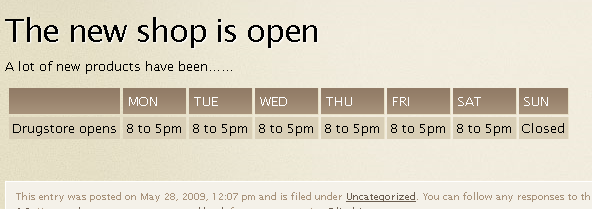
A client’s view using the shortcode 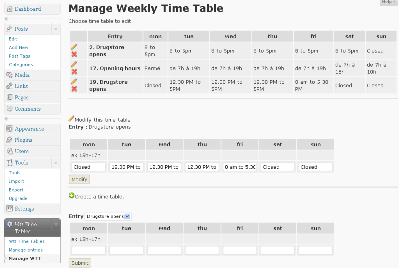
Admin WTT management
Installation
- Upload the ‘wttPlugIn’ folder to the ‘/wp-content/plugins/’ directory
- Activate the plugin through the ‘Plugins’ menu in WordPress
- Go to Settings on the Admin Panel and set it up
Use this shortcode anywhere :
[wttdsp entry_id=5] where 5 is the id of the time table…or [wttdsp entry_id=5,17,8] for multiple entries.
FAQ
- Can I add multiple entries to a timetable ?
-
Yes, just use a list of IDs separated by a comma instead of one ID (v1.2)
- Can I use the timetable in spanish ?
-
yes, just use the locale folder inside the weekly time yable plugin folder to put your translations (v1.2)
Spanish and french are already in place.
ವಿಮರ್ಶೆಗಳು
ಈ ಪ್ಲಗಿನ್ಗೆ ಯಾವುದೇ ವಿಮರ್ಶೆಗಳಿಲ್ಲ.
Contributors & Developers
“Weekly TimeTable – WordPress PlugIn” is open source software. The following people have contributed to this plugin.
ಕೊಡುಗೆದಾರರು
Translate “Weekly TimeTable – WordPress PlugIn” into your language.
Interested in development?
Browse the code, check out the SVN repository, or subscribe to the development log by RSS.
Changelog
1.3
- Spanish and French Translation available
1.2
- I18n ready
- Possibility to add multiple entries (shortcode with ID list) for one time table
- Possibility to enter html as entries
- translated in spanish and french
1.0
First Version