

ವಿವರಣೆ
Safeguard your WordPress website from evolving malware, brute force attacks, and zero-day vulnerabilities.
GUARDIAN GAZA BY REDSECLABS
Guardian Gaze is a research-driven WordPress security plugin designed to help website owners, developers, and agencies protect their sites from malware infections, brute-force attacks, unauthorized changes, and emerging WordPress vulnerabilities.
Built by RedSecLabs, a cybersecurity firm specializing in threat research, detection engineering, and defensive tooling, Guardian Gaze focuses on continuous monitoring, accurate detection, and clear visibility into your site’s security posture.
The plugin includes real-time security monitoring across malware detection, login security, IP management, WordPress hardening, and activity awareness. Detection logic is supported by ongoing threat intelligence updates, ensuring protection adapts to new and evolving attack techniques.
Guardian Gaze is designed to provide reliable, practical WordPress security without aggressive lockouts, excessive alerts, or heavy resource usage.
Key Features
WordPress Malware Detection & File Monitoring
Guardian Gaze includes a built-in malware scanner that analyzes WordPress core files, plugins, and themes for suspicious or unauthorized changes.
Detects modified or infected files
Identifies malware injections, backdoors, and malicious code
Highlights changes in core or plugin integrity
Designed for continuous monitoring, not one-time scans
Helps users understand findings before taking action
Login Security & Brute Force Protection
Reduce WordPress login abuse and authentication attacks.
Limit repeated failed login attempts
Reduce brute-force and credential-stuffing attempts
Identify unusual login behavior or suspicious activity
These controls protect common entry points (wp-login.php, XML-RPC) without blocking legitimate users.
IP Management & Traffic Filtering
Manage and reduce unwanted or abusive traffic.
Block or allow IPs manually
Automatically flag suspicious IP behavior
Reduce noise caused by bots, scanners, and automated attacks
Ideal for sites experiencing repeated probing or targeted attacks.
WordPress Security Hardening
Improve your website’s default security posture with guided hardening options.
Strengthen WordPress configuration
Reduce exposure to known weak points
Follow recommended WordPress security practices
Each hardening option is clearly explained before changes are applied.
Central Security Dashboard
View real-time security events and activity:
Latest malware scan results
Login attempts and security logs
Blocked and flagged IP addresses
Alerts, notifications, and system status
Designed for both beginners and developers managing multiple sites.
Configurable Alerts & Security Notifications
Stay informed with security notifications and alerts.
Email notifications for login events and scan results
Adjustable alert sensitivity
Useful for both single-site owners and agencies
Continuous Threat Intelligence Updates
Guardian Gaze receives updated detection logic, indicators, and patterns through the Guardian Gaze Security Intelligence API.
These updates help:
- Improve detection accuracy
- Adapt to new WordPress security threats
- Maintain performance and stability
- Privacy & Data Use
- Guardian Gaze uses external services only for security functionality such as license validation, threat intelligence updates, and optional reporting.
- No unnecessary data collection
- No sensitive content or passwords transmitted
- All communication uses secure WordPress-native APIs
- Optional features can be disabled
- Guardian Gaze follows a privacy-first design, collecting only security metadata needed for functionality.
- External Services Used
- Guardian Gaze connects to the following services:
EXTERNAL SERVICES
This plugin connects to several external services to provide security features and functionality. Below is a detailed explanation of each service, what data is sent, and why:
1. Guardian Gaze API – wp-api.guardiangaze.com
Used for license checks, malware pattern updates, and optional email reporting.
Sends:
Admin email, site URL, API key
Plugin version, definitions version
IPs (for global blocking)
Scan report data (if email reporting enabled)
- Terms of Service: https://www.guardiangaze.com/terms-of-service/
- Privacy Policy: https://www.guardiangaze.com/privacy-policy/
2. Guardian Gaze API – www.guardiangaze.com
Used for plugin registration.
Sends:
Site URL
- Terms of Service: https://www.guardiangaze.com/terms-of-service/
- Privacy Policy: https://www.guardiangaze.com/privacy-policy/
3. WordPress.org API (api.wordpress.org)
Used for core file integrity checks and version validation.
Sends:
WordPress version
Locale/language
- Terms of Service: https://wordpress.org/about/privacy/
- Privacy Policy: https://wordpress.org/about/privacy/
4. IP-API.com Geolocation Service (ip-api.com)
Used for geolocation of IP addresses.
(Sends visitor IPs; uses free tier; results cached.)
- Terms of Service: https://ip-api.com/docs/legal
- Privacy Policy: https://ip-api.com/docs/legal
5. IPAPI.co Geolocation Service (ipapi.co)
Alternative geolocation provider used for dashboard analytics.
(Sends visitor IPs.)
- Terms of Service: https://ipapi.co/terms/
- Privacy Policy: https://ipapi.co/privacy/
Important Notes
- All API calls use WordPress wp_remote_get() and wp_remote_post()
- Data transferred over HTTPS whenever available (IP-API exception noted)
- No user passwords or sensitive data is ever collected or transmitted
- Geolocation lookups are cached to limit external requests
About RedSecLabs
RedSecLabs is a cybersecurity company focused on threat research, detection engineering, and building defensive tools for real-world scenarios.
Guardian Gaze reflects this philosophy by offering a transparent, research-backed WordPress security plugin designed for long-term reliability and practical protection.
Screenshots

Guardian Gaze – Dashboard Overview 
Malware Scan Results 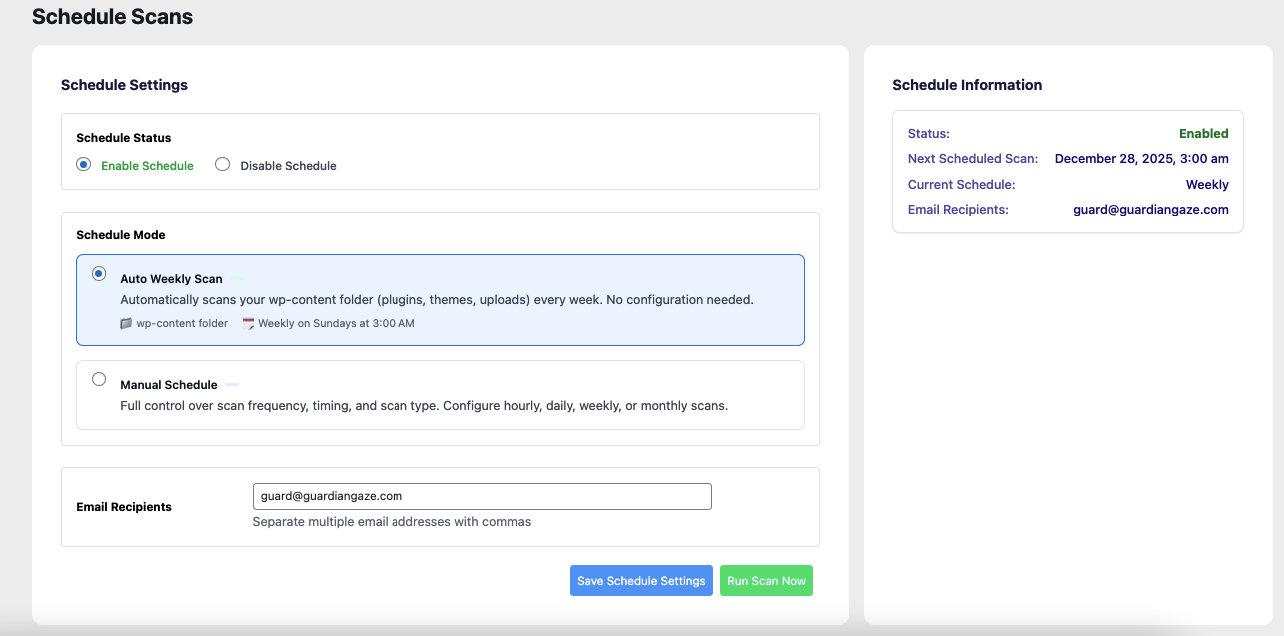
IP Management Panel 
Login Security Settings 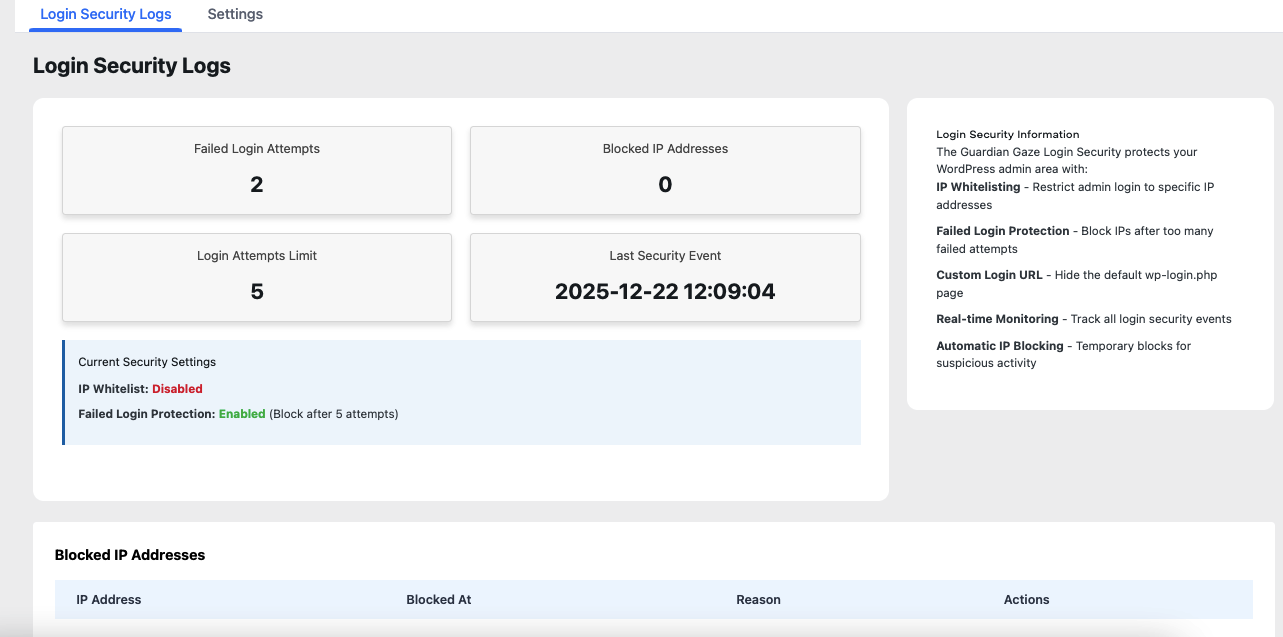
Security Hardening Options 
General Settings Page
Installation
- Upload the plugin files to /wp-content/plugins/guardian-gaze/
- Activate the plugin from the WordPress admin dashboard
- Follow the setup steps to register your installation
- Configure login security, malware scanning, IP rules, and hardening
- Review the dashboard for real-time security events
FAQ
-
Does Guardian Gaze require a license key?
-
A license key is required to activate threat-intelligence updates, email reports, and IP reputation services. The plugin will still function in a limited mode without a license, but real-time detection updates will not be available.
-
How often are malware patterns updated?
-
Malware patterns and detection logic are updated daily through the Guardian Gaze Security Intelligence API. Updates evolve continuously as new WordPress-specific threats, malware variants, and attack techniques emerge.
-
Will this plugin slow down my website?
-
No. Guardian Gaze is designed to be lightweight and non-disruptive.
Scans leverage optimized detection logic and do not rely on heavy signature databases. All external requests are cached where possible, and no resource-intensive actions run on every page load. -
Does Guardian Gaze automatically delete malware?
-
No. Guardian Gaze focuses on safe and reliable detection instead of automated file removal. This reduces the risk of false positives breaking your site. The plugin provides clear indicators so you can decide the appropriate remediation steps.
-
Does this plugin collect personal or sensitive data?
-
No. Guardian Gaze uses a privacy-first design and only collects minimal technical metadata required for security functions.
Passwords, personal information, and website content are never transmitted to external services. -
What external services does Guardian Gaze use?
-
Guardian Gaze connects to:
Guardian Gaze API for malware patterns, licensing, and optional reporting
WordPress.org API for core integrity checks
IP-API.com / IPAPI.co for IP geolocation (dashboard and country-based rules)
These services are used only for functionality that requires external threat intelligence or data validation. -
Does Guardian Gaze use AI or machine learning?
-
Yes. Guardian Gaze incorporates AI-assisted detection models and machine-learning–driven pattern analysis developed by RedSecLabs.
These systems help identify suspicious code, behavioral anomalies, and emerging attack techniques that may not match traditional signatures.
ವಿಮರ್ಶೆಗಳು
ಈ ಪ್ಲಗಿನ್ಗೆ ಯಾವುದೇ ವಿಮರ್ಶೆಗಳಿಲ್ಲ.
Contributors & Developers
“Guardian Gaze” is open source software. The following people have contributed to this plugin.
ಕೊಡುಗೆದಾರರು
Translate “Guardian Gaze” into your language.
Interested in development?
Browse the code, check out the SVN repository, or subscribe to the development log by RSS.
Changelog
2.1.3
- Encryption updated.
2.1.1
- Fixed bug in file integrity monitoring.
2.1.0
- Added new feature to scan updated files.
2.0.8
- Fixed security keys regeneration creating too many backups.
2.0.7
- Fixed bugs email report delivery.
2.0.6
- Fixed bug in file integrity monitoring.
2.0.5
- Added AI scan feature.
2.0.4
- Fixed bug in file integrity monitoring.
2.0.2
- Fixed bug in file integrity monitoring.
2.0.0
- Initial release