

Description
New Photo Gallery offers a versatile solution for creating and managing image collections on your WordPress website. This plugin enables you to build responsive photo galleries that adjust seamlessly to different screen resolutions, ensuring a consistent viewing experience across desktop and mobile devices.
The core functionality centers on a grid-based display that keeps your images organized. When a visitor clicks on an item, it opens in a lightbox, providing a focused view of the image or video. This feature is particularly useful for portfolios, product showcases, or event albums where visual detail is important.
Beyond standard images, the plugin supports video content from YouTube and Vimeo, allowing you to create mixed media galleries. You can also utilize the layout options to present team members or partner logos in a structured format. The interface is designed to be intuitive, letting you upload media and generate shortcodes without complex configuration.
Demos
Photo Gallery Free | Photo Gallery Premium
What You Can Create
- Photo Gallery – Organize your images in a clean, structured grid layout.
- Portfolio Showcase – Present your work professionally with optional hover effects.
- Lightbox Display – Enable users to view images in a full-screen overlay.
- Video Gallery – Integrate content directly from YouTube and Vimeo.
- Team Layouts – Introduce team members with photos and bios.
- Brand Displays – Show client logos or partner brands effectively.
Key Features (Free Version)
- Responsive grid system that adapts to any screen size.
- Lightbox functionality for viewing images and videos without leaving the page.
- Create unlimited galleries with no restriction on the number of images.
- Support for YouTube and Vimeo video embedding.
- Image protection for gallery
- Grayscale effect for images.
- Options to add titles and descriptions to your media.
- Multiple column configurations (ranging from 2 to 6 columns).
- Hover effects for gallery thumbnails.
- Shortcode system for easy insertion into posts and pages.
- Translation support for multilingual websites.
Premium Features
Upgrade to the premium version for additional capabilities:
- Masonry Layout – Utilize a dynamic Pinterest-style grid for varied image aspect ratios.
- Advanced Hover Effects – Choose from 30 distinct animation styles for thumbnails.
- Load More Pagination – Implement a “Load More” button for large collections.
- Map Integration – Associate images with location data on a map.
- Custom Links – Attach specific URLs to individual gallery items.
- Fixed Dimension Lightbox – maintain consistent sizing for the lightbox viewer.
- Transition Effects – Smooth 2D animations when enhanced gallery navigation.
- Visual Enhancements – Apply shadow and glow effects to thumbnails.
- Interface Customization – Adjust colors for the lightbox tool and background.
- Custom CSS – Apply your own style rules for precise control.
- Priority Support – Receive direct assistance for technical inquiries.
How to Use
- Navigate to Photo Gallery > Add New in your WordPress dashboard.
- Provide a title for your new gallery.
- Upload your desired images using the standard media uploader.
- Adjust the gallery settings, such as column count and spacing.
- Copy the shortcode generated by the plugin.
- Paste this shortcode into any page or post editor.
- Publish the page to view your live gallery.
Screenshots

Photo Gallery With Spacing 
Photo Gallery Without Spacing 
Photo Gallery With Thumbnail 
Photo Gallery Without Thumbnail 
Photo Gallery Tool Settings Option 
Video Gallery With Spacing 
Video Gallery Without Spacing 
YouTube Thumbnail Video gallery 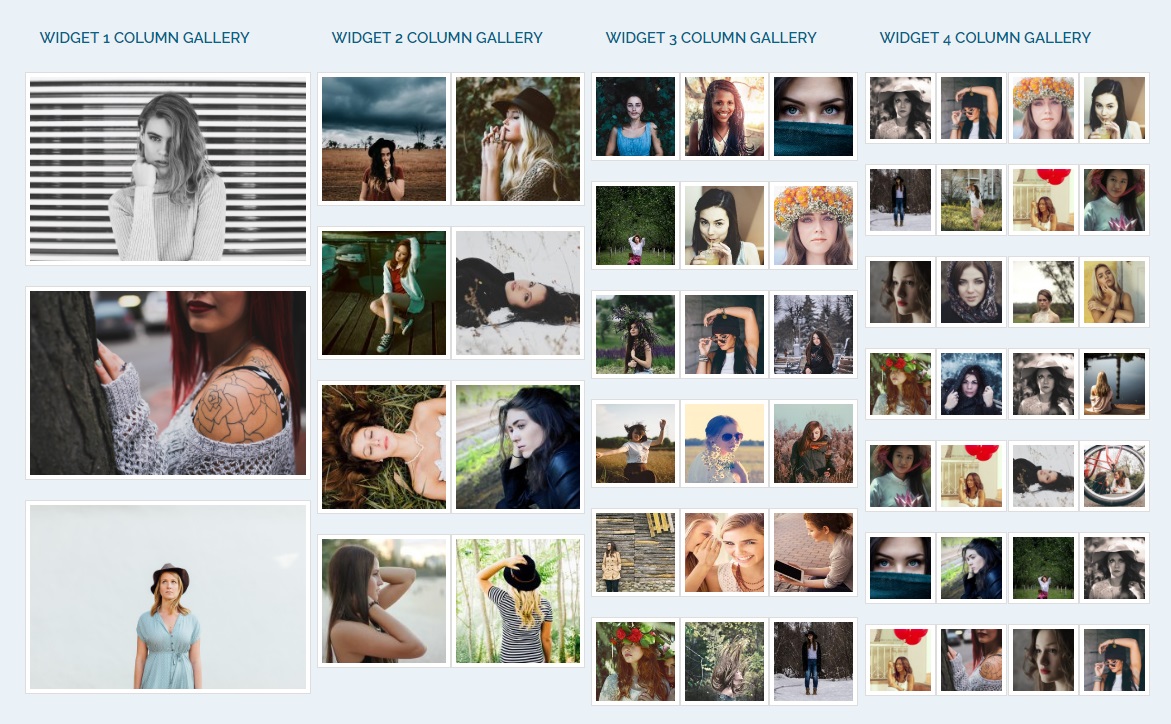
Vimeo Thumbnail Video gallery 
Column Layout Settings 
Full Width Photo Gallery 
Photo Gallery Settings
Installation
Automatic Installation
- Go to Plugins > Add New in your WordPress dashboard.
- Search for “Photo Gallery Starter”.
- Click Install Now and then Activate.
Manual Installation
- Download the plugin zip file.
- Go to Plugins > Add New > Upload Plugin.
- Choose the zip file and click Install Now.
- Activate the plugin.
After Activation
- Navigate to Photo Gallery in your admin menu.
- Click Add New to create your first gallery.
- Upload images and configure settings.
- Use the shortcode in your pages or posts.
FAQ
-
How do I create a photo gallery?
-
Go to Photo Gallery > Add New in your dashboard. Enter a title, upload your images, configure the display settings, and copy the shortcode. Paste this shortcode into any page or post to display your gallery.
-
Can I add multiple galleries to one page?
-
Yes, you can add multiple galleries to a single page. Simply paste the respective shortcodes into your page content where you want them to appear.
-
Is the gallery responsive on mobile devices?
-
Yes, the galleries are designed to be responsive. The grid layout automatically adjusts to fit the screen size, ensuring compatibility with desktops, tablets, and smartphones.
-
How do I add videos to my gallery?
-
When adding items to your gallery, you can input a YouTube or Vimeo URL instead of uploading an image. The plugin will fetch the thumbnail and play the video within the lightbox.
-
Can I customize the lightbox appearance?
-
The free version provides a standard lightbox style. The premium version allows for further customization, including color options for tools and background events.
-
What image formats are supported?
-
The plugin supports standard web image formats such as JPG, JPEG, PNG, GIF, and WebP.
-
How do I change the number of columns?
-
You can adjust the column layout in the gallery settings. Options range from 2 to 6 columns to suit your layout needs.
-
Can I use the gallery in widget areas?
-
Yes, the shortcode can be placed in any widget area that accepts shortcodes, allowing you to display galleries in sidebars or footers.
-
Does the plugin affect website loading speed?
-
The plugin is designed for efficiency, loading scripts only when necessary. For optimal performance with large galleries, we recommend using properly optimized images.
-
How do I get support for this plugin?
-
For users of the free version, please use the plugin support forum. Premium users have access to priority support through our website.
-
Can I translate the plugin to my language?
-
Yes, the plugin is translation-ready. You can use translation tools or create your own language files to localize the interface.
-
How do I display only specific images?
-
The shortcode currently displays all images contained within that specific gallery. To show different sets of images, you should create separate galleries for each set.
Reviews


Contributors & Developers
“New Photo Gallery” is open source software. The following people have contributed to this plugin.
Contributors


“New Photo Gallery” has been translated into 1 locale. Thank you to the translators for their contributions.
Translate “New Photo Gallery” into your language.
Interested in development?
Browse the code, check out the SVN repository, or subscribe to the development log by RSS.
Changelog
1.5.4
- Tested with WordPress 6.9
- New: Redesigned Settings Page with modern Card-based UI.
- Fixed: Typos in function names and shortcode logic.
- Fixed: Deprecated jQuery load event.
- Improvement: Removed unused code and variables.
- Improvement: Standardized code structure (removed closing PHP tag).
1.5.3
- Fixed translation loading warning for WordPress 6.7+
- Updated default gallery settings (3 column layout, full size thumbnails)
- Default thumbnails spacing set to No
1.5.2
- Tested with WordPress 6.8.3
1.5.1
- Tested with WordPress 6.8.1
1.5.0
- Bug fixes and improvements
1.4.9
- Fixed Twenty Twenty-Five theme compatibility issue
- Bug fixes
1.4.8
- Removed deprecated docs menu
- Bug fixes
1.4.7
- Added Vimeo video poster fetch functionality
- Tested with WordPress 6.7.1
- Bug fixes
1.4.6
- Tested with WordPress 6.6.2
- Bug fixes
1.4.5
- Tested with WordPress 6.6.1
1.4.4
- Tested with WordPress 6.5.4
1.4.3
- Security improvements
- Tested with WordPress 6.5.3
- Bug fixes
1.4.2
- Security improvements
- Tested with WordPress 6.5.2
- Bug fixes
1.4.1
- Tested with WordPress 6.4.3
- Bug fixes
1.4.0
- Tested with WordPress 6.4.2
- Bug fixes