

Description
Unlock full potential with the PRO Version: PDFMentor Pro — WordPress PDF Generator for Elementor
Are you looking for a reliable Elementor PDF generator? PDF Generator for WordPress Elementor is the most comprehensive solution to export to PDF directly from your website.
Whether you need to let users save page as PDF in WordPress, generate invoices, or download blog posts for offline reading, this Elementor PDF plugin handles it all while retaining your exact page layout and styles.
Why choose our Elementor PDF Plugin?
We make it simple to turn any page into a document. Unlike other tools that break your layout, our plugin ensures high-fidelity conversion.
- WordPress Post to PDF: essential for bloggers who want to offer their articles as downloadable guides.
- WooCommerce Product to PDF: Perfect for store owners needing to generate product data sheets, catalogs, or brochures instantly.
- Elementor Print Button: Give your users the option to print specific sections or pages cleanly.
- Form to PDF Layouts: Design custom invoices, receipts, or contracts in Elementor and allow users to export them (ideal for form to PDF visual conversions).
Core Features
- Elementor PDF Download Button: Drag and drop a customizable button anywhere on your site using the Elementor widget.
- WordPress Export to PDF: Convert Pages, Posts, and Custom Post Types with a single click.
- WooCommerce Ready: Dedicated features to convert a WooCommerce product to PDF.
- Custom Header & Footer: Add your logo, branding, or custom HTML to the PDF header/footer.
- Watermarking: Protect your content by adding custom watermarks to generated files.
- Custom CSS: Full control over the PDF styling using custom CSS.
- Content Protection: Option to disable text copying from the generated PDF.
- Translation Ready: Includes .pot file for easy localization.
Premium Features
Most plugins in the market today are not compatible with all the elements of the Elementor Page Builder. On the other hand, our WordPress PDF generator is an exception, loaded with support for almost all Elementor Pro widgets.
It is the most robust Elementor PDF plugin available, supporting the alignment of Rows, Columns, and complex layouts.
Supported Elements & Key Features:
1. Basic Widgets of Elementor
* Customize Divider and Heading elements with Custom CSS.
2. Pro Widgets of Elementor
Our plugin supports all major elements and widgets in Elementor Pro:
* Posts (WordPress post to PDF optimized)
* Portfolio
* Gallery
* Slides
* Price Lists & Price Tables
* Flip Box
* Call to Action
* Media Carousel
* Testimonial Carousel
* Reviews
* Countdown
* Share Buttons
3. General Widgets of Elementor
Full support for Elementor’s General Widgets:
* Image Box & Icon Box
* Star Rating
* Image Carousel
* Basic Gallery
* Icon List
* Progress Bar
* Testimonial
* Tabs, Accordion, & Toggle
* Social Icons
* Alert
4. Site Widgets
* Sitemap
* Menu Cart
5. Single Widgets
* Author Box
* Post Comment
* Post Navigation
* Post Info
6. WooCommerce Widgets (WooCommerce Product to PDF)
Fully compatible with online stores. We include support for specific shopping elements:
* Products
* Custom Add to Cart
* Product Categories
* Gallery
* Cart
* Products by Rating
7. WordPress Widgets in Elementor
* Calendar
* Gallery
* Cart
* Products
8. WooCommerce Single Product Page
Create PDFs for WooCommerce single products effortlessly. Simply add the Elementor PDF download button to your single product page template. Includes security features to disable content copying.
DOCUMENTATION 📝
For more information about PDFMentor Pro — WordPress PDF Generator for Elementor, please visit our documentation here.
Follow Us
Liked Our Plugin?
- Join our Facebook Group
- Learn from our tutorials on YouTube Channel
- Or rate us on WordPress 🙂
Screenshots

Screenshot 1 
Screenshot 2 
Screenshot 3 
Screenshot 4 
Screenshot 5 
Screenshot 6 
Screenshot 7 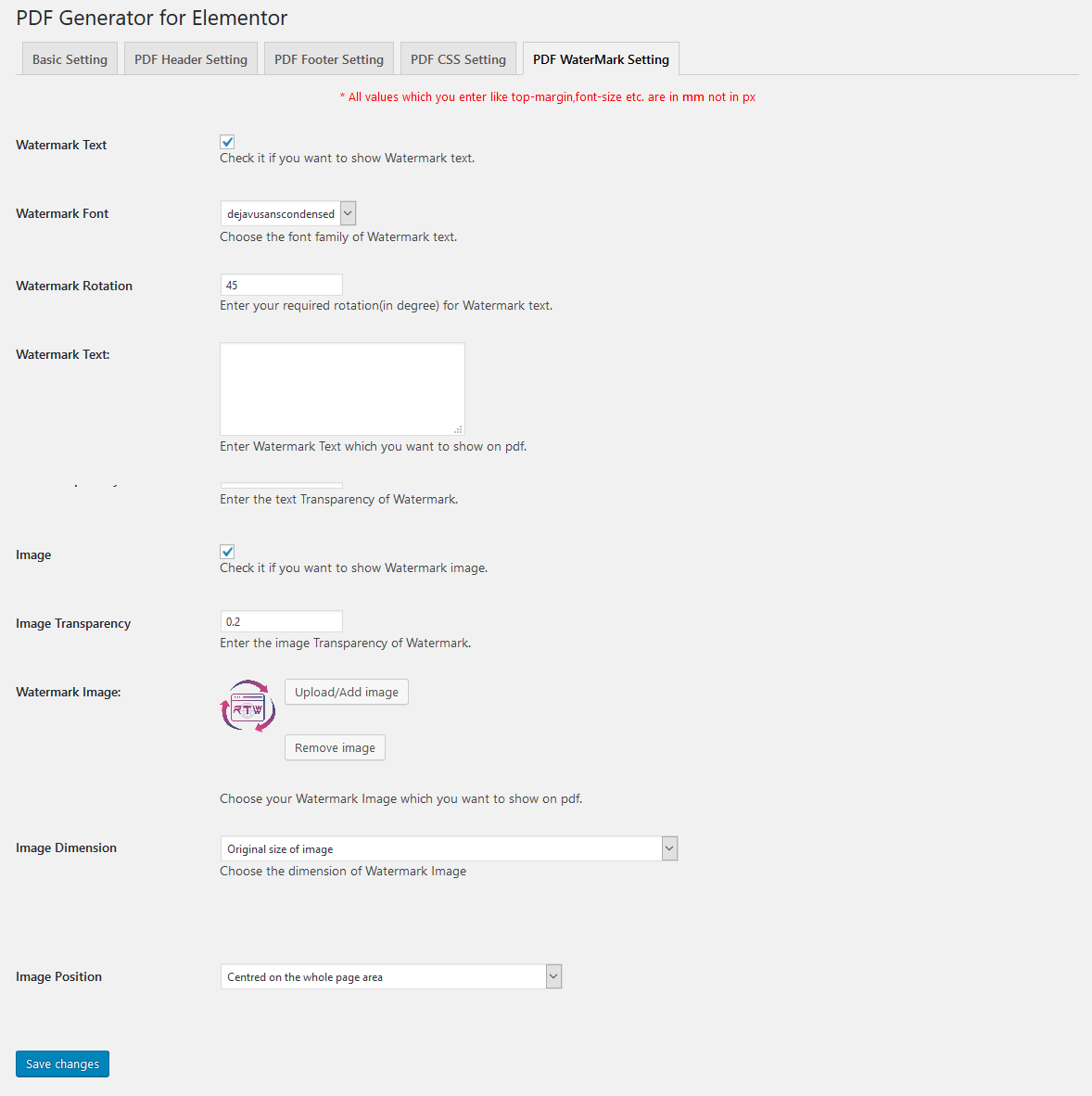
Screenshot 8 
Screenshot 9 
Screenshot 10 
Screenshot 11 
Screenshot 12
Installation
Minimum Requirements
- WordPress 5.0 or greater
- PHP version 7.0 or greater
- MySQL version 5.0 or greater
We recommend your host supports
- PHP version 7.4 or greater
- MySQL version 5.6 or greater
- WordPress Memory limit of 64 MB or greater (128 MB or higher is preferred)
Automatic installation
Automatic installation is the easiest option. To do an automatic install of PDF Generator for WordPress Elementor, log in to your WordPress dashboard, navigate to the Plugins menu, and click Add New.
In the search field type «PDF Generator for WordPress Elementor» and click Search Plugins. Once you’ve found our plugin, click «Install Now».
Manual installation
The manual installation method involves downloading our plugin and uploading it to your web server via your favorite FTP application. The WordPress codex contains instructions on how to do this here.
FAQ
-
Simply search for the «PDF Download Button» widget in your Elementor editor panel and drag it to any location on your page. You can customize the icon, text, and alignment directly within the Elementor interface.
-
Can I use this plugin to convert a WooCommerce product to PDF?
-
Yes! This is a core feature. You can place the download button on any single product page to allow customers to download product details, effectively creating a WooCommerce PDF catalog or spec sheet for offline use.
-
Does this Elementor PDF generator support custom fonts and CSS?
-
Absolutely. Our plugin supports almost all standard CSS properties. You can add Custom CSS in the plugin settings to ensure your PDF matches your brand identity perfectly.
-
Can I export a WordPress post to PDF with images included?
-
Yes, the plugin is optimized for WordPress post to PDF conversion. It retains images, layouts, and text formatting, making it ideal for blogs and articles.
-
Is it possible to use this for «Form to PDF» functionality?
-
Yes. You can design an invoice or receipt layout using Elementor widgets and allow users to download that specific page as a PDF, effectively serving as a form to PDF solution for custom layouts.
-
Does the plugin work with Elementor Pro widgets?
-
Our plugin offers extensive compatibility with Elementor Pro widgets, including Price Tables, Galleries, and Slides, ensuring your advanced layouts render correctly in the PDF.
-
Yes, you have full control. You can upload a custom logo, add business details, or even write custom HTML for the header and footer areas of your PDF.
-
Does this plugin allow users to print instead of download?
-
While the primary function is to save page as PDF, users can easily open the generated file and use their browser or PDF viewer’s print function. The high-quality rendering ensures the Elementor print button functionality produces a clean paper copy.
Reviews


Contributors & Developers
“PDF Generator for WordPress Elementor” is open source software. The following people have contributed to this plugin.
Contributors
Translate “PDF Generator for WordPress Elementor” into your language.
Interested in development?
Browse the code, check out the SVN repository, or subscribe to the development log by RSS.
Changelog
2.2.0
- WordPress 6.9 compatible
- WooCommerce 10.4.3 compatible
- Other minor bugs fixed
2.1.0
- Security bug fixes
2.0.0
- All security & vulnerability has been fixed
- Translation issue fixed as reported by users
- Routine Checkup
- Compatibility testing with latest version of PHP, WordPress, Elementor & WooCommerce
- All Major & Minor bug fixes
1.7.5
- Cross-Site Scripting (XSS) vulnerability fixed
- Routine compatibility testing with latest version of PHP, WordPress, Elementor & WooCommerce
- Minor bug fixes
1.7.4
- Routine compatibility testing with latest version of PHP, WordPress, Elementor & WooCommerce
- Minor bug fixes
1.7.3
- Added compatibility with Elementor Flexbox
- Compatible with latest version of WordPress & WooCommerce
- Minor bug fixes
1.7.2
- Fixed library issue
- Minor bug fixes
- Compatible with PHP 8.2.0
1.7.1
- Minor bug fixes
- Compatible with WordPress 6.2.2
1.7.0
- Added WooCommerce Product SKU in Single Product Layout
- Variable/Grouped Product Price fixed in Single Product Layout
- Add to Cart Link fixed in Single Product Layout
- Related Product fixed in Single Product Layout
- Minor bug fixes
1.6.3
- Minor bug fixes
- Compatible with Elementor 3.6.8
- Compatible with WordPress 6.0.1
1.6.2
- Removed Elementor’s deprecated function
- Fixed PDF generation issue
- Compatible with Elementor 3.6.2
- Compatible with WordPress 5.9.3
1.6.1
- Optimized generation of WooCommerce Single Product
- Fixed caching issue on WooCommerce cart page
- Fixed PDF library inclusion
- Compatible with Elementor 3.5.5
- Compatible with WordPress 5.9
1.6.0
- Added option to disable copying of content from generated PDF
- Compatible with Elementor 3.4.8
- Compatible with WordPress 5.8.2
- Minor bug fixes
1.5.3
- RTL issue Fixed
- Exclude element option in the Download PDF Widget Fixed
- PDF generation of Cart items Fixed
- Made compatible Elementor 3.4.6
- Made compatible WordPress 5.8.1
- Made compatible WooCommerce 5.8.0
- Minor bug fixes
1.5.2
- Minor bug fixes
1.5.1
- Minor bug fixes
1.5.0
- Added option for generating PDF for WooCommerce Single Product
- Added option to hide page number of the Footer
- PDF widget disappears bug fixed
- Empty PDF bug fixed
- Minor bug fixes
1.4.0
- Header menu bug fixed
- Added option whether to display Download PDF button on cart page, shop page and checkout page
- Minor bug fixes
1.3.1
- PRO version bugs fixes
- Minor bug fixes
1.3.0
- Made compatible with PDFMentor PRO version
- Minor bug fixes
1.2.0
- Added option to Set Background Color
- Added option to Set Background Image
1.0.1
- Added Option to Hide Page or Post Title
- Minor bug fixes
1.0.0
- Initial Release