

Description
Aparat Feed is a powerful and lightweight Aparat WordPress plugin that automatically displays the latest videos from any Aparat channel directly on your WordPress website.
Instead of embedding single videos manually, this plugin fetches and shows the newest channel posts dynamically — perfect for content creators, bloggers, businesses, and video publishers.
Built with performance and simplicity in mind, it runs smoothly on both small blogs and high-traffic websites. Aparat Feed helps you keep your site fresh with minimal effort.
Key Features
✅ Automatically display latest Aparat channel posts
✅ Lightweight and optimized for speed
✅ Fully responsive video grid
✅ Easy to configure
✅ Clean and modern output
✅ SEO-friendly structure
✅ No manual video embedding required
✅ Built-in caching to reduce API requests
Live Preview
Want to test before using on your site?
👉 View live preview of the plugin
Enter the Aparat channel username in the plugin settings and display the latest videos on your site automatically.
Support
If you encounter any issues, you can ask your question in the plugin support forum:
👉 Open a support topic
🔥 If you have new feature ideas or improvement suggestions, feel free to share them in the support forum as well.
ℹ️️ Please make sure to follow the official support rules: WordPress support guidelines
Pro Version
🚀 Want more power? Unlock advanced features and get priority help with the Aparat Feed Pro version & Premium Support.
👉 Need fast and reliable WordPress hosting or expert website design services? Visit Pars Mizban – WordPress Hosting & Web Design.
Love Aparat Feed?
If this plugin helps your site grow, please support us:
⭐ Give us a 5-star rating
Your feedback helps us improve the plugin and add more powerful features.
Translate and Contribute
❤️ We welcome contributions from the community
🌍 Want to translate the plugin into your preferred language?:
Start translate easily!
📈 View translation activity: Translation contributors
💻 Want to contribute to development?
Browse or collaborate on our codes and Join development on GitHub repository
Advanced Statistics
Curious about plugin growth?
📊 View advanced plugin statistics
Validated by:
https://wpreadme.com
https://wordpress.org/plugins/developers/readme-validator
Screenshots
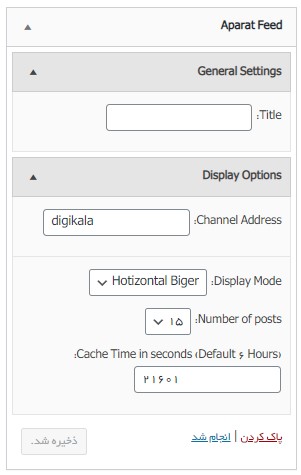
Management section 
Display style 1 
Display style 2 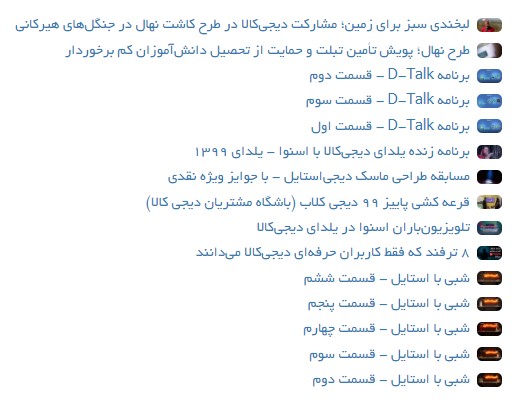
Display style 3
Installation
Minimum Requirements
- WordPress 6.0 or greater
- PHP 7.4 or greater is required (PHP 8.0 or greater is recommended)
- MySQL 5.6 or greater, OR MariaDB version 10.1 or greater, is required.
You can install this plugin in two ways:
Automatic installation (Install from within WordPress)
Automatic installation is the easiest option, WordPress will handle the file transfer, and you won’t need to leave your web browser.
- Log in to your WordPress dashboard
- Navigate to the Plugins menu within your dashboard
- Click “Add New.”
- In the search field, type the name of this plugin and click “Search Plugins.”
- Once you’ve found us, you can view details about it such as the point release, rating, and description.
- Most importantly, you can install it by clicking “Install Now,” and WordPress will handle the rest.
- Activate the plugin from your Plugins page
Manual installation
Manual installation method requires downloading this plugin and uploading it to your web server via your favorite FTP application. The WordPress codex contains instructions on how to do this here.
- Download the plugin ZIP file and extract it
- Upload the extracted folder to the /wp-content/plugins/ directory
- Activate the plugin through the ‘Plugins’ menu in WordPress
FAQ
-
How can I get help and support?
-
If you encounter any issues, you can submit questions via the Plugin support forum and follow the WordPress Support Guidelines.
-
How can I submit feature requests/new ideas/suggestions/feedback/?
-
Please submit your feature requests/new ideas/suggestions/feedback in the Plugin support forum and follow the WordPress Support Guidelines.
-
How can I report a bug?
-
Please report any bugs via the GitHub Issues page.
-
How can I update the plugin?
-
You can update the plugin directly from your WordPress dashboard, but we still recommend you back up your site:
- Go to Dashboard Plugins
- Find the plugin
- Simply Click Update Now when a new version is released.
-
How can I preview the plugin before using it?
-
You can see the Live preview to test its appearance and functionality.
-
To get the Pro version or premium support of the plugin visit Pars Mizban Aparat Pro for the premium edition.
-
Can I translate the plugin to my preferred language?
-
👉 Absolutely. You can easily Translate the plugin to your preferred language here!
-
What are current translations of the plugin (Available languages)?
-
Current translations are already available in some languages. You can View the latest translation activity
-
Can I contribute to development?
-
Yes! Contributions are welcome on GitHub!
👉 You can browse or collaborate on our code and Join the plugin GitHub repository! -
What web hosting you recommend for WordPress websites?
-
Using optimized hosting services such as Pars Mizban web hosting can greatly improve site speed and stability.
-
How does this plugin work?
-
The plugin fetches and displays the latest posts from an Aparat channel automatically on your WordPress site. It does NOT embed a single fixed video — it dynamically shows the newest channel content.
-
How often are Aparat videos updated?
-
The plugin automatically retrieves and displays the latest posts from the selected Aparat channel.
Reviews
There are no reviews for this plugin.
Contributors & Developers
“Aparat WordPress Video Feed Plugin” is open source software. The following people have contributed to this plugin.
Contributors

“Aparat WordPress Video Feed Plugin” has been translated into 1 locale. Thank you to the translators for their contributions.
Translate “Aparat WordPress Video Feed Plugin” into your language.
Interested in development?
Browse the code, check out the SVN repository, or subscribe to the development log by RSS.
Changelog
1.3.1
- Minor improvements
- Performance enhancements
- Compatibility fixes
1.2.5
- Some Bugs fixed
1.2.4
- Some Bugs fixed
1.2.3
- Some Bugs fixed
1.2.2
- Some Bugs fixed
1.2.1
- Some Bugs fixed
1.2.0
- Whole code rewritten and compatible with new WP version and PHP
1.1.0
- Optimizing the thumbnail image of the video icon
1.0.0
- First Version