

Сүрөттөө
20+ Essential Addons for WPForms – Conditional Fields, Multi Step, Redirection, Columns, Repeater, Webhooks, Zapier & more
THE EASIEST AND BEST WPFORMS ADDONS PLUGIN FOR WORDPRESS
👉 Official Demo Link: Click Here
👉 Explore Pro: Play with Backend Options
👉 Buy Pro Version: Click Here
👉 Get Support: Click Here
👉 Our Documentation
👉 Join Our Facebook Group
Equipped with over 20 essential features, Ultra Addons For WPForms is the must-have plugin to complement WPForms. It significantly enhances the functionality of your website’s forms created using WPForms. This All-in-One WordPress Contact Form plugin includes a wide range of options, from basic to advanced, catering to all the needs of your website Contact Forms.
FREE ADDONS for WPForms
- Smart Phone Field
- Database Addon
- Date & Time Picker
- File Upload Field
- Multi Step Forms
- Mailchimp Addon
- Repeater Fields
- Rich Text Field
- Website / URL Field
- Google Sheets Addon
PRO ADDONS
- Conditional Fields
- Post Submissions
- User Registration
- Google Calendar Addon
- Google Sheets Connector – Pro
- Google Drive
- HubSpot Connector
- Webhooks Addon
- Zapier Integration
- AWeber Integration
- Save & Resume
- Digital Signature
How It works:
In addition, please check our Documentation.
Free Version:
Smart Phone Field For WPForms
Our Phone Field addon allows you to create a country dropdown list with country flags. The tag field automatically populates country names in the standard dropdown field within the phone field.
Database Addon for WPForms
Store and manage all form submissions directly inside your WordPress dashboard with our WPForms Database addon. Never lose form entries and access data anytime.
Date & Time Picker for WPForms
Add a flexible and user-friendly date and time picker to your WPForms. Let users select dates and times effortlessly using a modern calendar interface, customizable formats, and validation options—perfect for bookings, appointments, event registrations, deliveries, and scheduling forms.
File Upload Field For WPForms
The File Upload add-on makes it easy to collect files and media through WPForms. It allows users to upload files securely through WPForms and collect documents, images, and attachments directly from your forms.
Multi Step Forms for WPForms
With our Multi-Step add-on for WPForms, you can easily create multi-step forms in WordPress. Split long WPForms into multiple steps to improve usability and completion rates.
Mailchimp Addon for WPForms
The Mailchimp add-on for WPForms lets you automatically add users’ email addresses to your Mailchimp lists when a form is submitted.
Repeater Fields for WPForms
The Repeater field addon allows you to create repeating sets of fields within your forms. Users can dynamically add or remove fields as needed, making it ideal for multiple items, team members, or list-based inputs.
Rich Text Field for WPForms
The Rich Text field add-on allows users to format text and images directly within your forms before submission. It adds a powerful WYSIWYG editor to WPForms, enabling users to style text, add links, format content, and create rich, structured submissions—no HTML knowledge required.
Website / URL Field for WPForms
The Website Links / URL field allows only valid website URLs to be entered and automatically checks the format during submission. Collect and validate website URLs easily in WPForms to ensure clean, accurate link submissions every time.
Google Sheets Addon for WPForms
Connect WPForms with Google Sheets to automatically sync form entries and organize your data in one place. Send every WPForms submission directly to a Google Sheet—no manual work needed—making it easy to track activity, collaborate with your team, and manage data for contact forms, registrations, orders, surveys, and more.
More free addons are on the way. Stay tuned!
Pro Version
The Pro version includes all the features available in the free version. Plus:
Conditional Fields for WPForms
Our Conditional Logic for WPForms add-on helps you implement conditional logic to show or hide fields based on user selections and backend rules, making your WPForms contact forms more interactive and user-friendly.
Post Submissions Addon for WPForms
With the Post Submissions add-on for WPForms, you can accept guest posts, user-submitted post types, and other content without giving users access to your WordPress dashboard. It allows users to submit WordPress posts directly from the frontend using WPForms, making it ideal for guest posts, directories, and community-driven content.
User Registration Addon for WPForms
With the User Registration add-on for WPForms, you can easily add registration and profile management to your site. It automatically creates WordPress user accounts from WPForms submissions, making it perfect for memberships, portals, and gated content sites.
Digital Signature for WPForms
Our Digital Signature for WPForms add-on lets you collect secure electronic signatures directly in WPForms forms. Users can sign using a mouse or touchscreen, making contracts, agreements, and consent forms fast and paperless.
Save & Resume for WPForms
Our Save & Resume for WPForms add-on lets users save form progress and continue later using a secure link. This reduces form abandonment and improves completion for long WPForms forms.
Google Calendar Addon for WPForms
Automatically create Google Calendar events from WPForms submissions. Ideal for appointments, bookings, and scheduling workflows.
Google Sheets Pro for WPForms
Sync WPForms entries to Google Sheets in real time with advanced control. Perfect for teams that need automated data management.
Google Drive Addon for WPForms
The Google Drive add-on is the easiest way to automatically store form entries, documents, and file uploads in your Google Drive. Keep files organized and accessible without manual downloads.
HubSpot Connector for WPForms
Send WPForms leads straight into HubSpot CRM automatically. Manage contacts, deals, and follow-ups more efficiently.
Webhooks Addon for WPForms
Send WPForms data to any external platform using webhooks. Build custom integrations and advanced workflows effortlessly.
Zapier Addon for WPForms
Connect WPForms with thousands of apps using Zapier automation. Trigger actions and workflows without writing custom code.
AWeber Integration for WPForms
Integrate WPForms with AWeber to automatically add new subscribers from form submissions. Simplify email marketing and list growth.
More Pro addons are in development and will be available soon.
Join our Community to stay updated
Join our Facebook group to stay informed with the latest news and updates about Tourfic.
Our Support
We provide full support on the WordPress.org forums & Our Website. Check our Support Policy.
Privacy Policy
Ultra Addons for WPForms uses Appsero SDK to collect limited telemetry data. By default, the SDK does not collect any data and only begins gathering basic telemetry after the user grants permission via an admin notice. Appsero SDK does not collect data without explicit user consent. This data helps us diagnose issues more efficiently, improve our products, and deliver a better experience for all users.
How can I report security bugs?
You can report security bugs through the Patchstack Vulnerability Disclosure Program. The Patchstack team helps validate, triage, and handle any security vulnerabilities. Report a security vulnerability.
Our Plugins
- Ultimate Before After Image Slider & Gallery – BEAF
- Instantio – WooCommerce Quick Checkout | Floating Cart, Side Cart & Popup Cart
- Tourfic – Ultimate Hotel Booking, Travel Booking & Apartment Booking WordPress Plugin
- Hydra Booking – All in One Appointment Scheduling and Booking Calendar Solution
Our Themes
Credits
- Icons and Illustrations: Iconfinder
- Special thanks to the WPForms team for their exceptional form builder.
Скриншоттор

Addons Dashboard 
Advanced Phone Field (Settings) 
Database Entries (Admin View) 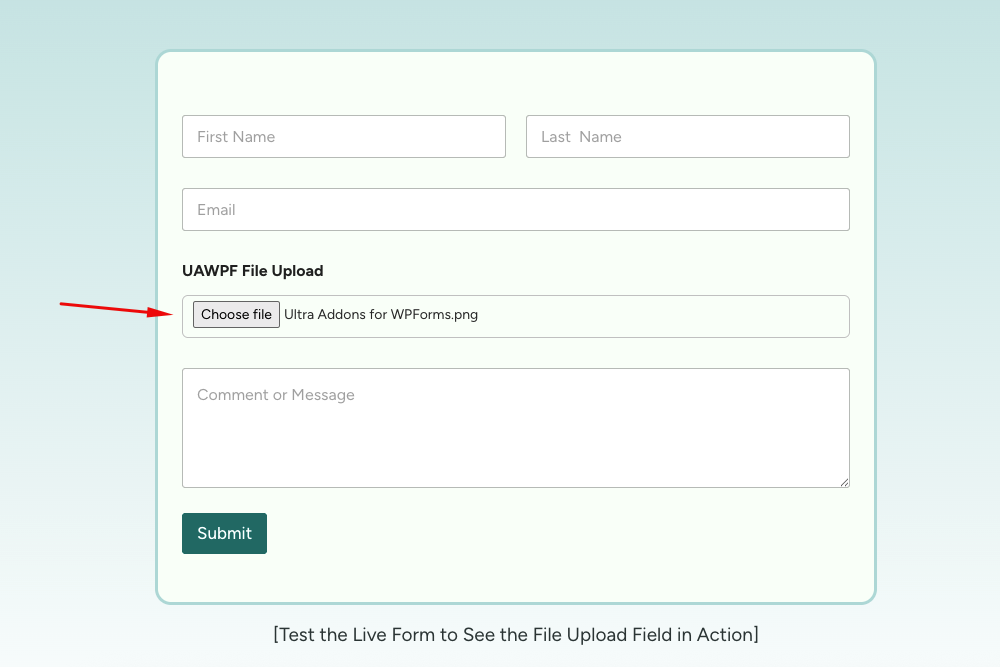
File Upload Field Example 
Multistep Form Example 
Mailchimp Integration Setup 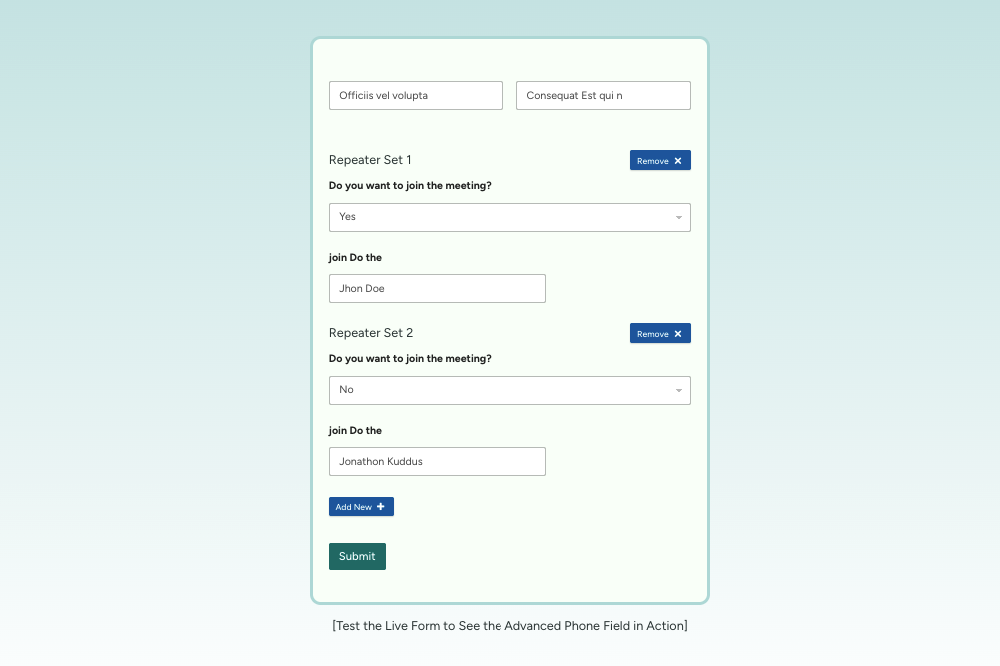
Repeater Field in Action 
Website URL Field Preview
Орнотуу
- Download and unzip the plugin. Upload the unzipped folder to the wp-contents/plugins folder of your WordPress installation.
- Active the plugin from the WordPress Plugins administration page OR, Go to the WordPress admin panel, click ‘Plugins’ -> ‘Add new’. In the search input box, type ‘Ultra Addons for WPForms’.
- Install and activate the plugin.
- Go through the Quick setup wizard for the basic setup.
- Check our Documentation & YouTube videos for further instruction.
- Go to Plugin Settings (Dashboard -> WPForms Addons) and enable the addon you need.
FAQ.KG
-
Where do I report security bugs found in this plugin?
-
Please report security bugs found in the source code of the undefined plugin through the Patchstack Vulnerability Disclosure Program. The Patchstack team will assist you with verification, CVE assignment, and notify the developers of this plugin.
-
What is WPForms
-
WPForms is a popular WordPress form builder plugin that allows you to create contact forms, registration forms, surveys, payment forms, and more without writing code.
-
Why do we need a WPForms add-on plugin?
-
A WPForms add-on plugin extends the core functionality of WPForms by adding advanced features such as conditional logic, file uploads, integrations, and automation. It helps you build more powerful, interactive, and customized forms tailored to your website’s needs.
-
How To Create a Multi-Step Form Using WPForms Plugin
-
You can create a multi-step form with WPForms with Ultra Addons for WPForms’ Multi-Step Add-on, which lets you split long forms into clear, manageable steps. This improves user experience and helps increase form completion rates.
-
How to Save WPForms Data in WordPress Dashboard
-
Our WPFormsDB add-on helps you save all submitted data inside your WordPress dashboard. Just install the Ultra Addons for WPForms plugin and activate the WP Forms Database add-on.
-
How to add a File Upload Field in WPForms
-
You can add a File Upload field in WPForms using the File Upload Add-on of Ultra Addons for WPForms, which lets users upload documents, images, and media files directly through your forms. It’s secure, easy to set up, and ideal for collecting files from users.
-
How to Use Conditional Logic with WPForms
-
You can use conditional logic with WPForms by enabling Conditional Fields addon of Ultra Addons for WPForms and set rules to show or hide form fields based on user selections. This helps create more interactive, user-friendly forms that adapt to each user’s input.
-
How to Use the Phone Field with WPForms
-
You can use the Phone Field with WPForms by enabling the Phone Field add-on of Ultra Addons for WPForms. It allows users to select country codes with flags and automatically formats phone numbers correctly.
-
How to Add a Date & Time Picker in WPForms
-
You can add a date and time picker in WPForms by enabling the Date & Time add-on of Ultra Addons for WPForms. It provides a modern calendar interface with customizable formats and validation options.
-
How to Add a File Upload Field in WPForms
-
You can allow file uploads in WPForms by enabling the File Upload add-on of Ultra Addons for WPForms. This lets users securely upload documents, images, and other files directly through your forms.
-
How to Connect Mailchimp with WPForms
-
You can connect Mailchimp with WPForms by enabling the Mailchimp add-on of Ultra Addons for WPForms. This automatically adds users’ email addresses to your Mailchimp lists when forms are submitted.
-
How to Use Repeater Fields in WPForms
-
You can use repeater fields in WPForms by enabling the Repeater add-on of Ultra Addons for WPForms. It allows users to dynamically add or remove repeated sets of fields within a form.
-
How to Enable Rich Text Submissions in WPForms
-
You can enable rich text submissions in WPForms by activating the Rich Text add-on of Ultra Addons for WPForms. It adds a WYSIWYG editor so users can format text, add links, and create structured content.
-
How to Validate Website URLs in WPForms
-
You can validate website URLs in WPForms by enabling the Website Links add-on of Ultra Addons for WPForms. This ensures only properly formatted URLs are accepted in form submissions.
-
How to Send WPForms Entries to Google Sheets
-
You can send WPForms entries to Google Sheets by enabling the Google Sheets add-on of Ultra Addons for WPForms. It automatically syncs every form submission to a spreadsheet for easy tracking and sharing.
-
How to Sync WPForms with Google Calendar
-
You can sync WPForms with Google Calendar by enabling the Google Calendar add-on of Ultra Addons for WPForms. This automatically creates calendar events from form submissions.
-
How to Store WPForms Uploads in Google Drive
-
You can store WPForms uploads in Google Drive by enabling the Google Drive add-on of Ultra Addons for WPForms. It automatically saves form entries and uploaded files to your Drive account.
-
How to Send WPForms Leads to HubSpot
-
You can send WPForms leads to HubSpot by enabling the HubSpot add-on of Ultra Addons for WPForms. This transfers form submission data directly into your HubSpot CRM.
-
How to Accept Frontend Post Submissions with WPForms
-
You can accept frontend post submissions by enabling the Post Submissions add-on of Ultra Addons for WPForms. It allows users to submit WordPress posts without accessing the dashboard.
-
How to Create User Registration Forms with WPForms
-
You can create user registration forms in WPForms by enabling the User Registration add-on of Ultra Addons for WPForms. It automatically creates WordPress user accounts from form submissions.
-
How to Send WPForms Data Using Webhooks
-
You can send WPForms data to external services by enabling the Webhook add-on of Ultra Addons for WPForms. This allows you to build custom integrations with third-party platforms.
-
How to Automate WPForms with Zapier
-
You can automate WPForms workflows by enabling the Zapier add-on of Ultra Addons for WPForms. It connects WPForms with thousands of apps to trigger automated actions.
Сын-пикирлер
There are no reviews for this plugin.
Contributors & Developers
“Ultra Addons for WPForms” is open source software. The following people have contributed to this plugin.
Мүчөлөрү

Translate “Ultra Addons for WPForms” into your language.
Interested in development?
Browse the code, check out the SVN repository, or subscribe to the development log by RSS.
Өзгөртүүлөр
1.0.11 – Jan 16, 2026
- Info: System stability has been improved.
1.0.10 – Jan 15, 2026
- New Addon: Save and Resume Added.
- New Addon: Digital Signature Added.
1.0.9 – Jan 06, 2026
- Added: FAQ information related to security details.
1.0.8 – Jan 05, 2026
- Added: Date & Time Picker Addon.
- Added: Rich Text Editor Addon.
- Added: HubSpot Integration.
- Added: Google Calendar Addon (Pro).
- Added: Google Sheets Addon (Pro).
- Added: Post Submissions Addon (Pro).
- Added: User Registrations Addon (Pro).
1.0.7 – Dec 15, 2025
- Compatibility: Fully compatible with WordPress (v6.9).
1.0.6 – Dec 03, 2025
- Added: Conditional Fields addon.
1.0.5 – Dec 01, 2025
- Fixed: Phone number field console error.
1.0.4 – Nov 30, 2025
- Updated: Readme information updated.
1.0.3 – Nov 30, 2025
- Added: Google Sheets Integration addon.
- Added: AWeber Integration (Pro).
- Added: Google Drive Integration (Pro).
- Added: Webhook Integration (Pro).
- Added: Zapier Integration (Pro).
- Updated: Addons list in readme.txt.
1.0.2 – Nov 09, 2025
- Updated: Readme information updated.
- Compatibility: Now compatible with WPForms v1.9.8.4.
1.0.1 – Oct 29, 2025
- Updated readme information.
- Updated roadmap details.
1.0.0 – Oct 28, 2025
- Addons Introduced
- Advanced Phone Field
- Database Addon
- File Upload Field
- Multistep Form Addon
- Mailchimp Integration
- Repeater Field
- Website URL Field