

Description
Running flash sales manually? Struggling with complex discount scenarios? Losing sales because your pricing isn’t flexible enough?
GiantWP Discount Rules solves all of that.
This is the WooCommerce discount plugin that finally makes sense. No PhD required. No confusing settings buried five levels deep. Just smart, flexible discount rules that work the way you think.
Want to reward bulk buyers? Done. Need to run a “Buy 2 Get 1 Free” promotion? Easy. Want to give VIP customers 15% off everything? Set it up in 30 seconds. Need to discount specific categories only when cart total exceeds $100? We’ve got you covered.
The best part? Everything happens automatically. No coupon codes for customers to remember or type in. Your discounts just work, applying themselves when conditions are met and disappearing when they’re not.
Documentation | Pro Version | Get Support | Request Features
Why Store Owners Love This Plugin
It’s Actually Simple
Most discount plugins feel like you need an engineering degree. Not this one. We built it with a clean, modern interface that just makes sense. Create a rule, set your conditions, choose your discount. Done.
It’s Powerful (When You Need It)
Simple doesn’t mean limited. Behind that clean interface is a seriously powerful engine. Want to create a discount that only applies to returning customers who buy from specific categories on Tuesdays when their cart exceeds $75? Yeah, you can do that.
It Doesn’t Break Your Site
We’re obsessed with performance. The plugin is built with Vue.js for a lightning-fast admin experience, and the frontend code is optimized to not slow down your store. Fast plugin = fast store = happy customers.
It Actually Helps You Sell More
This isn’t just about offering discounts. It’s about strategic pricing that increases conversions. Show customers exactly how much they’ll save. Display “Buy 2 Get 20% Off” right on the product page. Watch your average order value climb.
What You Can Do (Free Version)
Smart Discount Types
* Percentage discounts (10% off, 25% off, you name it)
* Fixed amount discounts ($5 off, $20 off)
* BOGO deals (Buy One Get One Free or discounted)
* Category-wide discounts
* Storewide sales
* Customer role-based pricing (wholesale, VIP, members)
Intelligent Conditions
* Cart subtotal (“Spend $50, get 10% off”)
* Product quantity (“Buy 3+ items, save 15%”)
* Specific products or variations
* Product categories or tags
* Customer purchase history
* User roles (give your wholesalers special pricing)
* Cart weight
* Payment methods
* New vs. returning customers
Helpful Features That Actually Matter
* Upsell notifications – Show “Buy 2 Get 10% Off” on product pages to encourage larger orders
* Auto-apply discounts – No coupon codes needed. Customers see the savings automatically
* Schedule discounts – Set start and end dates. Your Black Friday sale starts and stops itself
* Usage limits – Cap how many times a discount can be used
* Discount tracking – See which rules are working and which aren’t
* Order labels – Shows which discount was applied on order pages
* Works with sale prices – Discount both regular and sale prices
* Simple on/off toggle – Disable rules without deleting them
* HPOS compatible – Works perfectly with WooCommerce’s High-Performance Order Storage
* Block editor ready – Compatible with cart and checkout blocks
Pro Version: When You Need More Power
Ready to take it further? The Pro version unlocks advanced strategies that serious store owners use:
Tiered Bulk Pricing
* Buy 1-5: Regular price
* Buy 6-10: 10% off
* Buy 11-20: 20% off
* Buy 21+: 30% off
Set up unlimited pricing tiers based on quantity, total spend, weight, or any condition you can think of.
Advanced BOGO (Buy X Get Y)
* Buy any shirt, get any pants 50% off
* Buy 2 products from Category A, get 1 from Category B free
* Buy $100 worth of electronics, get a free accessory
* Apply fixed or percentage discounts to the free/discounted items
Shipping Discounts
* Free shipping when cart total exceeds $X
* Percentage off shipping for VIP customers
* Conditional shipping fees and discounts
Priority Support
* Get help from real humans who actually know the plugin
* Faster response times
* Direct access to our development team
Upgrade to Pro and unlock the full potential of dynamic pricing.
Real-World Examples
Let me show you how this works in practice:
Example 1: Encourage Bulk Orders
“Buy 5 or more of any product, get 15% off your entire order”
Set up a simple cart quantity condition with percentage discount
Customers automatically see the discount when they hit 5 items
Example 2: Reward Loyal Customers
“Returning customers who’ve spent $500+ get 10% off everything”
Create a rule with purchase history condition
Applies automatically when they log in
Example 3: Category Flash Sale
“All shoes 25% off this weekend only”
Set category discount with scheduled start/end dates
Automatically activates Friday at midnight, deactivates Sunday at 11:59 PM
Example 4: Wholesale Pricing
“Wholesale customers get 30% off all orders over $200”
Combine user role condition with cart subtotal
Only wholesale customers see the pricing
Example 5: Classic BOGO
“Buy 2 pairs of jeans, get 1 free”
Set up BOGO rule for jeans category
Free item automatically added to cart
Available Conditions (Mix and Match)
Cart Conditions
* Cart subtotal (before discounts)
* Total cart quantity
* Cart weight
Product Conditions
* Specific products
* Product variations
* Categories
* Tags
* Regular price
Customer Conditions
* Logged in status
* User role
* Specific customers
* New vs. returning
Purchase History
* Number of previous orders
* Products purchased before
* Categories purchased before
Other Conditions
* Payment method
You can combine as many conditions as you need. Match all conditions (AND logic) or match any condition (OR logic).
Development & Contributing
This plugin is actively developed and maintained by GiantWP Solutions. We welcome contributions, bug reports, and feature suggestions.
Source Code
Full unminified source code and build instructions are available on GitHub:
View on GitHub
Report Bugs
Found a bug? Please report it on our GitHub Issues page or contact us through our website.
Request Features
Have an idea for a new feature? We’d love to hear it! Submit feature requests through our contact form.
Privacy Policy
GiantWP Discount Rules – Dynamic Pricing & BOGO Deals for WooCommerce uses Appsero SDK to collect some telemetry data upon user’s confirmation. This helps us to troubleshoot problems faster & make product improvements.
Appsero SDK does not gather any data by default. The SDK only starts gathering basic telemetry data when a user allows it via the admin notice. We collect the data to ensure a great user experience for all our users.
Integrating Appsero SDK DOES NOT IMMEDIATELY start gathering data, without confirmation from users in any case.
Learn more about how Appsero collects and uses this data.
Credits
Created with care by the team at GiantWP Solutions.
Special Thanks
* To the WordPress and WooCommerce communities for inspiration and support
* To our beta testers who helped shape this plugin
* To every store owner using this plugin—you make this worthwhile
Like This Plugin?
If GiantWP Discount Rules is helping your store, please consider:
* Leaving a 5-star review on WordPress.org
* Sharing it with other store owners
* Upgrading to Pro to support continued development
Your support means everything to a small team like ours. Thank you! 🙏
Screenshots

Simple settings page with all options in one place 
Create new discount rules with an intuitive popup interface 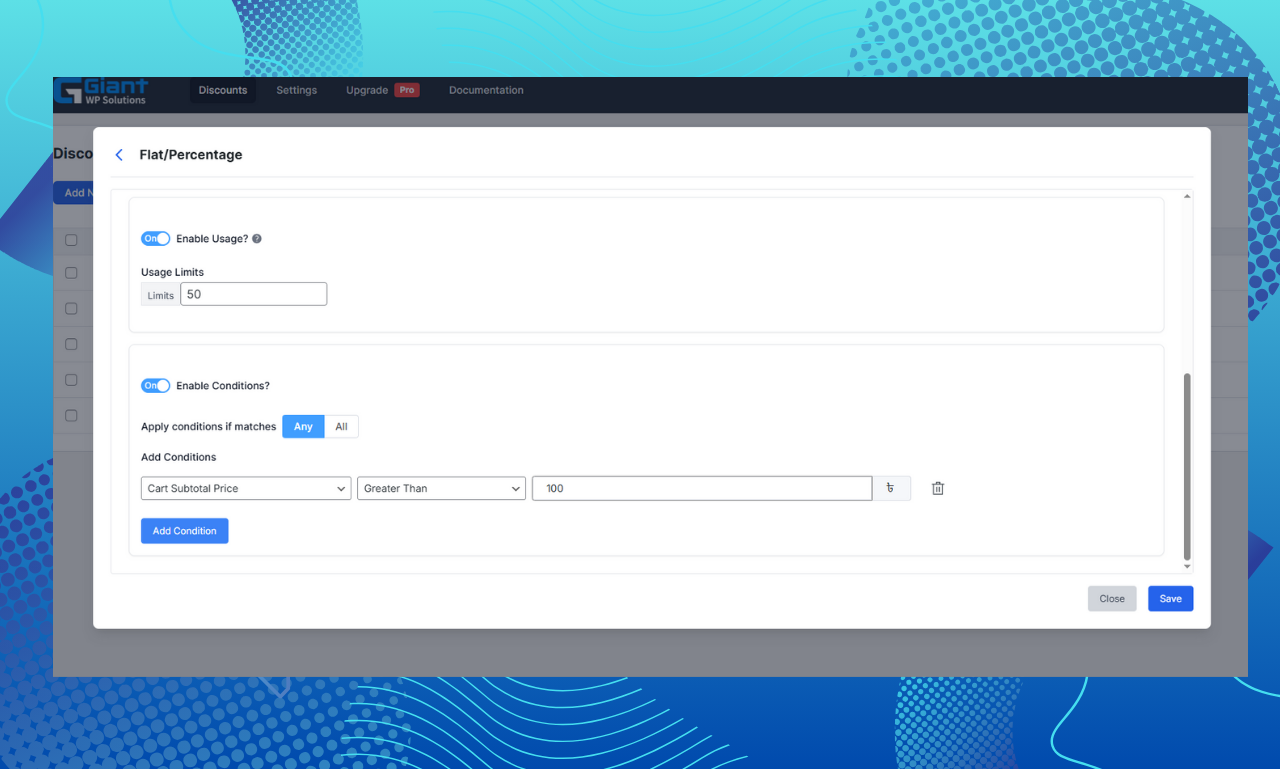
Flat/Percentage discount builder with powerful condition system 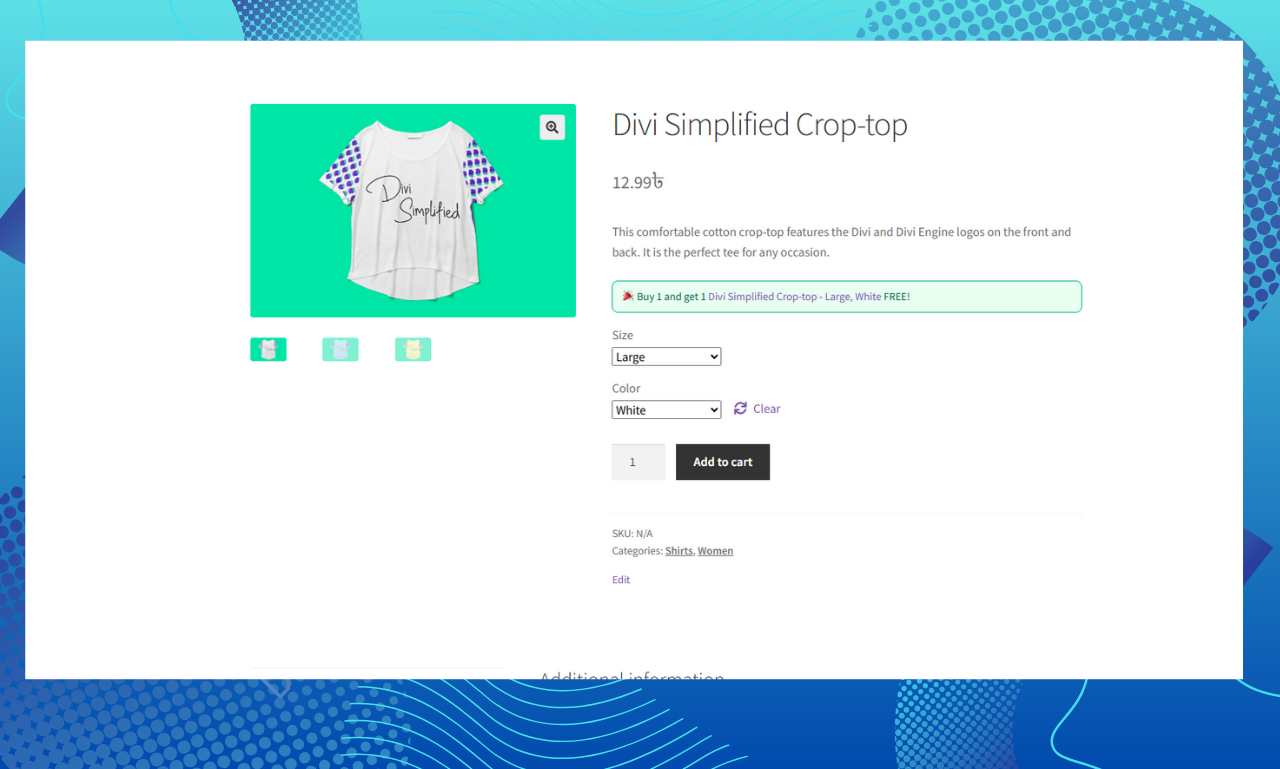
Upsell notification showing on product page: “Buy 2 Get 15% Off” 
BOGO deal displaying on cart page with free item highlighted 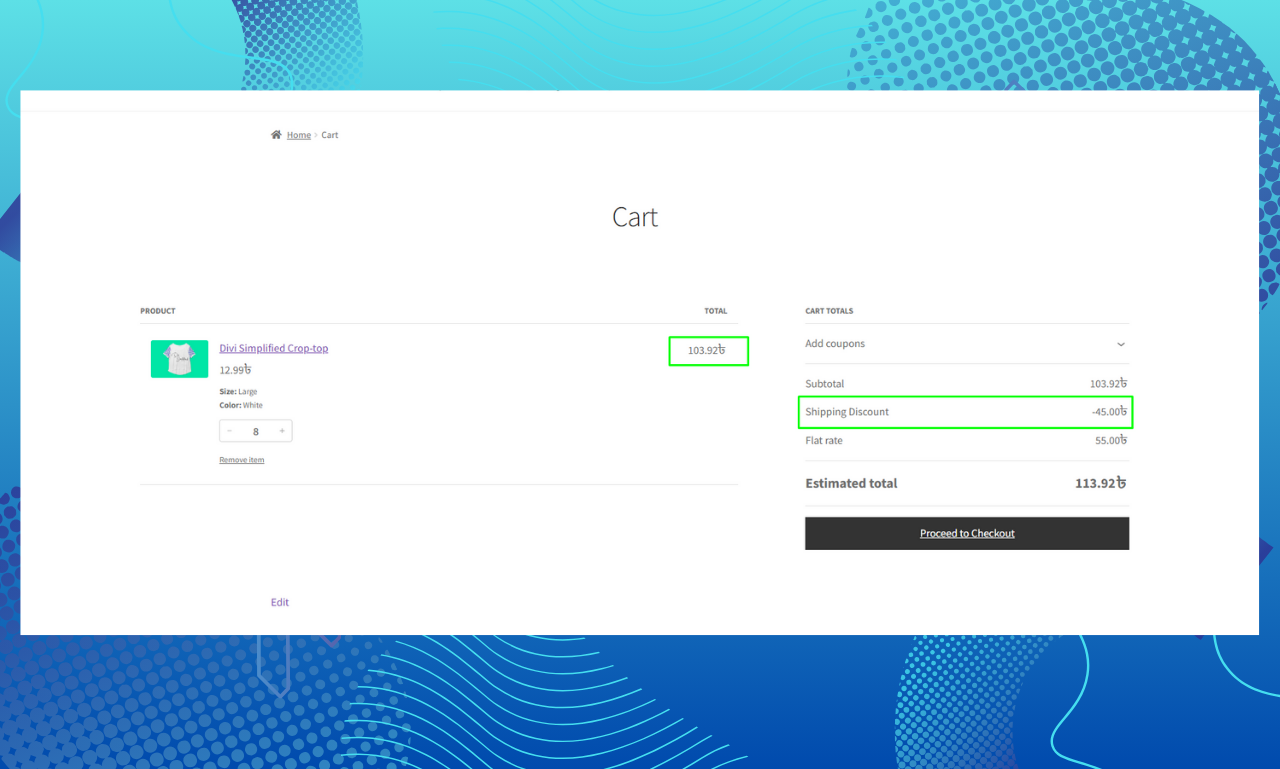
Shipping discount automatically applied based on cart total 
Buy X Get Y promotion showing discounted item in cart
Installation
Automatic Installation (Recommended)
- Log into your WordPress dashboard
- Go to Plugins Add New
- Search for “GiantWP Discount Rules”
- Click “Install Now” then “Activate”
- Navigate to WooCommerce Discount Rules
- Create your first discount rule
Manual Installation
- Download the plugin ZIP file
- Go to Plugins Add New Upload Plugin
- Choose the ZIP file and click “Install Now”
- Activate the plugin
- Navigate to WooCommerce Discount Rules
Getting Started
After installation, you’ll see a new menu item under WooCommerce called “GiantWP Discount Rules”. Click it to access the discount dashboard.
To create your first discount:
1. Click “Add New Rule”
2. Choose your discount type (Flat/Percentage or BOGO)
3. Set your discount amount
4. Add conditions (optional but recommended)
5. Schedule it or leave it active indefinitely
6. Save and test on your store
The interface is intuitive, but if you get stuck, check out our documentation.
FAQ
-
Is this plugin really free?
-
Yes! The core features are completely free and always will be. You can create unlimited discount rules with the free version. The Pro version adds advanced features like tiered pricing, advanced BOGO, and shipping discounts for stores that need them.
-
Will discounts show on product pages?
-
Yes! You can enable upsell notifications that show messages like “Buy 2 Get 10% Off” directly on product pages. This helps customers understand the deal before they add items to cart.
-
Can I exclude products that are already on sale?
-
Absolutely. There’s a filter option that lets you exclude sale products from discount rules. Or you can choose to discount sale prices too—it’s up to you.
-
Do I need to create coupon codes?
-
Nope! That’s the beauty of this plugin. Discounts apply automatically when conditions are met. No coupon codes to remember, copy, or type in. It just works.
-
What happens if a customer qualifies for multiple discounts?
-
You set the priority for each rule. The highest priority rule wins. This gives you complete control over which discount applies when there’s overlap.
-
Can I give different discounts to different customer groups?
-
Yes! You can create role-based discounts. For example, give wholesale customers 30% off, VIP members 20% off, and regular customers 10% off—all from the same store.
-
Will this work with WooCommerce subscriptions or memberships?
-
Yes, it works with standard WooCommerce subscription and membership plugins. You can create discounts based on customer roles from these plugins.
-
Does it work with variable products?
-
Absolutely. You can apply discounts to specific variations or all variations of a product.
-
Can I schedule discounts in advance?
-
Yes! Set start and end dates/times for any discount rule. Perfect for flash sales, seasonal promotions, or holiday discounts.
-
Will the discount show on invoices and receipts?
-
Yes. Discounts appear as separate line items on invoices, receipts, and in WooCommerce order details.
-
Does this work with the new WooCommerce block editor?
-
Yes! The plugin is fully compatible with the cart and checkout blocks, as well as the classic cart and checkout pages.
-
Is it compatible with HPOS (High-Performance Order Storage)?
-
100% compatible. We built it to work perfectly with WooCommerce’s modern order storage system.
-
What about performance? Will this slow down my site?
-
Not at all. We’re performance nerds. The plugin is optimized to be lightweight and fast. The admin uses Vue.js for a snappy interface, and the frontend code is minimal and efficient.
-
Can I see which discounts are being used most?
-
Yes. Each rule tracks how many times it’s been applied, so you can see which promotions are actually driving sales.
-
Is there a usage limit feature?
-
Yes. You can limit how many times a discount can be used total, or per customer. Great for limited-time offers.
-
Does it work with my theme?
-
Yes. The plugin works independently of themes and has been tested with popular themes like Astra, Kadence, OceanWP, Storefront, and many others.
-
I need help setting up a complex discount. Can you help?
-
Free users can get support through the WordPress.org forums. Pro users get priority email support with direct access to our team. We’re here to help!
-
Can developers extend this plugin?
-
Absolutely! The plugin is built with clean, extendable code. There are hooks and filters throughout, and you can extend core classes to add custom functionality.
Reviews

Contributors & Developers
“GiantWP Discount Rules – Dynamic Pricing & BOGO Deals for WooCommerce” is open source software. The following people have contributed to this plugin.
Contributors

Interested in development?
Browse the code, check out the SVN repository, or subscribe to the development log by RSS.
Changelog
1.2.12
- Update plugin assets
- minor frontend changes
1.2.9 – December 27, 2024
- Fixed: Minor bug fixes and stability improvements
- Added: BOGO badge now displays in cart to highlight free/discounted items
1.2.7 – November 8, 2024
- Fixed: Minor bugs and compatibility issues
- Added: Better integration with popular themes and plugins
1.2.6 – October 28, 2024
- Added: Complete translation support (.pot file) for PHP and Vue.js components
- Fixed: Added translator comments to comply with WordPress standards
- Improved: Overall translation readiness for multilingual stores
1.2.3 – October 28, 2024
- Updated: Plugin naming for better clarity
1.2.0 – October 27, 2024
- Added: Upsell notification feature for product pages
- Updated: Complete UI refresh with improved user experience
- Improved: WooCommerce compatibility and performance
1.1.5 – October 17, 2024
- Improved: Minor updates and data syncing enhancements
1.1.4 – August 15, 2024
- Fixed: Various bugs identified by users
- Improved: Compatibility with latest WooCommerce version
- Note: This is a verified stable working version
1.1.3 – August 12, 2024
- Improved: Code refinements and optimizations
1.1.2 – May 28, 2024
- Fixed: Bug fixes reported by community
1.1.1 – May 22, 2024
- Fixed: Minor bug fixes
1.1.0 – April 11, 2024
- Fixed: Various bugs and improvements
- Improved: Overall plugin stability
1.0.5
- Fixed: Code improvements and bug fixes
- Improved: Performance optimizations
1.0.4
- Initial stable release
- Added: Flat/Percentage discount support
- Added: Advanced condition builder
- Added: Scheduling and usage limit features
- Added: Modern Vue.js admin interface