Moving to katecpp.github.io

I decided to move my blog to
katecpp.github.io.

Jekyll with Github Pages is much more flexible than the wordpress.com.
More about my motivation : http://katecpp.github.io/hello-jekyll

I am happy about every single visitor who reads my blog.
I hope you will enjoy my new page too!

KateCpp

Enum class. Why should you care?

The usage of enums is pretty common and it might seem that this language feature is well-known to everybody. And yet, despite the fact that the C++11 standard has almost 4 years, some people are stuck with old style enum instead of using the enum class version. In this article I will discuss the differences between C++98 enum and C++11 enum class and prove that the latter one is almost always better idea.

C++98 unscoped enum

C++98 style-enum is unscoped, which means that the names of enumerators are available in global scope. It results in global namespace pollution and the growing possibility of the name conflict. For example, consider an enum which defines the message type. See what happens if you define somewhere a variable called error. Will you be able to spot the bug in a big program?

enum MsgType
{
    request,
    ack,
    error
};

int process()
{
   int error = 0;
   /* ... */
   MsgType currentMsgType = getType();
   if (currentMsgType == error){ /* ... */}
}

To avoid such mistakes the names of enumerator should be more unique, e.g. begin with the enum type prefix, like MsgType_request. You could also wrap the enum with struct or class and refer to enum values with the class name specified. Other (and possibly better) option is using C++11 scoped enum.

C++11 scoped enum

enum class MsgType
{
    request,
    ack,
    error
};

Such enum is called scoped enum, because the names of enumerators are not known to global scope. To use them you need to specify the enum class name and use the scope resolution operator ::.

int process()
{
   int error = 0;
   /* ... */
   if (currentMsgType == MsgType::error){ /* ... */}
}

Now the risk of name conflict with enumerators reached zero level. The enum class name is required also by creation and initialization of enum values.

   MsgType currentMsgType = MsgType::request;
   MsgType previousMsgType(MsgType::ack);

This also allows you to create many enum classes with equal enumerators names. Such code is totally legal and safe — the names are not conflicting with each other since you use them with enum class name explicitly.

enum class MsgType
{ request, ack, error };
enum class ActionType
{ request, ack, error };
enum class Status
{ on, off, error };

Implicit conversions. Is it what you want?

There is also another big difference between C++98 enum and C++11 enum class: unscoped enums are implicitly convertible to integers, while the latter one are not. Code below (C++98 enum) would compile with no warnings, but does it have sense in all cases? Maybe you would like to have some compiler tip, that this part of code looks suspicious?

MsgType crtMsg = request;

double someResult = crtMsg/2;
double anotherResult = sin(crtMsg);
bool correctSize = (crtMsg < 126.5);

The same code, for C++11 enum class will not compile:

MsgType crtMsg = MsgType::request;

double someResult = crtMsg/2;
// error! no match for operator /
double anotherResult = sin(crtMsg);
// error! cannot convert MsgType to double
bool correctSize = (crtMsg < 126.5);
// error! no match for operator <

To compile the code you need to explicitly cast the enum to int with static_cast. That will allow you to spot some bugs at early stage.

Forward declaration of enum

The advantages of forward class declaration instead of including headers are widely known: the compile time is shorter, the translation unit is not so polluted with redundant symbols, the unnecessary recompilation of sources when the header changes can be avoided. If it so great, then why not use it for enums? Let’s try it with C++98.

enum MsgType; // forward declaration

class C
{
public:
    bool process(MsgType msg);
};

We added the forward declaration in header of the C class and the proper include in source file. Anyway, something is wrong — the code does not compile. The compiler says: error: use of enum 'MsgType' without previous declaration
enum MsgType;

It’s because the underlying type of enum is not known. The compiler needs to know how many bytes will be required to store the enum and it cannot be decided based on the forward declaration like above. It’s necessary to see the biggest value stored inside this enum. The presented enum MsgType could be stored on 1 byte — the biggest value to store (error) is equal to 2. However it’s totally up to compiler how many bytes will be used. My compiler decided to use 4 bytes for that.

But does it mean that the forward declaration of enum is not possible? Let’s try the same with enum class. Now it works! We just discovered another difference between C++98 enum and C++11 enum class. The underlying type of enum class is implicitly known by the compiler (it’s int by default).

However, I must mention that for C++98 enum the forward declaration is also possible. It’s only required to specify underlying type manually:

enum MsgType : int; // forward declaration

class C
{
public:
    bool process(MsgType msg);
};

In conclusion, the forward declaration is possible for both C++98 and C++11 enums, but for enum classes it’s a little bit easier.

Enum as a struct member

Another consequence of unknown underlying type appears when the C++98 enum should be a struct member. The struct size can be different when the code is compiled on various machines!

Summary

  • C++11 enum class does not pollute namespace like C++98 enums do,
  • C++11 enum class prevents implicit conversions which provides you more safety,
  • C++11 enum class size is defined (int by default),
  • C++11 enum class forward declaration is easier.

Qt knowledge quiz – first release

Some time ago I announced that I am preparing myself for the Qt Essentials Exam. In preparation I create the Qt knowledge quiz, which is a set of my self-invented questions with answers and explanations. After submitting answer, you will receive referral material which describes the topic of question (usually Qt Docs). I emphasize that these questions have nothing to do with real Qt Essentials questions. They can be helpful during the learning time to discover which parts of Qt material are poorly understood though.

At the moment the base contains 25 questions, anyway I am going to develop it constantly. I also welcome any comments, mistakes reports and suggestions.

The webpage itself isn’t very fancy. The main goal of it is to be practical and user friendly.  So if you think that the appearance is austere, you’re right. Maybe in some time I will tune it somehow.

Click here to play Qt knowledge quiz: Qt Quiz.

Stay tuned for new questions!


Useful resources:

  1. Qt Essentials Exam Curriculum 010-002
  2. Qml Book – Qt5 Cadaques
  3. Almost 100 of youtube Qt video tutorials by Brian @VoidRealms Youtube Playlist

Update: already 33 questions in the base!


QtCreator: TODO plugin

TODO plugin is very simple but extremely convenient plugin for QtCreator created by Dmitry Savchenko. It creates additional window of To-do Entries, which is displayed in the panel next to Compile Output. The colourful entries are sorted by type and you can easily navigate through all of them — just click on the entry and you will be moved to the place in the code where the comment appears. It’s great feature for the people who write TODO comments and then browse them by the usual search text function.

The To-do Entries window is divided into two sub-windows: entries in current document and entries in active project. Such division helps the proper work organization.

QtCreator todo plugin

The plugin by default recognizes notes: TODO, BUG, FIXME, NOTE, HACK.

Continue reading

Data driven tests with QTest

Qt provides functional and convenient framework for automate tests. It’s easy to setup, since it does not require any third party libraries nor special configuration. It also contains special mechanisms for Qt specific testing, like signals and slots handling, anyway it’s also good for non-Qt C++ project.

Qt test Setup

The only one requirement is to have Qt installed.

Then, open your test .pro file and add:

QT += testlib

In the test .cpp file, include:

#include <QtTest>

That’s all. You are able now to write your QT test cases. Pretty simple!

Data driven tests

One very useful feature of Qt Tests is data driven testing. It allows you to create a test case with many various data sets without repeating the same code many times, or using loops.

Imagine you want to test a sorting function which takes as an argument the reference to vector of int and performs the sorting in place.

void sort(std::vector<int>& data);

Of course it’s necessary to test it with many inputs. You could start with writing following code:

class SelectionSort_test : public QObject
{
    Q_OBJECT

public:
    SelectionSort_test();

private Q_SLOTS:

    void sort_test();
};
void SelectionSort_test::sort_test()
{
    // C++11 extended initialization list
    vector<int> inputVector_1({5,8,9,2,0});
    vector<int> result_1({0,2,5,8,9});
    sort(inputVector_1);
    QCOMPARE(inputVector, result);

    vector<int> inputVector_2({0,1,0,1,0});
    vector<int> result_2({0,0,0,1,1});
    sort(inputVector_2);
    QCOMPARE(inputVector_2, result_2);

    vector<int> inputVector_3({9,8,7,6,5});
    vector<int> result_3({5,6,7,8,9});'
    sort(inputVector_3);
    QCOMPARE(inputVector_3, result_3);
}

It’s a bit repetitive and the code size grows very fast with adding new data sets. Besides, if you need to modify the test case, you need to do the change n times, what may lead to some mistakes.

That’s where the data driven testing should be used. To start with data driven testing, you need to define another private Q_SLOT with the name of the test function + “_data” postfix, like:

private Q_SLOTS:
    void sort_test();
    void sort_test_data();

The sort_test_data() method contains the data passed to sort_test() method. The body of sort_test_data() needs following elements: first, use QTest::addColumn to define the parts of your data set. Here we need input vector of type vector of int and the result also of type vector of int. Then use QTest::newRow to fill the data sets with data; each row is separate data set.

void SelectionSort_test::sort_test_data()
{
    QTest::addColumn<vector<int>>("inputVector");
    QTest::addColumn<vector<int>>("result");

    QTest::newRow("set 1")
            << vector<int>({5,8,9,2,0})
            << vector<int>({0,2,5,8,9});

    QTest::newRow("set 2")
            << std::vector<int>({0,1,0,1,0})
            << std::vector<int>({0,0,0,1,1});

    QTest::newRow("set 3")
            << std::vector<int>({9,8,7,6,5})
            << std::vector<int>({5,6,7,8,9});
}

After your data sets are prepared, you just need to load them into the test function and run the test. Use QFETCH macro to load the columns defined in sort_test_data() function. The syntax is:

QFETCH(data_type, column_name(no quotes) );

This macro will create local variables with names equal to column names. Note that inside QFETCH macro you shall not use quotes around the column name. If you try to fetch data from not-existing column (wrong column name), the test will assert.

void SelectionSort_test::sort_test()
{
    QFETCH(vector<int>, inputVector);
    QFETCH(vector<int>, result);

    sort(inputVector);
    QCOMPARE(inputVector, result);
}

This is how we created readable, easy to modify test with many various data sets. Above method will run QCOMPARE for every data set from sort_test_data function.

Custom data types

If you want to run the Qt data driven tests with the custom types, you can receive an error: Type is not registered, please use the Q_DECLARE_METATYPE macro to make it known to Qt’s meta-object system. The solution is already given in the message. You just need to add this macro into the header of your custom class. The macro should be outside the namespace, just like presented in below CFoo example:

#ifndef CFOO_H
#define CFOO_H

#include <QMetaType>
#include <string>

namespace F
{
class CFoo
{
public:
// some declarations...
private:
    int m_number;
    std::string m_name;
};
}

Q_DECLARE_METATYPE(F::CFoo)
#endif // CFOO_H

Test results

The results exactly show which check with which data set failed or succeeded:

PASS   : SelectionSort_test::sort_test(set 1)
PASS   : SelectionSort_test::sort_test(set 2)
PASS   : SelectionSort_test::sort_test(set 3)
Totals: 3 passed, 0 failed, 0 skipped, 0 blacklisted
********* Finished testing of SelectionSort_test *********

You can check out my github repository to take a look on the project with QT tests. The applied project structure was created with help of dragly.org post (projects in QtCreator with unit tests) and modified for my needs.

Binary literals

Introduced by: C++14

Until C++14, standard C++ allowed to define numbers in:

  • decimal notation:
    int number = 7;
  • hexadecimal notation:
    int number = 0x7;
  • octal notation:
    int number = 07;

Anyhow, without special compiler extensions it was not allowed to define numbers in binary format. It changes from C++14. The core language supports binary literals. It’s possible to define integer with 0b or 0B prefix to represent binary number.

int number = 0b0111;

It’s worth noticing that the GCC compiler has offered the possibility to define binary numbers since GCC 4.3.

It may be not the most crucial feature of C++ standard, but I believe there are cases when use of binary representation will improve readability of the code.

deprecated attribute

Introduced by: C++14

Attribute deprecated is a new feature of C++14 standard. It can be mostly useful for programmers who develop classes shared between various teams or projects.

When a method of some class becomes obsolete and this class is used only in its owners’ team, it can be just removed and all the occurrences of this function call can be replaced with new valid method calls. This operation becomes unrealizable when the function is a part of shared interface used by various teams. Deleting the obsolete method would be harmful in that case; we cannot know who, where and how often is calling that method and how long they would need to refactor their code to suit new interface. We want to allow them using the deprecated function.

Anyway we would like to tell them somehow that they use the obsolete function and it’s recommended to replace all the calls. And that’s the purpose of attribute deprecated in C++14.

Deprecated in short words

Calling the method marked as deprecated will result in compiler warning. It’s possible to provide custom warning message.

Example of usage

class CSharedInterface
{
public:
    [[deprecated]]
    void run();
};

Calling the method run() will result in compiler warning:
warning: ‘void CSharedInterface::run()’ is deprecated (declared at mainwindow.h:9) [-Wdeprecated-declarations]

Custom warning message can point to new recommended method.

    [[deprecated("use start instead")]]
    void run();

Then the compiler gives warning:

warning: ‘void CSharedInterface::run()’ is deprecated (declared at mainwindow.h:9): use start instead [-Wdeprecated-declarations]

Not only methods can be deprecated; it’s also possible to mark classes, variables, typedefs, enums and other entities.

Storing sparse matrix – list of lists LIL

Usually matrices in C++ programs are represented as two-dimensional arrays. Memory requirement of such array is proportional to m×n, where m and n are the height and width of this array.

Almost all of dense matrix values are significiant

Things look differently if the matrix we need to store is a sparse matrix. Sparse matrix is a matrix which most elements have default value (often zero) and only few elements have other value. Storing such matrix in two-dimensional array would be a big waste of memory space, especially when it is large-sized and the sparsity level is high. Such array can be stored in reduced space with no information loss and with only slight deterioration in performance.

Example of sparse matrix

List of lists: Efficient representation of sparse array

One of possible approaches to store sparse array is a list of lists (LIL) method. The whole array is represented as list of rows and each row is represented as list of pairs: position (index) in the row and the value. Only elements with value other than default (zero in presented case) are stored. For the best performance the lists should be sorted in order of ascending keys.

Let’s consider one-dimensional array for simplicity. It contains a huge amount of elements, but only the initial ones are presented below. Three elements are of non-zero value.

Sparse 1D array

It can be represented as following list of pairs (index, value):

1D sparse array list of lists

The representation of 2D sparse matrix is similar; just store rows with its sequential number (index) in the another list. You have list (of rows) of lists (row’s elements).

Example of implementation in C++

CSparse1DArray is example draft C++11 implementation of fixed-size 1D sparse array of integers, based on list approach. The value of skipped fields can be customized,
it’s 0 by default.

class CSparse1DArray
{
public:
    CSparse1DArray(size_t length, int defVal = 0);
    CSparse1DArray() = delete;

    int get(size_t idx) const;
    void set(size_t idx, int value);
    size_t size() const;

private:
    std::list<std::pair <size_t, int> > m_list;
    size_t                              m_size;
    int                                 m_defVal;
};
CSparse1DArray::CSparse1DArray(size_t length
                              , int defVal)
    : m_list()
    , m_size(length)
    , m_defVal(defVal)
{
}

int CSparse1DArray::get(size_t idx) const
{
    for (auto it = m_list.begin(); 
         it != m_list.end(); 
         ++it)
    {
        if (idx == it->first)
        {
            return it->second;
        }
    }

    return m_defVal;
}

void CSparse1DArray::set(size_t idx, int value)
{
    if (idx >= m_size)
    {
        return;
    }

    auto it = m_list.begin();
    while (it != m_list.end())
    {
        if (it->first > idx)
        {
            break;
        }
        else if (it->first == idx)
        {
            it->second = value;
            return;
        }

        ++it;
    }

    m_list.insert(it, std::pair<size_t, int>(idx, value));
}

Ready solutions

It may be clever to use already implemented solutions. For C++ usage, check out the possibilities of boost library for sparse matrices. For Python try sparse matrices in SciPy library.

Improve performance with cache prefetching

CPU puts recently used/often used data into small, very fast memory called cache. Understanding the basics of how cache works can lead to big performance improvements. The whole trick is to make the most of the data that already is in cache.

Cache basics

When a program needs to load some data, it looks for it first in the internal memory, which is the fastest — processor registers and cache. Cache is organized as hierarchy of cache levels:

  • L1 is the fastest and the smallest level of cache, usually about few kilobytes (often 16-32kB). Hit latency : ~4 cycles,
  • L2 is bigger (often 256kB-4MB), but slower. Hit latency: ~10 cycles,
  • L3 is optional. Bigger and slower than L2. Hit latency: ~40 cycles.

The reference to main memory can be around 200 times slower than the reference to L1. Hit latency are example values for Core i7 Xeon 5500 Series [source].

On Linux it’s possible to check the cache size with the command lscpu. My CPU’s cache is following:
L1d cache: 32K
L1i cache: 32K
L2 cache: 256K
L3 cache: 3072K

Cache hierarchy

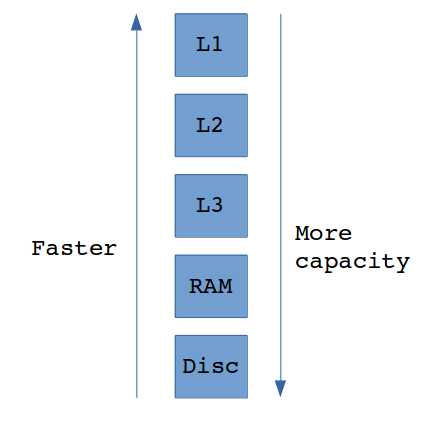
Program starts to look for the data in the fastest cache level (L1) first and if data is not found there it goes further to L2 and L3. If data is still not found, it reads the data from main memory (RAM). The slowest and the biggest memory is of course disc — it can store almost unlimited amount of data, but the disc seek can be around 100,000 times slower than reference to RAM. Figure below presents the memory size and speed dependency.

Cache hierarchy

Memory size and reading speed dependency

Prefetching

When the needed data was not found in cache and was loaded from main memory, the CPU makes something to ensure that next operations on this data will be faster — it stores just fetched data into cache. Things that were in cache before can be erased to make room in cache for these new data.

But CPU in fact stores not only demanded data into cache. It also loads neighbouring (following) data in cache because it’s very likely that these data will be requested soon. Operation of reading more data than requested is called prefetching. If such prefetched data is in fact requested in the nearest future, it can be loaded with cache hit latency instead of expensive main memory reference.

Performance test

I made an experiment to check how much these cache things can improve. I implemented two almost identical functions, which sum all elements in the 2D array. The only difference is the traverse direction — first function sumArrayRowByRow reference to elements reading array row by row, second one — sumArrayColumn-ByColumn— column by column. If we consider the memory layout of 2D array, it’s obvious that only the first function references to array elements respecting their sequential order in memory.

quint64 sumArrayRowByRow()
{
    quint64 sum = 0;

    for (size_t i = 0; i < HEIGHT; i++)
    {
        for (size_t j = 0; j < WIDTH; j++)
        {
            sum += array[i][j];
        }
    }

    return sum;
}
quint64 sumArrayColumnByColumn()
{
    quint64 sum = 0;

    for (size_t i = 0; i < HEIGHT; i++)
    {
        for (size_t j = 0; j < WIDTH; j++)
        {
            sum += array[j][i];
        }
    }

    return sum;
}

The test was run for various sizes of square array of quint8: 32×32, 64×64, 128×128, 512×512, 1024×1024, 2048×2048 and 4096×4096.

The experiment showed no big differences for small-sized arrays. The theoretically better function, sumArrayRowByRow was only about 1% faster than sumArray- ColumnByColumn for arrays of dimension 32×32, 64×64 and 128×128. The reason of that can be easily spotted. The total size of the biggest mentioned array is 128*128 bytes, which is about 16kB. It’s half the size of my L1d cache, so it’s possible that the whole array was loaded to cache.

Cache influence on performance small array

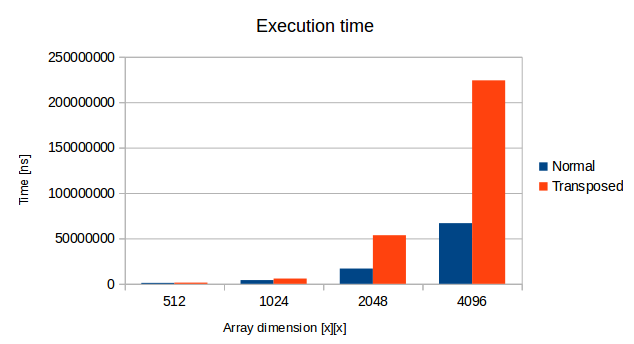
The situation changes dramatically when the array size increases. The bigger the array was, the bigger advantage the “memory-ordered” function took. Operations on the biggest array 4096×4096 was more than 3 times slower with the sumArrayColumnByColumn function! This whole array takes ~16MB so there is no way to fit it whole into cache. Here prefetching made a big difference.

Cache influence on performance big array

Summary

Reference to elements in order of their memory placement. Traverse arrays in row-by-row manner, operate on the struct members in the order of their declaration and so on. Such approach may result in performance improvements.

I recommend this awesome article about cache: Gallery of processor cache effects .

How to load external .json to array in js

During my work on the javascript Qt quiz, I had to decide how to store quiz questions. I have chosen the external json file for that purpose. This post describes this solution.

  1. Write json content with the use of json parser to avoid typos. Parsers like http://json.parser.online.fr/ will help you to painfully create even the longest json files — you will see error immediately when you break the syntax.
  2. The valid json can look like this:
     {
         "quiz": 
         [
             {
                 "question": "Question 1",
                 "a": "Answer a",
                 "b": "Answer b",
                 "c": "Answer c",
                 "correct": "a"
             },
             {
                 "question": "Question 2",
                 "a": "Answer a",
                 "b": "Answer b",
                 "c": "Answer c",
                 "correct": "b"
             },
             {
                 "question": "Question 3",
                 "a": "Answer a",
                 "b": "Answer b",
                 "c": "Answer c",
                 "correct": "c"
             }
         ]
     }
    
  3. Save json in the same folder as your js script. I named my file questions.json.
  4. Load the json data with $.getJSON. Following example is complete script that loads the questions from json to allQuestions array.
        var allQuestions = new Array();
        
        $(function(){
            $.getJSON('questions.json',function(data){
                allQuestions = data.quiz;
                console.log('json loaded successfully');
            }).error(function(){
                console.log('error: json not loaded');
            });
        });
    
  5. Now your json data is available in allQuestions array and you can access it, for example:
    var currentQuestion = allQuestions[0].question;
    var answerA         = allQuestions[0].a; 
    /* and so on*/
    

This solution can be developed further with encoding and decoding json.