
説明
Plugin that adds your Twitter account details box in your WordPress site via widget.
Work in progress… but it’s working! Like this: https://raw.githubusercontent.com/0is1/wp-twitter-account-box/master/public/images/twitteraccountbox-example.png
Roadmap towards version 1.0
This plugin works already. But there’s still things TODO:
- Enable Twitter authentication as default (maybe Premium?)
- Figure out if it’s possible to check if user already follows the account and show “Following”-button instead of “Follow”-button
- Maybe GET friendships/exists
- Style Tweet button and load Twitter images locally if user is using any “anti social media”-plugin in browser
- Style admin panel options-page
- Make TAB more responsive
- Better error handling
- Documentation
- Test with different WP-versions
Shortcode
- You can use this shortcode in posts and pages: [twitter_account_box]
Next version: 0.3.0
- Better error handling with tweet data and code refactoring
Version: 0.4.0
- Support to favorite tweets
Debug
Did you notice a bug?
Please tell about it: janne [AT] jannejuhani.net
Or open an issue on GitHub
Thanks!
スクリーンショット

Admin panel settings 
Twitter Account Box in action 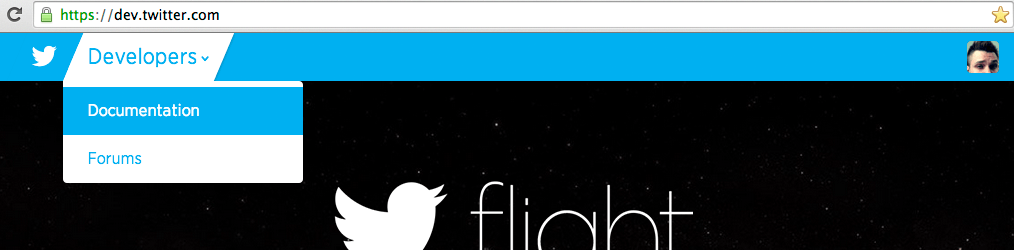
Go to dev.twitter.com and click “Developers -> Documentation” 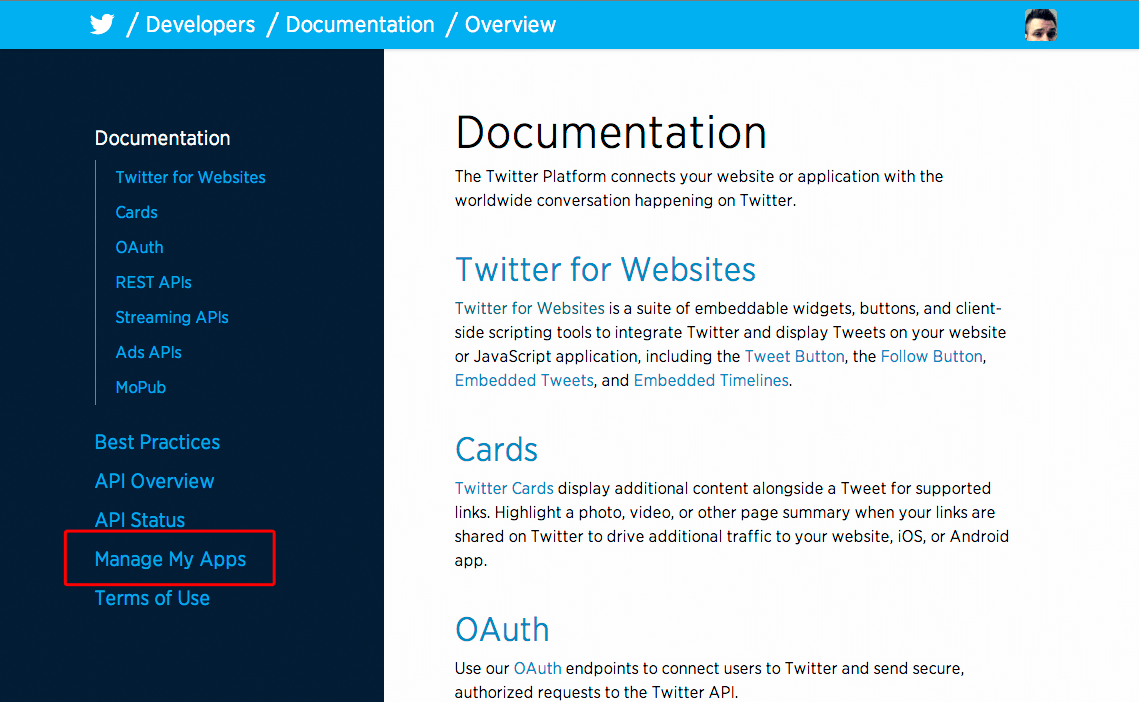
Click “Manage My Apps” 
Click “Create New App” 
Create Twitter App 
Go to “API-keys” page and click “Create Access Token” 
Get key, token and secrets
インストール
- Upload/Install the plugin and activate it
- Go to Settings -> Twitter Account Box
- Fill in all Twitter auth-inputs, you can get those from Twitter Development-site
- Add Twitter username you want to show on your site
- Save and go to Appearance -> Widgets, and add Twitter Account Box Widget to your Widget area
FAQ
- How I get Twitter Consumer Key etc.?
-
You can get those from Twitter Development-site. Sign in or create new account, after login click “Developers -> Documentation” (top left dropdown), click “Manage My Apps”, on the next page click “Create New App” and complete the process. Then click “Create my access token”-button on “API Keys”-page (see screenshots).


貢献者と開発者

“Twitter Account Box aka TAB” をあなたの言語に翻訳しましょう。
開発に興味がありますか ?
変更履歴
0.2.12
- Add support to shortcode: [twitter_account_box]
- Some small code refactoring
0.2.11
- Add small style fixes
0.2.10
- Add some style fixes
- Add better screenshots and info about how to register Twitter Application
0.2.9.1
- Fix nested tweet-divs
- Fix image overflow style problem with some themes and browsers
0.2.9
- Enable tweets
- Add some styles
0.2.1
- Make TAB a little bit more responsive
- Add some style defaults
0.2.0
- Add new screenshots
- Edit options-page auth input names
- Add some developer info and donate-button on options-page
- Add some style fixes
- Add icons
0.1.0
- First version