

説明
Shop Explorer is an all in one WooCommerce management tool designed to make running your online store faster and easier. Instead of spending hours creating, editing products, orders, or customers one at a time, you can manage everything in bulk from one clean, lightning-fast dashboard.
With its powerful management system like bulk editor, you can update thousands of products, variations, and orders in just a few minutes. The modern interface is built for speed and simplicity, so you spend less time clicking around and more time growing your business.
Think of Shop Explorer as the WooCommerce dashboard you always wished existed simple, fast, and built for real store owners.
Activity Guard | 📖 Documentation | 💬 Pro Support
🚀 Why 100,000+ Store Owners Choose Shop Explorer:
✅ Bulk Edit WooCommerce Products – Edit thousands of products simultaneously with advanced filtering
✅ Lightning Fast Performance – Optimized for large catalogs without slowing down your site
✅ Advanced Analytics Dashboard – Real time revenue tracking with professional charts
✅ Smart Bulk Operations – Intelligent validation prevents accidental data corruption
✅ Modern Interface – Replace the slow WooCommerce admin with a fast, intuitive dashboard
✅ Zero Coding Required – User-friendly interface for everyone
Support & Connect
Let’s grow, connect, and build together! 🚀
-
🤝 Join our community on Facebook: Facebook
-
🎥 Subscribe to our YouTube channel: YouTube
-
🐦 Follow us on X (Twitter): X / Twitter
-
🌟 Love Shop Explorer?: Leave a Review
🎯 Perfect for Store Owners Who Need:
- Bulk product editing for large inventories (1000+ products)
- Fast order management with advanced filtering and bulk operations
- Real-time analytics to track revenue, orders, and performance
- Time-saving tools to replace repetitive manual tasks
- Professional dashboard that scales with business growth
- Reliable bulk operations with safety features and validation
🎯 Why Choose Shop Explorer?
Replace the slow, cluttered WooCommerce admin with a lightning-fast, modern interface that makes store management effortless. Whether you’re managing 10 products or 10,000, Shop Explorer scales with your business needs.
Say goodbye to the slow, cluttered WooCommerce dashboard. Shop Explorer makes everything feel instant, clean and effortless.
⚡ Core Features:
📊 Advanced Revenue Analytics and WooCommerce Bulk Dashboard
Transform your store data into actionable insights with comprehensive analytics. Replace WooCommerce’s basic bulk edit tools with a powerful single editor that lets you update prices, stock, categories, attributes, and more – all from one screen.
Bulk Edit Products and Order:
- Bulk price updates (regular price, sale price) with percentage calculations
- Bulk stock management with intelligent validation
- Bulk category and tag assignments
- Bulk status changes (publish, draft, private)
- Bulk order status updates with intelligent validation
- Bulk order export (CSV/Excel) with custom fields
- Bulk order processing with progress tracking
- Advanced search by customer, product, order ID
- Date range filtering with quick presets
Advanced Filtering:
- Filter by product type (Simple, Variable, Grouped, External)
- Price range filters (Min/Max price)
- Stock quantity filters with low stock alerts
- Category and tag filtering
- Featured products filter
- On-sale products filter
- Search by product name, SKU, description
- Sort by: Date, Name, Price, Stock, SKU (Ascending/Descending)
- Filter by order status (Pending, Processing, Completed, etc.)
- Date range filters (Last 7/30/60/90 days, custom ranges)
- Price range filters (Min/Max total)
- Item count filters (Min/Max items per order)
- Customer search (name, email, phone)
- Product search within orders
- Sort by: Date, Total, Items, Customer (Ascending/Descending)
Advanced Revenue Analytics:
- Real-time Revenue Tracking – Interactive column charts powered by Recharts
- Daily, Weekly, Monthly Breakdowns – Detailed revenue analysis across time periods
- Average Order Value Analytics – Track and optimize your AOV
- Top-Performing Products Analysis – Identify your best sellers
- Custom Date Range Filtering – Today, Yesterday, Last 7/15/30 days, or custom ranges
- Professional Visualizations – Beautiful, responsive charts using Recharts library
- Export Analytics Data – Download reports in CSV format for external analysis
- Growth Indicators – Track revenue growth with percentage changes
- Order Trends – Visualize order patterns and seasonal trends
Key Performance Metrics:
- 💰 Total Revenue with percentage growth
- 📦 Total Orders with status breakdown
- 💵 Average Order Value with comparisons
- 📊 Product catalog statistics
- 📈 Daily/Weekly/Monthly averages
- 🎯 Top-performing products analysis
Business Intelligence:
- 📊 Customer lifetime value tracking
- 📊 Product performance metrics
- 📊 Sales trends and forecasting
👥 Complete Customer Management
Manage your WooCommerce customers with advanced filtering, bulk operations, and detailed analytics.
Customer Features:
- 👤 Customer database with advanced search and filtering
- 👤 Purchase history and order tracking
- 👤 Customer lifetime value (CLV) calculation
- 👤 Registration and last order date tracking
- 👤 Bulk customer operations and export
- 👤 Customer segmentation and analytics
👥 Lightning-Fast Order Management
Manage WooCommerce orders with unprecedented speed and efficiency using our advanced filtering and bulk operations system.
Order Bulk Operations:
- Bulk order status updates with intelligent validation
- Bulk order export (CSV/Excel) with custom fields
- Bulk order processing with progress tracking
- Bulk customer notifications
- Advanced search by customer, product, order ID
- Date range filtering with quick presets
Order Management Features:
- 📋 Complete order details view with customer information
- 📋 Order notes management (add, edit, delete)
- 📋 Payment and shipping information
- 📋 Refund processing
- 📋 Order status history tracking
📦 Advanced Product Management
Comprehensive product management with bulk editing capabilities:
Product Browsing & Filtering:
- Fast product table with advanced filtering
- Search by product name, SKU, description
- Filter by product type (Simple, Variable, Grouped, External)
- Category and tag filtering
- Price range filters (Min/Max price)
- Stock quantity filters (Min/Max stock)
- Featured products filter
- On-sale products filter
- Stock status filtering (In Stock, Out of Stock, Low Stock)
Sorting Options:
- Sort by: Date Created, Product Name, Price, Stock Quantity, SKU
- Ascending/Descending order
- Instant client-side sorting
Product Attributes:
- Featured: Filter featured products only, non-featured, or all
- On Sale: Filter products on sale, not on sale, or all
- Quick access to promotional products
Bulk Product Editing:
- Bulk price updates with percentage-based changes
- Bulk stock management
- Bulk category/tag assignments
- Bulk status changes (publish, draft, private)
- Bulk featured status toggle
- Intelligent validation engine
- Progress tracking with real-time updates
- Threshold system to prevent accidental mass changes
- Batch processing for thousands of products
Product Editor:
- Complete product information management
- Product variations support
- Image management and gallery
- Category and tag assignment
- Custom fields and attributes
- SEO-friendly product updates
- Inventory management
- Pricing (regular and sale prices)
- Product description with WYSIWYG editor
- Short description
- Product data tabs (General, Inventory, Shipping, etc.)
Variation Management:
- Create and manage product variations
- Bulk variation generation
- Variation-specific pricing and stock
- Variation images
- Variation attributes
Attribute Management:
- Create and manage product attributes
- Attribute terms management
- Global attributes
- Product-specific attributes
🔧 Smart Bulk Operations
Intelligent bulk editing with safety features:
Threshold System:
– Set minimum/maximum limits for bulk updates
– Warning prompts for large operations
– Confirmation dialogs for critical changes
– Prevents accidental mass modifications
Progress Tracking:
– Real-time progress bars
– Success/failure counts
– Detailed operation logs
– Cancel operation capability
Batch Processing:
– Handle thousands of records efficiently
– Configurable batch sizes (default: 5000)
– Optimized database queries
– Memory-efficient processing
– Server load management
Bulk Edit Optimization :
– Optimize mode for large datasets
– Configurable batch sizes
– Threshold warnings
– Performance monitoring
📈 Business Intelligence Features
Comprehensive analytics and reporting:
Dashboard Metrics:
– Total revenue with growth indicators
– Order statistics (total, pending, processing, completed)
– Product inventory status
– Low stock alerts
– Average order value
– Daily/weekly/monthly averages
Revenue Analytics:
– Interactive column charts
– Daily revenue breakdown
– Order count trends
– Average order value trends
– Period comparisons
– Export to CSV
Top Products:
– Best-selling products by revenue
– Best-selling products by quantity
– Product performance metrics
– Sales trends per product
Recent Activity:
– Real-time activity feed
– Order updates
– Product changes
– Customer registrations
– System events
⚙️ Flexible Configuration
Extensive settings and customization options:
General Settings:
– Database mode (enabled by default)
– Multivendor mode (coming soon)
– Auto-sync settings (coming soon)
– Sync interval configuration
WooCommerce Settings:
– Analytics dashboard toggle
– Incomplete orders tracking
– Cart interactions tracking
– Abandonment delay configuration
– Cleanup old records settings
Bulk Edit Settings:
– Optimize mode toggle
– Batch size configuration
– Threshold limits
– Performance optimization
Export Settings:
– Configure export formats
– Select data to export
– Schedule automatic exports (coming soon)
– Export history
Notification Settings:
– Email notifications toggle
– Notification email address
– Success notifications
– Error notifications
– Sync status alerts
Perfect For:
* E-commerce store owners managing large inventories
* WooCommerce developers seeking better admin tools
* Digital agencies managing multiple client stores
* Businesses requiring advanced analytics and reporting
* Anyone frustrated with the default WooCommerce admin
Transform your WooCommerce experience today! Shop Explorer isn’t just a plugin – it’s a complete store management solution that grows with your business.
スクリーンショット
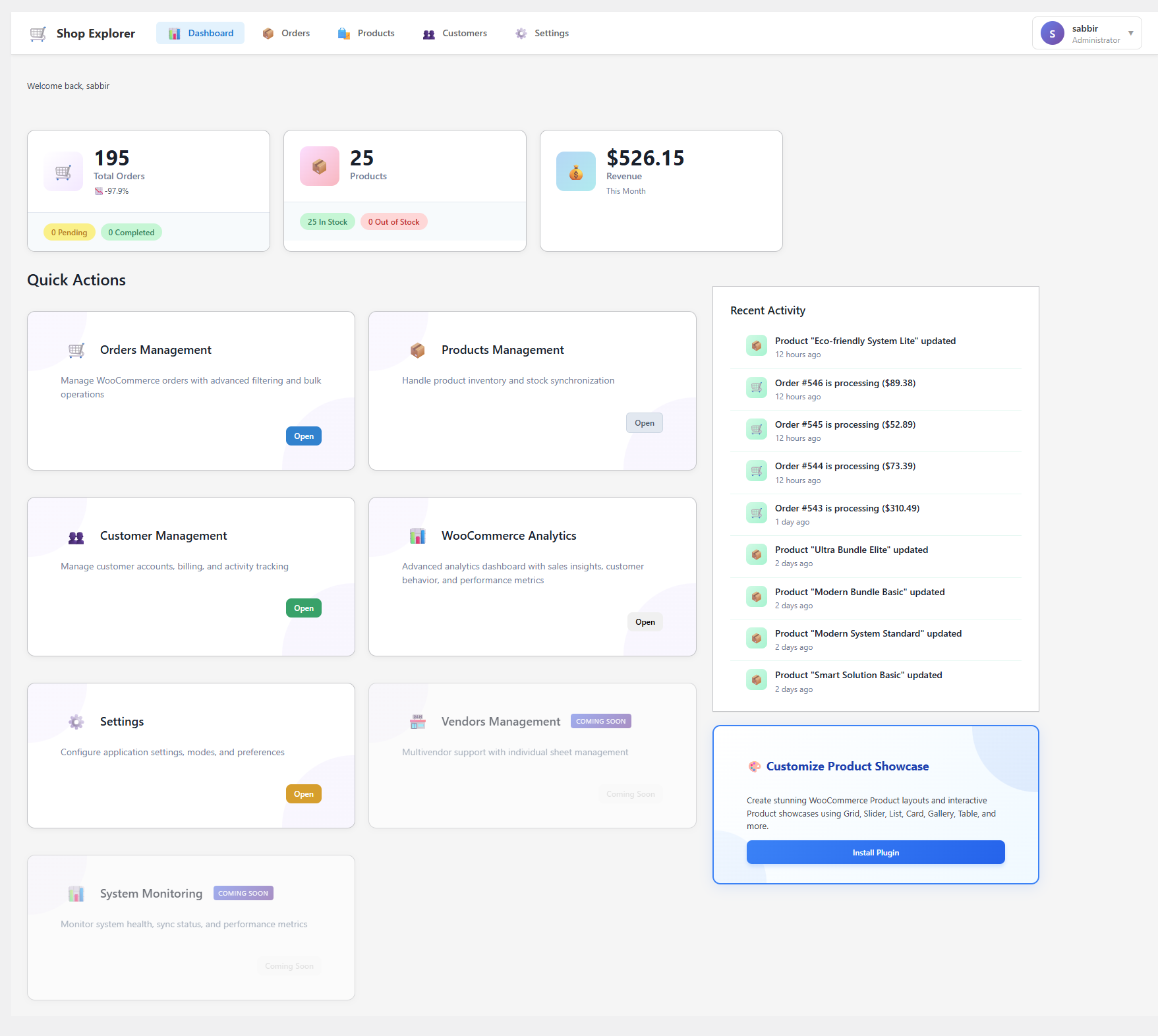
Modern Analytics Dashboard – Real-time revenue analytics with interactive charts and key performance indicators 
Advanced Order Management – Lightning-fast order browsing with powerful filtering and bulk operations 
Smart Product Management – Bulk product editing with intelligent validation and threshold controls 
Customer Management Hub – Complete customer database with activity tracking and segmentation tools 
Revenue Analytics Charts – Professional Recharts visualization showing daily revenue, orders, and average order value 
Bulk Operations Interface – Safe bulk editing with progress tracking and undo functionality 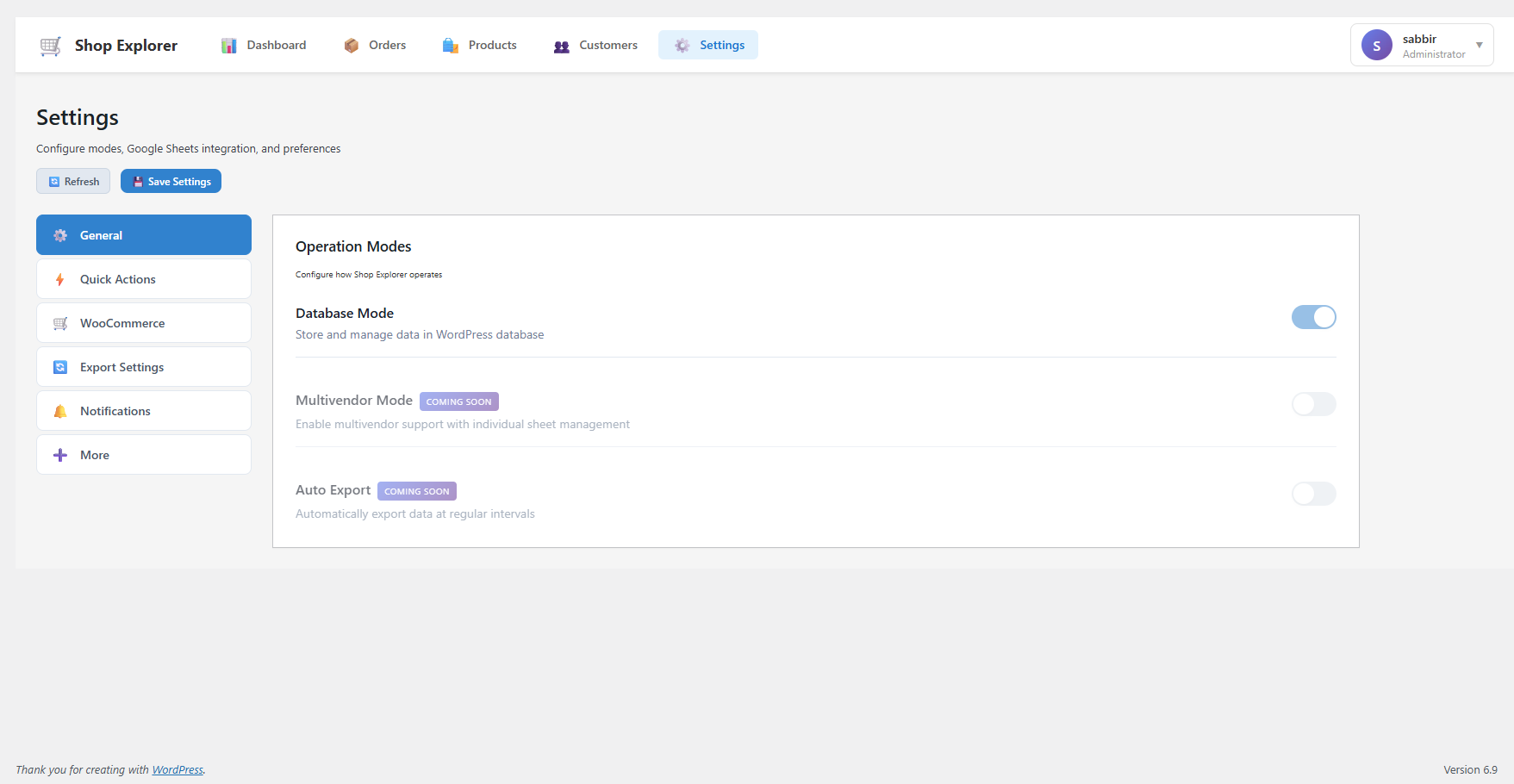
Mobile Responsive Design – Fully optimized interface for tablets and mobile devices 
Settings & Configuration – Flexible configuration options for customizing your workflow
インストール
🚀 Quick Installation (Recommended)
-
Install via WordPress Admin:
- Go to Plugins Add New in your WordPress dashboard
- Search for “Shop Explorer”
- Click “Install Now” and then “Activate”
-
Manual Installation:
- Download the plugin zip file
- Upload to
/wp-content/plugins/directory - Extract the files
- Activate through the ‘Plugins’ menu
-
Initial Setup:
- Navigate to “Shop Explorer” in your WordPress dashboard
- Complete the quick setup wizard
- Configure your preferred settings
- Start managing your store like a pro!
FAQ
-
🤔 Is Shop Explorer compatible with my WooCommerce setup?
-
Yes! Shop Explorer is designed to work seamlessly with any WooCommerce installation. It supports all product types, variations, and WooCommerce extensions.
-
📊 How accurate are the analytics and reports?
-
Shop Explorer pulls data directly from your WooCommerce database in real-time, ensuring 100% accuracy. All calculations are performed using WooCommerce’s native functions.
-
🔧 Can I bulk edit thousands of products safely?
-
Absolutely! Our intelligent threshold system and validation engine prevent accidental data corruption. You can set limits and the system will warn you before making large changes.
-
💾 Will this slow down my website?
-
No! Shop Explorer is performance-optimized with efficient database queries, caching, and lazy loading. It actually improves admin performance compared to the default WooCommerce interface.
-
🔌 Does it conflict with other plugins?
-
Shop Explorer is built following WordPress coding standards and is compatible with most WooCommerce plugins. If you encounter any conflicts, our support team is ready to help.
-
📈 Can I export my data and analytics?
-
Yes! You can export orders, products, and customers data in CSV format for external analysis or backup purposes.
-
🆘 What kind of support do you provide?
-
We provide comprehensive documentation, video tutorials, and responsive support through the WordPress.org forums and our website.
評価

貢献者と開発者
Shop Explorer – Advanced WooCommerce Management, Bulk Edit & Analytics Dashboard はオープンソースソフトウェアです。以下の人々がこのプラグインに貢献しています。
貢献者
変更履歴
1.2.0 – 14-01-2026
🎉 Major Feature Release – Advanced Filtering
* **Advanced Order Filtering Sort by: Order Date, Total Price, Item Count, Ascending or Descending
* **Advanced Product Filtering Sort by: Date Created, Product Name, Price, Stock Quantity, SKU, Ascending or Descending
🔧 Improvements:
* Bulk editor page dragable scroll to easily bulk editing
1.1.0 – 11-01-2026
✨ New Features:
* Advanced Revenue Analytics Dashboard with interactive Recharts visualization
* Smart Date Filtering – Today, Yesterday, Last 7/15/30 days, Custom ranges
* Real-time Analytics – Revenue, Orders, Average Order Value tracking
* Enhanced Bulk Operations with intelligent threshold system
* Customer Management System with activity tracking
* Professional Chart Visualization using Recharts library
* Export Functionality for all data types (CSV format)
🔧 Improvements:
* Performance optimization for large datasets
* Enhanced error handling and validation
* Improved loading states and user feedback
* Streamlined navigation and user flow
🐛 Bug Fixes:
* Fixed date filter synchronization issues
* Resolved bulk operation validation edge cases
* Improved API error handling
* Fixed responsive design issues on mobile
* Corrected currency formatting in analytics
1.0.1
- Fix: Fixed bulk editor page styling issues
- Minor UI improvements
1.0.0
- Initial stable release
- Core WooCommerce management features
- Basic bulk operations
- Order and product management